
I am looking to build a nice setup around a TH2GO. I will be buying 3 19 inch monitors and my question is: What are some suggestions on a great 19 inch monitor?
I am not dead set on 19 inch but my plan was to have the native resolution at 1280x1024, if there is a better option than 3X 19 inch please let me know.
Thanks
looking to build a TH2GO setup
-
Paddy the Wak

- Editors

- Posts: 3436
- Joined: 27 Jul 2004, 17:42
looking to build a TH2GO setup
Hello ... welcome to the forum ... :D
I don't have any suggestions for you as I have 3 x 20" Dell's running at non native resolution ... 3 x 1280x1024 ... they look great.
Their native is 1600x1200.
Hopefully others will have some suggestions for you ... 8)
I don't have any suggestions for you as I have 3 x 20" Dell's running at non native resolution ... 3 x 1280x1024 ... they look great.
Their native is 1600x1200.
Hopefully others will have some suggestions for you ... 8)
looking to build a TH2GO setup
the DELL screens are great, they have good Stands, you can turn them, and flat, thin borders.
just don't buy 20" screens with non-nativeresolutions, just get 1280x1024. it works, and looks best :)
just don't buy 20" screens with non-nativeresolutions, just get 1280x1024. it works, and looks best :)
-
MobsterOO7

- Insiders

- Posts: 1055
- Joined: 19 Sep 2006, 16:25
- Location: Ruckersville, Virginia
looking to build a TH2GO setup
My suggestion is that you should find the screens you are looking to get in a store somewhere and find out how much backlight bleeding is going on. The last thing I would want is to buy three screens and find out the blackest color they can display is a light shade of gray.
EVGA GeForce GTX 970 SC ACX 2.0 3.5GB | 3 X LG Flatron 24EA53VQ in Nvidia Surround | Optoma HD20
looking to build a TH2GO setup
Thanks for the replies guys. I will check out the DELL 1280x1024 monitors.
looking to build a TH2GO setup
are there any opinions on whether or not a black border is better than a gray/silver border.....or vice versa?
-
MobsterOO7
- Insiders
- Posts: 1055
- Joined: 19 Sep 2006, 16:25
- Location: Ruckersville, Virginia
looking to build a TH2GO setup
Black is always better. For everything.
EVGA GeForce GTX 970 SC ACX 2.0 3.5GB | 3 X LG Flatron 24EA53VQ in Nvidia Surround | Optoma HD20
-
[email protected]
- Posts: 446
- Joined: 15 Sep 2007, 21:28
looking to build a TH2GO setup
Get black it makes a world of difference.
Good System Setup
E6300 Core 2 Duo
2-4 gbs of ram
Any Hard Drive Size - Personal Preference
Sound Card - SoundBlaster X-Fi (got to have surround sound for surround gaming)
Video Card- Bare Minimum 8600GTS or High End 7900 Series (TH2G Doesnt play well with ATI). I recommend 8800GT 512mb or Higher...SLI is always a good option too...
Monitors - Three Dell 1907-1908 Ultrasharp Monitors (geeks.com has them for $159) Plus a forth monitor for the other DVI port for vent, email, TV or whatever...
2-4 gbs of ram
Any Hard Drive Size - Personal Preference
Sound Card - SoundBlaster X-Fi (got to have surround sound for surround gaming)
Video Card- Bare Minimum 8600GTS or High End 7900 Series (TH2G Doesnt play well with ATI). I recommend 8800GT 512mb or Higher...SLI is always a good option too...
Monitors - Three Dell 1907-1908 Ultrasharp Monitors (geeks.com has them for $159) Plus a forth monitor for the other DVI port for vent, email, TV or whatever...
looking to build a TH2GO setup
I went through this same process and ended up getting three HP LP2065's 20"' and am absolutely THRILLED with them.
First, they are 1600x1200.... so for those games that do not work in TH2GO, I still get fantastic resolution.
Secondly, if running in SLI, these panels have two DVI inputs instead of one DVI and one VGA. This works very well for me as I wanted the ability to run Windows with three monitors without having to use Matrox's TERRIBLE desktop software.
With this setup, when I do not run in SLI, I have the second inputs on the two outside monitors connected via DVI. The monitors auto-sense which input is being used and automatically switch the input to that port; no manual switching at all!
Picture quality is excellent even in my very dark games.
First, they are 1600x1200.... so for those games that do not work in TH2GO, I still get fantastic resolution.
Secondly, if running in SLI, these panels have two DVI inputs instead of one DVI and one VGA. This works very well for me as I wanted the ability to run Windows with three monitors without having to use Matrox's TERRIBLE desktop software.
With this setup, when I do not run in SLI, I have the second inputs on the two outside monitors connected via DVI. The monitors auto-sense which input is being used and automatically switch the input to that port; no manual switching at all!
Picture quality is excellent even in my very dark games.
Gigabyte GTX 980 - SLI
i7-4770k @4ghz
16GB Ram
Planar SA2311W 3D Vision monitors (x3)
Windows 7 x64 Ultimate SP1
i7-4770k @4ghz
16GB Ram
Planar SA2311W 3D Vision monitors (x3)
Windows 7 x64 Ultimate SP1
Re: looking to build a TH2GO setup
I am looking to build a nice setup around a TH2GO. I will be buying 3 19 inch monitors and my question is: What are some suggestions on a great 19 inch monitor?
I am not dead set on 19 inch but my plan was to have the native resolution at 1280x1024, if there is a better option than 3X 19 inch please let me know.
Thanks
as always i recommend NECs multisync 1990FXp.
+ thinnest bezel u can get.
+ very good image quality
+ very good support
- price
- a bit of ghosting sometimes
looking to build a TH2GO setup
Thanks for the replies.
Those NEC's are nice but boy are they pricey. I looked at the DELL 1908's and they are closer to the price range i was looking at. I might shoot for some NiB's on Ebay. As for for the computer requirements i think i meet or exceed all if the ones that ithrial listed.
If anyone else has any more to add please keep it coming.
Those NEC's are nice but boy are they pricey. I looked at the DELL 1908's and they are closer to the price range i was looking at. I might shoot for some NiB's on Ebay. As for for the computer requirements i think i meet or exceed all if the ones that ithrial listed.
If anyone else has any more to add please keep it coming.
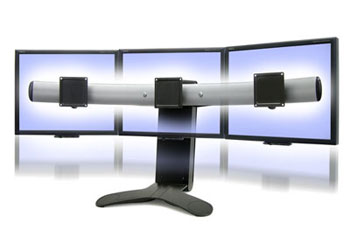
Triple head monitors
too expensive for most,but man are these awesome :wink:
http://www.cinemassivedisplays.com/Trio_19DS.php
they are just standard samsung 19" monitors [about 225.00 each at new egg ]
what you are really paying for is the awesome rig that holds the monitors perfectly together.
Money wasn't an issue for me and space and clutter was --sooo I'm loving them 8)

http://www.cinemassivedisplays.com/Trio_19DS.php
they are just standard samsung 19" monitors [about 225.00 each at new egg ]
what you are really paying for is the awesome rig that holds the monitors perfectly together.
Money wasn't an issue for me and space and clutter was --sooo I'm loving them 8)
-
Paddy the Wak
- Editors
- Posts: 3436
- Joined: 27 Jul 2004, 17:42
looking to build a TH2GO setup
Ok....so i picked up DELL ULTRASHARP 1908FP x3 on ebay new in box for about $160 each :).
Where is the best place to get a Triple Head 2 go Digital?
Where is the best place to get a Triple Head 2 go Digital?
-
MobsterOO7
- Insiders
- Posts: 1055
- Joined: 19 Sep 2006, 16:25
- Location: Ruckersville, Virginia
looking to build a TH2GO setup
Well with google product search you can find them for less, but not much less. But those online stores seemed a little sketchy to me, and I ended up just getting it direct from Matrox.
EVGA GeForce GTX 970 SC ACX 2.0 3.5GB | 3 X LG Flatron 24EA53VQ in Nvidia Surround | Optoma HD20
looking to build a TH2GO setup
Well i finally got my 3 Dell monitors and i received my TH2go. I have everything working and it is awesome. The only thing that i have yet to solve is color sync between monitors....it is close but i can still tell. Does anyone have a suggestion on how to get all 3 color sync'ed? As i said in a previous post they are all Dell 1908FP's but they do not look the same via manual settings.
Thanks everyone for your input and help!
Thanks everyone for your input and help!
-
MobsterOO7
- Insiders
- Posts: 1055
- Joined: 19 Sep 2006, 16:25
- Location: Ruckersville, Virginia
looking to build a TH2GO setup
Well, if all of the monitors are the same model, then all of their color profiles should be identical. As long as their settings are the same that is.
I'm going to guess that they are in fact not the same. In which case you will never truly get anything to look exactly the same. But you can get it close, which you already have. But with a little more tweaking you can probably get it a bit closer.
I'm going to guess that they are in fact not the same. In which case you will never truly get anything to look exactly the same. But you can get it close, which you already have. But with a little more tweaking you can probably get it a bit closer.
EVGA GeForce GTX 970 SC ACX 2.0 3.5GB | 3 X LG Flatron 24EA53VQ in Nvidia Surround | Optoma HD20
looking to build a TH2GO setup
They are all the same model....but i did notice subtle variations in them as i was un-boxing them. I have adjusted all of them to the same profile/color settings but they are still different.. sometimes it is more apparent than others. I was really just wondering if there was any insider tricks or tools that can be used....i looked around and could not find anything easy.
Who is online
Users browsing this forum: No registered users and 9 guests