Pariah

Detailed breakdowns of how games react to widescreen, ultra-wide, 4k and multi-mon
Post Reply
version8
Posts: 2
Joined: 16 Apr 2005, 04:50

Pariah

Post by version8 »


Widescreen Grade: B
Ultra-Widescreen Grade: Incomplete
Multi-monitor Grade: Unsupported
4k Grade: Incomplete

Read Full Detailed Report - Pariah

Pariah is a first-person shooter computer game developed by Digital Extremes, co-developers of the Unreal franchise. It was released on May 3, 2005 for Windows and Xbox. It uses a modified version of the Unreal engine and the Havok physics engine. A demo featuring the multiplayer portion of the game was released half a month before the game. Pariah received mixed reviews from critics.


4:3


16:10


16:9


21:9


3x1

Last edited by version8 on 23 Apr 2018, 01:17, edited 6 times in total.
Reason: Edit
User avatar
Paradigm Shifter
Editors
Editors
Posts: 5706
Joined: 14 Oct 2003, 13:52

Solution: Pariah [Edit] [Hor +] [Flawed]

Post by Paradigm Shifter »

PC or Mac?

Try looking in the registry (be careful, and make a backup first) to see if you can find any resolution linked keys. If not, it's probably an .exe hack... (if it'll work at all.)

I'll move this thread to the relevant forum, once I know what that is, k? ;)
Tempus
Posts: 14
Joined: 02 Apr 2005, 03:48

Solution: Pariah [Edit] [Hor +] [Flawed]

Post by Tempus »

It's in the System directory. Works fine.
User avatar
Paradigm Shifter
Editors
Editors
Posts: 5706
Joined: 14 Oct 2003, 13:52

Solution: Pariah [Edit] [Hor +] [Flawed]

Post by Paradigm Shifter »

I take it it uses the Unreal engine, then?

This thread has more on the UT engine games:

http://www.widescreengamingforum.com/forum/viewtopic.php?t=17
User avatar
skipclarke
Founder
Founder
Posts: 7358
Joined: 13 Oct 2003, 05:00

Solution: Pariah [Edit] [Hor +] [Flawed]

Post by skipclarke »

You can reset the FOV by opening the console and typing "FOV xxx" The default appears to be 70, so the widescreen would be 84
The_cranky_hermit
Insiders
Insiders
Posts: 3010
Joined: 07 Nov 2005, 04:16

Solution: Pariah [Edit] [Hor +] [Flawed]

Post by The_cranky_hermit »

This info is based on the demo.

Warning: This solution will require you to start the game over if you have already started playing.

If you haven't created a profile yet, you can skip all the steps that involve deleting files.

Go to gameDirsaves, and delete everything. Go to gameDirsystem. Delete User.ini if it's there. Also, look for any .ini files with the same name as your profile (for example, the default profile name, Mason, has a file called Mason.ini), and delete them (editting them for FOV won't work).

Now edit the file DefUser.ini, and look for this part:
[Engine.PlayerController]
...
DefaultFOV=70.000000

Edit the DefaultFOV line to set your FOV. According to the FOV Calc, it should be 80.080645 for 16:10, and 86.073033 for 16:9.

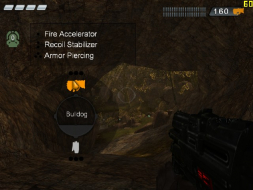
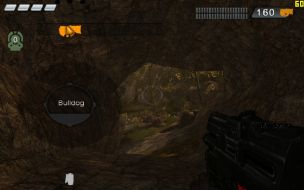
Now launch the game and create a profile. The FOV will be correct (you can view User.ini and .ini to confirm this). But, there is one major problem: The weapon selection interface is not only stretched, but the weapon icons themselves actually "jump" off of the interface. They jump so far that the description box for the Bulldog is no longer visible, and in the case of the grenade launcher, you actually have to move the mouse cursor off screen to the left in order to select it.


1024x768


1280x800

Post Reply

Who is online

Users browsing this forum: No registered users and 5 guests