Total Annihilation: Kingdoms

Detailed breakdowns of how games react to widescreen, ultra-wide, 4k and multi-mon
Post Reply
The_cranky_hermit
Insiders
Insiders
Posts: 3010
Joined: 07 Nov 2005, 04:16

Total Annihilation: Kingdoms

Post by The_cranky_hermit »


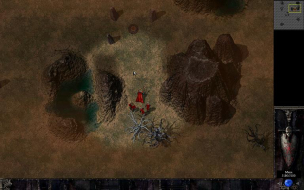
Widescreen Grade: A
Ultra-Widescreen Grade: Incomplete
Multi-monitor Grade: Incomplete
4k Grade: Incomplete

Read Full Detailed Report - Total Annihilation: Kingdoms

Total Annihilation: Kingdoms is a fantasy themed RTS from Cavedog Entertainment. It uses similar technology as the sci-fi RTS Total Annihilation, but is otherwise unrelated. You command one of four kingdoms, and fight a series of battles with magic, monsters, and medieval weaponry.


4:3


16:10


16:9


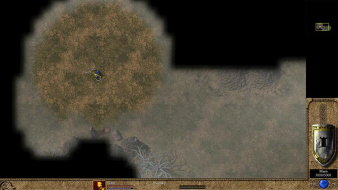
3x1

Last edited by The_cranky_hermit on 09 Mar 2014, 21:35, edited 2 times in total.
Reason: Edit
kotmfu
Posts: 25
Joined: 01 Nov 2006, 13:42

Total Annihilation: Kingdoms: Detailed report

Post by kotmfu »

can confirm: 1920*1200 and 1680x1050 and the other 2 do not showup, cutscenes and menus are stretched

there are no single player anomilies i have come across
game is as the same as the demo with respect to everything else
hope i was a help
The_cranky_hermit
Insiders
Insiders
Posts: 3010
Joined: 07 Nov 2005, 04:16

Total Annihilation: Kingdoms: Detailed report

Post by The_cranky_hermit »

the other 2 do not showup

Do they show up in *Windows* for you? This is important; no game will let you use a resolution that your system doesn't support unless it runs in windowed mode. Therefore, if a resolution works for you in Windows but not in the game, it means that resolution is unsupported by the game. If a resolution doesn't work for you in Windows and doesn't work for you in the game, it means nothing.

cutscenes and menus are stretched

Can you post two comparison screenshots of cut-scenes?
The_cranky_hermit
Insiders
Insiders
Posts: 3010
Joined: 07 Nov 2005, 04:16

Total Annihilation: Kingdoms: Detailed report

Post by The_cranky_hermit »

Cranky's coverage estimate: 88.5%
kotmfu
Posts: 25
Joined: 01 Nov 2006, 13:42

Total Annihilation: Kingdoms: Detailed report

Post by kotmfu »

i shall re install this game in the morning (as it is late over in aus) and will tell u if those other res's work.
game deserves to be certified after being built on one of the greatest rts's ever
edit: game doesnt support the 2 resolutions. i have them showing up in windows but not in the game.
edit2: that one shot i took of a cutscene.. is the same for both screenshots at diff aspect ratios (ie fixed ratio cutscenes and menus)
posting a second shot would be pointless and as my card black bars the side. it doesnt sho up as stretched.
The_cranky_hermit
Insiders
Insiders
Posts: 3010
Joined: 07 Nov 2005, 04:16

Total Annihilation: Kingdoms: Detailed report

Post by The_cranky_hermit »

Are you *positive* that the game doesn't work at those resolutions? That would be very strange, because the original TA does. Can you double-check that?

As for cut-scenes, it sounds to me like it uses FMVs that force your screen to run at a fixed resolution. If that's the case, then they won't be evaluated, because the correction is system dependant (that is, you can't say they stretch or pillarbox, because the game itself does neither).

==Grading==

Calculated grade: B+
Potential grade: Certified

Major unresolved issues:
Does the game support 1440x900 and 1920x1080?

Minor unresolved issues:
None

Cranky's Coverage estimate: 89.5%
kotmfu
Posts: 25
Joined: 01 Nov 2006, 13:42

Total Annihilation: Kingdoms: Detailed report

Post by kotmfu »

just checked again neither v1, or v3 supports those 2 resolutions (unless there is a non native hack somewhere).
i can use these res's in windows but not in the game as they do not show up.
ive had a look around for ini files etc to change the res in and found nothing.
so i think u can close this one

The_cranky_hermit
Insiders
Insiders
Posts: 3010
Joined: 07 Nov 2005, 04:16

Total Annihilation: Kingdoms: Detailed report

Post by The_cranky_hermit »

Bizarre, but I'll take your word for it.

==Grading==

Calculated grade: B+

Major unresolved issues:
None

Minor unresolved issues:
None

Summary of widescreen-related flaws:
1440x900 and 1920x1080 are unsupported.

Cranky's Coverage estimate: 100%
Quiarcus
Posts: 1
Joined: 28 Jan 2007, 21:29

Total Annihilation: Kingdoms: Detailed report

Post by Quiarcus »

Just reinstalled this one and low and behold, with the v3 patch in the game supports 1440x900 (not sure any higher, that's the limit of my monitor).
The_cranky_hermit
Insiders
Insiders
Posts: 3010
Joined: 07 Nov 2005, 04:16

Total Annihilation: Kingdoms: Detailed report

Post by The_cranky_hermit »

Two conflicting opinions. I feel inclined to believe you, since the original TA supported everything, but I think I'd like a third opinion.

==Grading==

Calculated grade: B+
Potential grade: Certified

Major unresolved issues:
Does the game support 1440x900 and 1920x1080?

Minor unresolved issues:
None

Cranky's Coverage estimate: 89.5%
The_cranky_hermit
Insiders
Insiders
Posts: 3010
Joined: 07 Nov 2005, 04:16

Total Annihilation: Kingdoms: Detailed report

Post by The_cranky_hermit »

I just tried the demo again on my 24" monitor, and all the resolutions work.

Calculated grade: Certified

Major unresolved issues: None
Minor unresolved issues: None

Cranky's Coverage estimate: 100%
Post Reply

Who is online

Users browsing this forum: No registered users and 15 guests