


Far Cry

Detailed breakdowns of how games react to widescreen, ultra-wide, 4k and multi-mon
User avatar
Paddy the Wak
Editors
Editors
Posts: 3436
Joined: 27 Jul 2004, 17:42

Far Cry

Post by Paddy the Wak »


Widescreen Grade: B
Ultra-Widescreen Grade: Incomplete
Multi-monitor Grade: C
4k Grade: B

Read Full Detailed Report - Far Cry

Upon its release, Far Cry awed the world by beating Half Life 2 and Doom 3 (then most anticipated titles) by being the first of a series of “next gen” first person shooter’s. It was critically and publicly acclaimed for its cutting-edge graphics, AI, and environment, and won further praise for being the first game to support HDR.

A tropical paradise seethes with hidden evil in Far Cry, a cunningly detailed action shooter that pushes the boundaries of combat to shocking new levels. Freelance mariner Jack Carver is cursing the day he ever came to this island. A week ago, a brash female reporter named Valerie had offered him an incredible sum of cash to take her to this unspoiled paradise. Shortly after docking, however, Jack's boat was greeted by artillery fire from a mysterious militia group swarming about the island. With his boat destroyed, his money gone, and the gorgeous Valerie suddenly missing, Jack now finds himself facing an army of mercenaries amidst the wilds of the island, with nothing but a gun and his wits to survive. But the further he pushes into the lush jungle canopy, the stranger things become. [Ubi Soft]
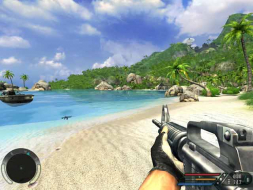


4:3
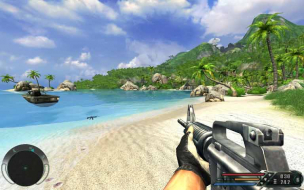

16:10
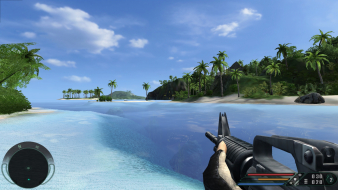

16:9


3x1

Last edited by Paddy the Wak on 16 Jan 2018, 12:57, edited 6 times in total.
Reason: Edit
neoWidescreen
Posts: 255
Joined: 24 Jan 2006, 10:39

Far Cry [+FOV Hack]: Detailed Report

Post by neoWidescreen »

==Game Information==

Upon its release, Far Cry awed the world by beating Half Life 2 and Doom 3 (then most anticipated titles) by being the first of a series of “next genâ€Â
The_cranky_hermit
Insiders
Insiders
Posts: 3010
Joined: 07 Nov 2005, 04:16

Far Cry [+FOV Hack]: Detailed Report

Post by The_cranky_hermit »

A couple of things.

==Method==
Can you figure out what FOV settings should be used to make the game Hor+, for both 16:10 and 16:9 resolutions?

==Screen change==
Using screenshots to demonstrate that the game is Vert- BEFORE the FOV fix isn't really necessary and is potentially confusing. I would remove them.

==Multiplayer support==
You said that most FC servers override the FOV setting. Is it possible to create a server that does not?

==Aspect ratio support==
Rather than saying 16:9 uses vert-, I would say that you need to use a higher FOV setting in order to maintain Hor+.

==Grading==
How did you arrive at B+? Based on my rubrick, Far Cry gets either a D+ or a C+, depending on whether or not it's possible to create a server that permits FOV change. These are the values I used:
C59: Hor+
D59: Full
E59: Full
F59: (blank)
G59: Full
H59: .ini
I59: Stretch
J59: Uncorrected

When F59 is "Unsupported," the grade is "D+." When F59 is "Supported," the grade is "C+."
neoWidescreen
Posts: 255
Joined: 24 Jan 2006, 10:39

Far Cry [+FOV Hack]: Detailed Report

Post by neoWidescreen »

I'm going to leave the 16:9 ratio for someone else to work out. I've just wasted another night trying to solve this. :cry:

At 1280x1024 (4:3) FOV=90
At 1280x720 (16:9) FOV=96
BUT
At 1280x768 (16:10) FOV=96 ... shouldn't it be less??? :?

Yet at 1920x1200 (16:10) the FOV needs to be 108. This is confusing the hell outta me, and since I intend to run this at 1920x1200 & I don't have a 16:9 monitor this doesn't concern me.


The multiplayer testing was difficult too; ubi.com blocked me out of my own account for 15mins coz it doesn't retain your username/password :roll: took a while to figure out i was getting kicked from every server coz i was in -devmode. :( Then Farcry crashes, and so it reports my cd-key is in use. :roll: FarCry was a multiplayer only game. I'm just glad i've finished this.... another game written off the Detailed Report Request list.
The_cranky_hermit
Insiders
Insiders
Posts: 3010
Joined: 07 Nov 2005, 04:16

Far Cry [+FOV Hack]: Detailed Report

Post by The_cranky_hermit »

Now that you've said that Punkbuster ignores ZoomView.lua, the grade changes yet again.

Based on this information, and assuming that most servers will override your FOV setting if it's set through ZoomView.lua, Far Cry recieves a C+. But if this is demonstrated to be the exception, and not the rule, it will recieve a B-.
neoWidescreen
Posts: 255
Joined: 24 Jan 2006, 10:39

Far Cry [+FOV Hack]: Detailed Report

Post by neoWidescreen »

Multiplayer Update:

I've just been playing FarCry on a couple of different servers using the FOV hack (zoomView.lua modified) for the last 30mins, and Punkbuster didn't kick me once. Unbelievable, coz PB has kicked me dozens of times playing America's Army for less offenses like deleting a music file or binding a key to suicide. :? It's like PB isn't even running in FarCry!

So it's safe to say you can change the FOV on public servers. :) You MUST zoom in & out once with a weapon for the FOV to change. Here's a couple of screenshots

NOTE: These are multiplayer screenshots. do not confuse with single player screenshots.

FOV=90


FOV=108 (after zooming in & out)


Here's some other screenies just to prove it does work.
kawasakiguy37
Posts: 7
Joined: 06 Aug 2005, 00:14

Far Cry [+FOV Hack]: Detailed Report

Post by kawasakiguy37 »

I think I might know why it seems to not draw far off trees:

Far cry is probably going to only draw a certain number of trees on the screen at once (depending on settings) as to not totally overload your system, and in most cases increasing the FOV allows more trees to be seen on the side......so far cry then stops rendering some other trees (in this case, the farthest ones on the top of the mountain)
neoWidescreen
Posts: 255
Joined: 24 Jan 2006, 10:39

Far Cry [+FOV Hack]: Detailed Report

Post by neoWidescreen »

Yup, you're partly right on that. One thing that doesn't explain is some marginal clipping occurs with distant mountains.

i would love to upgrade to see if tree distance increases and if their quality improves.
k1darkknight
Posts: 14
Joined: 12 May 2006, 05:02

Far Cry [+FOV Hack]: Detailed Report

Post by k1darkknight »

notes and questions:

1 - Widescreen resolutions that seem to be supported in-game via the options menu, without any modifications: 1280x720, 1280x768, 1360x768

2 - Shouldn't the FOV for 16:9 resolutions be more like 120? If we break down the aspect ratios to their x:1 equivalents, 4:3, 16:10, and 16:9 work out to ~1.33:1, 1.6:1, and ~1.77:1, respectively. 16:10 is exactly 1.2 times the width of 4:3, and 16:9 is 1 1/3 times the width of 4:3 (given identical heights). If the FOV for 4:3 is given as 90, and the FOV for 16:10 is given as 108 (1.2 times 90). Shouldn't the FOV for 16:9 be 1 1/3 times that for 4:3, or 120?

3. Does changing the FOV in the scripts.pak file make it +H or -V? The screenshots showing the difference between 16:10 and 16:9 seem to indicate that it is -V.

4. Finally, is there an easy ingame, console (~ key) method of changing the FOV? If so, what is the syntax for that command, and is -devmode required?


Thanx a bunch!
k1darkknight
The_cranky_hermit
Insiders
Insiders
Posts: 3010
Joined: 07 Nov 2005, 04:16

Far Cry [+FOV Hack]: Detailed Report

Post by The_cranky_hermit »

FOV is an angle, not a linear scaling number. If the correct FOV were directly proportional to the aspect ratio, triple-head would require an FOV of 270, which is much too high since the monitor's don't actually go behind you.
mengzor
Posts: 173
Joined: 06 Jun 2006, 18:49

Far Cry [+FOV Hack]: Detailed Report

Post by mengzor »

dang. i cant seem to get the fov to change =/

wonder what im doing wrong.


you say you can use the devmode to change fov
whats the command?
k1darkknight
Posts: 14
Joined: 12 May 2006, 05:02

Far Cry [+FOV Hack]: Detailed Report

Post by k1darkknight »

you say you can use the devmode to change fov
whats the command?

Actually, I was asking if there was a way to change the fov in the console. Someone had posted it, but it was slightly confusing. They said it was " fov xyz " and I wasn't sure if that meant that it had to be a 3-digit number or what.
If you type the following, you will get the default fov:

fov 90

For other fov's, just change the number to whatever you want to try. 108 seems to work well for 16:9 monitors, though 120 worked well, too. This site has a FOV Calculator. It came up with 106.something (can't get it to work, just now) for 16:9 on FarCry. Someone had suggested 108 for 16:10, though it seems it should actually be a bit lower, as 16:10 is a little less wide than 16:9.
mengzor
Posts: 173
Joined: 06 Jun 2006, 18:49

Far Cry [+FOV Hack]: Detailed Report

Post by mengzor »


fov 90

cheers <3
neoWidescreen
Posts: 255
Joined: 24 Jan 2006, 10:39

Far Cry [+FOV Hack]: Detailed Report

Post by neoWidescreen »

good point. i can see why "fov xyz" could be confusing so i've updated my 1st post
User avatar
skipclarke
Founder
Founder
Posts: 7358
Joined: 13 Oct 2003, 05:00

Far Cry [+FOV Hack]: Detailed Report

Post by skipclarke »

Added 2560x1600 support based on Ruaviator's testing
User avatar
skipclarke
Founder
Founder
Posts: 7358
Joined: 13 Oct 2003, 05:00

Far Cry [+FOV Hack]: Detailed Report

Post by skipclarke »

Far Cry v1.33 supports any widescreen resolutions natively


Just for my own clarification: With version 1.33, is it simply a matter of choosing my (standard 1920x1200) resolution in the menu, or will I have to alter the FOV as well?
neoWidescreen
Posts: 255
Joined: 24 Jan 2006, 10:39

Far Cry [+FOV Hack]: Detailed Report

Post by neoWidescreen »

Just for my own clarification: With version 1.33, is it simply a matter of choosing my (standard 1920x1200) resolution in the menu, or will I have to alter the FOV as well?


You can pick 1920x1200 in the video settings menu, but you'll need to follow the above 'hack' under "Permanently Changing the FOV" if you want to change the FOV. Some people don't really care or notice the FOV, but it is nice. ;)
emanuel.en
Posts: 185
Joined: 31 Aug 2006, 19:00

Far Cry [+FOV Hack]: Detailed Report

Post by emanuel.en »

Off Topic:

Well, i have a question. :D

How can I activate HDR in Far Cry? I want to know it before my pc arrives. :?
Jupix
Posts: 103
Joined: 08 Jun 2005, 11:22

Far Cry [+FOV Hack]: Detailed Report

Post by Jupix »

Off Topic:

Well, i have a question. :D

How can I activate HDR in Far Cry? I want to know it before my pc arrives. :?


You have to patch it to the latest version, 1.0 doesn't have HDR. I don't recall whether it's on by default but to enable it manually you must use the console.

http://www.hardocp.com/article.html?art=Njc4LDQ=
emanuel.en
Posts: 185
Joined: 31 Aug 2006, 19:00

Far Cry [+FOV Hack]: Detailed Report

Post by emanuel.en »

[quote]Off Topic:

Well, i have a question. :D

How can I activate HDR in Far Cry? I want to know it before my pc arrives. :?


You have to patch it to the latest version, 1.0 doesn't have HDR. I don't recall whether it's on by default but to enable it manually you must use the console.

http://www.hardocp.com/article.html?art=Njc4LDQ=

Is there an way without the console? some config changes?

EDIT: Finally i have found something.

You have to add "r_HDRRendering = "7"" to the system.cfg. :)

Can I force Anti-Aliasing to Far Cry while HDR is running?
Post Reply

Who is online

Users browsing this forum: Bing [Bot] and 14 guests

