
I have a game that gives the option to select only those resolutions allowed by your desktop. I would like to play it in widescreen, but the lowest 16:10 resolution available is '1280x800'.
I only bring this up because I read somewhere about a game that did the same thing, and they posted a way to add custom desktop resolutions, which would show up in the game. But the solution was for NVidia cards.
Does anyone know how to add custom resolutions to your desktop with a RADEON card?
B.T.W. PowerStrip wont work for this. It has to actually show up as an option for a desktop resolution.
custom resolution
-
BongoTrumman
- Editors

- Posts: 641
- Joined: 04 Aug 2005, 10:51
custom resolution
Yes powerstrip will work. With PS you create a custom driver(.inf) with whatever custom resolutions you want for you monitor and install that one and voila you have all the new resolutions to choose from as desktop or game res.
It is not like with Nvidia you can do it on-the-fly without having to install but it works.
There might be an easy way with ati too but I don´t have an ati card so I don´t know how to add custom resolutions on that. Maybe that ati traytools can do something like that.
It is not like with Nvidia you can do it on-the-fly without having to install but it works.
There might be an easy way with ati too but I don´t have an ati card so I don´t know how to add custom resolutions on that. Maybe that ati traytools can do something like that.
-
Paradigm Shifter

- Editors
- Posts: 5706
- Joined: 14 Oct 2003, 13:52
custom resolution
Maybe that ati traytools can do something like that.
I've not used them for all that long, but I've not found a way to do that yet...
custom resolution
well I have powerstrip and I can't figure out how to do it. Would you mind going through it step by step please?
custom resolution
OK, I've figured out how to make the .ini file, but now I'm haning trouble installing it.
-
BongoTrumman
- Editors
- Posts: 641
- Joined: 04 Aug 2005, 10:51
custom resolution
Rightclick my computer and choose manage, go to device manager, locate your screen under monitors in the right pane, rightclick your monitor and choose update driver, choose the manual option so you can point out the inf file yourself and install it.
There are many ways to install the monitor driver and this is just one of them. No need to write them all.
There are many ways to install the monitor driver and this is just one of them. No need to write them all.
custom resolution
I have exactly the same problem with my ATI card: that I want to run games on a low 16:10 resolution.
I have omega drivers installed but it still doesn't have the reslutions that I'm looking for (1152x720 and 1024x640). So I installed powerstrip went to display profiles -- configure -- advanced -- custom resolutions -- add resolutions -- restarted my comp -- tried custom res with windows -- it didn't work properly (there were weird lines everywhere on the screen) -- went back to powerstrip -- removed the custom res -- restarted comp -- and went to display settings in windows -- all the custom res were still listed -- I could set my desktop res to any of them and they worked properly (even the ones that didn't work before) -- I uninstalled powerstrip -- but still every custom res works properly (even in games).
Well, I wrote down every step for you because I'm still not sure where and how I solved my problem.
Could somebody please enlighten me? How could I add the working custom resolutions? I'm just sooo confused...
I have omega drivers installed but it still doesn't have the reslutions that I'm looking for (1152x720 and 1024x640). So I installed powerstrip went to display profiles -- configure -- advanced -- custom resolutions -- add resolutions -- restarted my comp -- tried custom res with windows -- it didn't work properly (there were weird lines everywhere on the screen) -- went back to powerstrip -- removed the custom res -- restarted comp -- and went to display settings in windows -- all the custom res were still listed -- I could set my desktop res to any of them and they worked properly (even the ones that didn't work before) -- I uninstalled powerstrip -- but still every custom res works properly (even in games).
Well, I wrote down every step for you because I'm still not sure where and how I solved my problem.
Could somebody please enlighten me? How could I add the working custom resolutions? I'm just sooo confused...
custom resolution
Does anybody have any idea about my question above?
custom resolution
i have the almost same situation
Now, i have another problem too,
i have no idea why i can't change the resolution on Powerstrip
the custom resolution was blank that i can't go on this option.
do anyone have idea how can i enable it?
also i have create the profile by powerstrip but after i follow the step
Display properties> Advanced > Monitor > properties> Driver> update Driver
also i try another way:
System Properties> hardware> Device Manager> monitors> plug and play monitor> update driver
it's still won't work.... =.=
i really have no idea of how to set the correct resolution 1440 x 900 for the stupid acer monitor AL1916W
My setup
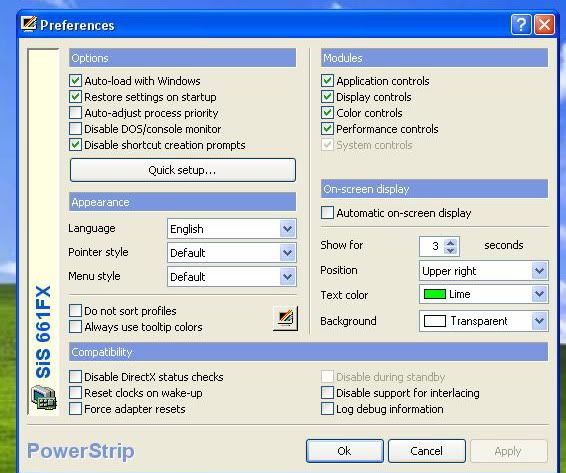
i can't enable the custom resolution
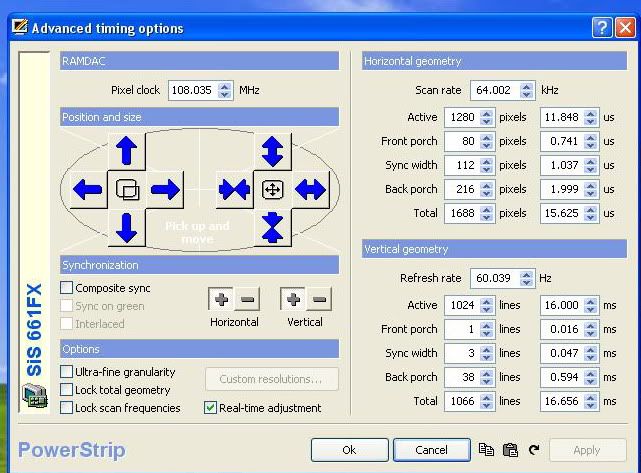
the profile i created
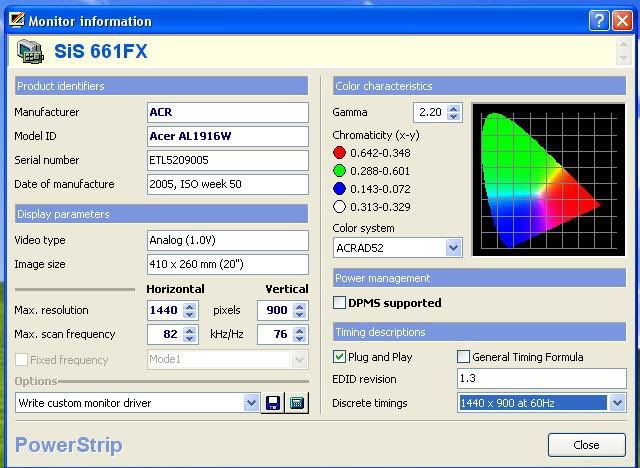
Now, i have another problem too,
i have no idea why i can't change the resolution on Powerstrip
the custom resolution was blank that i can't go on this option.
do anyone have idea how can i enable it?
also i have create the profile by powerstrip but after i follow the step
Display properties> Advanced > Monitor > properties> Driver> update Driver
also i try another way:
System Properties> hardware> Device Manager> monitors> plug and play monitor> update driver
it's still won't work.... =.=
i really have no idea of how to set the correct resolution 1440 x 900 for the stupid acer monitor AL1916W
My setup
i can't enable the custom resolution
the profile i created
custom resolution
First of all, I'm not a big expert in this field but could that be that your monitor simply doesn't support custom resolutions? That's my guess.
I've read it somewhere that it could happen.... maybe it was in a powerstrip guide don't remember...
But going back to my original question: could somebody tell me how I enabled all those resolutions with powerstrip? I want to reformat my HD soon so I want to get back my resolutions. This is still a mystery for me...
I've read it somewhere that it could happen.... maybe it was in a powerstrip guide don't remember...
But going back to my original question: could somebody tell me how I enabled all those resolutions with powerstrip? I want to reformat my HD soon so I want to get back my resolutions. This is still a mystery for me...
-
BongoTrumman
- Editors
- Posts: 641
- Joined: 04 Aug 2005, 10:51
custom resolution
bveld, I don´t know but I don´t see any reason why it would happen again after a format if you install the driver that has the custom res. With a reinstall everything is fresh so if it won´t work it seems like it could be a hardware issue.
custom resolution
Well, thank everyone for all of your help. With the custom rez I added I can my game now has that resolution available, However, there is still one more problem. If I use the custom rez on the desktop it's in panning mode, so part of the screen doesn't show and when I move my mouse there the screen scrolls on the desktop. It is also the same way in the game, so part of the screen is cut off.
custom resolution
When I make the custom resolution of '800x500' I restart my computer, then the resolution is available, when I switch to it, it goes to panning mode. To figure out why it does this, I right clicked the tray icon
display profiles -> configure -> advanced timing options
in the horizontal section is says 'Active | 640 |' and I can't change it. and in the vertical section 'Active | 480 |'. But the resolution is 800x500. this may be why it goes to panning mode. Is there anything that I can do to prevent this.
Also what does it mean in the custom rez section when it gives you the option of checking positive under polarity?
[EDIT]
I didn't want to make another post so I'll put this here.
even though a resolutions width/height=1.6 doesn't mean it works. for example I know 1280x800 works because it's my desktop rez. Then I additionally found '640x400' works. but '800x500' does NOT work, even though 800/500=1.6.
So coult someone suggest other 16:10(1.6) ratios that work or give me some kind of rule that allows me to know if it will work?
display profiles -> configure -> advanced timing options
in the horizontal section is says 'Active | 640 |' and I can't change it. and in the vertical section 'Active | 480 |'. But the resolution is 800x500. this may be why it goes to panning mode. Is there anything that I can do to prevent this.
Also what does it mean in the custom rez section when it gives you the option of checking positive under polarity?
[EDIT]
I didn't want to make another post so I'll put this here.
even though a resolutions width/height=1.6 doesn't mean it works. for example I know 1280x800 works because it's my desktop rez. Then I additionally found '640x400' works. but '800x500' does NOT work, even though 800/500=1.6.
So coult someone suggest other 16:10(1.6) ratios that work or give me some kind of rule that allows me to know if it will work?
Who is online
Users browsing this forum: No registered users and 2 guests