
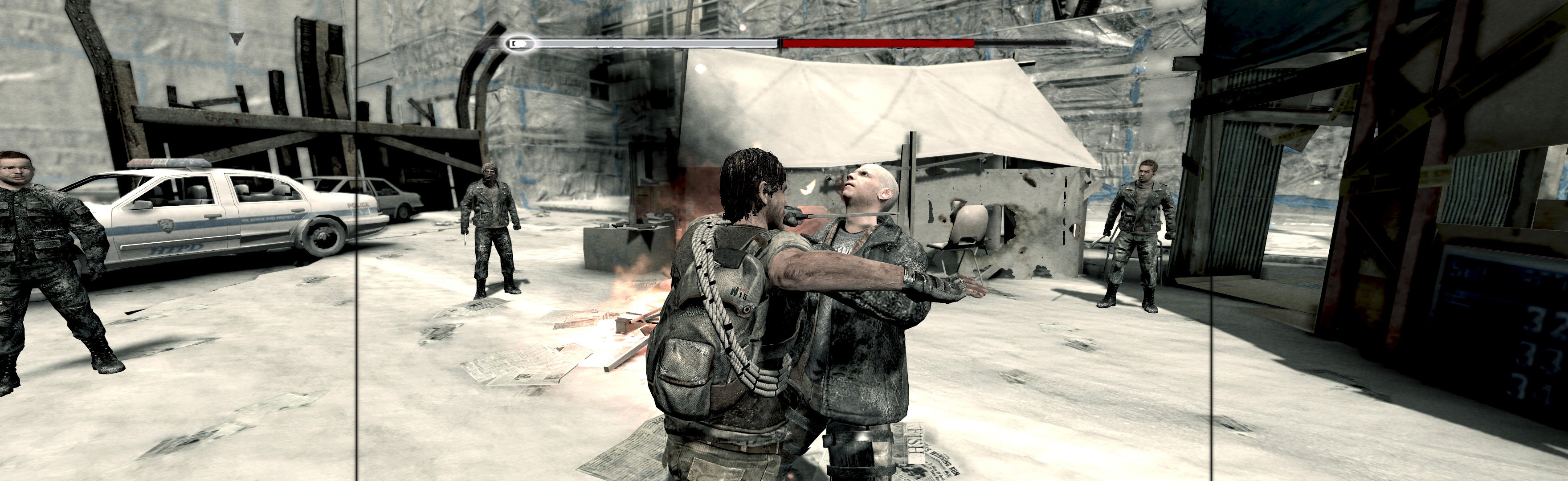
I Am Alive 2012 Manual PLP Instructions

Comments on blog posts from WSGF members
Post Reply
imusrt
Insiders
Insiders
Posts: 291
Joined: 21 Oct 2014, 23:33

I Am Alive 2012 Manual PLP Instructions

Post by imusrt »

Bit complex setup, but perfect easy PLP once done.


(PLP screenshot with bezel effect)


1. SoftTH (DX9 x86).
2. Flawless Widescreen (FWS): Load game plugin, checkmark all, FOV slider maxed. Then quit.
3. Find [FWS install folder]\PluginCache\FWS_Plugins\ Modules\IAmAlive\ Dependencies\Scripts\IAmAlive.lua.
4. File edits (Notepad): fDefaultAspectRatio = (~ set to 0.25. Less is higher FOV; adjust as needed, cropping below belt). Replace string "DisplayInfo:GetAspectRatio()" with "####/####" (no quotes, your height / width), save.
5. Start FWS, start game. In-game select fullscreen & massive resolution.


NOTES:
A. FWS must be restarted to recognise edits.
B. Should backup lua file. If game stretches in future, paste file back in.


View guide for general help with the instructions.

wkduffy
Posts: 4
Joined: 30 Aug 2017, 17:12

Re: I Am Alive 2012 Manual PLP Instructions

Post by wkduffy »

imusrt: Sorry for necroposting on your blog, but I really like I Am Alive, played it many years ago on console. Now revisiting on PC. I tried your widescreen fix here for use with my 3440x1440 single monitor. Needless to say, it didn't work. I guess the PLP workarounds don't work on single monitors? Or is the problem the 21:9 aspect ratio of a single monitor? Anyway, using your instructions (SoftTH + FWS with edited lua), I did get the 3440x1440 resolution choice in the video options menu to show, and I can select it. Actually, I think it is working, but it does not reveal the whole monitor, with black bars down left and right side still. Am I doing something wrong, or this game simply won't work this way? Thanks for any thoughts if you get this...
User avatar
suiken_2mieu
Insiders
Insiders
Posts: 2351
Joined: 20 Aug 2009, 04:20
Location: Virginia
Contact:

Re: I Am Alive 2012 Manual PLP Instructions

Post by suiken_2mieu »

You shouldn't need to use SoftTH for your single monitor. Try the latest Flawless Widescreen plugin, that's probably where your issue is coming from. (Note: I don't own the game, but that's what Flawless Widescreen is for, making sure your FOV and aspect ratio is correct.)
System Core: | Intel Core i5-2500K + ASUS P8Z68-V + 16GB Corsair XMS3 DDR3 1333 MHz | Win7 x64 | MSI R7970 Lightning 3GB [1105/1400] |
Display: | 3 x Dell Ultrasharp 3007WFP-HC @ 7680x1600 | Dell u3011 |
Post Reply

Who is online

Users browsing this forum: No registered users and 3 guests