Castle of Illusion

Detailed breakdowns of how games react to widescreen, ultra-wide, 4k and multi-mon
Post Reply
User avatar
czarman
Insiders
Insiders
Posts: 685
Joined: 11 Dec 2008, 23:51
Location: Germany

Castle of Illusion

Post by czarman »


Widescreen Grade: B
Ultra-Widescreen Grade: C
Multi-monitor Grade: C
4k Grade: B

Read Full Detailed Report - Castle of Illusion

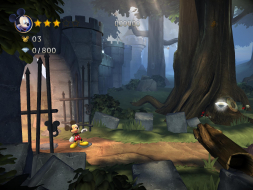
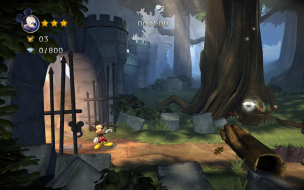
Mickey Mouse returns to the Castle in a 3D reimagining of the Megadrive/Genesis classic.


4:3


16:10


16:9


21:9


3x1

Last edited by czarman on 18 Dec 2018, 20:06, edited 6 times in total.
Reason: Edit
CZARMAN aka 彼得爸爸
User avatar
scavvenjahh
Editors
Editors
Posts: 3424
Joined: 06 Mar 2008, 17:20

Re: Castle of Illusion

Post by scavvenjahh »

Here's how resolution settings work in Castle Of Illusion, and why getting the game to run at any resolution may be a breeze or a nightmare.

In-game resolution setting is a list of "display modes" that combine width, height and refresh rate. This list of modes seems to be exposed by the monitor driver, not the graphics card or the system, so there is no easy, foolproof way to fiddle with it (that I could find).

Display settings are stored in the registry:
HKCU\Software\SSA\COI
ScreenResIndex (decimal, 0-29)

The game detects the 30 first modes supported by your display starting from 800x600 and assigns a 'ScreenResIndex' number to it. Display modes ouside of that range will not be available in-game.
Now on any given display, several low resolutions usually support two or more refresh rates - each will count as one item on the list. Even worse, each width-by-height combination counts as a pair in the ScreenResIndex scale. For instance if the first items in your in-game list are:

800x600@60Hz
1024x768@60Hz
1024x768@75Hz

It means that out of the 30 ScreenResIndex values available to the game, 4 are already spent (not 3).

So depending entirely on your display's capabilities, your native resolution may or may not be available to the game !
A higher or lower native resolution is not even indicative of what the game can ultimately use...

On my Surround system, the max res I can pick is 1920x1200 (1920x1200@60Hz is #29, 1920x1200@59Hz is #30 in the list).
On my 29" monitor (2650x1080), the in-game list has so many "useless" display modes that the max res is 1920x1080@60Hz (only because it is mode #30 i.e ScreenResIndex 29).
On my older 30" panel however, only 60Hz resolutions are exposed. So the in-game list of display modes includes 2560x1600, no problem !

Things I tried that did not help:
- create custom resolutions through the registry (like 1280x540). New res's work in windows, but the in-game list is unchanged.
- prune the registry of "useless" resolutions stored by the graphics driver. All I could do was remove old monitor data and custom res's, not default display modes.
- forcerefreshrate and framelimiter settings (in pcrun.cfg) have no effect on detected display modes, either.

I suppose EDID or registry tweaks could work around the problem by hiding or deleting "useless" display modes, thus shrinking the ScreenResIndex list enough for it to include any native resolution. It seems overly complicated, though (read: way out of my league).

So there you go, the game's arbitrary "lemme count to 30 from 800x600" formula may effectively ruin support for many users, even though for all we know, the graphics engine itself supports any and all resolutions...
Toothless Spoon
Insiders
Insiders
Posts: 516
Joined: 01 Sep 2010, 11:38

Re: Castle of Illusion

Post by Toothless Spoon »

I believe I gave this game to Hayden or Helifax - but both are pretty busy fixing games etc, so who knows if it will get fixed, or if it's possible.
起死回生 (kishi kaisei) Wake from death and return to life..
User avatar
scavvenjahh
Editors
Editors
Posts: 3424
Joined: 06 Mar 2008, 17:20

Re: Castle of Illusion

Post by scavvenjahh »

If my findings are not too far off the mark, fixing the game would be a major PITA anyway. :lolno:
User avatar
czarman
Insiders
Insiders
Posts: 685
Joined: 11 Dec 2008, 23:51
Location: Germany

Re: Castle of Illusion

Post by czarman »

i added a new HOR+ solution and a FOV fix
CZARMAN aka 彼得爸爸
User avatar
scavvenjahh
Editors
Editors
Posts: 3424
Joined: 06 Mar 2008, 17:20

Re: Castle of Illusion

Post by scavvenjahh »

Time flies... and some things do get better. Happy New Year bruh.
User avatar
czarman
Insiders
Insiders
Posts: 685
Joined: 11 Dec 2008, 23:51
Location: Germany

Re: Castle of Illusion

Post by czarman »

Happy new Year :onethumb:
CZARMAN aka 彼得爸爸
User avatar
greatxerox
Posts: 15
Joined: 13 Sep 2016, 23:47
Location: Civrieux d'Azergues FRANCE
Contact:

Re: Castle of Illusion

Post by greatxerox »

thank you for the update Czarman & Scavvenga, your work is amazing !

i'd like to know :
"Eyefinity / Surround Specific Solution & Issues"
Same solution as in Ultra Widescreen, but in 5760x1080 you will see 2 Black bars on the sides."

For what's the settings for 7680 x 1440 please ? to change values offset

Corei7 4790K 32GB / 2xSLI: Titan Pascal 3DSurr 7680x1440 +FSIM cockpit :D
My Hardcore gamer rig : http://forum.hardware.fr/configuration. ... greatxerox
Here too http://www.game-debate.com/gaming-pc/in ... I&ram=16GB
User avatar
czarman
Insiders
Insiders
Posts: 685
Joined: 11 Dec 2008, 23:51
Location: Germany

Re: Castle of Illusion

Post by czarman »

7680x1440: Go to Offset 6040 look for 00 05 00 00 C7 44 24 3C D0 02 and change it to 00 1E 00 00 C7 44 24 3C A0 05
CZARMAN aka 彼得爸爸
petran79
Posts: 2
Joined: 17 Dec 2018, 23:17

Re: Castle of Illusion

Post by petran79 »

When I replace the exe file in Steam, 21:9 ratio works but I get garbled audio
User avatar
czarman
Insiders
Insiders
Posts: 685
Joined: 11 Dec 2008, 23:51
Location: Germany

Re: Castle of Illusion

Post by czarman »

Uploaded a new Attachment, should work now.
CZARMAN aka 彼得爸爸
petran79
Posts: 2
Joined: 17 Dec 2018, 23:17

Re: Castle of Illusion

Post by petran79 »

thanks and merry holidays!
Post Reply

Who is online

Users browsing this forum: No registered users and 10 guests