Star Wars: Battlefront II

Detailed breakdowns of how games react to widescreen, ultra-wide, 4k and multi-mon
Post Reply
Tanuki
Posts: 2866
Joined: 07 Jul 2007, 23:55

Star Wars: Battlefront II

Post by Tanuki »


Widescreen Grade: B
Ultra-Widescreen Grade: Incomplete
Multi-monitor Grade: C
4k Grade: Incomplete

Read Full Detailed Report - Star Wars: Battlefront II

Battlefront II is the second title in the Battlefront series from Pandemic and LucasArts. The series places the player in the middle of large-scale battles on both land and space. The game is fundamentally similar to its predecessor, albeit with the addition of new gameplay mechanics. The general objective in most missions is to eliminate the enemy faction.
Like Star Wars Battlefront, the game is split into two eras, the Galactic Civil War and the Clone Wars. Players have the ability to choose between six classes during gameplay.
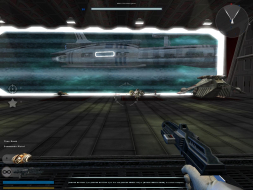


4:3
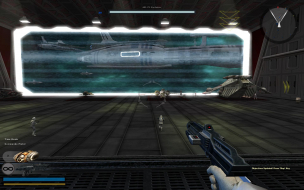

16:10
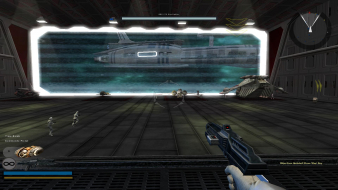

16:9


3x1

Last edited by Tanuki on 11 Aug 2018, 10:35, edited 4 times in total.
Reason: Edit
Tanuki
Posts: 2866
Joined: 07 Jul 2007, 23:55

Star Wars Battlefront II: Detailed Report

Post by Tanuki »

Edited.
The_cranky_hermit
Insiders
Insiders
Posts: 3010
Joined: 07 Nov 2005, 04:16

Star Wars Battlefront II: Detailed Report

Post by The_cranky_hermit »

==Grading==

Calculated grade: B

Major unresolved issues: None
Minor unresolved issues: None

Summary of widescreen-related flaws:
No widescreen in battle selections screens
Stretched FMVs

Cranky's coverage estimate: 100%
Alphabear
Posts: 1
Joined: 25 Jun 2010, 01:45

Re: Star Wars Battlefront II: Detailed Report

Post by Alphabear »

Can you tell me what was done to acheive 1920x1280 resolution in battlefront 2? In the ingame options the largst resolution setting that is listed for selection is 1680x1050. Does this need to be added manually somewhere. (Im using windows 7 and I run at 1920x1080 by default in windows and other games)
Tanuki
Posts: 2866
Joined: 07 Jul 2007, 23:55

Re: Star Wars Battlefront II: Detailed Report

Post by Tanuki »

The resolution should be there be default. If it is available on your desktop it might be a driver issue or something with Windows 7.

Look for the a config file for the game where the save the settings. You might be able to change it there. I don't have this installed anymore.
User avatar
GeneralAdmission
Editors
Editors
Posts: 1560
Joined: 12 Sep 2007, 19:14

Re: Star Wars Battlefront II: Detailed Report

Post by GeneralAdmission »

You can use just about any resolution by launching the game with the following command line parameter:

Code: Select all

BattlefrontII.exe /resolution [width] [height]

For you:

Code: Select all

BattlefrontII.exe /resolution 1920 1080


I'm assuming 1920x1280 was a typo.
User avatar
Slinky
Insiders
Insiders
Posts: 354
Joined: 26 Jan 2010, 01:51

Re: Star Wars Battlefront II: Detailed Report

Post by Slinky »

Anyone know of a fix for this game? I edited the ini file to allow my 5916x1080 res and that part works just fine, but the hud is so stretched that certain things on the game are unplayable.
User avatar
GeneralAdmission
Editors
Editors
Posts: 1560
Joined: 12 Sep 2007, 19:14

Re: Star Wars Battlefront II: Detailed Report

Post by GeneralAdmission »

Anyone know of a fix for this game? I edited the ini file to allow my 5916x1080 res and that part works just fine, but the hud is so stretched that certain things on the game are unplayable.

I've spent a decent amount of time trying to find a HUD fix to no avail. If you happen across a solution please share, as SWBFII is one of my favorite games.
Tanuki
Posts: 2866
Joined: 07 Jul 2007, 23:55

Re: Star Wars Battlefront II: Detailed Report

Post by Tanuki »

Looks like I missed HUD consolitis.
Morboth
Posts: 4
Joined: 05 Oct 2010, 06:17

Re: Star Wars Battlefront II: Detailed Report

Post by Morboth »

Hey guys, I'm currently running the Steam version of Battlefront II and can't select nothing more than 1600x1200, while my native res is 1920x1080 (and every single game I have runs wonderfully at such res).

Any ideas on how to solve this?
User avatar
scavvenjahh
Editors
Editors
Posts: 3424
Joined: 06 Mar 2008, 17:20

Re: Star Wars Battlefront II: Detailed Report

Post by scavvenjahh »

Four posts before yours. :roll:
User avatar
Slinky
Insiders
Insiders
Posts: 354
Joined: 26 Jan 2010, 01:51

Re: Star Wars Battlefront II: Detailed Report

Post by Slinky »

Hey guys, I'm currently running the Steam version of Battlefront II and can't select nothing more than 1600x1200, while my native res is 1920x1080 (and every single game I have runs wonderfully at such res).

Any ideas on how to solve this?

Beware, the HUD is !@#$'ed up really badly.
Morboth
Posts: 4
Joined: 05 Oct 2010, 06:17

Re: Star Wars Battlefront II: Detailed Report

Post by Morboth »

Four posts before yours. :roll:


Tried that, but didn't work... that's why I'm asking again. u.u

[quote]Hey guys, I'm currently running the Steam version of Battlefront II and can't select nothing more than 1600x1200, while my native res is 1920x1080 (and every single game I have runs wonderfully at such res).

Any ideas on how to solve this?

Beware, the HUD is !@#$'ed up really badly.

How so? What's the thing with the HUD?
Deusfaux
Posts: 156
Joined: 30 Mar 2006, 09:16

Re: Star Wars Battlefront II: Detailed Report

Post by Deusfaux »

2560x 1600 doesnt appear to be supported, with graphical anomalies covering the screen at that rez...
The_Black_Knight
Posts: 2
Joined: 28 Feb 2010, 20:37

Re: Star Wars: Battlefront II

Post by The_Black_Knight »

All,

Its IS possible for this game to support in game resolutions ABOVE 1920X1080 with minimal distortion (up to a certain point.....)
However, due to HUD limitations only 4:3, 16:9 and 16:10 ratios are supported.
21:9 and other aspects ratios cause extreme stretching of the HUD (such as Matrox Triple Head and Eye Infinity)
In order to achieve acceptable results it requirements manual editing of the GAMEDIR/GAMEDATA/data/_lvl_pc/vidmode.ini file.
Under supported graphic cards chipsets, you must input the the required resolution in the appropriate section under the resolution management with specific color depth.
I will share an extract example using 2560X1400 (16:9 resolution):

[Vendor 0x10DE Device 0x1212 Hint 0xFDC00000]
2560 1440 0 0 1
1920 1080 0 0 1
1680 1050 0 0 1
1600 900 0 0 1
1440 900 0 0 1
1400 1050 0 0 1
1366 768 0 0 1
1360 768 0 0 1
1280 1024 0 0 1
1280 960 0 0 1
1280 800 0 0 1
1280 768 0 0 1
1280 720 0 0 1
1280 600 0 0 1
1152 864 0 0 1
1024 768 0 0 1
800 600 0 0 1
720 480 0 0 1
640 480 0 0 1
640 400 0 0 1
512 384 0 0 1
400 300 0 0 1
320 240 0 0 1
320 200 0 0 1

You must input the added resolution within each section in order for the game to detect the resolution in game.
I recommend adding to every chipset section as I do not know the manufactuer that people would using for play.
Also, make sure the resolution is SUPPORTED by your video card. It seems that any supported video card resolution works, as I have tried some "oddball" resolutions and the game still recognizes them all.
The main selection screen remains at normal 4:3 proportion (albeit stretched). I have included a screen shot at 2650X1440 in proper pixel resolution.
2560X1600 resolution definitely is supported and looks a bit more stretched vertically.
For reference, I am using the Star Wars BattleFront II "Ultimate Edition" using a nVidia GeForce 675M graphics card.
Attachments
BattlefrontII 2013-07-26 12-48-10-67.png
BattlefrontII 2013-07-26 12-48-10-67.png (2.43 MiB) Viewed 11468 times
Zatie
Posts: 10
Joined: 09 Nov 2012, 16:08

Re: Star Wars: Battlefront II

Post by Zatie »

The only real issue I have experienced is the Map and weapon/ability info is far out to the sides, otherwise the game makes very good use of SLI in DirectX 11 mode, as do most (all) Frostbite games from my personal experience. Shots taken in NV Surround, 5760x1080 with 85 degree FOV. High/Ultra.

Image

Edit - Added some more screenshots:

Load screen graphic correctly scaled and centered:
Image

Loading videos correctly scaled and centered:
Image

Main menu correctly scaled and centered:
Image
and
Image

Character screen correct too:
Image

Cinematics are correctly scaled in the center:
Image

Map load screen looks fine, UI components correctly centered and scaled.
Image

Mission update text correctly positioned in the center:
Image
User avatar
AmeerNuub
Posts: 96
Joined: 30 Nov 2008, 07:03

Re: Star Wars: Battlefront II

Post by AmeerNuub »

Really? For multi-monitor mode, mine isn't working at all. Arcade Mode has character locked with head pointing down to the floor.

Controls are terrible too... cleared ALL instances of fire being assigned to mouse and assigned jump to mouse instead, but it still fires with the mouse button and only jumps when standing still. For movement, my X52 pro is mapped to simple wsad keys, but the character randomly goes backwards when pressed fully forward.
C_ee_X
Posts: 8
Joined: 03 Jan 2015, 20:03

Re: Star Wars: Battlefront II

Post by C_ee_X »

Hey guys, I hope I can revive this game and people playing it to make it fully compatible with Ultra Wide and Mutli Monitor resolutions. It still suffers from a distorted HUD when played at aspect ratios wider than 16:9.

I know that a possible workaround would be to use Flawless Widescreen Display Detection Override feature as I use it in Mass Effect and it fixes the HUD being drawn beyond the screen.

I imagine that it could help resize the HUD in Battlefront 2 but I'm not sure how to include the game into Flawless Widescreen as I don't know how to make a plugin.

It wouldn't actually need to do anything since the 3D render part of the game works native-ly in 21:9, only the HUD needs to be altered.

Does anybody have any idea on how to proceed?

Many thanks to all!
C_ee_X
Posts: 8
Joined: 03 Jan 2015, 20:03

Re: Star Wars Battlefront II: Detailed Report

Post by C_ee_X »

GeneralAdmission wrote:Anyone know of a fix for this game? I edited the ini file to allow my 5916x1080 res and that part works just fine, but the hud is so stretched that certain things on the game are unplayable.

I've spent a decent amount of time trying to find a HUD fix to no avail. If you happen across a solution please share, as SWBFII is one of my favorite games.


Hey guys, I hope I can revive this game and people playing it to make it fully compatible with Ultra Wide and Mutli Monitor resolutions. It still suffers from a distorted HUD when played at aspect ratios wider than 16:9.

I know that a possible workaround would be to use Flawless Widescreen Display Detection Override feature as I use it in Mass Effect and it fixes the HUD being drawn beyond the screen.

I imagine that it could help resize the HUD in Battlefront 2 but I'm not sure how to include the game into Flawless Widescreen as I don't know how to make a plugin.

It wouldn't actually need to do anything since the 3D render part of the game works native-ly in 21:9, only the HUD needs to be altered.

Does anybody have any idea on how to proceed?

Many thanks to all!
Post Reply

Who is online

Users browsing this forum: No registered users and 10 guests