
MvCI force pillarbox?
MvCI force pillarbox?
Is there any way to fix this so it doesn't stretch the resolution to fill the screen and instead forces it to pillarbox?


Re: MvCI force pillarbox?
Deleted
Last edited by jackfuste on 30 Sep 2017, 09:14, edited 1 time in total.
Re: MvCI force pillarbox?
Thanks for the effort but it doesn't seem to do anything. Probably doesn't help that it doesn't even allow you to select resolutions that aren't 16:9 or set it to borderless windowed mode.
Re: MvCI force pillarbox?
Deleted
Last edited by jackfuste on 30 Sep 2017, 09:15, edited 1 time in total.
Re: MvCI force pillarbox?
Copy patcher to the game folder (Marvel VS Capcom - Infinite\MVCI\Binaries\Win64) and apply patch to MVCI.exe
for 16x10; 5x4; 4x3 (1920x1200; 1280x1024; etc...)
for 2560x1080:
for 3440x1440:
for 48x10 (5040x1050; 5760x1200; etc...)
for 48x9 (4800x900; 5760x1080; etc...)
for 16x10; 5x4; 4x3 (1920x1200; 1280x1024; etc...)
for 2560x1080:
for 3440x1440:
for 48x10 (5040x1050; 5760x1200; etc...)
for 48x9 (4800x900; 5760x1080; etc...)
- Attachments
-
- MVCI_2560x1080.jpg (663.79 KiB) Viewed 12354 times
-
- MVCI_48.jpg (1.5 MiB) Viewed 12370 times

Re: MvCI force pillarbox?
great thanks jack !!!
if you supporting what I do, buy me a coffee here https://ko-fi.com/kevinsesario or instead direct to paypal.me/kevinsesario . EMAIL:mailto: ? subject= & body=
-
Nightwalker
- Posts: 14
- Joined: 06 Feb 2017, 14:06
Re: MvCI force pillarbox?
Thanks Jack, very GJ!
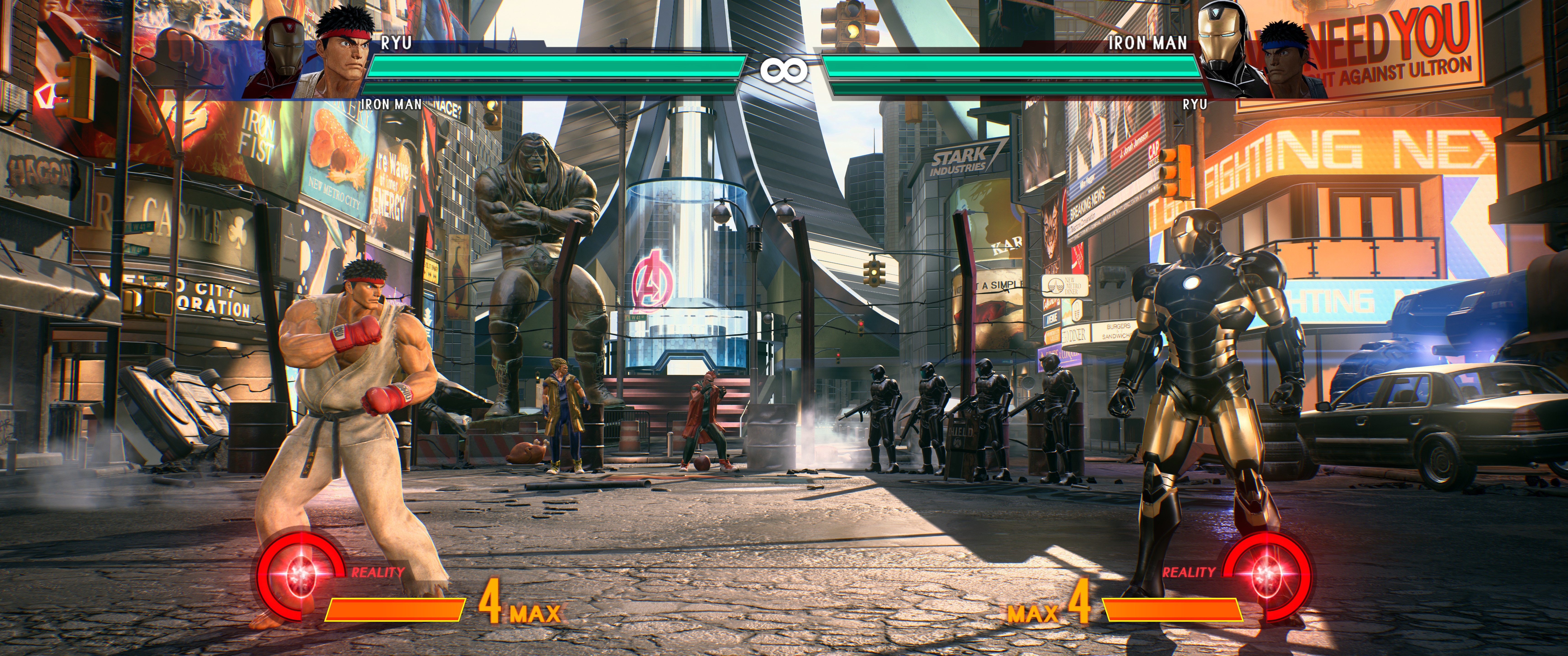
What for 5160x2160 21:9 resolution?
What for 5160x2160 21:9 resolution?
Re: MvCI force pillarbox?
Nightwalker wrote:What for 5160x2160 21:9 resolution?
Patcher doesn't force resolution, it's only setups borderless mode, removes black bars and corrects FOV.
So apply 5160x2160 as desktop resolution and run the game.
-
Nightwalker
- Posts: 14
- Joined: 06 Feb 2017, 14:06
Re: MvCI force pillarbox?
It seems doesnt work forcing DSR or changing desktop res. Game still runs in 3440x1440. 
Re: MvCI force pillarbox?
Nightwalker wrote:It seems doesnt work forcing DSR or changing desktop res. Game still runs in 3440x1440.
Maybe it's because you uses interface scaling. Set it to 100% after you setup DSR resolution.
Or in properties of MVCI.exe (Marvel VS Capcom - Infinite\MVCI\Binaries\Win64) set "Disable display scaling on high DPI settings" under "Compatibility" tab.

-
Nightwalker
- Posts: 14
- Joined: 06 Feb 2017, 14:06
Re: MvCI force pillarbox?
jackfuste wrote:Nightwalker wrote:It seems doesnt work forcing DSR or changing desktop res. Game still runs in 3440x1440.
Maybe it's because you uses interface scaling. Set it to 100% after you setup DSR resolution.
Or in properties of MVCI.exe (Marvel VS Capcom - Infinite\MVCI\Binaries\Win64) set "Disable display scaling on high DPI settings" under "Compatibility" tab.
Yes, finally it works. Thanks.
This is the first time I change that value for sure. In every game i've played set custom res its never been a problem.
Re: MvCI force pillarbox?
Nightwalker wrote:It seems doesnt work forcing DSR or changing desktop res. Game still runs in 3440x1440.
after you follow instruction on above from jackfuste then you must change DSR Resolution on desktop instead in a game . launch the game and automatically render DSR Res, mine is working !!!
- Attachments
-
- MVCI 2017-09-28 21-48-49-167.jpg (3.34 MiB) Viewed 5809 times
if you supporting what I do, buy me a coffee here https://ko-fi.com/kevinsesario or instead direct to paypal.me/kevinsesario . EMAIL:mailto: ? subject= & body=
-
JM Jacen Kelsai

- Posts: 14
- Joined: 12 Sep 2012, 09:02
Re: MvCI force pillarbox?
Hey, Everyone,
I just got done creating a DR page for MvCI. It covers jackfuste's fix. Here's the link below:
http://www.wsgf.org/dr/marvel-vs-capcom-infinite/en
The multi-mon section needs to be expanded and issues verified as I'm an ultrawide user, and the 4K section is currently vacant. I know this game has 4K support, but I have no means of testing and procuring assets.
Thanks, and thanks to jack for the fix!
I just got done creating a DR page for MvCI. It covers jackfuste's fix. Here's the link below:
http://www.wsgf.org/dr/marvel-vs-capcom-infinite/en
The multi-mon section needs to be expanded and issues verified as I'm an ultrawide user, and the 4K section is currently vacant. I know this game has 4K support, but I have no means of testing and procuring assets.
Thanks, and thanks to jack for the fix!
-
mistershan
- Posts: 11
- Joined: 03 Jun 2017, 21:14
Re: MvCI force pillarbox?
This patch doesn't work for me. The game boots up in 1080p windowed mode and won't let me change any display settings. I am using the 3440 x 1440 patch. I am on 1.1 version of the game. Is this patch maybe for an older version of the game?
-
JM Jacen Kelsai
- Posts: 14
- Joined: 12 Sep 2012, 09:02
Re: MvCI force pillarbox?
The patch was written for 1.0. I held off in updating because I didn't know if the addresses changed in the 1.1 update. Apparently, they did.
For everyone who hasn't updated, you can run the game without updating even if Steam is in online mode. Make sure Steam is set with "Auto updates disabled" and run the game exe directly. Do not use the shortcut Steam creates as that will require you to update before playing. The file location is ...\steamapps\common\MARVEL VS. CAPCOM INFINITE\MVCI\Binaries\Win64\MVCI.exe. You can create a shortcut to the exe and use it instead. I haven't played online, but the Capcom online check at start passes, as well.
Hope this helps.
For everyone who hasn't updated, you can run the game without updating even if Steam is in online mode. Make sure Steam is set with "Auto updates disabled" and run the game exe directly. Do not use the shortcut Steam creates as that will require you to update before playing. The file location is ...\steamapps\common\MARVEL VS. CAPCOM INFINITE\MVCI\Binaries\Win64\MVCI.exe. You can create a shortcut to the exe and use it instead. I haven't played online, but the Capcom online check at start passes, as well.
Hope this helps.
-
JM Jacen Kelsai
- Posts: 14
- Joined: 12 Sep 2012, 09:02
Re: MvCI force pillarbox?
I just added a compatibility disclaimer on the DR.
-
JM Jacen Kelsai
- Posts: 14
- Joined: 12 Sep 2012, 09:02
Re: MvCI force pillarbox?
The detailed report has been updated with new fixes for the current version of the game and a new 32:9 fix. Sorry for the late update. Major thanks to susahamat for the new fixes. 

Who is online
Users browsing this forum: No registered users and 6 guests