

Hello everyone,
I'm new to the forums (have been lurking for a while), but I haven't been able to find an answer to my problem. I've never been able to use 144hz with nvidia surround. I have 3x Asus PG279Q gsync monitors, and the maximum refresh rate I get is 120hz when in Surround.
I've tried a multitude of different drivers.
Has anyone seen this before? Is there a solution?
Thanks much,
144hz option missing
-
scavvenjahh

- Editors

- Posts: 3424
- Joined: 06 Mar 2008, 17:20
Re: 144hz option missing
Did you try resetting each monitor's settings to factory defaults ? OC in particular is likely to cause problems if it's not the same across the board. I don't have ROG Swifts but I'm happily using Acer G-Sync monitors at 144Hz in Surround.
Re: 144hz option missing
Thanks for you response. I believe they are the same, but I can try. I haven't overclocked any of the monitors, however. They work at 144hz in standalone mode, but only let me do 120hz in surround.
-
scavvenjahh
- Editors
- Posts: 3424
- Joined: 06 Mar 2008, 17:20
Re: 144hz option missing
What's your graphics card btw ?
Re: 144hz option missing
I'm running 2x980TI Hybrid in SLI. Driver version 372.90 on Windows 10.
-
scavvenjahh
- Editors
- Posts: 3424
- Joined: 06 Mar 2008, 17:20
Re: 144hz option missing
Are all monitors connected to the same card ? Do you get the same issue when SLI is disabled ?
Re: 144hz option missing
Same card. Haven't tried with SLI disabled.
Re: 144hz option missing
it works fine with SLI disabled. The only time I don't get the 144hz option is when running in Surround.

Re: 144hz option missing
Hello r3lik - I have the same monitors (for my surround). Just to confirm - your using option 2 based upon this link? Suggesting the center monitor attached to the green circle (upper left of the image) and your left and right monitors to the same card - orange circles.
http://www.geforce.com/hardware/technology/surround/system-requirements

-b0n3z
http://www.geforce.com/hardware/technology/surround/system-requirements
-b0n3z
ASUS Maximus XII Gene MB | i7 4790k CPU with Corsair Hydro Series H80i | Corsair Dominator Platinum 32GB | (2) EVGA nVidia GeForce GTX1080 Founders Edition in HB SLI | 1TB Samsung EVO SSD | Corsair Digital AX760i PSU | (3) Asus PG279Q (1) Asus PG278Q mounted on WSGF Ultimate Desk Stand v2 with Thru Desk Mount (3+1 Landscape Surround) | HTC Vive | Grace Design m9XX Headphone Amp/DAC | AudioEngine A5+ Bamboo | Ultimate Ears CIEM UE-5 Pro | ErgoDox Infinity Keyboard (Cherry Red) with Custom Keycaps | Logitech G502 Proteus Core Mouse | Win10 Enterprise x64
Current Setup
Current Setup
Re: 144hz option missing
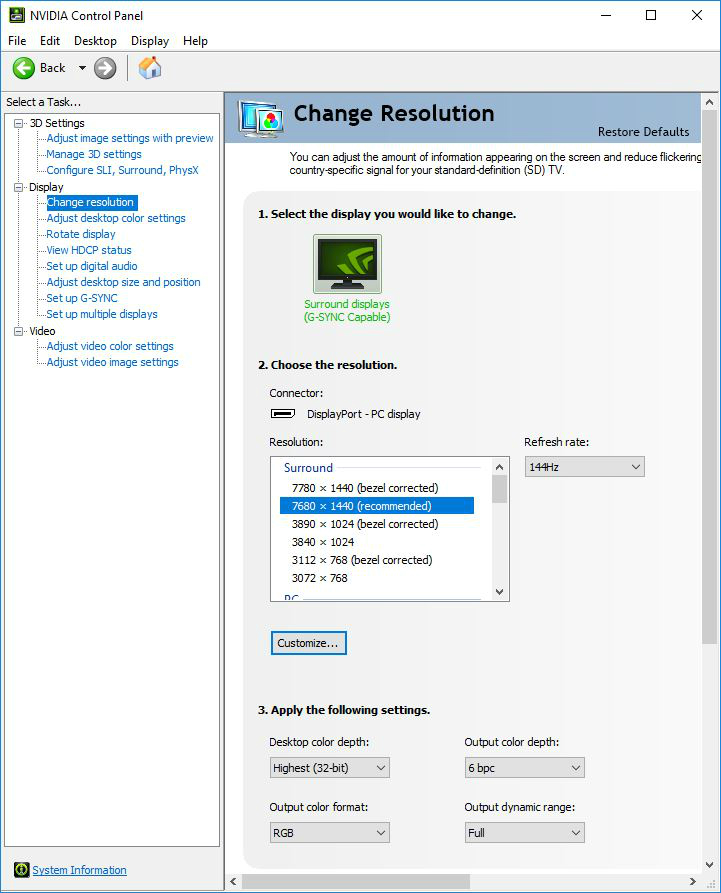
Just confirming you also have the 144Hz refresh selected under nVidia Control Panel options here?
-b0n3z
-b0n3z
ASUS Maximus XII Gene MB | i7 4790k CPU with Corsair Hydro Series H80i | Corsair Dominator Platinum 32GB | (2) EVGA nVidia GeForce GTX1080 Founders Edition in HB SLI | 1TB Samsung EVO SSD | Corsair Digital AX760i PSU | (3) Asus PG279Q (1) Asus PG278Q mounted on WSGF Ultimate Desk Stand v2 with Thru Desk Mount (3+1 Landscape Surround) | HTC Vive | Grace Design m9XX Headphone Amp/DAC | AudioEngine A5+ Bamboo | Ultimate Ears CIEM UE-5 Pro | ErgoDox Infinity Keyboard (Cherry Red) with Custom Keycaps | Logitech G502 Proteus Core Mouse | Win10 Enterprise x64
Current Setup
Current Setup
Who is online
Users browsing this forum: No registered users and 1 guest