Fractured Space

Detailed breakdowns of how games react to widescreen, ultra-wide, 4k and multi-mon
Post Reply
Guest

Fractured Space

Post by Guest »


Widescreen Grade: B
Ultra-Widescreen Grade: Incomplete
Multi-monitor Grade: C
4k Grade: Incomplete

Read Full Detailed Report - Fractured Space

Fractured Space is a competitive 5-v-5 tactical space battle game fought over five sectors. Brought to life in the stunning Unreal Engine 4, giants of interstellar conflict fight in spectacular close quarter battles for dominance.
Epic Space Battles
Fractured Space’s team-based 5v5 battles hinge on teamwork. Those who can strategise and work together to dominate the battlefield’s objectives will take the enemy base, and victory. Unity is strength.
The Fractured Space universe is always evolving. Regular additions are made to the roster of ships and arsenal of weapons. Frequent gameplay updates mean there’s always something new to adapt to.

(Source: official site)


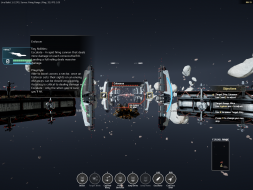
4:3


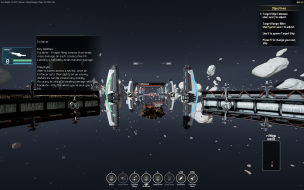
16:10


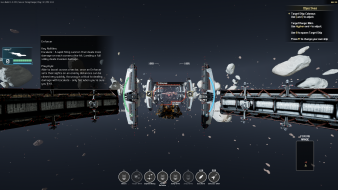
16:9


3x1

Last edited by Guest on 02 Oct 2016, 22:02, edited 2 times in total.
Reason: Edit
User avatar
Haldi
Editors
Editors
Posts: 2286
Joined: 08 May 2011, 18:58

Re: Fractured Space

Post by Haldi »

This is a Unreal Engine 4 game.
So it should be possible to get it Hor+ by changing the Engine.ini
Search for the AspectRatio_MaintainXFOV and change the X to Y

The engine.ini is most likely hidden in the AppData folder.

We gonna send it to outa space!
Xapuyc
Posts: 7
Joined: 01 Oct 2016, 15:31

Re: Fractured Space

Post by Xapuyc »

In folder "C:\Users\MyUserName\AppData\Local\spacegame\Saved\Config\WindowsNoEditor" exist Engine.ini file with following content:

Code: Select all

[Core.System]
Paths=../../../Engine/Content
Paths=%GAMEDIR%Content
Paths=../../../Engine/Plugins/2D/Paper2D/Content
Paths=../../../Engine/Plugins/Runtime/Coherent/CoherentUIGTPlugin/Content
Paths=../../../spacegame/Plugins/Wwise/Content


I try add "AspectRatio_MaintainXFOV"

Code: Select all

[Core.System]
Paths=../../../Engine/Content
Paths=%GAMEDIR%Content
Paths=../../../Engine/Plugins/2D/Paper2D/Content
Paths=../../../Engine/Plugins/Runtime/Coherent/CoherentUIGTPlugin/Content
Paths=../../../spacegame/Plugins/Wwise/Content

AspectRatio_MaintainXFOV

It's absolutly no effect. After launch game, Engine.ini was reverted to initial state.

P.S. Sorry for my english.
User avatar
Haldi
Editors
Editors
Posts: 2286
Joined: 08 May 2011, 18:58

Re: Fractured Space

Post by Haldi »

Sorry, could you try

[/Script/Engine.LocalPlayer]
AspectRatioAxisConstraint=AspectRatio_MaintainYFOV

You might have to set file properties of engine.ini to "Read Only"
We gonna send it to outa space!
Xapuyc
Posts: 7
Joined: 01 Oct 2016, 15:31

Re: Fractured Space

Post by Xapuyc »

it's work! FOV is hor+ with this ini-editing.
But HUD very stretched yet with MM.

Now, I make new screens and update game descriptions.

I hope, exist solution for HUD. It's actual issue yet :(
Post Reply

Who is online

Users browsing this forum: No registered users and 9 guests