The Sims

Detailed breakdowns of how games react to widescreen, ultra-wide, 4k and multi-mon
SometimesIDreamAboutCheese
Posts: 2
Joined: 23 May 2016, 17:57

Re: The Sims

Post by SometimesIDreamAboutCheese »

MrMisterMaster wrote:6) Start FarOut.exe and open the file UIGraphics.far. Press 'Add entry' and add the 3 images (one by one) you downloaded earlier:
  • PanelBack.bmp
  • largeback.bmp
  • dlgframe_1024x768.bmp
Press 'Save' and save the file.

7) Now open Res_CPanel.RT using Notepad. Locate the following line:

Code: Select all

{BITMAP,kUniversalCPBkg,"CPanel/Backgrounds/PanelBack.BMP"}
and replace it with

Code: Select all

{BITMAP,kUniversalCPBkg,"PanelBack.BMP"}
Save the file.

8) Now open Res_Nbhd.RT using Notepad. Locate the following lines:

Code: Select all

{RLEBMP,kLargeMask,"Downtown/LargeBack.bmp"}
{RLEBMP,kLargeMaskSS,"Studiotown/dlgframe_1024x768.bmp"}
and replace them with

Code: Select all

{RLEBMP,kLargeMask,"LargeBack.bmp"}
{RLEBMP,kLargeMaskSS,"dlgframe_1024x768.bmp"}
Save the file.

You don't actually have to edit any .far or .RT files. Just make new folders for the files and copy them there like this:

Code: Select all

The Sims\UIGraphics\CPanel\Backgrounds\PanelBack.bmp
The Sims\UIGraphics\Downtown\LargeBack.bmp
The Sims\UIGraphics\Studiotown\dlgframe_1024x768.bmp
MrMisterMaster
Posts: 3
Joined: 05 Apr 2016, 17:42

Re: The Sims

Post by MrMisterMaster »

SometimesIDreamAboutCheese wrote:
MrMisterMaster wrote:

You don't actually have to edit any .far or .RT files. Just make new folders for the files and copy them there like this:

Code: Select all

The Sims\UIGraphics\CPanel\Backgrounds\PanelBack.bmp
The Sims\UIGraphics\Downtown\LargeBack.bmp
The Sims\UIGraphics\Studiotown\dlgframe_1024x768.bmp

Really?? That would make the whole process so much easier!! Have you tested if it works as a fix?

Thanks for pointing this out :onethumb:
SometimesIDreamAboutCheese
Posts: 2
Joined: 23 May 2016, 17:57

Re: The Sims

Post by SometimesIDreamAboutCheese »

MrMisterMaster wrote:Really?? That would make the whole process so much easier!! Have you tested if it works as a fix?

Thanks for pointing this out :onethumb:

Yes. As long as the replacement files are in right location, the game will load them instead of the ones in .far files.
lavamario
Posts: 1
Joined: 15 Nov 2016, 08:20

Re: The Sims

Post by lavamario »

MrMisterMaster wrote:I must say, it was not an easy task but I was determined to fix this. Practically no information on the web, lots of trial and error, compatibility issues etc.. But in the end I did it and I'm proud :D

Hope this help! :TrueWS:


I made an account just to say you are an absolute legend and I love you. It works BEAUTIFULLY. And a big thank you to the widescreen hex editing, which paved the way for no-cd hd cracks found elsewhere on the net for easy access. Sims 1 has never looked better and I want to cry tears of nostalgic joy. Thank you so much, gentlemen.
MrMisterMaster
Posts: 3
Joined: 05 Apr 2016, 17:42

Re: The Sims

Post by MrMisterMaster »

lavamario wrote:

I made an account just to say you are an absolute legend and I love you. It works BEAUTIFULLY. And a big thank you to the widescreen hex editing, which paved the way for no-cd hd cracks found elsewhere on the net for easy access. Sims 1 has never looked better and I want to cry tears of nostalgic joy. Thank you so much, gentlemen.


Awesome! I'm really glad to hear that, and I am glad I could help out :D

Enjoy the nostalgic kick (now in HD) :twothumb:
Зарастроика
Posts: 1
Joined: 02 Dec 2016, 01:47

Re: The Sims

Post by Зарастроика »

Hello guys, I'm new here· :hide:

Would be better if we make a directory somewhere with all files ready for each single resolution, so people can download it right away with no hassle· :think:

I used GIMP, but the Run-Length Encoded option wasn't available, I have no idea why· GIMP also seems complex and I don't know other app of the same type that has these needed options· Tried exporting without it, and my game still keeps crashing when should appear the neighbourhood··· Basically I'm like 3 hours trying to make it work, but I couldn't· :? My resolution is 1360×768, still the most common one·

Thanks SO MUCH for all your hard work MrMisterMaster· That was glorious! :mrgreen: :rockout:★★★★★
DerpLink
Posts: 1
Joined: 22 Aug 2017, 23:42

Re: The Sims

Post by DerpLink »

I attempted to do this fix. I did it and my game just crashed, I don´t know what to do :( :( :( :( :(
mark22
Posts: 1
Joined: 21 Sep 2017, 16:19

Re: The Sims

Post by mark22 »

MrMisterMaster's fixes worked amazingly for the graphics glitching, and thank you SometimesIDreamAboutCheese for making his fixes a lot easier to implement.
MrMisterMaster's fantastic fixes: http://www.wsgf.org/forums/viewtopic.php?p=165104#p165104
SometimesIDreamAboutCheese's simple method: http://www.wsgf.org/forums/viewtopic.php?p=165928#p165928

I'm going to combine and sum up their methods for a 1366x768 screen resolution as well as provide a nicer background for the neighborhood view.

1) Hacking your 1024x768 to 1366x768
- main advantage being that if you wish, you can play in the original 800x600 at any time
- make a backup of your Sims.exe before you do anything
- follow the instructions here http://www.wsgf.org/dr/sims
- for 1366x768 you only need to change one value "00 04" to "56 05"
- I recommend using HxD for this https://mh-nexus.de/en/downloads.php?product=HxD
- When you search for the string of Hex values, ensure you choose "Hex Values" in "Datatype" field.
- To run the game in 1366x768 you can now use the "The Sims.. 1024x768" shortcut found in your start menu.

2) Fixing graphics glitches
- big thanks to MrMisterMaster and SometimesIDreamAboutCheese.
- navigate to C:\Program Files (x86)\Maxis\The Sims\UIGraphics or C:\Program Files\Maxis\The Sims\UIGraphics
- download the zip and put the files from it in their respective directories:
SometimesIDreamAboutCheese wrote:You don't actually have to edit any .far or .RT files. Just make new folders for the files and copy them there like this:

Code: Select all

The Sims\UIGraphics\CPanel\Backgrounds\PanelBack.bmp
The Sims\UIGraphics\Downtown\LargeBack.bmp
The Sims\UIGraphics\Studiotown\dlgframe_1024x768.bmp

3) Extra tips
- Save often. It's the round "..." icon and then the floppy disk icon.
- If you find that the game doesn't seem to save or crashes when you save, set it to run with Administrative Priviledges in Compatibility tab of the game shortcut.
- Have fun and don't forget to thank MrMisterMaster and SometimesIDreamAboutCheese!

Well, I'm going back to playing Sims. Peace.

Preview:
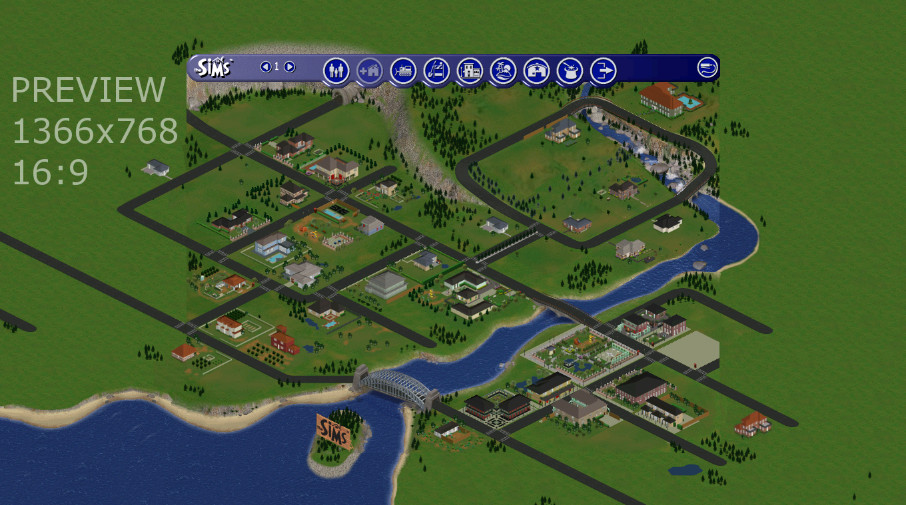
This is what it will look like once installed. It expands the neighborhood, it's as if you could see more of it. It's just a background, it's not perfect and in some places you can tell where the edge of the actual game is. It's more pleasant than a blue border though.
prev.jpg (160.34 KiB) Viewed 7386 times

Download:

The Sims 1366x768 Hack and Fixes.zip
the three bmp files to be replaced
(392.6 KiB) Downloaded 627 times
RadioactiveChicken
Posts: 1
Joined: 19 Feb 2018, 15:33

Re: The Sims

Post by RadioactiveChicken »

Thank you to everyone in the thread who worked together to make this solution straight forward to implement because the janky UI just didn't look right.
For anyone who needs to convert their resolution to hexadecimal I used the calculator here: https://www.binaryhexconverter.com/deci ... -converter. If you end up with a three digit number instead of four then you need to add a zero to the beginning of it.

I've attached the resized background images I used for 1680x1050 resolution. If you try and use the wrong size images you may have problems loading the game as I tried it anyway to see what would happen and the game hung on loading so it's best to crop the images to fit your screen.
Attachments
UIGraphics1680x1050.rar
(418.15 KiB) Downloaded 457 times
8bw73vg8tow3
Posts: 1
Joined: 12 Sep 2018, 23:29

Re: The Sims

Post by 8bw73vg8tow3 »

Hi all. I created a script that will handle the hex editing and copying the graphics files to the proper folders here:
https://github.com/FaithBeam/ps-sims-widescreen-fixer
Post Reply

Who is online

Users browsing this forum: Bing [Bot], Google [Bot], Semrush [Bot] and 20 guests
