GTR 2 - FIA GT Racing Game

Detailed breakdowns of how games react to widescreen, ultra-wide, 4k and multi-mon
Post Reply
User avatar
Mach1.9pants
Insiders
Insiders
Posts: 1512
Joined: 29 Jul 2007, 05:24
Location: NZ

GTR 2 - FIA GT Racing Game

Post by Mach1.9pants »


Widescreen Grade: B
Ultra-Widescreen Grade: B
Multi-monitor Grade: C
4k Grade: Incomplete

Read Full Detailed Report - GTR 2 - FIA GT Racing Game

GTR 2 is a racing simulation with high levels of realism from 10tacle and SimBin, it is an official game of the FIA GT Championship for the 2003 & 2004 seasons. It also features multiplayer modes with up to 28 players.


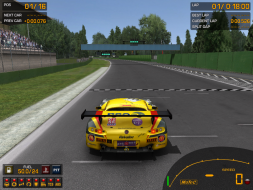
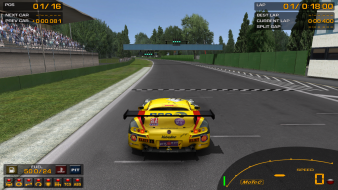
4:3


16:10


16:9


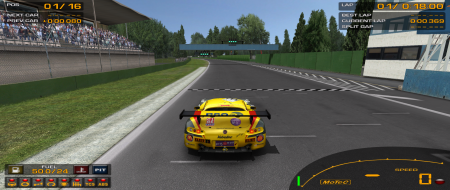
21:9


3x1

Last edited by Mach1.9pants on 19 May 2016, 06:52, edited 6 times in total.
Reason: Edit
The_cranky_hermit
Insiders
Insiders
Posts: 3010
Joined: 07 Nov 2005, 04:16

GTR 2: Detailed Report

Post by The_cranky_hermit »

==Aspect ratio support==

Can you provide a 16:9 and a 16:10 shot from the same place?


==Grading==

Calculated grade: C+
Potential grade: Certified

Major unresolved issues:
Are 1280x720, 1280x800, 1440x900, and 1920x1080 supported?
Need 16:9 and 16:10 comparison shot

Minor unresolved issues:
None

Cranky's coverage estimate: 77.5%
User avatar
Mach1.9pants
Insiders
Insiders
Posts: 1512
Joined: 29 Jul 2007, 05:24
Location: NZ

GTR 2: Detailed Report

Post by Mach1.9pants »

Hi
Changed the aspect screenshots. I stopped the car, made it a hell of a lot easier ;)
M1.9P
Oh I put a 4:3 screen shot of the scope for Armed Assault as well
Tanuki
Posts: 2866
Joined: 07 Jul 2007, 23:55

GTR 2: Detailed Report

Post by Tanuki »

Could you get some pics up of the third person camera modes?
User avatar
Mach1.9pants
Insiders
Insiders
Posts: 1512
Joined: 29 Jul 2007, 05:24
Location: NZ

GTR 2: Detailed Report

Post by Mach1.9pants »

Three other views, taken from the same point as the aspect ratio shots.
All 1920x1200


I didn't even think about the other views, I never use anything but 'cockpit' type views in games: First Person or it is cheating ;)
M1.9P
Edit:
Added a 4:3 1600x1200 image in third person, edited detailed report to include slight HUD stretch
The_cranky_hermit
Insiders
Insiders
Posts: 3010
Joined: 07 Nov 2005, 04:16

GTR 2: Detailed Report

Post by The_cranky_hermit »

==Grading==

Calculated grade: C+
Potential grade: B+

Major unresolved issues:
Are 1280x720 or 1920x1080 supported?

Minor unresolved issues:
Are 1280x800 and 1440x900 supported?

Summary of widescreen-related flaws:
HUD stretch

Cranky's coverage estimate: 88.5%
Tanuki
Posts: 2866
Joined: 07 Jul 2007, 23:55

GTR 2: Detailed Report

Post by Tanuki »

Major unresolved issues:
Are 1280x720 or 1920x1080 supported?

Minor unresolved issues:
Are 1280x800 and 1440x900 supported?


Yes, yes, yes, and yes.
The_cranky_hermit
Insiders
Insiders
Posts: 3010
Joined: 07 Nov 2005, 04:16

GTR 2: Detailed Report

Post by The_cranky_hermit »

==Grading==

Calculated grade: B+

Major unresolved issues: None
Minor unresolved issues: None

Summary of widescreen-related flaws:
HUD stretch

Cranky's coverage estimate: 100%
User avatar
Mach1.9pants
Insiders
Insiders
Posts: 1512
Joined: 29 Jul 2007, 05:24
Location: NZ

GTR 2: Detailed Report

Post by Mach1.9pants »

Major unresolved issues:
Are 1280x720 or 1920x1080 supported?

Minor unresolved issues:
Are 1280x800 and 1440x900 supported?


Yes, yes, yes, and yes.

Thanks mate, I just tested them as well ;) I followed the great tutorial on how set custom resolutions. I am just had Cranky the Grading Hermit re-assess the grading on this and it is done-Sweet! Thanks Cranky
Hardtale
Posts: 1
Joined: 19 May 2006, 09:09

GTR 2: Detailed Report

Post by Hardtale »

Ah excellent, thanks for the tip on the custom res! It didn't click until I just dug in. Just got a WS last week so still learning the ropes. For anyone else new to this follow the great tutorial here: http://www.widescreengamingforum.com/forum/posting.php?mode=editpost&p=116908

Then use the gtr2config.exe and the resolution will now show up in the list.
DevonK
Posts: 1
Joined: 20 Jun 2008, 19:02

GTR 2: Detailed Report

Post by DevonK »

For anyone else new to this follow the great tutorial here: http://www.widescreengamingforum.com/forum/posting.php?mode=editpost&p=116908
.

This link does not work due to the "edit" element in the link, nor does editing in the post number in the url to a "regular" post link - can someone post the correct link if they have it?
User avatar
Mach1.9pants
Insiders
Insiders
Posts: 1512
Joined: 29 Jul 2007, 05:24
Location: NZ

GTR 2: Detailed Report

Post by Mach1.9pants »

This is what I used, NVidia cards only:
http://www.widescreengamingforum.com/forum/viewtopic.php?t=7682
User avatar
Garrett
Insiders
Insiders
Posts: 366
Joined: 12 Mar 2013, 23:18

Re: GTR 2 - FIA GT Racing Game

Post by Garrett »

I have updated the ultra-widescreen and multi-monitor details. This game mostly works well at wider aspect ratios apart from the direction prompts increasing in size (see additional screenshots).

I have graded multi-monitor as limited due to the direction prompts becoming gigantic at these aspect ratios.

Post Reply

Who is online

Users browsing this forum: No registered users and 10 guests