New monitors, now Eyefinity not working?

Hardware discussions about AMD Eyefinity
Post Reply
ITSANSS
Posts: 20
Joined: 28 Aug 2010, 16:20

New monitors, now Eyefinity not working?

Post by ITSANSS »

Just hooked up three new monitors and now my Eyefinity seems to not be working.

Had three 27" LG Flatron W2753V monitors in 5760x1080 group and just got three 27" Asus VG278HE 144hz monitors hooked up and I can't for the life of me get the group to work.

I have my two DVI monitors displaying, but they're duplicate of each other and my third HDMI monitor is saying "no signal" and going into sleep mode.

I've dicked around and around in the CCC, but nothing seems to be working.

What gives?! :cry:

Thanks
coroner_
Posts: 16
Joined: 28 Mar 2015, 16:47

Re: New monitors, now Eyefinity not working?

Post by coroner_ »

Did you create a new group or try to?
Is this all from a single 290x?

Can you get it to work at less than 144hz?
I am not sure if they can do less as I had not looked.
2x 7870 crossfire to 3x 23" in LLL : 5760x1080 or w/VSR 7680x1440
ITSANSS
Posts: 20
Joined: 28 Aug 2010, 16:20

Re: New monitors, now Eyefinity not working?

Post by ITSANSS »

coroner_ wrote:Did you create a new group or try to?
Is this all from a single 290x?

Can you get it to work at less than 144hz?
I am not sure if they can do less as I had not looked.


Yes. Discarded old group and made new, but the screens don't so much as even flicker when I'm making changes. Like the CCC isn't even doing anything.

Oops, sorry about that. Yes, all from single R9 290X.

Under properties (digital flat panel), it shows "reported maximum refresh rate = 75". 144hz my ass!


Thanks for the help
User avatar
Delphium
Administrators
Administrators
Posts: 1789
Joined: 27 Dec 2009, 14:27

Re: New monitors, now Eyefinity not working?

Post by Delphium »

How did you connect your previous 3 displays, were you using 2x DVI + an active DP to DVI adaptor?

Are you using all the same cables and adaptors you had before?

In order to push 1920x1080@144 over DVI you must use DVI-Dual-Link cables and a dual-link adaptor.

Using the following calculator I created - http://www.wsgf.org/fovcalc.php
It is possible to determine what resolutions and refresh rates require what bandwidth.

DVI single link has a maximum video bandwidth of 3.96 Gbit/s (165 MHz)
However DVI Dual-Link has a maximum bandwidth of 7.92 Gbit/s (330 MHz)

Using a resolution of 1920x1080 the maximum refresh rate that can be pushed using a DVI-Single-Link cable/adaptor is 79Hz.

However with DVI-Dual-link it is possible to run 1920x1080 with a refresh rate of up to 159Hz.

This could explain why it is that you are only able to reach the 75Hz that is displayed to you as it seems that you are using DVI-Signle-Link cables/adaptors.

Please see here the difference between DVI-D Dual and Single link cables.
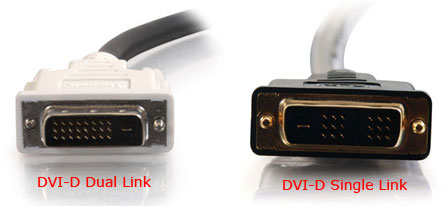
DVI-dual-link-vs-single-link.jpg
DVI-dual-link-vs-single-link.jpg (17.07 KiB) Viewed 9085 times


181px-DVI_Connector_Types.svg[1].png
181px-DVI_Connector_Types.svg[1].png (11.99 KiB) Viewed 9092 times


According to HOCP the R9-290X has bought back 2x Dual-Link DVI ports, which others cards only provided 1x DVI dual link and 1x DVI single link.

If you do not already have a Displayport to DVI Dual link adaptor then here is the one I use that has proven to be very reliable (worked on my 5870E6, 7970 and now my R9-Fury-X) - http://www.amazon.co.uk/Dell-BizLink-Di ... nk+adaptor.

In theory you should of cause be able to configure an eyefinity group that runs at the max of 75Hz with your existing cabling solution, assuming you do already have a Displayport to DVI single link active adaptor.
Note that adaptors come in both passive and active, you require an active adaptor just to be clear.

Once you have the right cables and the adaptors, or confirmed you have these then this might solve a lot of your problems.

Let us know how you get on. :)
| Gigabyte X79S-UP5-WiFi Skt2011 | i7 4820k @4.4GHz Watercooled (Ivy Bridge-E) | Corsair Vengence 32GB @2133MHz 11-11-11-27 2T Quad-Channel (8x4GB) | AMD R9-Fury-X 4GB @1140/505MHz + EKWB Watercooled | 256GB Crucial MX200 SSD | 8x 1TB Samsung F3 SATA-II | Corsair 850W TX PSU | 3x Dell S2209W 22"wide TFT's (5760x1080res) | Logitech Z-5400 5.1ch speakers | Win7 Ultimate x64 |
ITSANSS
Posts: 20
Joined: 28 Aug 2010, 16:20

Re: New monitors, now Eyefinity not working?

Post by ITSANSS »

Delphium wrote:How did you connect your previous 3 displays, were you using 2x DVI + an active DP to DVI adaptor?

Are you using all the same cables and adaptors you had before?

In order to push 1920x1080@144 over DVI you must use DVI-Dual-Link cables and a dual-link adaptor.

Using the following calculator I created - http://www.wsgf.org/fovcalc.php
It is possible to determine what resolutions and refresh rates require what bandwidth.

DVI single link has a maximum video bandwidth of 3.96 Gbit/s (165 MHz)
However DVI Dual-Link has a maximum bandwidth of 7.92 Gbit/s (330 MHz)

Using a resolution of 1920x1080 the maximum refresh rate that can be pushed using a DVI-Single-Link cable/adaptor is 79Hz.

However with DVI-Dual-link it is possible to run 1920x1080 with a refresh rate of up to 159Hz.

This could explain why it is that you are only able to reach the 75Hz that is displayed to you as it seems that you are using DVI-Signle-Link cables/adaptors.

Please see here the difference between DVI-D Dual and Single link cables.
DVI-dual-link-vs-single-link.jpg


181px-DVI_Connector_Types.svg[1].png


According to HOCP the R9-290X has bought back 2x Dual-Link DVI ports, which others cards only provided 1x DVI dual link and 1x DVI single link.

If you do not already have a Displayport to DVI Dual link adaptor then here is the one I use that has proven to be very reliable (worked on my 5870E6, 7970 and now my R9-Fury-X) - http://www.amazon.co.uk/Dell-BizLink-Di ... nk+adaptor.

In theory you should of cause be able to configure an eyefinity group that runs at the max of 75Hz with your existing cabling solution, assuming you do already have a Displayport to DVI single link active adaptor.
Note that adaptors come in both passive and active, you require an active adaptor just to be clear.

Once you have the right cables and the adaptors, or confirmed you have these then this might solve a lot of your problems.

Let us know how you get on. :)



Thanks for taking the time to respond!

I'm using the exact same cables as before. I never even unplugged them from the GPU. Even using the same power cords. Really was hoping for plug and play.

I'm using two DVI-D dual link cables for my left and middle monitor, and an HDMI for the third, right monitor. I've been using it this way, in Eyefinity, since I've had the R9 290X, which has been for at least a year now. When I had the HD 5870, I ran an active Display Port to DVI-D dual link adapter. But when I upgraded GPU, I no longer required the active DP adapter because the card (5870) went from analog to digital (290X) based on what I read online. Everything worked perfectly for a year or so until one of my monitors died. Now I've got these "fancy" 144hz monitors and I'm having problems. lol

So, based on the good cables I'm using and that nothing has changed except the monitors and that the old monitors worked with my current setup, what's next to look into? My next thought was uninstalling CCC and reinstalling....

I'm really at a loss! :(
coroner_
Posts: 16
Joined: 28 Mar 2015, 16:47

Re: New monitors, now Eyefinity not working?

Post by coroner_ »

Hard to say...
This prompted me to try something.
I have been using Single link DVI-D to DVI port, Single link DVI-D to DVI port, and Single link DVI-I (it says) to a passive DVI to Mini DisplayPort adapter.
This config gives me the VSR of 7680 x1440.

I switched out one cable to HDMI, then it did not matter if I used the DP adapter or not... I could no longer get the VSR to give me 7680 x 1440.
I expected better bandwidth but it did not play out that way at all.

On a maybe related note, I ran into a screen telling me it could not apply the config one of the times when trying to create a new eyefinity group... I restarted the pc and it then let me setup a new eyefinity group.
2x 7870 crossfire to 3x 23" in LLL : 5760x1080 or w/VSR 7680x1440
ITSANSS
Posts: 20
Joined: 28 Aug 2010, 16:20

Re: New monitors, now Eyefinity not working?

Post by ITSANSS »

coroner_ wrote:Hard to say...
This prompted me to try something.
I have been using Single link DVI-D to DVI port, Single link DVI-D to DVI port, and Single link DVI-I (it says) to a passive DVI to Mini DisplayPort adapter.
This config gives me the VSR of 7680 x1440.

I switched out one cable to HDMI, then it did not matter if I used the DP adapter or not... I could no longer get the VSR to give me 7680 x 1440.
I expected better bandwidth but it did not play out that way at all.

On a maybe related note, I ran into a screen telling me it could not apply the config one of the times when trying to create a new eyefinity group... I restarted the pc and it then let me setup a new eyefinity group.


Interesting. Considered going for the 1440p monitors. How you like them? I settled on the good ole 1080p. I'm sure I'll be happy with them if I get them to work properly in Eyefinity. lol

I really feel like it's not cable related since these exact cables had worked before. I think it's software. When I get a chance, I think I'll uninstall CCC and see what happens. But I just bought a boat and that's been taking up my evenings and my days are filled with having to go to work. It's a shame I have to work for a living, ain't it? :crazy:

Thanks, ya'll. If ya'll come up with any more ideas in the meantime, do tell! :thumbup:
coroner_
Posts: 16
Joined: 28 Mar 2015, 16:47

Re: New monitors, now Eyefinity not working?

Post by coroner_ »

That is the thing... my monitors are Asus VS238H-P's and are only 1080p monitors so I should be stuck at 5760 x 1080. The Crimson drivers Virtual Super Resolution option is giving me the ability to use 7680 x 1440 ... above what the monitor says to support, and with these single link DVI cables.
2x 7870 crossfire to 3x 23" in LLL : 5760x1080 or w/VSR 7680x1440
User avatar
Haldi
Editors
Editors
Posts: 2286
Joined: 08 May 2011, 18:58

Re: New monitors, now Eyefinity not working?

Post by Haldi »

That's not how VSR works.
VSR does the Up and downscaling on the GPU and only sends a 1920x1080 pixel signal to the Monitor.
We gonna send it to outa space!
User avatar
Delphium
Administrators
Administrators
Posts: 1789
Joined: 27 Dec 2009, 14:27

Re: New monitors, now Eyefinity not working?

Post by Delphium »

ITSANSS wrote:Thanks for taking the time to respond!

I'm using the exact same cables as before. I never even unplugged them from the GPU. Even using the same power cords. Really was hoping for plug and play.

I'm using two DVI-D dual link cables for my left and middle monitor, and an HDMI for the third, right monitor. I've been using it this way, in Eyefinity, since I've had the R9 290X, which has been for at least a year now. When I had the HD 5870, I ran an active Display Port to DVI-D dual link adapter. But when I upgraded GPU, I no longer required the active DP adapter because the card (5870) went from analog to digital (290X) based on what I read online. Everything worked perfectly for a year or so until one of my monitors died. Now I've got these "fancy" 144hz monitors and I'm having problems. lol

So, based on the good cables I'm using and that nothing has changed except the monitors and that the old monitors worked with my current setup, what's next to look into? My next thought was uninstalling CCC and reinstalling....

I'm really at a loss! :(


May I ask, have you tried swapping out the HDMI connection for the displayport to dvi dual link active adaptor you have?

I suspect that in order for the DVI+DVI+HDMI combo to work, the TMDS clock signal used for VGA/DVI/HDMI video signals (of which there is often 2 chips installed in a GPU, with each chip providing 2 clock signals) was split so that a single TMDS chip can provide DVI-single-link to 2x outputs, or a single TMDS chip to drive 1x DVI-dual-link as dual-link requires 2 clocks.

This is similar to how the Sapphire Flex Edition cards work, but splitting the TMDS signal outputs, this however only works for monitors below 1920x1200@60Hz.

Try swapping out your HDMI connection for the Displayport to dual link DVI and I suspect this will work.
| Gigabyte X79S-UP5-WiFi Skt2011 | i7 4820k @4.4GHz Watercooled (Ivy Bridge-E) | Corsair Vengence 32GB @2133MHz 11-11-11-27 2T Quad-Channel (8x4GB) | AMD R9-Fury-X 4GB @1140/505MHz + EKWB Watercooled | 256GB Crucial MX200 SSD | 8x 1TB Samsung F3 SATA-II | Corsair 850W TX PSU | 3x Dell S2209W 22"wide TFT's (5760x1080res) | Logitech Z-5400 5.1ch speakers | Win7 Ultimate x64 |
coroner_
Posts: 16
Joined: 28 Mar 2015, 16:47

Re: New monitors, now Eyefinity not working?

Post by coroner_ »

Haldi wrote:That's not how VSR works.
VSR does the Up and downscaling on the GPU and only sends a 1920x1080 pixel signal to the Monitor.


VSR off, I get only 1080.
VSR on, I get 1440.

I guess the monitor supports above what is claimed then.
2x 7870 crossfire to 3x 23" in LLL : 5760x1080 or w/VSR 7680x1440
User avatar
Delphium
Administrators
Administrators
Posts: 1789
Joined: 27 Dec 2009, 14:27

Re: New monitors, now Eyefinity not working?

Post by Delphium »

coroner_ wrote:
Haldi wrote:That's not how VSR works.
VSR does the Up and downscaling on the GPU and only sends a 1920x1080 pixel signal to the Monitor.


VSR off, I get only 1080.
VSR on, I get 1440.

I guess the monitor supports above what is claimed then.

Sadly not, the VSR tech, Virtual Super Resolution, means that the GPU presents to the game/OS a virtual display surface of 1440p, to which a game is then rendered at, this is then downscaled on the GPU using image compression and antialising techniques to 1080p when outputting to the monitors, in-fact if your monitors have a menu that can show the video signal input information, then you see that it is receiving only a 1080p source, not 1440p.

ITSANSS, I would be interested to know if you had luck with swapping out your HDMI connection for the Displayport to dual link DVI?
:)
| Gigabyte X79S-UP5-WiFi Skt2011 | i7 4820k @4.4GHz Watercooled (Ivy Bridge-E) | Corsair Vengence 32GB @2133MHz 11-11-11-27 2T Quad-Channel (8x4GB) | AMD R9-Fury-X 4GB @1140/505MHz + EKWB Watercooled | 256GB Crucial MX200 SSD | 8x 1TB Samsung F3 SATA-II | Corsair 850W TX PSU | 3x Dell S2209W 22"wide TFT's (5760x1080res) | Logitech Z-5400 5.1ch speakers | Win7 Ultimate x64 |
coroner_
Posts: 16
Joined: 28 Mar 2015, 16:47

Re: New monitors, now Eyefinity not working?

Post by coroner_ »

Delphium sir you are correct, the monitor itself still reports 1080, I have misunderstood :?

Why then could I not get this 1440 option with eyefinity if I changed my configuration to include a HDMI cable replacing a DVI?
Shouldn't that give me better bandwidth... it was not as good with res options so I switched back.
This HDMI cable is claiming to support 4k.
2x 7870 crossfire to 3x 23" in LLL : 5760x1080 or w/VSR 7680x1440
ITSANSS
Posts: 20
Joined: 28 Aug 2010, 16:20

Re: New monitors, now Eyefinity not working?

Post by ITSANSS »

Delphium wrote:
ITSANSS wrote:Thanks for taking the time to respond!

I'm using the exact same cables as before. I never even unplugged them from the GPU. Even using the same power cords. Really was hoping for plug and play.

I'm using two DVI-D dual link cables for my left and middle monitor, and an HDMI for the third, right monitor. I've been using it this way, in Eyefinity, since I've had the R9 290X, which has been for at least a year now. When I had the HD 5870, I ran an active Display Port to DVI-D dual link adapter. But when I upgraded GPU, I no longer required the active DP adapter because the card (5870) went from analog to digital (290X) based on what I read online. Everything worked perfectly for a year or so until one of my monitors died. Now I've got these "fancy" 144hz monitors and I'm having problems. lol

So, based on the good cables I'm using and that nothing has changed except the monitors and that the old monitors worked with my current setup, what's next to look into? My next thought was uninstalling CCC and reinstalling....

I'm really at a loss! :(


May I ask, have you tried swapping out the HDMI connection for the displayport to dvi dual link active adaptor you have?

I suspect that in order for the DVI+DVI+HDMI combo to work, the TMDS clock signal used for VGA/DVI/HDMI video signals (of which there is often 2 chips installed in a GPU, with each chip providing 2 clock signals) was split so that a single TMDS chip can provide DVI-single-link to 2x outputs, or a single TMDS chip to drive 1x DVI-dual-link as dual-link requires 2 clocks.

This is similar to how the Sapphire Flex Edition cards work, but splitting the TMDS signal outputs, this however only works for monitors below 1920x1200@60Hz.

Try swapping out your HDMI connection for the Displayport to dual link DVI and I suspect this will work.


Sorry I'm just getting back to ya'll. Bought a boat so I've been preoccupied. Haha

Well, damn, turns out that my Dell BizLink adapter is one of the things I gave to my sister to sell on eBay. It's gone. I'm still not quite following why I need it. When I went from the 5870 to the 290X, I no longer needed it and have been using two DVI-D cables and an HDMI for well over a year at 5760x1080 with no problems until one of my monitors died.

However, it would serve me right to have bought that adapter for $100 and sold it for $20 only to have to buy another one for $100. lmao

I still don't know why I can't even at least put these two DVI-D monitors in a group. I should be able to at least make a 2x1, right? That's what I was doing for months after my monitor died. I really feel that it's a software issue.....

Grrr :?


**************Update********************

Reinstalled CCC. I now have a 2x1 Eyefnity group. Third HDMI monitor still shows "no signal", but CCC sees that it's there. Still apparently unable to make it get signal to bring it out of sleep mode.

It's a step in the right direction, I think.....
User avatar
Peer_Review
Posts: 76
Joined: 11 Jun 2014, 02:54

Re: New monitors, now Eyefinity not working?

Post by Peer_Review »

If you unplug all the monitors from your GPU and plug only the one in question with an HDMI cable does it come on? If not try that on a different monitor to see if that works. If that doesn't work see if you have a different HDMI cable and check that.

Was the monitor that went out before using the HDMI port? It might also be that the HDMI port on your GPU went out. In many cases even a bad HDMI controller can still report a display to the OS. From everything I've read the HDMI is obviously the problem regardless of if it is a software or hardware issue.

The reason I'm thinking that is, even if AMD's driver required a DP connection to make a 3x1 group (which hasn't been the case for a few generations) it would still send the signal to the HDMI display to be used as 2+1. When HDMI first started appearing (on computer monitors) there were some issues with certain display scalers reconciling the HDMI signal correctly; and also with some display controllers sending correct signals when a different standard was present. Those were addressed some time ago however and aren't present in most if any newer displays or sources that use the standard. Since HDMI can read a DVI signal without the need for conversion, the controller will usually send it as such. This allows the parts of the controller to drop some complexity yet handle both much easier, and let a different part handle the other protocols, including audio if it is needed. It is actually far more complicated than that, but I think that will do for what I'm trying to get at. Which again is, something is wrong with the HDMI connection itself. Whether it is the Monitor, GPU, or cable I cannot say.

On another note You can still find a powered active DP adapter for around $80 (US) or so, perhaps even less, but that shouldn't be necessary. You can find a non-powered active display port adapter for around $15-$20 (US) on Amazon or Newegg. Those should work just fine. The ones they have been making for the last few years works exceptionally well. Vision-Tek makes some, as well as Sapphire. I've had a couple of each of those that worked without any issues. A powered one should only be necessary under a few specific circumstances; like if you had to send the signal several meters away for example.
ITSANSS
Posts: 20
Joined: 28 Aug 2010, 16:20

Re: New monitors, now Eyefinity not working?

Post by ITSANSS »

Peer_Review wrote:If you unplug all the monitors from your GPU and plug only the one in question with an HDMI cable does it come on? If not try that on a different monitor to see if that works. If that doesn't work see if you have a different HDMI cable and check that.

Was the monitor that went out before using the HDMI port? It might also be that the HDMI port on your GPU went out. In many cases even a bad HDMI controller can still report a display to the OS. From everything I've read the HDMI is obviously the problem regardless of if it is a software or hardware issue.

The reason I'm thinking that is, even if AMD's driver required a DP connection to make a 3x1 group (which hasn't been the case for a few generations) it would still send the signal to the HDMI display to be used as 2+1. When HDMI first started appearing (on computer monitors) there were some issues with certain display scalers reconciling the HDMI signal correctly; and also with some display controllers sending correct signals when a different standard was present. Those were addressed some time ago however and aren't present in most if any newer displays or sources that use the standard. Since HDMI can read a DVI signal without the need for conversion, the controller will usually send it as such. This allows the parts of the controller to drop some complexity yet handle both much easier, and let a different part handle the other protocols, including audio if it is needed. It is actually far more complicated than that, but I think that will do for what I'm trying to get at. Which again is, something is wrong with the HDMI connection itself. Whether it is the Monitor, GPU, or cable I cannot say.

On another note You can still find a powered active DP adapter for around $80 (US) or so, perhaps even less, but that shouldn't be necessary. You can find a non-powered active display port adapter for around $15-$20 (US) on Amazon or Newegg. Those should work just fine. The ones they have been making for the last few years works exceptionally well. Vision-Tek makes some, as well as Sapphire. I've had a couple of each of those that worked without any issues. A powered one should only be necessary under a few specific circumstances; like if you had to send the signal several meters away for example.


Well, I'm thinking it's the GPU now. I tried a different cable - no change. Tried different monitor - no change. I think the HDMI port is not sending signal. It knows something is plugged in, but it's not sending anything out.

Just to make sure before I order - Can I get a DisplayPort to HDMI adapter to plug into the GPU, run HDMI cable from adapter to monitor to make it work? Or is it better to have an actual cable that goes from DisplayPort to HDMI?

This?
http://www.amazon.com/Cable-Matters-Gol ... B004C9P9TM

or

This?
http://www.amazon.com/StarTech-com-Disp ... B001S2PYQY


Thanks!
ITSANSS
Posts: 20
Joined: 28 Aug 2010, 16:20

Re: New monitors, now Eyefinity not working?

Post by ITSANSS »

Peer_Review wrote:Was the monitor that went out before using the HDMI port? It might also be that the HDMI port on your GPU went out. In many cases even a bad HDMI controller can still report a display to the OS. From everything I've read the HDMI is obviously the problem regardless of if it is a software or hardware issue.


Oops. Forgot to answer this part. No, it was a DVI monitor that had gone out. Which is working now with the new monitor.

NOBODY in town has a DP to DVI-D or a DP to HDMI adapter. I'll be ordering one online looks like.
ITSANSS
Posts: 20
Joined: 28 Aug 2010, 16:20

Re: New monitors, now Eyefinity not working?

Post by ITSANSS »

Got my DisplayPort to HDMI adapter in the mail yesterday and just gave it a try this morning. Monitor is still showing "VGA No Signal" when turned on. Is my GPU crapping out or what?! :(
Post Reply

Who is online

Users browsing this forum: Bing [Bot] and 9 guests



