
hello,
I was wondering if it is possible to run fuel in 2400x600 resolution and what the hex value is for that resolution in regedit.
Does anyone know?
Thx
Fuel
-
scavvenjahh

- Editors

- Posts: 3424
- Joined: 06 Mar 2008, 17:20
Re: Fuel
VideoResolution value for 2400x600 should be 2580960.
-
Hydralisk_X
- Posts: 190
- Joined: 26 Jan 2010, 00:20
Re: Fuel
Anyone know what the correct hex value is for 5760x1080?
Also, how do you calculate the hex value for future reference? The decimal value doesn't make much sense to me either.
EDIT: Well that didn't take long. Took me about 2 minutes after looking at the hex / decimal values in this thread to figure it out.
For 5760x1080 the hex value is: 4381680
If you want to make your own resolution, convert whatever your single screen resolution to the decimal value (easily done by just clicking decimal). Add 2*Horizontal to that decimal number (i.e. 1920x1080 is 70780800 in decimal, 1920*2 + 70780800 = 70784640, then click the hexidecimal button and it'll be the right hex value).
I got this game from the steam sale... and for steam, you can't launch it with the steam launcher anymore after this. Make sure you go to steam/steamapps/common/fuel and find the seculauncher to launch it.
EDIT EDIT: Ok so I played a little bit in triple wide... but there's one thing that really bothers me. For some reason, in triple wide there's black lines on the ground. At first I thought it was due to texture filtering so I tried anisotropic, trillinear, and bilinear, but non of them changed anything. Going into single monitor mode fixes it. Here's a shot for comparison, top is 1920x1080, bottom is 5760x1080 (the middle part of it):
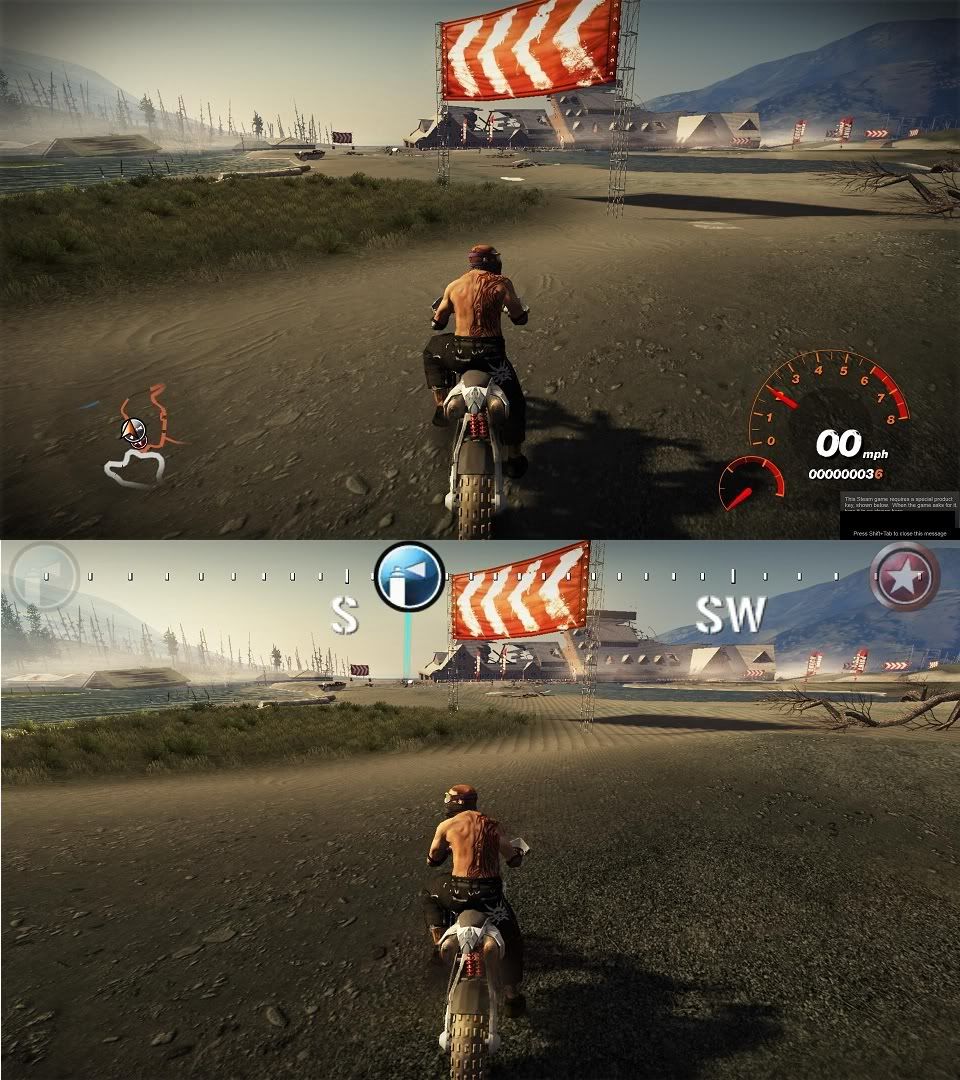
EDIT EDIT EDIT: Yea ok it's the shadow maps that cause the black lines... I looked at scavenjah's screenshots thread and it was mentioned. ONE LAST THING, I promise: Does AA/AF even work in this game? Setting it to 4xAA/8xAF doesn't affect my frames nor does it make the jaggies / blurry textures go away.
Also, how do you calculate the hex value for future reference? The decimal value doesn't make much sense to me either.
EDIT: Well that didn't take long. Took me about 2 minutes after looking at the hex / decimal values in this thread to figure it out.
For 5760x1080 the hex value is: 4381680
If you want to make your own resolution, convert whatever your single screen resolution to the decimal value (easily done by just clicking decimal). Add 2*Horizontal to that decimal number (i.e. 1920x1080 is 70780800 in decimal, 1920*2 + 70780800 = 70784640, then click the hexidecimal button and it'll be the right hex value).
I got this game from the steam sale... and for steam, you can't launch it with the steam launcher anymore after this. Make sure you go to steam/steamapps/common/fuel and find the seculauncher to launch it.
EDIT EDIT: Ok so I played a little bit in triple wide... but there's one thing that really bothers me. For some reason, in triple wide there's black lines on the ground. At first I thought it was due to texture filtering so I tried anisotropic, trillinear, and bilinear, but non of them changed anything. Going into single monitor mode fixes it. Here's a shot for comparison, top is 1920x1080, bottom is 5760x1080 (the middle part of it):
EDIT EDIT EDIT: Yea ok it's the shadow maps that cause the black lines... I looked at scavenjah's screenshots thread and it was mentioned. ONE LAST THING, I promise: Does AA/AF even work in this game? Setting it to 4xAA/8xAF doesn't affect my frames nor does it make the jaggies / blurry textures go away.
Re: Fuel
Is it possible to run this game in 2560x1080?
I tried 4381180 registry value according to Hydralisk_X's tutorial: (70780800+2560)→HEX, but the game won't launch. I get black screen and error.
Maybe I did something wrong or the game is just too old to run ultrawide resolution?
I tried 4381180 registry value according to Hydralisk_X's tutorial: (70780800+2560)→HEX, but the game won't launch. I get black screen and error.
Maybe I did something wrong or the game is just too old to run ultrawide resolution?
Last edited by tezt on 19 Dec 2015, 11:53, edited 1 time in total.



-
scavvenjahh
- Editors
- Posts: 3424
- Joined: 06 Mar 2008, 17:20
Re: Fuel
Duly added to the DRjackfuste wrote:2560x1080 — 04380A00
3440x1440 — 05A00D70

Re: Fuel
This is the formula to create your own Regedit resolution hex string for Fuel:
hexResolutionVertical & 0 & hexResolutionWidth.

Details here (& other fixes): http://www.wsgf.org/blog/imusrt/2015/12/23/fuel-2009-manual-plp-instructions-fixes
Notes:
- Use Windows Calculator to make each piece, then combine. e.g. 3520x1080 = 4380dc0
- Ignore Hydralisk_X instruction in above thread, his formula is wrong.
- Recommend enforcing AA with graphics card, & mod HUD. Game looks better this way.
hexResolutionVertical & 0 & hexResolutionWidth.
Details here (& other fixes): http://www.wsgf.org/blog/imusrt/2015/12/23/fuel-2009-manual-plp-instructions-fixes
Notes:
- Use Windows Calculator to make each piece, then combine. e.g. 3520x1080 = 4380dc0
- Ignore Hydralisk_X instruction in above thread, his formula is wrong.
- Recommend enforcing AA with graphics card, & mod HUD. Game looks better this way.
Who is online
Users browsing this forum: No registered users and 4 guests