Dreamfall Chapters: Book One: Reborn

Detailed breakdowns of how games react to widescreen, ultra-wide, 4k and multi-mon
Post Reply
Wookiegr
Posts: 52
Joined: 21 Oct 2014, 23:48

Dreamfall Chapters: Book One: Reborn

Post by Wookiegr »


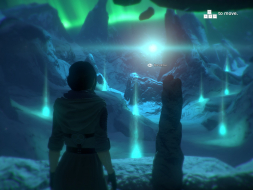
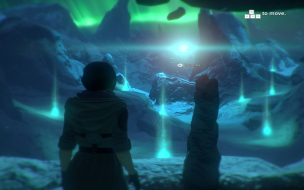
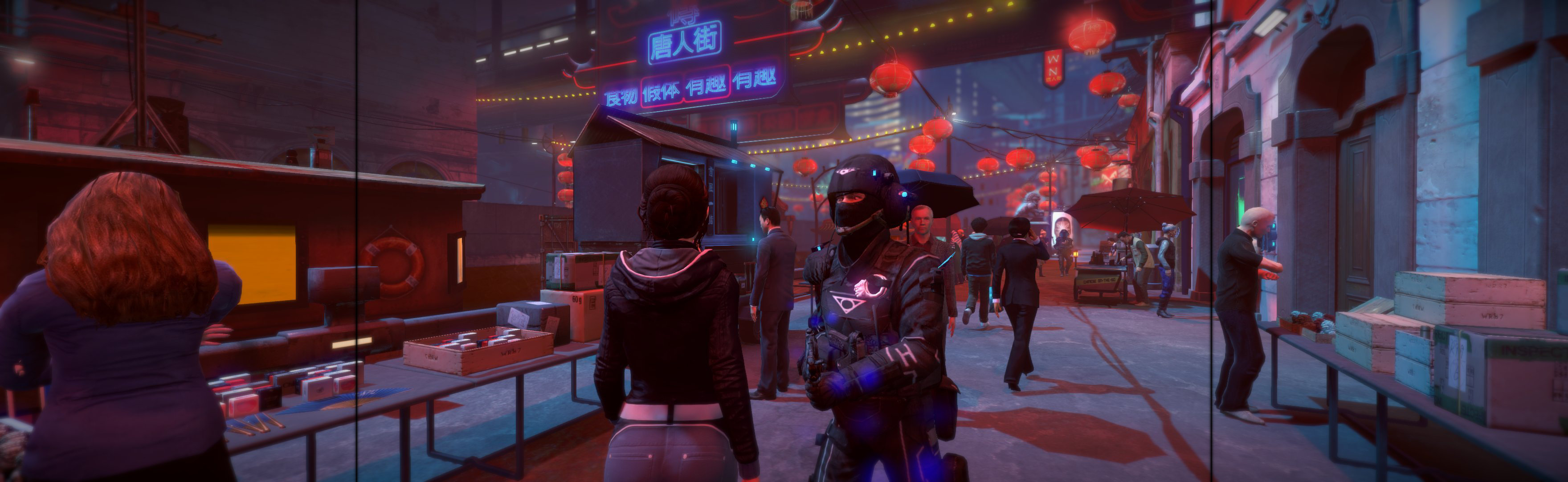
Widescreen Grade: A
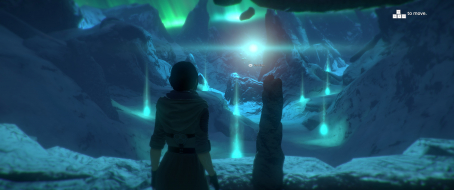
Ultra-Widescreen Grade: B
Multi-monitor Grade: C
4k Grade: A

Read Full Detailed Report - Dreamfall Chapters: Book One: Reborn

Dreamfall Chapters: The Longest Journey is an on-going episodic 3D adventure game with emphasis on character interaction, exploration of the game world, and puzzle solving. It is a sequel to the adventure games The Longest Journey and Dreamfall: The Longest Journey.

(Source: Wikipedia)


4:3


16:10


16:9


21:9


3x1

Last edited by Wookiegr on 05 Jan 2015, 02:32, edited 7 times in total.
Reason: Edit
User avatar
scavvenjahh
Editors
Editors
Posts: 3424
Joined: 06 Mar 2008, 17:20

Re: Dreamfall Chapters: Book One: Reborn

Post by scavvenjahh »

A few thoughts on the DR:
1) 16:10 screenshots look like 4:3 stretched... Are they just placeholders ? Otherwise, this is a big bummer, and WS support should be downgraded to B.
2) Multi-Mon support looks pretty solid gameplay-wise. Limited support (C) seems a bit harsh, despite how important the Vert- cinematics may be.
3) You probably don't have to know how to edit the registry to get the game to run at your native res...
Try launch options "-screen-width xxxx -screen-height yyyy" (no quotes, xxxx is the desired width, yyyy is the desired height). These command line parameters work for most Unity games.
imusrt
Insiders
Insiders
Posts: 291
Joined: 21 Oct 2014, 23:33

Re: Dreamfall Chapters: Book One: Reborn

Post by imusrt »

The stretched 16:10 screenshot now showing in DR is in error, somehow poorly made. It should be replaced with a proper one. The original 16:10 I took and posted in this DR was in no way stretched. For me, game rendered every basic resolution perfectly.
User avatar
msrblonline
Posts: 3
Joined: 22 Sep 2015, 21:22

Re: Dreamfall Chapters: Book One: Reborn

Post by msrblonline »

the registry edit does not do the thing anymore. any idea for a solution? when i change values in registry, the game changes it back on every start. i myself tried to deny access for programs to write registry. after that the value does not change anymore but the resolution remains 1920x1080.
imusrt
Insiders
Insiders
Posts: 291
Joined: 21 Oct 2014, 23:33

Re: Dreamfall Chapters: Book One: Reborn

Post by imusrt »

msrblonline, if DR's fullscreen solution fails & you're using 1 graphics card, you could use the borderless solution. Instructions below
http://www.wsgf.org/blog/imusrt/2015/04/27/dreamfall-chapters-book-one-reborn-2014-manual-plp-instructions
Image
User avatar
msrblonline
Posts: 3
Joined: 22 Sep 2015, 21:22

Re: Dreamfall Chapters: Book One: Reborn

Post by msrblonline »

imusrt wrote:msrblonline, if DR's fullscreen solution fails & you're using 1 graphics card, you could use the borderless solution. Instructions below
http://www.wsgf.org/blog/imusrt/2015/04/27/dreamfall-chapters-book-one-reborn-2014-manual-plp-instructions

Tahanks a lot! It worked! I am new to this ultrawide topic, so I guess I need to dig further not to ask questions answered allready! Have a nice day!
Mewulf
Posts: 1
Joined: 15 Dec 2015, 20:36

Re: Dreamfall Chapters: Book One: Reborn

Post by Mewulf »

The following works for me now:
Make a Shortcut and add -popupwindow -screen-width 2560 after "XXX\SteamLibrary\steamapps\common\Dreamfall Chapters\Dreamfall Chapters.exe"

Post Reply

Who is online

Users browsing this forum: No registered users and 13 guests