
Hi guys, new member here.
I recently updated to Windows 10 from 8.1 on my rig. Using my LG 29UM65-P I used to be able to switch from 2560x1080 to 1920x1080 with black bars natively in order to play games like Mass Effect 2 without any stretching. However, with my update to Windows 10 switching resolution only stretches the screen and doesn't change the aspect ratio any longer. If anyone has any tips on how I can fix this problem that would be awesome! Google didn't help... I promise I already tried that
21:9 after Windows 10 update, no more 1080p black bars! :(
-
Kapowtotheface
- Posts: 2
- Joined: 14 Aug 2015, 05:30


Re: 21:9 after Windows 10 update, no more 1080p black bars!
Hi,
You updated to windows 10 via inplace Update? So did you reinstall the GPU drivers?
You updated to windows 10 via inplace Update? So did you reinstall the GPU drivers?
We gonna send it to outa space!
-
Kapowtotheface
- Posts: 2
- Joined: 14 Aug 2015, 05:30
Re: 21:9 after Windows 10 update, no more 1080p black bars!
Yeah as far as I know I have the latest nvidia and mobo drivers
Re: 21:9 after Windows 10 update, no more 1080p black bars!
Same problem here with 2560x1440p on 3440x1440p monitor.
Win10, Nvidia 355.82 driver, 2560x1440p always stretched fullscreen.
Win10, Nvidia 355.82 driver, 2560x1440p always stretched fullscreen.


Re: 21:9 after Windows 10 update, no more 1080p black bars!
This is a driver setting. Open the video card control panel and ensure the GPU scaling setting is set the way you want it.
-
skipclarke

- Founder

- Posts: 7358
- Joined: 13 Oct 2003, 05:00
Re: 21:9 after Windows 10 update, no more 1080p black bars!
^^^
What Garret said. GPU scaling should be set to "aspect" or "maintain aspect". Though, at times I've had trouble with that sticking, even under Win7 or Win8. Your monitor should also have options. My LG has a couple of options. Look for Aspect or 1:1. These are a good failsafe when GPU settings don't work.
What Garret said. GPU scaling should be set to "aspect" or "maintain aspect". Though, at times I've had trouble with that sticking, even under Win7 or Win8. Your monitor should also have options. My LG has a couple of options. Look for Aspect or 1:1. These are a good failsafe when GPU settings don't work.
Re: 21:9 after Windows 10 update, no more 1080p black bars!
Nope.
GPU scaling(or anyelse setting)don't work anymore in MY Windows10.
It's work with my old 8.1 setup but no way to go with Win10 and the 2 980Ti.
2560x1440p go fullscreen anyway and the "1:1/Original" AR settings on LG o anything else don't work either. Fullscreen forever.
GPU scaling(or anyelse setting)don't work anymore in MY Windows10.
It's work with my old 8.1 setup but no way to go with Win10 and the 2 980Ti.
2560x1440p go fullscreen anyway and the "1:1/Original" AR settings on LG o anything else don't work either. Fullscreen forever.
-
skipclarke
- Founder
- Posts: 7358
- Joined: 13 Oct 2003, 05:00
Re: 21:9 after Windows 10 update, no more 1080p black bars!
That's very odd. I just re-did my HTPC with Win10. Will try it on my 21:9. What GPU are you using?
Re: 21:9 after Windows 10 update, no more 1080p black bars!
980Ti From D1 and relatives drivers version. No way to retain the correct aspect ratio with 2560x1440p on my 3440x1440p monitor with Win10 64Bit.
Always zoomed fullscreen. No problem instead with the old 8.1 Windows and the old 970.
Last chance it's try again with a fresh install.
Always zoomed fullscreen. No problem instead with the old 8.1 Windows and the old 970.
Last chance it's try again with a fresh install.
-
skipclarke
- Founder
- Posts: 7358
- Joined: 13 Oct 2003, 05:00
Re: 21:9 after Windows 10 update, no more 1080p black bars!
I've noticed that some games seem to honor it, and some don't. DiRT: Showdown doesn't, but it's running at 59Hz for some reason. Make sure you're running at 60Hz, and be sure to check the settings in-game.
Re: 21:9 after Windows 10 update, no more 1080p black bars!
Kapowtotheface,
I'm a bit late in response, but it should be said.
If your game is forcing you to use margins in 21:9, you can spread game manually to get rid of them.
For example, Mass Effect 2:
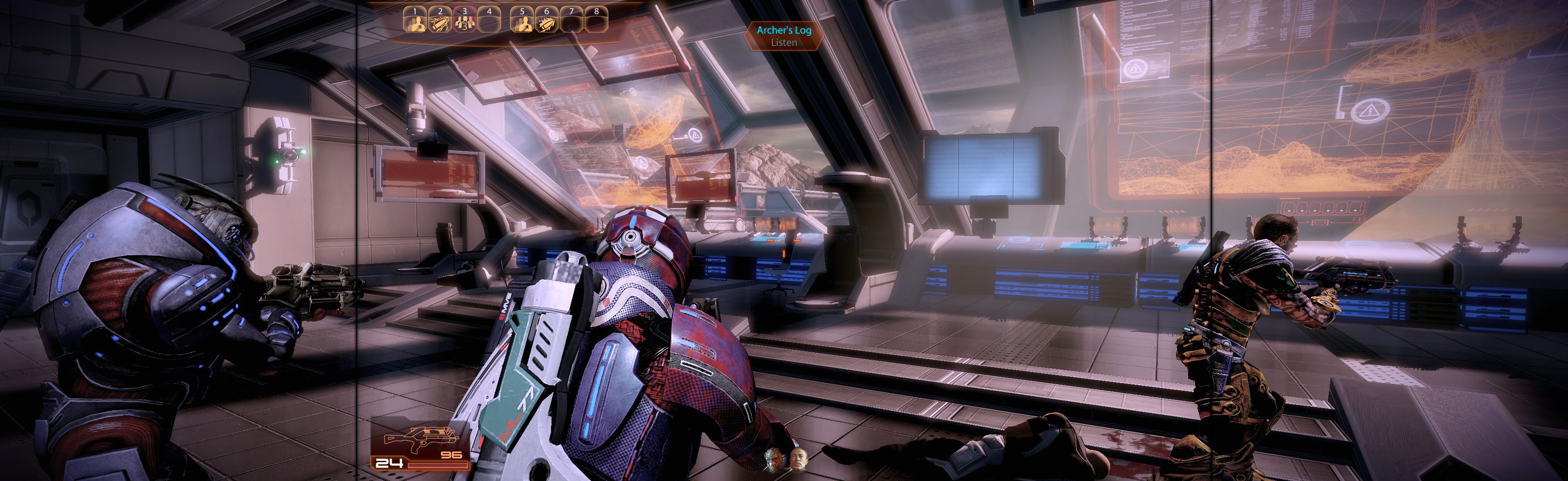
How to spread manually: http://www.wsgf.org/node/28740
Note:
- Those instructions were for Manual PLP. For 21:9, it requires some adjustment, but would work. You would need to adjust numbers in this way: pretend you have a 16:9 center with skinny side-screens. This would produce full-spread game with HUD on your fake "16:9 center".
- Also FWS menu's resolution override was not tested & may work fine (instead of the LUA edits). Again, you would pretend you have PLP in all these numbers.
I'm a bit late in response, but it should be said.
If your game is forcing you to use margins in 21:9, you can spread game manually to get rid of them.
For example, Mass Effect 2:
How to spread manually: http://www.wsgf.org/node/28740
Note:
- Those instructions were for Manual PLP. For 21:9, it requires some adjustment, but would work. You would need to adjust numbers in this way: pretend you have a 16:9 center with skinny side-screens. This would produce full-spread game with HUD on your fake "16:9 center".
- Also FWS menu's resolution override was not tested & may work fine (instead of the LUA edits). Again, you would pretend you have PLP in all these numbers.
Who is online
Users browsing this forum: Bing [Bot] and 3 guests