
Dear all, I am currently building my new PC for Racing Simulator primarily/ mainly and secondary FPS gaming (Arma3) and as work/ office computer.
Now my question is, with a single Nvidia TITAN X that i have, can i run without any problems 3x (triple screen setup) with no issues at all? Could i run 3x Acer XB270HU bprz UM.HB0AA.001 monitors? (Specs: 27", G-Sync, WQHD (2560 x 1440), DisplayPort, IPS, 4ms)
Or would I be able to run 1x ACER XR341CK (specs: 34", 21:9, G-Sync, 3440 x 1440) and 2x XB270HU bprz UM.HB0AA.001 on my single (1x) Nvidia Titan X?
this is my hardware setup:
o Corsair Graphite Series 730T Black Steel / Plastic ATX Full Tower Gaming Case
o Corsair AXi series AX1200i 1200W Digital ATX12V v2.31 and EPS 2.92 SLI Ready CrossFire Ready 80 PLUS PLATINUM Certified Full Modular Active PFC Power Supply New 4th Gen CPU Certified Haswell Ready
o ASUS RAMPAGE V EXTREME/U3.1 LGA 2011-v3 Intel X99 SATA 6Gb/s USB 3.1 Extended ATX Intel Motherboard
o Intel Core i7-5930K Haswell-E 6-Core 3.5GHz LGA 2011-v3 140W BX80648I75930K Desktop Processor
o Noctua NH-U12 S for Intel LGA 2011,1156,1155,1150 and AMD AM2/AM2+/AM3/3+,FM1/2 Sockets, U Type, 5 Heatpipe,120mm CPU Cooler Cooling
o Corsair Dominator Platinum 32GB (4 x 8GB) 288-Pin DDR4 SDRAM DDR4 3000 (PC4-24000) Desktop Memory Model CMD32GX4M8B3000C15
o NVIDIA GeForce GTX TITAN X 12GD5 12GB
o SAMSUNG 850 PRO MZ-7KE512BW 2.5" 512GB SATA III 3-D Vertical Internal Solid State Drive (SSD)
o SAMSUNG 850 EVO MZ-75E250B/AM 2.5” 256GB SATA III Internal Solid State Drive (SSD)
o Seagate Hybrid Drives STCL4000400 4TB MLC/8GB SATA 6.0Gb/s NCQ Desktop SSHD
o ASUS Black 12X BD-ROM 16X DVD-ROM 48X CD-ROM SATA Internal Blu-ray Drive Model BC-12B1ST/BLK/B/AS
o Nippon Labs USB 2.0 Internal Memory Card Reader 3.5" All In One ICR-BB
thank you all for your help in advance...
what 3x (triple) ACER monitor setup will work? with 1x (sing
-
rocafella1978
- Posts: 9
- Joined: 29 Apr 2015, 19:29
what 3x (triple) ACER monitor setup will work? with 1x (sing
MOBO: Asus RVE | CPU: Intel i7-5930K | RAM: 32GB Corsair Dom.Platinum DDR4 3000 | GPU: 2-WAY SLI Nvidia GeForce GTX Titan X | SOUND: Asus RVE Onboard &
Asus Xonar DGX | DRIVES: Samsung 850 PRO 512GB SSD, 850 EVO 256GB SSD and
Seagate Hybrid 4TB SSHD PSU: Corsair AX1500i 1500W CASE: Corsair Graphite 730T
| DISPLAY: Asus PG348Q 34" 21:9 Ultra-wide QHD (3440x1440) 100Hz G-SYNC | OS: Win10 Pro-64bit
Asus Xonar DGX | DRIVES: Samsung 850 PRO 512GB SSD, 850 EVO 256GB SSD and
Seagate Hybrid 4TB SSHD PSU: Corsair AX1500i 1500W CASE: Corsair Graphite 730T
| DISPLAY: Asus PG348Q 34" 21:9 Ultra-wide QHD (3440x1440) 100Hz G-SYNC | OS: Win10 Pro-64bit

Re: what 3x (triple) ACER monitor setup will work? with 1x (
Hi,

Arma 3 does take quite a bit GPU power... how much is the "Ultra quality Preset" ? according to Tom's Hardware the old Titan managed to get about 40 FPS.

The new Titan X is about 40% more Powerfull, Looking at the Crysis 3 Benchmark from Anandtech:
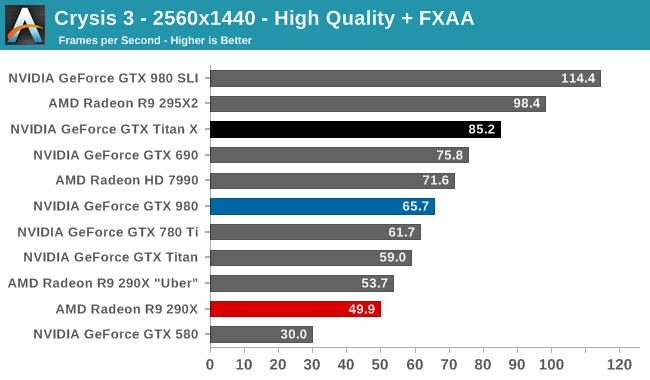
(and yet even there you can't use the 144hz of your Monitor to the fullest on high quality settings)
to run 3 Monitors you would need about 2.3-2.8x the Power of this.
If you intend to use the Monitor on ULBM mode with 85Hz that might work on Low to Medium settings on most new games.
Here you can see Project Cars in UHD TripleWide on 60Hz with 4x Titan GPU's
http://www.craveonline.com/gaming/artic ... 3-monitors
On a Single 1440p Monitor with a Titan X this one here seems to reach about 50 FPS, but i guess the settings are all cranked up.
https://www.youtube.com/watch?v=TcYcVURP_1Q
Here is a pretty good review about 4k Surround, You can assume that you will get about 40-70% Better Performance with a 1440p triplewide setup.
http://www.tweaktown.com/tweakipedia/76 ... index.html
So if you wan't to play in High settings you'd better think about SLI with 2 or 3 of these cards, if you're OK with lowering settings all the way down then a Single Titan X could might have enough performance. 144hz will probably still be out of reach for new games.
If you want high FPS and Triplemonitor you'd better keep an eye out for FullHD Monitors.
Arma 3 does take quite a bit GPU power... how much is the "Ultra quality Preset" ? according to Tom's Hardware the old Titan managed to get about 40 FPS.
The new Titan X is about 40% more Powerfull, Looking at the Crysis 3 Benchmark from Anandtech:
(and yet even there you can't use the 144hz of your Monitor to the fullest on high quality settings)
to run 3 Monitors you would need about 2.3-2.8x the Power of this.
If you intend to use the Monitor on ULBM mode with 85Hz that might work on Low to Medium settings on most new games.
Here you can see Project Cars in UHD TripleWide on 60Hz with 4x Titan GPU's
http://www.craveonline.com/gaming/artic ... 3-monitors
On a Single 1440p Monitor with a Titan X this one here seems to reach about 50 FPS, but i guess the settings are all cranked up.
https://www.youtube.com/watch?v=TcYcVURP_1Q
Here is a pretty good review about 4k Surround, You can assume that you will get about 40-70% Better Performance with a 1440p triplewide setup.
http://www.tweaktown.com/tweakipedia/76 ... index.html
So if you wan't to play in High settings you'd better think about SLI with 2 or 3 of these cards, if you're OK with lowering settings all the way down then a Single Titan X could might have enough performance. 144hz will probably still be out of reach for new games.
If you want high FPS and Triplemonitor you'd better keep an eye out for FullHD Monitors.
We gonna send it to outa space!
-
rocafella1978
- Posts: 9
- Joined: 29 Apr 2015, 19:29
Re: what 3x (triple) ACER monitor setup will work? with 1x (
hi Haldi, thank you so much for your valuable and such detailed answer, to be honest, since my PC experience and know-how is really over 10 years ago, i am completely and utterly stunned by what options I have and what could work, would work and maybe works on my Titan X. (i am basically looking for something, a setup with triple screens so my son and myself can enjoy the racing sim genre of games).
would maybe a setup work:
Option (1)
Center Screen: Acer XB270H Abprz UM.HB0AA.A01, 27" Full HD (1920 x 1080), 16:9, DisplayPort, 144hz, G-Sync
Left and Right Screens: Acer XB270H Abprz UM.HB0AA.A01, 27" Full HD (1920 x 1080), 16:9, DisplayPort, 144hz, G-Sync
Option (2) - would NV Surround still work if resolutions are different?
Center Screen: Acer XB270HU bprz UM.HB0AA.001, 27" WQHD (2560 x 1440), 16:9, DisplayPort, 144hz, G-Sync
Left and Right Screens: Acer XB270H Abprz UM.HB0AA.A01, 27" Full HD (1920 x 1080), 16:9, DisplayPort, 144hz, G-Sync
Option (3)
all 3x screens: Acer XB240H Abpr UM.FB0AA.A01, 24" Full HD (1920 x 1080), 16:9, DisplayPort, 144hz, G-Sync
I know and can see that there are so many options and possibilities, I just would like to see, what i can do, of course, no need to play the games in highest setting with AA and all the way ULTRA settings, but if possible high FPS would be great (lowered settings surely) being able to play with 1x-2x (one or two) Nvidia Titan X (2-WAY SLI).
another big question, can i combine different screen sizes and resolutions? is that possible will that work with NV Surround? or does it make sense at all? or is it always better to go with 3x identical monitors?
would maybe a setup work:
Option (1)
Center Screen: Acer XB270H Abprz UM.HB0AA.A01, 27" Full HD (1920 x 1080), 16:9, DisplayPort, 144hz, G-Sync
Left and Right Screens: Acer XB270H Abprz UM.HB0AA.A01, 27" Full HD (1920 x 1080), 16:9, DisplayPort, 144hz, G-Sync
Option (2) - would NV Surround still work if resolutions are different?
Center Screen: Acer XB270HU bprz UM.HB0AA.001, 27" WQHD (2560 x 1440), 16:9, DisplayPort, 144hz, G-Sync
Left and Right Screens: Acer XB270H Abprz UM.HB0AA.A01, 27" Full HD (1920 x 1080), 16:9, DisplayPort, 144hz, G-Sync
Option (3)
all 3x screens: Acer XB240H Abpr UM.FB0AA.A01, 24" Full HD (1920 x 1080), 16:9, DisplayPort, 144hz, G-Sync
I know and can see that there are so many options and possibilities, I just would like to see, what i can do, of course, no need to play the games in highest setting with AA and all the way ULTRA settings, but if possible high FPS would be great (lowered settings surely) being able to play with 1x-2x (one or two) Nvidia Titan X (2-WAY SLI).
another big question, can i combine different screen sizes and resolutions? is that possible will that work with NV Surround? or does it make sense at all? or is it always better to go with 3x identical monitors?
MOBO: Asus RVE | CPU: Intel i7-5930K | RAM: 32GB Corsair Dom.Platinum DDR4 3000 | GPU: 2-WAY SLI Nvidia GeForce GTX Titan X | SOUND: Asus RVE Onboard &
Asus Xonar DGX | DRIVES: Samsung 850 PRO 512GB SSD, 850 EVO 256GB SSD and
Seagate Hybrid 4TB SSHD PSU: Corsair AX1500i 1500W CASE: Corsair Graphite 730T
| DISPLAY: Asus PG348Q 34" 21:9 Ultra-wide QHD (3440x1440) 100Hz G-SYNC | OS: Win10 Pro-64bit
Asus Xonar DGX | DRIVES: Samsung 850 PRO 512GB SSD, 850 EVO 256GB SSD and
Seagate Hybrid 4TB SSHD PSU: Corsair AX1500i 1500W CASE: Corsair Graphite 730T
| DISPLAY: Asus PG348Q 34" 21:9 Ultra-wide QHD (3440x1440) 100Hz G-SYNC | OS: Win10 Pro-64bit
Re: what 3x (triple) ACER monitor setup will work? with 1x (
NVidia only supports Surround Setups when you use Monitors with the same resolution!
And to make it harder, it only works if the Monitors have the same Sync Polarity, so if you use nVidia it's always recommended to use 3x the exact same monitor. It MIGHT work with different monitors, it might not work. finding out the sync polarity of a monitor is kinda a hassle and not easy.
Even if you use AMD it's better if you use 3x the same Monitor because they have the same Panel which will result in same Color. Altought you CAN use different resolution Monitors on AMD, i.e 1920x1080|2560x1080|1920x1080 and funny stuff like that. I think it's even possible to run a 60hz|120hz|60hz Setup with AMD (though i'm not entirely sure, and i don't know how that would work with AMD Free-sync)
The Problem is that Titan X cost a fortune, and even less of the Titan X users have a Triplewide Monitor Setup ^^
So the best you can get are assumptions on how well it will work based on similar setups.
The good point is a titan X has 12gb VRAM, so you certainly won't hit a VRAM Limit ever ^^
P.S
Scavvenjahh has a Titan X running on 3x 1920x1200 triplewide. He has shown some performance in this thread:
http://www.wsgf.org/forums/viewtopic.php?f=72&t=28149
And to make it harder, it only works if the Monitors have the same Sync Polarity, so if you use nVidia it's always recommended to use 3x the exact same monitor. It MIGHT work with different monitors, it might not work. finding out the sync polarity of a monitor is kinda a hassle and not easy.
Even if you use AMD it's better if you use 3x the same Monitor because they have the same Panel which will result in same Color. Altought you CAN use different resolution Monitors on AMD, i.e 1920x1080|2560x1080|1920x1080 and funny stuff like that. I think it's even possible to run a 60hz|120hz|60hz Setup with AMD (though i'm not entirely sure, and i don't know how that would work with AMD Free-sync)
The Problem is that Titan X cost a fortune, and even less of the Titan X users have a Triplewide Monitor Setup ^^
So the best you can get are assumptions on how well it will work based on similar setups.
The good point is a titan X has 12gb VRAM, so you certainly won't hit a VRAM Limit ever ^^
P.S
Scavvenjahh has a Titan X running on 3x 1920x1200 triplewide. He has shown some performance in this thread:
http://www.wsgf.org/forums/viewtopic.php?f=72&t=28149
We gonna send it to outa space!
-
rocafella1978
- Posts: 9
- Joined: 29 Apr 2015, 19:29
Re: what 3x (triple) ACER monitor setup will work? with 1x (
also found this monitor...maybe this in triple setup?
http://www.usa.philips.com/c-p/272G5DYE ... ifications
Philips 272G5DYEB Brilliance LCD monitor, G-SYNC, G-line, 144Hz, 27", TN Panel, 1920 x 1080 @144Hz, 1ms (gtg), DisplayPort 1.2, USB3.0x4 with 1x fast charger
will also look at Scavvenjahh's thread and search around to learn and educate myself. a lot to learn, and only few options left for/ with Nvidia G-Sync.
http://www.usa.philips.com/c-p/272G5DYE ... ifications
Philips 272G5DYEB Brilliance LCD monitor, G-SYNC, G-line, 144Hz, 27", TN Panel, 1920 x 1080 @144Hz, 1ms (gtg), DisplayPort 1.2, USB3.0x4 with 1x fast charger
will also look at Scavvenjahh's thread and search around to learn and educate myself. a lot to learn, and only few options left for/ with Nvidia G-Sync.
MOBO: Asus RVE | CPU: Intel i7-5930K | RAM: 32GB Corsair Dom.Platinum DDR4 3000 | GPU: 2-WAY SLI Nvidia GeForce GTX Titan X | SOUND: Asus RVE Onboard &
Asus Xonar DGX | DRIVES: Samsung 850 PRO 512GB SSD, 850 EVO 256GB SSD and
Seagate Hybrid 4TB SSHD PSU: Corsair AX1500i 1500W CASE: Corsair Graphite 730T
| DISPLAY: Asus PG348Q 34" 21:9 Ultra-wide QHD (3440x1440) 100Hz G-SYNC | OS: Win10 Pro-64bit
Asus Xonar DGX | DRIVES: Samsung 850 PRO 512GB SSD, 850 EVO 256GB SSD and
Seagate Hybrid 4TB SSHD PSU: Corsair AX1500i 1500W CASE: Corsair Graphite 730T
| DISPLAY: Asus PG348Q 34" 21:9 Ultra-wide QHD (3440x1440) 100Hz G-SYNC | OS: Win10 Pro-64bit
-
scavvenjahh

- Editors

- Posts: 3424
- Joined: 06 Mar 2008, 17:20
Re: what 3x (triple) ACER monitor setup will work? with 1x (
Definitely, yes. Beware of SLI though - using this on top of Surround and everything might prove trickier than it seems.rocafella1978 wrote:Now my question is, with a single Nvidia TITAN X that i have, can i run without any problems 3x (triple screen setup) with no issues at all?
-
rocafella1978
- Posts: 9
- Joined: 29 Apr 2015, 19:29
Re: what 3x (triple) ACER monitor setup will work? with 1x (
scavvenjahh wrote:Definitely, yes. Beware of SLI though - using this on top of Surround and everything might prove trickier than it seems.rocafella1978 wrote:Now my question is, with a single Nvidia TITAN X that i have, can i run without any problems 3x (triple screen setup) with no issues at all?
understood, thank you for your help and tips.
MOBO: Asus RVE | CPU: Intel i7-5930K | RAM: 32GB Corsair Dom.Platinum DDR4 3000 | GPU: 2-WAY SLI Nvidia GeForce GTX Titan X | SOUND: Asus RVE Onboard &
Asus Xonar DGX | DRIVES: Samsung 850 PRO 512GB SSD, 850 EVO 256GB SSD and
Seagate Hybrid 4TB SSHD PSU: Corsair AX1500i 1500W CASE: Corsair Graphite 730T
| DISPLAY: Asus PG348Q 34" 21:9 Ultra-wide QHD (3440x1440) 100Hz G-SYNC | OS: Win10 Pro-64bit
Asus Xonar DGX | DRIVES: Samsung 850 PRO 512GB SSD, 850 EVO 256GB SSD and
Seagate Hybrid 4TB SSHD PSU: Corsair AX1500i 1500W CASE: Corsair Graphite 730T
| DISPLAY: Asus PG348Q 34" 21:9 Ultra-wide QHD (3440x1440) 100Hz G-SYNC | OS: Win10 Pro-64bit
-
rocafella1978
- Posts: 9
- Joined: 29 Apr 2015, 19:29
Re: what 3x (triple) ACER monitor setup will work? with 1x (
just to update you guys, went with triple PG348Q for work, work paid. and I do not regret it, gorgeous and wonderfully working displays with my Titan X's!
getting a second rig just for gaming and am looking what triples to pick for that new build:
- ASUS PG279Q
- ACER XB321HK
- ACER Predator X34
will keep you posted, and it did include a lot of sending back and ordering/ replacing displays (lots of ordering and refunding...) but figured best way to find the monitor/ display i like best and want! suggestions/ recommendations are great and fantastic, but maybe what someone likes or dislikes, i might feel the opposite about it.
getting a second rig just for gaming and am looking what triples to pick for that new build:
- ASUS PG279Q
- ACER XB321HK
- ACER Predator X34
will keep you posted, and it did include a lot of sending back and ordering/ replacing displays (lots of ordering and refunding...) but figured best way to find the monitor/ display i like best and want! suggestions/ recommendations are great and fantastic, but maybe what someone likes or dislikes, i might feel the opposite about it.
MOBO: Asus RVE | CPU: Intel i7-5930K | RAM: 32GB Corsair Dom.Platinum DDR4 3000 | GPU: 2-WAY SLI Nvidia GeForce GTX Titan X | SOUND: Asus RVE Onboard &
Asus Xonar DGX | DRIVES: Samsung 850 PRO 512GB SSD, 850 EVO 256GB SSD and
Seagate Hybrid 4TB SSHD PSU: Corsair AX1500i 1500W CASE: Corsair Graphite 730T
| DISPLAY: Asus PG348Q 34" 21:9 Ultra-wide QHD (3440x1440) 100Hz G-SYNC | OS: Win10 Pro-64bit
Asus Xonar DGX | DRIVES: Samsung 850 PRO 512GB SSD, 850 EVO 256GB SSD and
Seagate Hybrid 4TB SSHD PSU: Corsair AX1500i 1500W CASE: Corsair Graphite 730T
| DISPLAY: Asus PG348Q 34" 21:9 Ultra-wide QHD (3440x1440) 100Hz G-SYNC | OS: Win10 Pro-64bit
Who is online
Users browsing this forum: No registered users and 6 guests