
Doom 3 went open source awhile back, and I've been working on adding proper aspect ratio support. I think it's looking pretty good now, so here it is:
How to use:
Two things to keep in mind, that might prevent some confusion.
1: This is not a "fix" per se, but rather a new version of the game. It does not include data files or CD keys - those must be acquired from an official version of the game.
2: Having both the official version and the WSGF version on your hard drive, side-by-side, is advisable for bugtesting purposes. But it will require an additional 1.5GB of space. You can probably bypass this by using the fs_base command line parameter instead of copying stuff, but I haven't tested it.
So first, you need to have the full version of Doom 3 installed, updated to version 1.3.1. It's available on Steam, which should also automatically apply the updates.
Download this: (link removed)
Unpack it somewhere. Do not just copy the files to the Doom 3 directory - this will cause crashes. Instead, go to where the whole game is installed, go to its "base" directory. Select these files:
DoomConfig.cfg (optional)
doomkey
pak000.pk4 and all other files beginning with pak and ending with pk4
xpkey (if you have it)
Copy them to the "base" directory of the directory you just unpacked. Do NOT copy any of the "gameXX.pk4" files. They will crash the game.
If you have the expansion pack too, you will also want to copy these files from the old "d3xp" to the new "d3xp"
DoomConfig.cfg (optional)
pak000.pk4 and all other files beginning with pak and ending with pk4
Again, leave the "gameXX.pk4" files alone.
Run the game once, set your detail levels, then quit. Go to the game directory, open the folder "base," and edit the file "DoomConfig.cfg" with a text editor.
First, if this contains any line that sets "cg_fov," remove it. The old FOV behavior assumes a baseline aspect ratio of 4:3 and uses a default value of 90. The new FOV behavior assumes a baseline aspect ratio of 1:1 and uses a default value of 75, and dynamically adjusts from there (at 4:3, the H-FOV will come out to approximately 90).
Next, find the line containing seta r_mode. Make it -1. This tells Doom 3 to use a custom resolution, and also to enable non-4:3 aspect ratio support.
Then find the lines containing seta r_customHeight and seta r_customWidth. Change them to your desired resolution, and be careful not to confuse them.
Finally, find the line containing seta r_aspectRatio. Make it 0. I have changed the behavior from the original - a value of 0 will automatically calculate your proper aspect ratio. You can also manually set it. A value of 1.78, for instance, will force a 16:9 aspect ratio regardless of your resolution (r_mode must still be -1, or this will have no effect).
If you have the expansion pack or any mods, you must repeat this process for each of them. Run the mod, set your detail levels, quit, go to the appropriate folder (d3xp for the expansion), change the settings in "DoomConfig.cfg" appropriately.
This works in tallscreen too, albeit with some HUD quirks I haven't figured out how to fix yet.
There's one very big limitation to this. Mods seem to make this crash. I haven't figured out how to fix this yet. I also haven't had a whole lot of luck with multiplayer - the handful of servers out there seem to either require "pure" clients (which this isn't), or use mods.
Doom 3: WSGF Edition WIP (testers wanted)
-
The_cranky_hermit
- Insiders

- Posts: 3010
- Joined: 07 Nov 2005, 04:16
The_cranky_hermit
First, you need to have the full version of Doom 3 installed, updated to version 1.3.
1.3 not 1.3.1 ?
I ask because the 1.3.1 update broke the gtx graphics mod that worked fine with 1.3

I can test it, btw what
I can test it, btw what should be the difference, at multi-monitor resolutions, between this solution and the old one thats included in the DR - http://widescreengamingforum.com/dr/doom-3 ?
-
The_cranky_hermit
- Insiders
- Posts: 3010
- Joined: 07 Nov 2005, 04:16
Quote:I ask because the 1.3.1
I ask because the 1.3.1 update broke the gtx graphics mod that worked fine with 1.3
1.3.1. My mistake.
what should be the difference, at multi-monitor resolutions, between this solution and the old one thats included in the DR - http://widescreengamingforum.com/dr/doom-3 ?
The old solution doesn't do multi-mon right at all. And the HUD/UI stretches at anything other than 4:3.

ive got a box copy of doom 3,
ive got a box copy of doom 3, never updated it, never added any expansions and only has like 1 mod i never use.
i might give it a shot
i might give it a shot
Asus P8P67 Pro, I7 2600k @ 4.6Ghz, 8gb, 250GB SSD/ 4TB Mechanical, Modded GTX 780TI, 3x AOC 27" IPS 5760x1080
-
scavvenjahh

- Editors

- Posts: 3424
- Joined: 06 Mar 2008, 17:20
Man oh man. Reinstalling now.
Man oh man. Reinstalling now.
-
scavvenjahh
- Editors
- Posts: 3424
- Joined: 06 Mar 2008, 17:20
This is working great. Can't
This is working great. Can't find any way to use hi-res texture mods, but Evilengine's Enhanced Models pak works ok.
One blemish though, the zoom is very limited in widescreen. Doom3 is a "hip shooter" at heart, but in a game with no iron sights, the zoom was quite useful. Not to mention some easter eggs, like the one involving reading a monitor screen over a certain NPC's shoulder, are also harder to catch.
Zooming in on the guard's helmet from the beginning of the game:
4:3

16:10

The zoom is roughly 1.5x more powerful in 4:3 than in WS/TH.
One blemish though, the zoom is very limited in widescreen. Doom3 is a "hip shooter" at heart, but in a game with no iron sights, the zoom was quite useful. Not to mention some easter eggs, like the one involving reading a monitor screen over a certain NPC's shoulder, are also harder to catch.
Zooming in on the guard's helmet from the beginning of the game:
4:3
16:10
The zoom is roughly 1.5x more powerful in 4:3 than in WS/TH.

Can you post the source (or
Can you post the source (or diff files) for your changes? I have some ideas.
Widescreen Fixer - https://www.widescreenfixer.org/
Widescreen Fixer Twitter - https://twitter.com/widescreenfixer
Personal Twitter - https://twitter.com/davidrudie
Widescreen Fixer Twitter - https://twitter.com/widescreenfixer
Personal Twitter - https://twitter.com/davidrudie
-
ViciousXUSMC

- Editors
- Posts: 1497
- Joined: 31 Jul 2006, 14:58
For some reason I remember
For some reason I remember playing Doom 3 in Eyefinity.
Maybe I was just playing vert- and didnt even notice.
Maybe I was just playing vert- and didnt even notice.
-
scavvenjahh
- Editors
- Posts: 3424
- Joined: 06 Mar 2008, 17:20
Read previous replies...The
Read previous replies...
The game stretches by default. Old Surround solution was Hor+ enough, but not perfectly Hor+ for all aspects. All 2D elements (crosshair, PDA, FMVs) would just stretch. RoE's grabber gun had FOV issues, too.
This is a much better solution for D3 and RoE's campaigns, in both WS and TH.
The game stretches by default. Old Surround solution was Hor+ enough, but not perfectly Hor+ for all aspects. All 2D elements (crosshair, PDA, FMVs) would just stretch. RoE's grabber gun had FOV issues, too.
This is a much better solution for D3 and RoE's campaigns, in both WS and TH.
Is this still available for
Is this still available for testing? The link in the OP is invalid. If you uploaded a new version, you need to update the link because Mediafire generates a new file key for every file uploaded even if it replaces a file with the same file name.
i was wondering if it was
i was wondering if it was still available as well. i bought the ID pack over the holidays and even though i own a box copy, i now have the steam copy installed and all updated and such as well.
Asus P8P67 Pro, I7 2600k @ 4.6Ghz, 8gb, 250GB SSD/ 4TB Mechanical, Modded GTX 780TI, 3x AOC 27" IPS 5760x1080
-
The_cranky_hermit
- Insiders
- Posts: 3010
- Joined: 07 Nov 2005, 04:16
Here's the new
Here's the new link, hosted on WSGF Media. (link removed)
As for source, I'm waiting for iodoom3 to come out with a release. I'm planning on merging my fixes into theirs. The GPL'd code is kind of a mess in places, and I cleaned parts of it up in my own way, but I'm betting the ioquake3 guys will do it better.
As for source, I'm waiting for iodoom3 to come out with a release. I'm planning on merging my fixes into theirs. The GPL'd code is kind of a mess in places, and I cleaned parts of it up in my own way, but I'm betting the ioquake3 guys will do it better.
-
The_cranky_hermit
- Insiders
- Posts: 3010
- Joined: 07 Nov 2005, 04:16
I just addressed the zooming
I just addressed the zooming issue and uploaded a new version.
Basically, the issue was that each weapon has a "zoom FOV" value built into it, but these values are meant to correspond to the xFOV of a 4:3 FOV, and my code was applying this value to the yFOV. So while the old behavior shrank xFOV from 90 to 70, the new behavior shrank yFOV from 75 to 70.
So I redefined the weapon zoomFOV function. If the aspect ratio is greater than 1:1, it will recalculate the value to an appropriate yFOV value. Fists for instance will return a value of 55, instead of 70.
Just realized that this made it vert - while zooming. I'm not quite sure why, but I'll figure it out next time I don't feel like doing something else.
Old 4:3 zooming behavior:

New 16:9 zooming behavior:

Basically, the issue was that each weapon has a "zoom FOV" value built into it, but these values are meant to correspond to the xFOV of a 4:3 FOV, and my code was applying this value to the yFOV. So while the old behavior shrank xFOV from 90 to 70, the new behavior shrank yFOV from 75 to 70.
So I redefined the weapon zoomFOV function. If the aspect ratio is greater than 1:1, it will recalculate the value to an appropriate yFOV value. Fists for instance will return a value of 55, instead of 70.
Just realized that this made it vert - while zooming. I'm not quite sure why, but I'll figure it out next time I don't feel like doing something else.
Old 4:3 zooming behavior:
New 16:9 zooming behavior:
-
The_cranky_hermit
- Insiders
- Posts: 3010
- Joined: 07 Nov 2005, 04:16
And a good night's rest made
And a good night's rest made me realize a dumb math error that caused the zoom to be vert -. Fixed it, uploaded new version.

Also I realized that the HUD text's slanting is exaggerated as you increase the aspect ratio. I have no idea why, but I'm betting it's related to the misalignment that occurs in tallscreen.
Also I realized that the HUD text's slanting is exaggerated as you increase the aspect ratio. I have no idea why, but I'm betting it's related to the misalignment that occurs in tallscreen.
Re: Doom 3: WSGF Edition WIP (testers wanted)
This works except for mods. Sikkmod crashes during save loading. Shame, was really looking forward to playing with sikk and wulfen textures
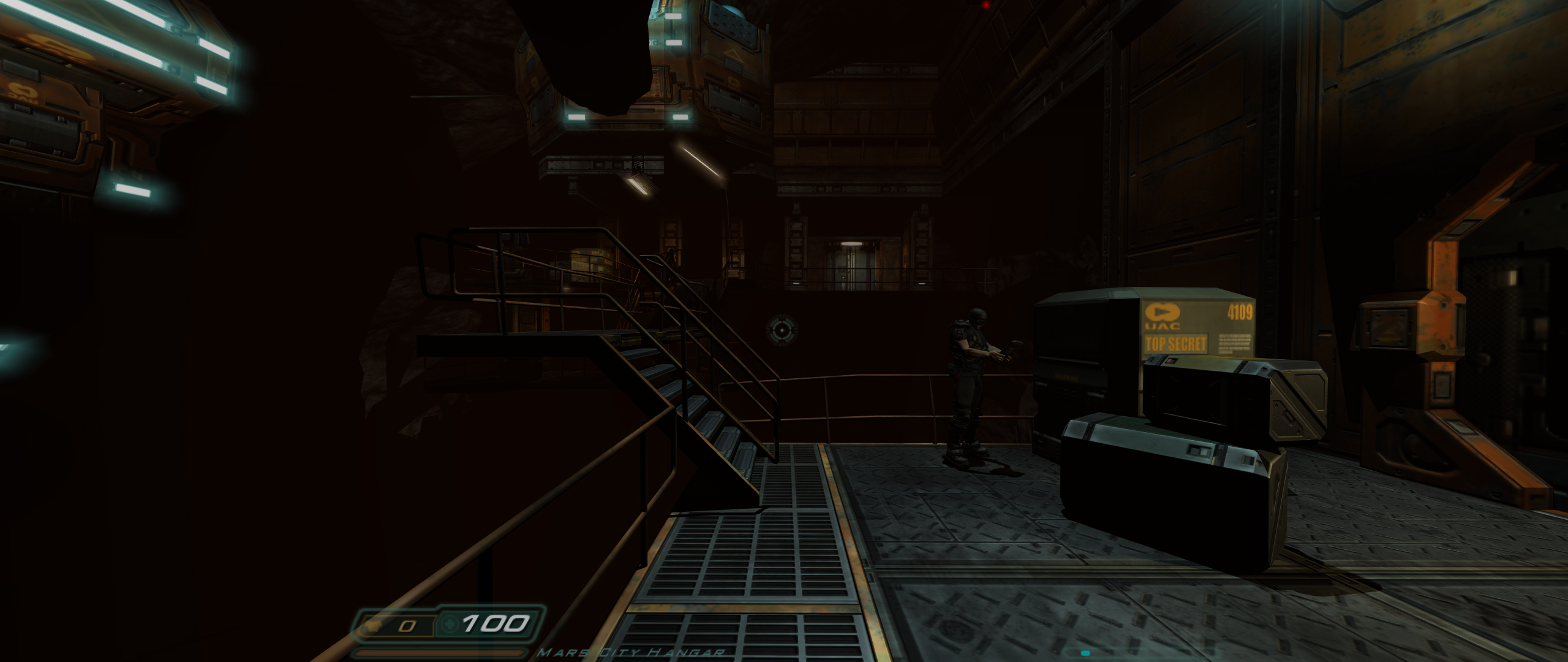
hermit, did you abandon the project?
hermit, did you abandon the project?
-
tepescovir
- Posts: 293
- Joined: 14 Apr 2006, 19:06
Re: Doom 3: WSGF Edition WIP (testers wanted)
I played doom 3 a while back in triple screen, there was then an update and hasnt worked for me in triple screen since.
intel x79
2 way 780ti's under water
Intel 4760 extreme @ 4GHz
3 x 42 inch screens @5860x1080
16 gigs xmp ram @2200
2 way 780ti's under water
Intel 4760 extreme @ 4GHz
3 x 42 inch screens @5860x1080
16 gigs xmp ram @2200
Who is online
Users browsing this forum: No registered users and 25 guests