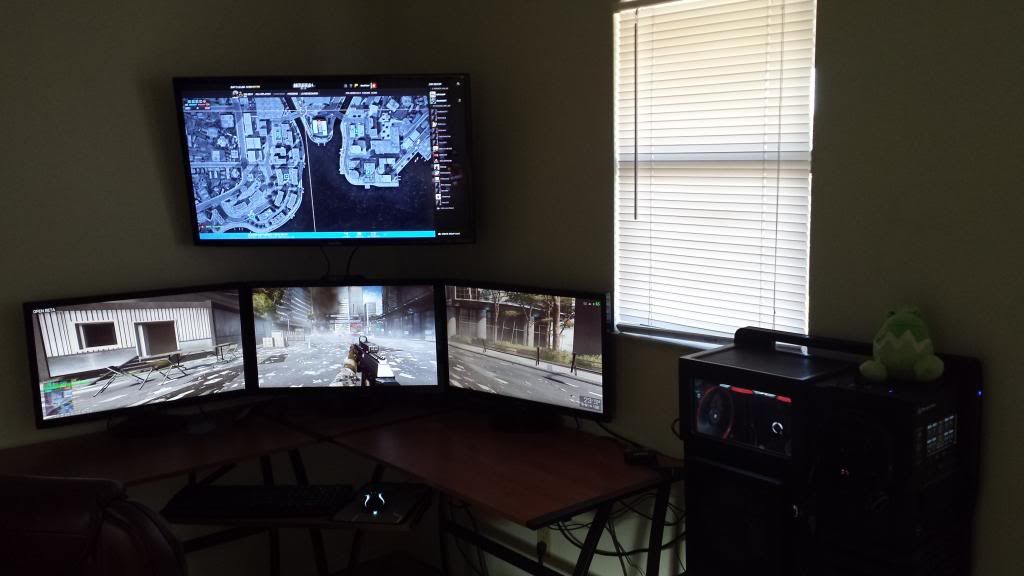
I can say that it is a lagfest but its really fun. Trying to run it in Surround does not work very well in regards of optimization, HUD items and other stuff is well done however. I'ts a very low pgu usage and i only get som 35isch FPS. So i change to single screen and now i run it in 120 fps.
I do however miss gaming in 5760*1080. I really hope this is fixed bafire the actual launch of BF4.
Have some of you guys tried it with Surround or Eyefinity yeat? What is your findings?
The game is running great here on trifire 7970's and the latest AMD 13.10B2 drivers. I am running ultra settings with 2xAA. I am using a FPS cap of 65 FPS in my USER.CFG. I hardely ever see dips below 65 fps game play is smooth and fluid. I do get occasional server lag though where you start to rubber band while running. I know Nvidia released some beta drivers for the game have you tried those?
I have everything on ultra and 4xMsaa and get 50-60 @ 5760x1080. I tried upping the super-sampling but it didn't like it much and at 150% I was getting under 30 fps.
起死回生(kishi kaisei)Wake from death and return to life..
Defcoms wrote:The game is running great here on trifire 7970's and the latest AMD 13.10B2 drivers. I am running ultra settings with 2xAA. I am using a FPS cap of 65 FPS in my USER.CFG. I hardely ever see dips below 65 fps game play is smooth and fluid. I do get occasional server lag though where you start to rubber band while running. I know Nvidia released some beta drivers for the game have you tried those?
Yes, I used the new nvidia drivers. But problem is gone now. After the latest game patch everything is smooth and fine now. All on Ultra and 2xMSAA, turned off Motion Blur and Super Sampling at 100%. Now all 3-Way Sli GPU's are used till max and I'm a happy chap.
Thx for the FPS limit trick in the user.cfg wasn't aware of that one!
| i7 6850K Broadwell-e @4.2Ghz | DDR4 32GB @3200Mhz| 2x Msi 1080 X | Asus X99 Deluxe II /H110i/AX1200iw | | 3x Dell P2314H @ 5760x1080 + Philips 43" 4K IPS BDM4350UC Monitor + Oculus Rift CV1 | | 1*Samsung EVO 960 500GB NVMe x4 gen.3 | 2x Intel SSD SATA III Raid 0 | 2x Intel SSD SATA III Raid 0 | 2x 2TB SSHD Seagate SATA III Raid 0 | | Logitech G810 - G502 - G240 - G27 - G940 - | TrackIR 5 Pro | Saitek RHINO X55 HOTAS | Xbox One Elite Gpad | Asus Vulcan Pro | Asus Xonar U7 | Sony STR-DE495P External Surround Home Cinema Reciever |
How's everyones vram usage on this? in 5760x1080 I get about 3.7GB which makes my 7970's cry a little. Doesn't really matter if I run low or ultra, same vram. If I lower the render resolution ~60% I can get below 3gb and it feels smoother (might be due to 100fps instead of 50-70)
Most monitoring apps report the wrong memory usage when using more then 1 gpu. They add the memory usage for each card even though the info is shadowed. Use one card with the same game settings then see what it is, then enable the other gpu/gpu's.
Oh and I am loving the new battle screen interactive map. I am going to be adding a 42 in TV mounted over my 3x27inch screens soon and use my micro PC to drive it. U am using my laptop atm for battle screen.
To use the battle screen on another pc just log into battle log join a game on your gaming rig. A blue bar will pop up on the bottom of battle log click battle screen and enjoy the full size map on a separate screen or pc. You can also switch server as we'll like this without leaving the game.
Defcoms wrote:Most monitoring apps report the wrong memory usage when using more then 1 gpu. They add the memory usage for each card even though the info is shadowed. Use one card with the same game settings then see what it is, then enable the other gpu/gpu's.
Oh and I am loving the new battle screen interactive map. I am going to be adding a 42 in TV mounted over my 3x27inch screens soon and use my micro PC to drive it. U am using my laptop atm for battle screen.
To use the battle screen on another pc just log into battle log join a game on your gaming rig. A blue bar will pop up on the bottom of battle log click battle screen and enjoy the full size map on a separate screen or pc. You can also switch server say we'll like this without leaving the game.
Genius. x2. Disabled crossfire and voila, ~1800-1900MB. Well that solves that question thanks. Another thing, I noticed that if I can my fps to 60 I get MUCH less stutter than when it's at 70-75fps so that solved that issue aswell.
Oh that sounds really neat actually Can you run it "separately" on one computer say if I would add a 4th monitor or does it use a ton of resources? I do have a server i could route a monitor cable to I guess if not.
No it don't use hardly any resources all you are doing is running the battlelog web page on a separate PC or monitor. I guess you could do a 3x1 with 1 over the top Eyefinity setup. I'm just not sure if crossfire still works in that arrangement. I will test it once I get my new TV and wall mount bracket. But I am hopping to be able to run commander mode on that screen while gaming on my 3x1.
When you join a game alt+tab out you will see the battlescreen option at the bottom. You can be logged into battle log on another pc as well out just can't launch origin on it or it will boot out of the game and say account in use elsewhere. If using the battlescreen on another pc just open battlelog in a web browser and make sure the plug in is installed.
Defcoms wrote:No it don't use hardly any resources all you are doing is running the battlelog web page on a separate PC or monitor. I guess you could do a 3x1 with 1 over the top Eyefinity setup. I'm just not sure if crossfire still works in that arrangement. I will test it once I get my new TV and wall mount bracket. But I am hopping to be able to run commander mode on that screen while gaming on my 3x1.
SUCH a cool feature, how did I miss this :S thought it was only for ipads and other shit. Will try attaching another monitor now
Good stuff! Except I hooked up the monitor to the onboard cpgpu which caused cpu load to go bananas and fps drop. Will buy a hdmi->dvi cable instead of an adapter so it'll fit the gpu tomorrow instead!
Defcoms wrote:No it don't use hardly any resources all you are doing is running the battlelog web page on a separate PC or monitor. I guess you could do a 3x1 with 1 over the top Eyefinity setup. I'm just not sure if crossfire still works in that arrangement. I will test it once I get my new TV and wall mount bracket. But I am hopping to be able to run commander mode on that screen while gaming on my 3x1.
When you join a game alt+tab out you will see the battlescreen option at the bottom. You can be logged into battle log on another pc as well out just can't launch origin on it or it will boot out of the game and say account in use elsewhere. If using the battlescreen on another pc just open battlelog in a web browser and make sure the plug in is installed.
Cool, I must really try this out this weekend, gonna setup a 4th monitor and try it out. If its not working with Sli I'm gonna use a laptop connected to the 4th monitor. Prolly need some ducktape, hammer and nails as well to make the damn monitor sit on-top of the other 3
| i7 6850K Broadwell-e @4.2Ghz | DDR4 32GB @3200Mhz| 2x Msi 1080 X | Asus X99 Deluxe II /H110i/AX1200iw | | 3x Dell P2314H @ 5760x1080 + Philips 43" 4K IPS BDM4350UC Monitor + Oculus Rift CV1 | | 1*Samsung EVO 960 500GB NVMe x4 gen.3 | 2x Intel SSD SATA III Raid 0 | 2x Intel SSD SATA III Raid 0 | 2x 2TB SSHD Seagate SATA III Raid 0 | | Logitech G810 - G502 - G240 - G27 - G940 - | TrackIR 5 Pro | Saitek RHINO X55 HOTAS | Xbox One Elite Gpad | Asus Vulcan Pro | Asus Xonar U7 | Sony STR-DE495P External Surround Home Cinema Reciever |
why ? Because if i try to tab out of BF4 it crashes -.- i need to change to windowed mode, change out, activate the map, switch back, activate fullscreen. and hope Crossfire is working. And my 4th monitor is on the wrong place....
why ? Because if i try to tab out of BF4 it crashes -.- i need to change to windowed mode, change out, activate the map, switch back, activate fullscreen. and hope Crossfire is working. And my 4th monitor is on the wrong place....
Great idea. Will try that as well
Btw, why isn't your hud elements centered, is it on purpose or doesn't it work in Eyefinity? Mine is centered to the middle screen, using Surround.
| i7 6850K Broadwell-e @4.2Ghz | DDR4 32GB @3200Mhz| 2x Msi 1080 X | Asus X99 Deluxe II /H110i/AX1200iw | | 3x Dell P2314H @ 5760x1080 + Philips 43" 4K IPS BDM4350UC Monitor + Oculus Rift CV1 | | 1*Samsung EVO 960 500GB NVMe x4 gen.3 | 2x Intel SSD SATA III Raid 0 | 2x Intel SSD SATA III Raid 0 | 2x 2TB SSHD Seagate SATA III Raid 0 | | Logitech G810 - G502 - G240 - G27 - G940 - | TrackIR 5 Pro | Saitek RHINO X55 HOTAS | Xbox One Elite Gpad | Asus Vulcan Pro | Asus Xonar U7 | Sony STR-DE495P External Surround Home Cinema Reciever |
Well I Stayed up late into the early AM mounting the new 40 inch Samsung 3D TV. I still need to adjust the TV some and bring it down closer to my screens. Eyefinity and crossfire are working fine though with a extended display over my 3x1.
Toothless Spoon wrote:Here I was content with my 3 monitors, now you go and show me this - you make me sick!!
My neighbors are prob sick of me as well. I'm sure they loved me drilling into the concrete at 11 PM
Any of you using 3x1+1 extended notice that the HUD is moved to the outer screens? I disable the extended screen and reboot relaunch game and the HUD is back on the center screen. I tested BF3,BF4 and Mass Effect 3. Mass Effect 3 FOV was incorrect when running 3x1+1. I think there is a issue with AMD drivers and how they detect your resolution when running 3x1+1.
After 10m of black duct tape and some BRIO Rail toys stolen from my 6y old son (he actuality came up with the idéa to use some of them ) i finally got the 4th screen set up and running from a laptop. 4th screen not supported from GTX 500 series and down in 3-way Sli unless i use a 4th gpu, but that's not gonna fit on my mobo anyway, also i dont wanna ALT-TAB and stuff. This was awesome!
| i7 6850K Broadwell-e @4.2Ghz | DDR4 32GB @3200Mhz| 2x Msi 1080 X | Asus X99 Deluxe II /H110i/AX1200iw | | 3x Dell P2314H @ 5760x1080 + Philips 43" 4K IPS BDM4350UC Monitor + Oculus Rift CV1 | | 1*Samsung EVO 960 500GB NVMe x4 gen.3 | 2x Intel SSD SATA III Raid 0 | 2x Intel SSD SATA III Raid 0 | 2x 2TB SSHD Seagate SATA III Raid 0 | | Logitech G810 - G502 - G240 - G27 - G940 - | TrackIR 5 Pro | Saitek RHINO X55 HOTAS | Xbox One Elite Gpad | Asus Vulcan Pro | Asus Xonar U7 | Sony STR-DE495P External Surround Home Cinema Reciever |






 thanks.
 Can you run it "separately" on one computer say if I would add a 4th monitor or does it use a ton of resources? I do have a server i could route a monitor cable to I guess if not.