
Finally setting up Nvidia Surround, hooked up a monitor I had using one HDMI port and one DVI port on my Nvidia 680 FTW, wanted to test if I could span the screen across them before purchasing my other monitors, it would be 2 seperate screens but not one big one for gaming. The "Surround" option in Nvidia control panel is greyed out.
- Looking through alot of forums and videos, one from here even he used HDMI to DVI adapter for HDMI port so now I am wondering if that would fix my problem or why he used the adapter instead of straight HDMI.
- Also My card says DVI-I and DVI-D ports, I know nothing about the difference so concerned if I need DVI-I or -D cords ontop of the HDMI slot issue.
http://www.evga.com/Products/Product.as ... P4-3684-KR
Thanks for any help.
Question about DVI-I and -D cords

Re: Question about DVI-I and -D cords
Im pretty sure when i had my 560 sli setup the nvidia surround option will only be available when there are 3 monitors connected with THE SAME SYNC POLARITY (This is very important!) so 3 dissimilar monitors will not work! The easiest way is to get 3 monitors exactly the same (which have both hdmi & dvi). I know you probably want to test before you buy and 2 monitors (is this what you were testing?) will not work. So long story short, the 680 definitely supports 3x1 surround setups so just go out and buy the monitors you require (Remember get the same ones or same sync polarity!). Also if you doing 1920x1080 dont worry about dvi-d (digital) or div-i (digi or analogue via vga adapter) they should both work fine.
Re: Question about DVI-I and -D cords
Thanks that answered all my concerns!
Re: Question about DVI-I and -D cords
One more thing I just thought of, since DVI-I is analog and digital should I get a DVI-D to DVI-I adapter for the one DVI-D slot I have or a splitter for DVI-I, or will the adapter not do anything?
-
Svardskampe
- Insiders

- Posts: 56
- Joined: 22 Mar 2013, 01:15
Re: Question about DVI-I and -D cords
Dlusion wrote:One more thing I just thought of, since DVI-I is analog and digital should I get a DVI-D to DVI-I adapter for the one DVI-D slot I have or a splitter for DVI-I, or will the adapter not do anything?
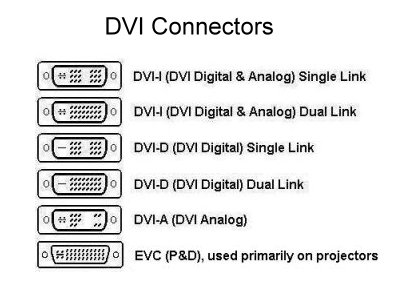
Adapter won't do anything. To keep it simple: you can completely forget all the analogue part of the DVI stuff. You only use the digital part of it nowadays. DVI analogue is something from the CRT days. Using a DVI-I cable it will only use the digital pins anyway.
The thing you do need to look out for is the difference between "dual link" and "single link". Basically: with a single link you can only power monitors up to 1920x1200 at 60hz. If you have a 120hz monitor or with a resolution greater than that, you need a duallink cable.
If you just have a very standard 1920x1080 display at 60hz, then no worries. Any DVI cable works (unless it's DVI-A, but they don't exist anymore).
Actual difference:
Re: Question about DVI-I and -D cords
Awesome, That fixes that aswell! Appreciate all the great help and fast responses!
Who is online
Users browsing this forum: No registered users and 1 guest