Call of Duty: Modern Warfare 3

Detailed breakdowns of how games react to widescreen, ultra-wide, 4k and multi-mon
User avatar
thales100
Editors
Editors
Posts: 1898
Joined: 06 Nov 2008, 01:08

Call of Duty: Modern Warfare 3

Post by thales100 »


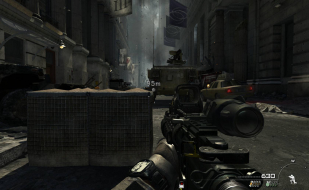
Widescreen Grade: B
Multi-monitor Grade: C

Read Full Detailed Report - Call of Duty: Modern Warfare 3

Call of Duty: Modern Warfare 3 (abbreviated as Call of Duty: MW3, CoD: MW3 or simply MW3) is a first-person shooter video game, developed by Infinity Ward and Sledgehammer Games with Raven Software assisting in development. It's the third installment in the Modern Warfare series, a direct sequel to 2009's Call of Duty: Modern Warfare 2, and the eighth Call of Duty installment.


User avatar
thales100
Editors
Editors
Posts: 1898
Joined: 06 Nov 2008, 01:08

Call of Duty: Modern Warfare 3

Post by thales100 »


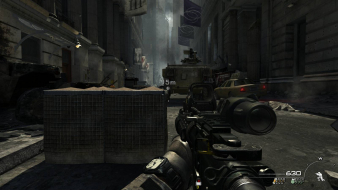
Widescreen Grade: B
Multi-monitor Grade: C

Read Full Detailed Report - Call of Duty: Modern Warfare 3

Call of Duty: Modern Warfare 3 (abbreviated as Call of Duty: MW3, CoD: MW3 or simply MW3) is a first-person shooter video game, developed by Infinity Ward and Sledgehammer Games with Raven Software assisting in development. It's the third installment in the Modern Warfare series, a direct sequel to 2009's Call of Duty: Modern Warfare 2, and the eighth Call of Duty installment.


Last edited by thales100 on 04 Jun 2013, 09:12, edited 1 time in total.
Reason: Edit
User avatar
xxdenialxx
Posts: 17
Joined: 09 Sep 2011, 19:46

i hope some1 does a fix soon

Post by xxdenialxx »

i hope some1 does a fix soon its like pulling teeth playing one screen, maby its the same fix as mw2 on that widescreen fixer program
User avatar
thales100
Editors
Editors
Posts: 1898
Joined: 06 Nov 2008, 01:08

The multi-mon fix is out ppl,

Post by thales100 »

The multi-mon fix is out ppl, enjoy ... http://widescreengamingforum.com/news/call-duty-modern-warfare-3-multi-monitor-solution-available
tet5uo
Insiders
Insiders
Posts: 405
Joined: 28 Nov 2010, 22:18

Dopefish is fast, lol.

Post by tet5uo »

Dopefish is fast, lol.
H8Cr1me
Posts: 38
Joined: 08 Nov 2011, 21:59

Resolution is not correct

Post by H8Cr1me »

The widescreen fix remedied my aspect ratio problem. However, even though the in-game menu says my resolution is 5040x1050, and the cfg (seta r_mode "5040x1050") is set, my resolution is not 5040x1050. It's really pixelated and blurry as if it were set to a lower resolution.

Anyone know what could be the issue here?
User avatar
thales100
Editors
Editors
Posts: 1898
Joined: 06 Nov 2008, 01:08

Have you set "Image Quality"

Post by thales100 »

Have you set "Image Quality" to Native in the "Video" (Advanced Video) in game menu ?
H8Cr1me
Posts: 38
Joined: 08 Nov 2011, 21:59

THAT WORKED!

Post by H8Cr1me »

THAT WORKED!!

Thanks man. I had it set to "Extra." I guess that means extra suckage.
User avatar
thales100
Editors
Editors
Posts: 1898
Joined: 06 Nov 2008, 01:08

H8Cr1me wrote:THAT

Post by thales100 »

THAT WORKED!!

Thanks man. I had it set to "Extra." I guess that means extra suckage.


Cool, cheers. :onethumb
User avatar
xxdenialxx
Posts: 17
Joined: 09 Sep 2011, 19:46

my stuff is in the wrong

Post by xxdenialxx »

my stuff is in the wrong places (not middlescreen) map ect is ok and my icons are huge like peoples death tags and objectives is this me or have i got it done wrong
tepescovir
Posts: 293
Joined: 14 Apr 2006, 19:06

Thankyou Dopefish.

Post by tepescovir »

Thankyou Dopefish. :)
intel x79
2 way 780ti's under water
Intel 4760 extreme @ 4GHz
3 x 42 inch screens @5860x1080
16 gigs xmp ram @2200
Highstrike
Posts: 8
Joined: 09 Nov 2011, 02:10

this doesn't work !!!!!!!I

Post by Highstrike »

I am running a on a single monitor, on 1920x1080. The shitty FOV is driving me up the walls.
Using the widescreen fixer with the plugin on 1x16:9 doesn't do shit.
Using the widescreen fixer with the plugin on custom and doing my own calculations gives me a better FOV but everything is compressed together, for example the scope on the sniper is no longer round but oval.

what am i doing wrong ?! could someone please guide me ?
THANK YOU!
User avatar
thales100
Editors
Editors
Posts: 1898
Joined: 06 Nov 2008, 01:08

xxdenialxx wrote:my stuff is

Post by thales100 »

my stuff is in the wrong places (not middlescreen) map ect is ok and my icons are huge like peoples death tags and objectives is this me or have i got it done wrong


Whats the version of the game youre running xxdenialxx ?

@HighStrike : Please gently post your doubts in the Widescreen Fixer Thread, so dopefish can help you - http://widescreengamingforum.com/node/7971 .
teardropmina
Posts: 46
Joined: 30 Jun 2011, 16:04

fix for triple screen works,

Post by teardropmina »

fix for triple screen works, but not worth it for this game...everything maxed out @6100x1080, I thought I was playing a PS2 game...
User avatar
thales100
Editors
Editors
Posts: 1898
Joined: 06 Nov 2008, 01:08

teardropmina wrote:fix for

Post by thales100 »

fix for triple screen works, but not worth it for this game...everything maxed out @6100x1080, I thought I was playing a PS2 game...


Have you set "Image Quality" to "Native" in Advanced Video options ?
User avatar
xxdenialxx
Posts: 17
Joined: 09 Sep 2011, 19:46

1.2.358 it also says this on

Post by xxdenialxx »

1.2.358 it also says this on the widescreen fixer http://www.youtube.com/watch?v=D33rxb4P2OQ u can see when i tab to see my score its on the left screen so is the main menu and a+b objectives + death things are massive it look ok on that small vid but they are massive compaired to a normal resolution
eyefanity
Posts: 7
Joined: 09 Nov 2011, 17:19

xxdenialxx wrote:1.2.358 it

Post by eyefanity »

1.2.358 it also says this on the widescreen fixer http://www.youtube.com/watch?v=D33rxb4P2OQ u can see when i tab to see my score its on the left screen so is the main menu and a+b objectives + death things are massive it look ok on that small vid but they are massive compaired to a normal resolution


Yeah, this is how it's looking for me too. The icons in certain MP modes (objective points, death tags) are all stretched. Thanks for posting the video! Hopefully a fix is on the way.
User avatar
thales100
Editors
Editors
Posts: 1898
Joined: 06 Nov 2008, 01:08

Dopefish has updated the MW3

Post by thales100 »

Dopefish has updated the MW3 MP plugin, fixing some issues, please check the Widescreen Fixer thread - http://widescreengamingforum.com/node/7971?page=90 .
aerik
Posts: 1
Joined: 13 Aug 2012, 01:05

X-hair

Post by aerik »

Hey . first sry for my english, i'm brazillian ..

i like know how remove the X-hair than appear when hit a enemy ..

somebody ?

thx :)
Thunderbunz
Posts: 1
Joined: 10 Feb 2015, 05:37

Re: Call of Duty: Modern Warfare 3

Post by Thunderbunz »

Hi folks wondering if you have experienced low fps with modern warfare 3. I can run the game single monitor no lag, but as soon as I go into eyefinity it drops to about to about 10 fps or crashes(you can still hear the game playing in background). I just reinstalled win 7 and ended up with the problem. Strange thing is I figured it out before and had it working, but now I am DUHHH! Any advice greatly appreciated.

Specs are Asus p6t motherboard
ATI R9 280x
RAM Vengance 24 G
Kingston ssd 120 G
If other info is needed please specify, you folks just have more knowledge than I.
Thanks all.

Post Reply

Who is online

Users browsing this forum: Bing [Bot] and 1 guest