

Hello all! It's been a long time since I've been here, so I figured I might as well come back with a bang. Introducing the Universal Intelligent Pre-Loader (or UIPL for short)!
The UIPL will be a tool for gamers of all walks suffering the woes of disk speed bottlenecking. How? Pre-Loading content from the game into RAM before even loading! The concept is simple; Say you wish to play Diablo III but you don't have an SSD or have it installed to a HDD that may be suffering from old age and slowing down your gaming with little lag spikes here and there from new items being rendered/loaded while in game. What about the load times? This tool should help virtually eliminate all that lag AND load time by placing all the game's core data into a RAM disk drive (RDD) and then junctioning that data back into place so the game never knows the difference! The technique was first introduced to me for Star Wars: The Old Republic in which you could experience a significant performance increase with heavy user populations by pre-loading key files into the RAM disk to reduce things such as character render times by making the texture files instantly available! I've looked around and there isn't another tool like this even though it's been discussed repeatedly in the past on the internet. I'd like to trumpet in the awesomeness that is the current market of cheap RAM, where 32GB of "gaming" RAM is $160 with shipping.
This is just a preliminary post to hold a place as I continue to develop. I have a testing application which will end up becoming a function of the end application as a command line option; "/check".
The test tool is available here: http://cynagen.com/UIPLtest.zip
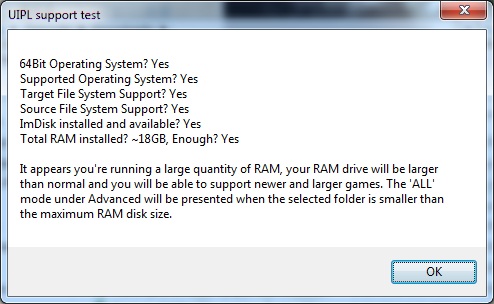
IF you're interested in this tool and showing your support; Please download the above test tool and take a screenshot of the test popup and post back here on the thread with it. All support and discussion is welcome and I look forward to your input!
Modes planned:
Most Accessed File: This mode will record the accesses of the game files in the folder, logging important statistics to use when deciding which files to pre-load and which ones to leave on the magnetic HDD. This is the default mode when adding games.
Smallest Files First: This mode will select the smaller files to load to the drive first, especially useful when a game has a LOT of small files that it reads from frequently, or if the disk is heavily fragmented from all your fragging!
Largest Files First: This mode will select the largest files to load to the drive first, especially useful with Blizzard titles, Star Wars: The Old Republic, and the upcoming Planetside 2! Great for reducing lag on data streamed out of larger files throughout the game!
All: This is the ultimate of all modes! This will pre-load ALL available game content to RAM disk if possible and provide you with the fastest and smoothest gaming experience!
Features planned:
Simple setup with new games: Just open the app from your system tray and click add game, once you've done so, drag the sliders to your preferences and let it auto-pilot you to a better, faster gaming experience. Or take full control with Advanced mode, giving you direct control over what's pre-loaded if you know what you're looking for!
Support for game specific launchers/loaders/updaters so that you can keep your game up to date while still harnessing the power of pre-loading to RAM.
URI links to allow for quick configuration adds, configuration sharing via a link on a website!
(Your suggestion could end up here!)
I will be providing mock-up interface screenshots soon!
UPDATES:
9/17/12 - I have a working profiling beta, if you would like to start profiling your games now in preparation for the full version of the tool sometime in the coming weeks (I'm aiming for less than a month), and wish to help me test my pre-loading algorithms at the same time (by sending in sample profiles you generate), then please make yourselves known on the thread, or by PMing me directly! Either way, your participation and support are always greatly appreciated! Thanks!
10/5/12 - I have a working release profiling beta which is now user friendly. Please see this post for more details and download link!
4/10/13 - I'm starting to get some data to work with now, as well as crash reports. I'll be patching it up a bit here and adding active logging functions so that I can start to collect details on the trouble being seen in the wild. Seems that playing for hours (the absolute best case scenario!) causes the tool to bomb, whoops!
4/21/15 - I've pushed through some changes in order to address the "crashing" at the end where it could not collect data. I found that it was linked to games specifically with launchers that would pop up and steal focus. I have implemented calls to fix this and was able to greatly speed things up because of this. Please download a new copy of UIPLtest.zip from the link above to test out the overdue patch.
[TOOL] Cynagen's Universal Intelligent Pre-Loader [4-21-15]
[TOOL] Cynagen's Universal Intelligent Pre-Loader [4-21-15]
Last edited by Cynagen on 21 Apr 2015, 09:57, edited 5 times in total.
Current build: Intel i5-4670k | 32GB DDR3 | RAID0 2x250GB 850EVOs | nVidia GTX980Ti (MSI G1 Gaming Edition) | SoundBlaster Zx | Dell 2405FPW (Landscape, primary) & HP w2338h (Portrait)


miss the "+1" button
miss the "+1" button ;)
Looking forward to try it out.
P.S ImDisk will be included?
Looking forward to try it out.
P.S ImDisk will be included?
We gonna send it to outa space!
If software could be
If software could be considered sexy, this would be supermodel class. It's one of those things I'd love control over. Optimisation++.
"Personally, I see it as a virtue - trying to make the world a slightly better place _without_ trying to impose your moral values on other people. You do whatever the h*ll rings your bell, I'm just an engineer who wants to make the best OS possible." - Linus Torvalds


Haldi wrote:miss the "+1"
miss the "+1" button
Indeed, what happened to the rep system?
Philips BDM4065UC(3840x2160) Acer Z35(2560x1080@200hz); 980 Ti Hybrid @stock ; 6700K 4.6ghz (1.35v)/D15; 16GB 3200mhz; Asus Maximus Ranger VIII; AX860; 1TB 960 EVO; 750GB 840 EVO; Teufel Concept D 500; Sennheiser HD6XX; Windows 10 (latest build)
Very cool tool Cynagen! Have
Very cool tool Cynagen! Have you tested if you get performance improvement (faster loading times) when you use this tool even if all your games all already on an ssd?

Philips BDM4065UC(3840x2160) Acer Z35(2560x1080@200hz); 980 Ti Hybrid @stock ; 6700K 4.6ghz (1.35v)/D15; 16GB 3200mhz; Asus Maximus Ranger VIII; AX860; 1TB 960 EVO; 750GB 840 EVO; Teufel Concept D 500; Sennheiser HD6XX; Windows 10 (latest build)
Haldi wrote:miss the "+1"
miss the "+1" button ;)
Looking forward to try it out.
P.S ImDisk will be included?
ImDisk may be linked to and auto-downloaded, but will not be included in the packaging (until ImDisk itself is discontinued/becomes abandonware and requires such protections).
Very cool tool Cynagen! Have you tested if you get performance improvement (faster loading times) when you use this tool even if all your games all already on an ssd?
Average peak SSD throughput is what? 400MB/sec on SATA III (6gbps)?
According to http://en.wikipedia.org/wiki/DDR3_SDRAM#Modules the peak DDR3-1600 (average gamer stick) speed is 12.8GB/sec, so yeah I'd say that's a benefit.
Current build: Intel i5-4670k | 32GB DDR3 | RAID0 2x250GB 850EVOs | nVidia GTX980Ti (MSI G1 Gaming Edition) | SoundBlaster Zx | Dell 2405FPW (Landscape, primary) & HP w2338h (Portrait)
Status update: I am currently
Status update: I am currently working on the file selection algorithms. I have a mock-up of the first version interface (I want it to be completely auto-pilot to begin with) that I can use for release as soon as I get these algorithms down, this includes a learning algorithm. The RAM disk management is in the bag after these are written up. The file selections are key to ensuring this thing's success (or failure if tweaked wrong).
Current build: Intel i5-4670k | 32GB DDR3 | RAID0 2x250GB 850EVOs | nVidia GTX980Ti (MSI G1 Gaming Edition) | SoundBlaster Zx | Dell 2405FPW (Landscape, primary) & HP w2338h (Portrait)
The rep system got removed
The rep system got removed with some other things. There's a site overhaul going on right now. Yell at skipclarke and crackerjackmack about it. ;)
(imagination not allowed in signature)
This sounds really

This sounds really interesting. I'm currently using Supercache to do a similar sort of acceleration on my game SSDs and occasionally experimenting with RAM disks, keeping isos of various game installs on another disk. So the idea of a program which will create and load the games straight into a RAM disk on launch is very appealing, as it will cut out a lot of the messing around.
hehe so 18gb gets the message
hehe so 18gb gets the message but 32gb does not ?
btw: Zencyde: how the heck did you manage to get 18gb ? 4x4 +2gb ?
P.S Cynagen, while browsing the web for fancyCache and other RamCache tools i found ou that Windows automatically uses the RAM as Cache for files. If we know set up a RAMdisk of 10GB there will only be 2gb for Windows caching. Might decrease the overall windows performance ?
btw: Zencyde: how the heck did you manage to get 18gb ? 4x4 +2gb ?
P.S Cynagen, while browsing the web for fancyCache and other RamCache tools i found ou that Windows automatically uses the RAM as Cache for files. If we know set up a RAMdisk of 10GB there will only be 2gb for Windows caching. Might decrease the overall windows performance ?
We gonna send it to outa space!

This tool sounds amazing, can
This tool sounds amazing, can you post a little more details on how you're doing it? Is it like the WS fixers where it injects new code into the game memory to overwrite the disk read/write calls, or is there something built into Windows that allows you to cache files into RAM?
Haldi wrote:hehe so 18gb gets
hehe so 18gb gets the message but 32gb does not ?
I wondered about that myself and ran it several times, but never got it. I'm guessing that it has something to do with me not already having ImDisk installed.
grok23 wrote:Haldi wrote:hehe
[quote]hehe so 18gb gets the message but 32gb does not ?
I wondered about that myself and ran it several times, but never got it. I'm guessing that it has something to do with me not already having ImDisk installed.
hehe so 18gb gets the message but 32gb does not ?
btw: Zencyde: how the heck did you manage to get 18gb ? 4x4 +2gb ?
P.S Cynagen, while browsing the web for fancyCache and other RamCache tools i found ou that Windows automatically uses the RAM as Cache for files. If we know set up a RAMdisk of 10GB there will only be 2gb for Windows caching. Might decrease the overall windows performance ?
1. You do not meet all qualifications, therefore you are not presented with any inkling that you are capable of running this tool. This is to avoid confusion on if you currently support the tool or not.
I wondered about that myself and ran it several times, but never got it. I'm guessing that it has something to do with me not already having ImDisk installed.
This is why.
2. I've used SuperSpeed's SuperCache and was woefully unhappy with how they handle it. They catch reads from disk and try to cache results based on most requested data to speed things up, however, this requires driver injection and an extra interrupt to the read stack to check if there's already data cached. Furthermore, when you're playing a game like SWTOR which is making upwards hundreds of calls to the HDD to read data to build the dynamic clothing on EVERY CHARACTER in your visible range, you can see how this extra layer, while after population might help, the initial performance hit was enough for me to say screw it. Also, they didn't have a signed driver so I had to boot in test mode all the time. ImDisk HAS a signed driver preventing anyone from having to do anything extra to make my tool work. Since the files are completely loaded into RAM before running the game, this makes the read times instant and cuts out the middle man software such as SuperSpeed and the like. You are correct, windows caches, to the Pagefile, if you're running more than 8GB of RAM, why are you running a page file? You don't need it anymore, mine has been disabled the entire life of this build with no ill-effects (besides WoW bitching until recent patches because they're old and stupid).
3. If you have 16GB of RAM, your MAX RamDisk size will be 10GB, leaving 6GB (more than enough for most 64bit games (most are 32bit and can't directly address larger than 3.5GB due to addressing limits) and your OS (64bit Windows)) to operate in normally. If you have 32GB, this cap will be lifted to 26GB. The RamDisk estimated (these numbers are NOT final and may be adjusted as needed based on user performance reports) max disk sizes based on total RAM are as follows:
6GB (Minimum total RAM supported): 2GB RamDisk (4 Reserved)
8GB (Average 'gamer' total): 3GB RamDisk (5 Reserved)
10GB: 4GB RamDisk (Full 6 Reserved)
12GB: 6GB RamDisk
14GB: 8GB RamDisk
16GB: 10GB RamDisk
32GB: 26GB RamDisk
There's a method to the madness, a science to the math. ;-)
This tool sounds amazing, can you post a little more details on how you're doing it? Is it like the WS fixers where it injects new code into the game memory to overwrite the disk read/write calls, or is there something built into Windows that allows you to cache files into RAM?
This tool does nothing of the sort. No code injection, no intra-process redirection. There is only the NTFS junction (redirect) which is seamless to the user and games run on the machine. The process is relatively simple: Figure out which files to pre-load, generate a pre-calculated RamDisk based on the max disk size permitted and the total size of files to be loaded, move originals to safety deposit, copy originals into RamDrive, junction the files on the RamDrive back into their original places on the HDD/SDD, launch the game. Upon close of the game, unload the RamDrive (freeing up your RAM for normal operation), and then restore files to their original locations from safety deposit. Pretty simple (for those technically inclined), it's just the fully automated management is what I'm providing. Technically you can all do this now, I'm just making it a no-brainer and readily available for every user to take advantage of. Not everyone is comfy running all the command line tools required for this operation to be completed successfully.
There was also talk in the IRC chat of why this tool was not written up and released years ago... well there was 2 reasons. First, RAM was not cheap like it is today. Second, most machines before the Phenom/i5 series could not address more than 8GB of RAM, the "cap" on desktop computers has recently been lifted to allow greater and greater quantities to be installed. Yes, server hardware has traditionally had a much higher "cap" however these components were usually much more expensive than desktop, and thus prohibitive to enthusiast gamers by being outside their price range.
I wanted to further update everyone, I will have a 5-day weekend coming up here shortly, 6-day if I don't get called in on Labor Day, and plan on getting a beta out sometime on the weekend. I look forward to everyone's feedback.
Current build: Intel i5-4670k | 32GB DDR3 | RAID0 2x250GB 850EVOs | nVidia GTX980Ti (MSI G1 Gaming Edition) | SoundBlaster Zx | Dell 2405FPW (Landscape, primary) & HP w2338h (Portrait)
Cynagen wrote:You are
You are correct, windows caches, to the Pagefile, if you're running more than 8GB of RAM, why are you running a page file? You don't need it anymore, mine has been disabled the entire life of this build with no ill-effects (besides WoW bitching until recent patches because they're old and stupid).
And Two Worlds 2 -.- to many games bitching around without pagefile :( (or 64mb pagefile) Mhmmm maybe creating a Pagefile and loading it into Ramdisk? ... what a hoax -.-
There's a method to the madness, a science to the math. ;-)
So 48GB results in 42Gb Ramdisk ? :) But there also is an "advanced option" right? Most games aren't bigger than 35GB.
Looking forward to the beta :) but don't forget to enjoy your Weekend.
We gonna send it to outa space!
Haldi wrote:Cynagen wrote:You
[quote]You are correct, windows caches, to the Pagefile, if you're running more than 8GB of RAM, why are you running a page file? You don't need it anymore, mine has been disabled the entire life of this build with no ill-effects (besides WoW bitching until recent patches because they're old and stupid).
And Two Worlds 2 -.- to many games bitching around without pagefile :( (or 64mb pagefile) Mhmmm maybe creating a Pagefile and loading it into Ramdisk? ... what a hoax -.-
There's a method to the madness, a science to the math. ;-)
So 48GB results in 42Gb Ramdisk ? :) But there also is an "advanced option" right? Most games aren't bigger than 35GB.
Looking forward to the beta :) but don't forget to enjoy your Weekend.
[quote]You are correct, windows caches, to the Pagefile, if you're running more than 8GB of RAM, why are you running a page file? You don't need it anymore, mine has been disabled the entire life of this build with no ill-effects (besides WoW bitching until recent patches because they're old and stupid).
And Two Worlds 2 -.- to many games bitching around without pagefile :( (or 64mb pagefile) Mhmmm maybe creating a Pagefile and loading it into Ramdisk? ... what a hoax -.-
There's a method to the madness, a science to the math. ;-)
So 48GB results in 42Gb Ramdisk ? :) But there also is an "advanced option" right? Most games aren't bigger than 35GB.
Looking forward to the beta :) but don't forget to enjoy your Weekend.
Enjoy... weekend? What? These words do not compute. My first day of that weekend will be spent asleep, hibernation style. Then I'll get back to programming, and I'm hoping to have the basic beta (no advanced options) available for Friday evening/Saturday morning so people can check it out on their 3-day Labor Day weekend, give me solid feedback. I thought about the pagefile in RAM before, even tried it, then said "screw pagefiles, and screw any games that require it because it's an ancient fix to an old problem that doesn't exist anymore, and if they must rely on this crutch, they're obviously not programming for me."
48GB of RAM would indeed result in an available 42GB RamDisk. Also, the advanced options are for people to take full control to optimize a game's pre-load how they see fit (turning off all auto-pilot, not recommended unless you know exactly what you're doing, hence, 'advanced' mode).
Current build: Intel i5-4670k | 32GB DDR3 | RAID0 2x250GB 850EVOs | nVidia GTX980Ti (MSI G1 Gaming Edition) | SoundBlaster Zx | Dell 2405FPW (Landscape, primary) & HP w2338h (Portrait)
I look forward to trying it
I look forward to trying it out, though I'm away next weekend, so I'll get to it early the week after.
The idea of this tool sounds
The idea of this tool sounds amazing. How will it work with Steam Library's though? Most of my games are there and from what I've read about ramdiscs, steam doesn't like them very much.
Example of this is here...
Steam and Ram Discs
Example of this is here...
Steam and Ram Discs
i7 3770k, P8Z77v Pro, 16gb Ram,2x Samsung 840 SSD RAID 0 + 4.5tb storage, 7970 Oc'd + 7950 in crossfire, 3x SP2309w monitors + 1 acer monitor, Asus D2X Xonar, Creative T40 Speakers plus satalite speakers + audio transducer
Ignore my last post.I set
Ignore my last post.
I set something similar up using a RAMDisk and Steam Mover. The boost in speed is great. Only down side is the size of the files that I need in the RAM disc are often too big. E.g. most game installs are over 8gb and I dont want to use more that for a RAMDisk.
That said, the options in your app sound like the perfect solution. I cant wait.
I set something similar up using a RAMDisk and Steam Mover. The boost in speed is great. Only down side is the size of the files that I need in the RAM disc are often too big. E.g. most game installs are over 8gb and I dont want to use more that for a RAMDisk.
That said, the options in your app sound like the perfect solution. I cant wait.
i7 3770k, P8Z77v Pro, 16gb Ram,2x Samsung 840 SSD RAID 0 + 4.5tb storage, 7970 Oc'd + 7950 in crossfire, 3x SP2309w monitors + 1 acer monitor, Asus D2X Xonar, Creative T40 Speakers plus satalite speakers + audio transducer
sparx1981 wrote:I set
I set something similar up using a RAMDisk and Steam Mover. The boost in speed is great. Only down side is the size of the files that I need in the RAM disc are often too big. E.g. most game installs are over 8gb and I dont want to use more that for a RAMDisk.
Since I am using steammover, we will see how the interaction will work when the beta is out. Am very excited. I have read that ram prices will go down in october, so might be shopping for a 32gb kit.
Philips BDM4065UC(3840x2160) Acer Z35(2560x1080@200hz); 980 Ti Hybrid @stock ; 6700K 4.6ghz (1.35v)/D15; 16GB 3200mhz; Asus Maximus Ranger VIII; AX860; 1TB 960 EVO; 750GB 840 EVO; Teufel Concept D 500; Sennheiser HD6XX; Windows 10 (latest build)
My test setup just failed,
My test setup just failed, the computer crashed and although it was saving my ramdisc to an image on a shutdown, because it crashed the ramdisc was lost.
With this in mind, it might be a good idea to ensure that your app doesn't remove the original game files. Perhaps they could be copied to a temp folder within their original location. This way they can be re-initialised in the event of the ramdisc failing.
With this in mind, it might be a good idea to ensure that your app doesn't remove the original game files. Perhaps they could be copied to a temp folder within their original location. This way they can be re-initialised in the event of the ramdisc failing.
i7 3770k, P8Z77v Pro, 16gb Ram,2x Samsung 840 SSD RAID 0 + 4.5tb storage, 7970 Oc'd + 7950 in crossfire, 3x SP2309w monitors + 1 acer monitor, Asus D2X Xonar, Creative T40 Speakers plus satalite speakers + audio transducer
Who is online
Users browsing this forum: No registered users and 1 guest