
Widescreen Gaming Forum

[-noun] Web community dedicated to ensuring PC games run properly on your tablet, netbook, personal computer, HDTV and multi-monitor gaming rig.
It is currently 06 Jun 2026, 22:08

All times are UTC [ DST ]


Post new topic Reply to topic  [ 3 posts ] 
Author Message
PostPosted: 11 Feb 2012, 23:01 
Offline

Joined: 11 Feb 2012, 21:43
Posts: 2
Hi,

So this is my first post on the widescreen gaming forum, I have browsed this site before looking for games which are compatible with eyefinity and making
use of the widescreen fixer tool. The reason I am posting here is because no where else seems to be able to help me with my problem and I figure a forum
dedicated to widescreen/eyefinity gaming will surely have the answer.

So here is the problem I have two 5870's and when it comes to using eyefinity I've never been able to have crossfire enabled. Whenever I start a game
using eyefinity with crossfire enabled I get a problem where all my screens go black and it constantly makes the windows default sound when connecting a
USB or monitor, you know the one (Incoming epic sound to text impression ("Du Du")). The only way to stop it from doing this is to ALT+F4 the application (game)
or CTRL+ALT+DEL back to my desktop. Now if I disable crossfire eyefinity runs perfectly fine. I've had this problem since I got a eyefinity set-up around last June.
I have been googling this issue in my free time now and then since last june with nothing more to go on than it being possible something to do with
the display port not getting enough voltage. Although if that was the case why would eyefinity work perfectly when using one card but suddenly seize up when it comes
to using crossfire.

SPECS:
Motherboard: Asus P6T
CPU: i7 920 @ 4Ghz
RAM: 9GB DDR3 @ 1600Mhz
GPU's: 2x 5870's @ Stock
PSU: Silverstone Strider 800Watt
Monitor's: 3x 27" IIYAMA E2710HDS
Connections: 2x DVI 1x Active Displayport
Display port Adapter: Sapphire Active DP to Single Link DVI-D Adapter

What I've Tried:
Swapping around cards.
Flashing both cards to latest Bios.
Updating motherboard Bios.
RMA'd old display port and got a replacement - still same problem.
Switching which monitor got the Display port.
Checked for overheating - No cards overheating.
Reinstalled Windows.
Tested on all drivers from 10.4 to 12.1.

GPU 1: XFX 5870
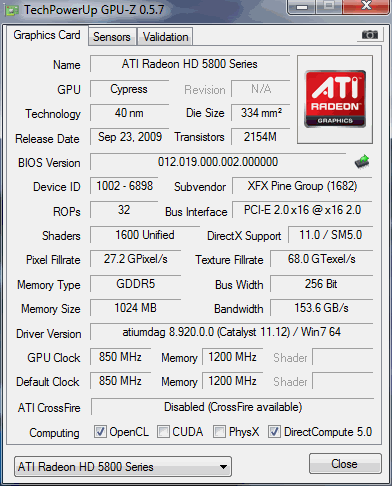

GPU 2: SAPPHIRE 5870
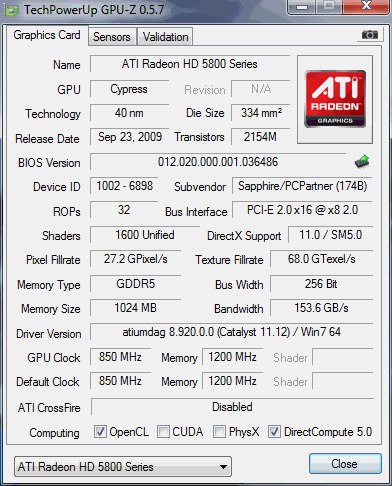

Hoping someone might have a Idea of what is happening as I could really use that extra GPU when it comes to some eyefinity games.

Thanks for reading -SKENG-


Top
 Profile  
Reply with quote  
 Post subject: ]-[iya..
PostPosted: 15 Feb 2012, 00:52 
Offline

Joined: 01 Dec 2011, 19:57
Posts: 74
Location: Toronto
It seems you have all bases covered.. All the right pieces ..etc.

I have a similar setup and has been working gloroiusly for years now.

The only thing I find odd is that this is NEW for you. This is 2o12.

This now brings new questions to light.
History of the cards? OC'd and tired?
Try diff' CF cable?
Oh, diff' cards? Hrmmm.. Seems they are! This could be a problem. Do you dare flash them to same BIOS? Are they both refferance cards?
If you try common BIOS test the snot out of it first. Like benchmarks ..etc.

Any chabce one might have been a 5850 flashed to '70.

Oh just noticed.. One card is in a PCIe x8 slot! That board has 3 x16 sluts. Or card/slot has bad connection!

_________________
- AMD 965 @3.8 - Gigabyte 790fx ud5 - AMD 7970 Ghz - OCZ Reaper 4GB - OCZ Vetex - Eyefinity 3x Asus vw266h - Samsung t260hd + 226ux - (soundcard) - Sony 5.1 ~700w - PC P&C 750w - Corsair K60 -


Top
 Profile  
Reply with quote  
 Post subject: Yeah I noticed it only
PostPosted: 18 Feb 2012, 04:59 
Offline

Joined: 11 Feb 2012, 21:43
Posts: 2
Yeah I noticed it only running 8X might be a dodgy slot but I've got my sound card on a PCI lower down so no chance I'll swap
out my sound card for a little extra GPU power. :P

The big update is I have figured out the problem, seemed I needed to drop my monitors from 60 Hertz to 50 Hertz and this solved
my crossfire eyefinity with some games. Still having trouble with a few games though, I think it's because they are trying to force 60 Hertz
and it's screwing it up. =[


Top
 Profile  
Reply with quote  
Display posts from previous:  Sort by  
Post new topic Reply to topic  [ 3 posts ] 

All times are UTC [ DST ]


Who is online

Users browsing this forum: No registered users and 6 guests


You cannot post new topics in this forum
You cannot reply to topics in this forum
You cannot edit your posts in this forum
You cannot delete your posts in this forum
You cannot post attachments in this forum

Search for:
Jump to:  
cron


Powered by phpBB® Forum Software © phpBB Group