
Sapphire 7970 Crossfire Eyefinity Issues with multiple games, please help

Hardware discussions about AMD Eyefinity
Post Reply
peruviansonata
Posts: 8
Joined: 14 Feb 2012, 10:37

Sapphire 7970 Crossfire Eyefinity Issues with multiple games, please help

Post by peruviansonata »

So here is my system first before describing my issues

3x ASUS 25.5inch VW266H monitors
i5 2500k
Asus P8z68-V Pro/Gen 3
G.Skill 8Gb (2x4Gb) 1600 Sniper
2x Sapphire 7970s
Silencer MK2 950watt PSU
Crucial M4 CT128M4SSD2 2.5" 128GB SATA III MLC

So I am experiencing alot of microstuttering when playing games like Battlefield 3 and Tera when running on 3 monitors, If I disable crossfire, then I get a better performance in the games somewhat, It shows High FPS when running in crossfire, showing me getting 60-80+ FPS at decently high settings, but it feels like the game is running at 30-40 FPS. Once I disable Crossfire and run the games normally, It shows like 40-60ish FPS and runs alot smoother than Crossfire enabled. I tried multiple things, I got driver sweeper and removed and reinstalled different drivers of all types, ones for just the 7900 series, 11.1 Cap 1 and 2 and 3 and a bunch of other drivers that people have recommended. I have tried overclocking or resetting back to default settings, I have done mostly anything I could think of, then I noticed something. I was wondering Why it shows my PCI-E slots running at different speeds slightly?
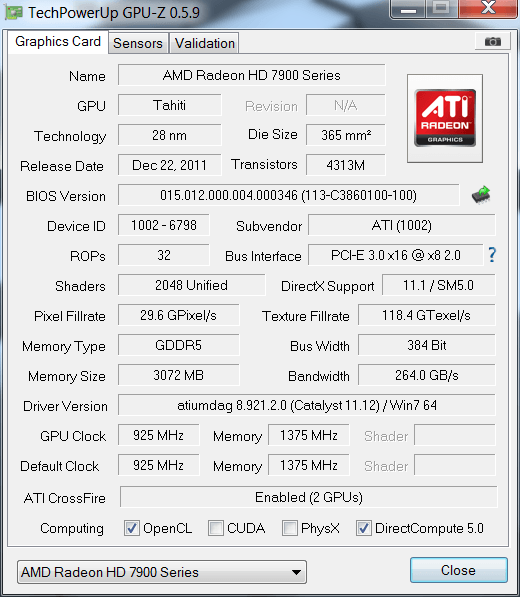


This is the first reading of the card using GPU-Z and it shows its Bus interface running at PCI-E 3.0x16 @ x8 2.0
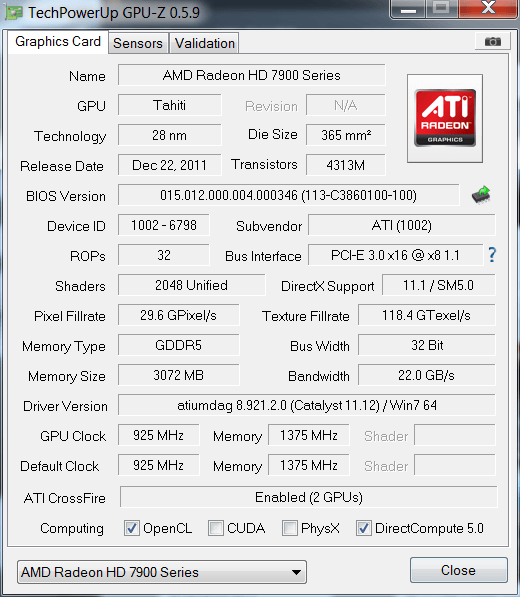


and this is what it shows for the second card, running at PCI-E 3.0x16 @ x8 1.1


And this is an image of me running the Render test, shows the two cards also running at different speeds in the PCI-E bus.

Now I am not sure what exactly this means, but it fluctuates from 8 1.1 to 8 2.0 when I start the test, then stays as both at 8 2.0, would this have anything to do with my issue, and also what else could I do if this is not the issue with my problem.
Moose
Posts: 167
Joined: 07 Nov 2011, 15:32

A quick google on your

Post by Moose »

A quick google on your motherboard shows that you have 2 x PCIe 3.0/2.0 x16 (x16 or dual x8) and 1 x PCIe 2.0 x16 (x4 mode, black). This means that if you use two graphics cards, both of them will run at x8 mode instead of x16. I suggest buying a new motherboard with two proper x16 lanes.

The stuttering is a known issue with 7970's in CrossfireX. Here is the thread discussing that matter. What I suggest you try is actually taking out the second card, make sure the remaining card is in the x16 slot, and then run the tests again.

Moose
Music is my life. You are my music.
peruviansonata
Posts: 8
Joined: 14 Feb 2012, 10:37

so I pretty much need to get

Post by peruviansonata »

so I pretty much need to get a whole new CPU AND Mobo according to that thread? says AMD runs better with AMD cards?
Moose
Posts: 167
Joined: 07 Nov 2011, 15:32

peruviansonata wrote:so I

Post by Moose »

so I pretty much need to get a whole new CPU AND Mobo according to that thread?


I said: recommend. I explained to you what the problem is and gave you some free advice. It's just that if you buy a new motherboard with two true x16 lanes, your grapics cards have higher bandwidth at their disposal, thus increasing performance. And why on earth would you buy a new CPU if you're just getting a new motherboard?

says AMD runs better with AMD cards?


Your Intel Core should run just fine, relax. Read before you post, do research before you buy!
Music is my life. You are my music.
peruviansonata
Posts: 8
Joined: 14 Feb 2012, 10:37

thanks, any suggestions on

Post by peruviansonata »

thanks, any suggestions on boards that I could get, so far looking around newegg all say 16x@ 1 or 8x @ 2, no 16x@ 2 so far.
Moose
Posts: 167
Joined: 07 Nov 2011, 15:32

PCI 3.0:

Post by Moose »

PCI 3.0: http://www.asrock.com/mb/overview.nl.asp?Model=Z68%20Extreme3%20Gen3
That's just one of many 1155 motherboards with PCI 3.0 slots. Here's a link to compare 2.0 and 3.0 bandwidth with each other.

PCI 2.0: I won't post any PCI 2.0 motherboards. I've got 84 hits now, there are too many to choose from.

Moose

EDIT: Do you have triple or dual-link memory?
Music is my life. You are my music.
peruviansonata
Posts: 8
Joined: 14 Feb 2012, 10:37

2 x PCI Express 3.0 x16 slots

Post by peruviansonata »

2 x PCI Express 3.0 x16 slots (PCIE2/PCIE4: single at x16 (PCIE2) / x8 (PCIE4), or dual at x8 (PCIE2) / x8 (PCIE4)) (PCI Express 3.0 with Intel Ivy Bridge CPU, PCI Express 2.0 with Intel Sandy Bridge CPU) this is the stats of the board you linked to me, im not sure if im reading it wrong, but doesnt it say single @ x16 or dual at 8x? im looking off of the newegg site though where i was gonna purchase it., Also I am running dual channel
Moose
Posts: 167
Joined: 07 Nov 2011, 15:32

I don't think a PCI 3.0

Post by Moose »

I don't think a PCI 3.0 motherboard is nessecary, I'll look into some PCI 2.0 motherboards
Music is my life. You are my music.
User avatar
Haldi
Editors
Editors
Posts: 2286
Joined: 08 May 2011, 18:58

Tzzzz...1. Tera is fucked

Post by Haldi »

Tzzzz...

1. Tera is fucked up! Needs better driver!

2. PCI-E 3.0 only works with i73820/3930k/3960x
Or the new Ivy Bridge CPU's (no guarante on that)

If you have Problems with micro stutter try MSI Afterburner and set Framerate Limit in RTSS
We gonna send it to outa space!
johnsm
Posts: 1
Joined: 18 Feb 2012, 09:47

I used to have four 5850s and

Post by johnsm »

I used to have four 5850s and they worked alright, but they only had 4 gigs of gddr5 as a whole, so I upgraded a bit and bought three 7970s,

What it does is have them running at PCI E 2.0 x8, 1.1 x8, and 1.1 x8 sometimes detects 896 MB of total dedicated gddr5 across the 3 cards, sometimes detects 3072 of dedicated, and 2048 of dedicated this is a little annoying, i have a rampage iii extreme as my mobo.

When i had them in there, at first it would refuse to play any game and bsod with the ati thingy as the reason, now it plays with one card...


I also am trying to do my eyefinity of 3240x1920... when my 5850s would do it fine on med high w/o aa


Id hate to have to return these.
...
User avatar
Wijkert
Insiders
Insiders
Posts: 552
Joined: 06 Sep 2011, 09:29
Location: Haarlem, the Netherlands

Buying a new motherboard that

Post by Wijkert »

Buying a new motherboard that has pcie 3.0 won't do you any good: source! Running two 7970 on x8 lanes won't bottleneck them in any measurable way. And I am talking about performance here, not to mention microstuttering which is a whole nother problem. Crossfire/SLI + eyefinity/surround while generate microstuttering because of the variance of time between frames. This kills smoothness and playability. There really isn't any good solution to your problem other than selling you second card and just use the one. Both nvidia and amd have a lot of work to do when it comes to improving their drivers. I am sure this problem is not at the top of their list, so don't get your hopes up.
Philips BDM4065UC(3840x2160) Acer Z35(2560x1080@200hz); 980 Ti Hybrid @stock ; 6700K 4.6ghz (1.35v)/D15; 16GB 3200mhz; Asus Maximus Ranger VIII; AX860; 1TB 960 EVO; 750GB 840 EVO; Teufel Concept D 500; Sennheiser HD6XX; Windows 10 (latest build)
mattsimis
Posts: 298
Joined: 19 Mar 2004, 15:19

Listen to the above poster,

Post by mattsimis »

Listen to the above poster, the problem described has nothing to do with PCI Lanes or speeds, it sounds like a classic microstutter problem.

Maybe driver related, maybe helped by capping FPS and maybe helped by changing frame pre-rendering to 0 (or 1) in either the games (BF3 has a console command) or with a tweaking tool.
[GTX1080 - 4.48GHz 4690k - planning projector mayhem]
peruviansonata
Posts: 8
Joined: 14 Feb 2012, 10:37

so not sure what exactly, may

Post by peruviansonata »

so not sure what exactly, may be the new drivers from the 15th/16th of feb, or all the hot fixes, FPS limiting, registry tweaks and some minor overclocking in the video cards, but I finally have a sustained FPS with no issues with everything on ultra except for MSAA and HSAO off, and it looks great, runs smooth and no microstuttering, some slight frame distortion when moving really fast, but thats to be expected with Vsync off. It runs smooth,plays smooth and feels smooth, finally feel like I am getting my moneys worth.

here is an image with my FPS and settings set up to. (I capped fps at 55, felt somewhat smoother and someone else on another forum recommended it w/ msi afterburner)


and this is some in game footage while flying


Works great, and i am really happy with the results, Thanks for those who helped in this thread and the many other threads I read on this forum, much appreciated.

(Side note) the second pic, what does the graph on the left mean with that weird curve its doing?
Moose
Posts: 167
Joined: 07 Nov 2011, 15:32

Hm nice that you're not

Post by Moose »

Hm nice that you're not having the microstuttering anymore. Do you still have it in other games or is it completely gone?
Music is my life. You are my music.
User avatar
Haldi
Editors
Editors
Posts: 2286
Joined: 08 May 2011, 18:58

peruviansonata

Post by Haldi »

................
(Side note) the second pic, what does the graph on the left mean with that weird curve its doing?


Where did you get that Graph ? *want''s one!*

Looks like Framerate for me, just not in "picture per second" but in "time between pictures in milliseconds". So i assume you had a FPS drop when the green curve was high ? (and why is there a seperate CPU & GPU graph... no realy where did you get that tool?^^)
We gonna send it to outa space!
peruviansonata
Posts: 8
Joined: 14 Feb 2012, 10:37

its actually built into

Post by peruviansonata »

its actually built into Battlefield 3 so you can see your CPU and GPU usage in game, only available in BF3 though and I think BF:BC2, its pretty handy, too bad msi afterburner doesnt implement something like that.
User avatar
Haldi
Editors
Editors
Posts: 2286
Joined: 08 May 2011, 18:58

little offtopic now....

Post by Haldi »

little offtopic now.... but.

They will implement something.. well i heard something bout *plugins* so you can do like anything you want to ;)
We gonna send it to outa space!
peruviansonata
Posts: 8
Joined: 14 Feb 2012, 10:37

that would be nice, I have a

Post by peruviansonata »

that would be nice, I have a new found love for msi afterburner, just not sure how far I can push my 7970s when I overclock them with it, Also Question, When Overclocking in crossfire, do u overclock both card individually equally? or do u just overclock 1 and set the other to sync?
User avatar
Wijkert
Insiders
Insiders
Posts: 552
Joined: 06 Sep 2011, 09:29
Location: Haarlem, the Netherlands

peruviansonata wrote:that

Post by Wijkert »

that would be nice, I have a new found love for msi afterburner, just not sure how far I can push my 7970s when I overclock them with it, Also Question, When Overclocking in crossfire, do u overclock both card individually equally? or do u just overclock 1 and set the other to sync?


I would use the option on synchronizing settings for both gpu's. Keep in mind that although both your cards can reach a certain clockspeed that in crossfire they may not.
Philips BDM4065UC(3840x2160) Acer Z35(2560x1080@200hz); 980 Ti Hybrid @stock ; 6700K 4.6ghz (1.35v)/D15; 16GB 3200mhz; Asus Maximus Ranger VIII; AX860; 1TB 960 EVO; 750GB 840 EVO; Teufel Concept D 500; Sennheiser HD6XX; Windows 10 (latest build)
grandpatzer
Posts: 12
Joined: 02 Mar 2010, 18:11

Wijkert wrote:Buying a new

Post by grandpatzer »

Buying a new motherboard that has pcie 3.0 won't do you any good: source! Running two 7970 on x8 lanes won't bottleneck them in any measurable way. And I am talking about performance here, not to mention microstuttering which is a whole nother problem. Crossfire/SLI + eyefinity/surround while generate microstuttering because of the variance of time between frames. This kills smoothness and playability. There really isn't any good solution to your problem other than selling you second card and just use the one. Both nvidia and amd have a lot of work to do when it comes to improving their drivers. I am sure this problem is not at the top of their list, so don't get your hopes up.

Buying a new motherboard that has pcie 3.0 won't do you any good: source! Running two 7970 on x8 lanes won't bottleneck them in any measurable way. And I am talking about performance here, not to mention microstuttering which is a whole nother problem. Crossfire/SLI + eyefinity/surround while generate microstuttering because of the variance of time between frames. This kills smoothness and playability. There really isn't any good solution to your problem other than selling you second card and just use the one. Both nvidia and amd have a lot of work to do when it comes to improving their drivers. I am sure this problem is not at the top of their list, so don't get your hopes up.


That is on a wery low resolution, according this article even GTX 480 SLI - 5760x1200 will have +10% performance hit in high resolution 16x/16x vs 8x/8x.

I'm starting to regret my Z68 x8/x8 board, only pci-e 2.0 :(

I has one 16x slot and the other slot is up to x8 so I guess it gives me x8/x8 then.
Post Reply

Who is online

Users browsing this forum: No registered users and 4 guests

