Play Star Wars™: The Old Republic™ and be the hero of your own Star Wars™ saga in a story-driven massively-multiplayer online game from BioWare and LucasArts.
Explore an age thousands of years before the rise of Darth Vader when war between the Galactic Republic and the Sith Empire divides the galaxy.
Developed by BioWare & LucasArts.
Play Star Wars™: The Old Republic™ and be the hero of your own Star Wars™ saga in a story-driven massively-multiplayer online game from BioWare and LucasArts.
Explore an age thousands of years before the rise of Darth Vader when war between the Galactic Republic and the Sith Empire divides the galaxy.
Developed by BioWare & LucasArts.
I wonder if there's an anti-cheat system in place. I'm interested in trying to center the HUD at least. I've been playing this on a single screen simply because the HUD is too far to the sides.
I wonder if there's an anti-cheat system in place. I'm interested in trying to center the HUD at least. I've been playing this on a single screen simply because the HUD is too far to the sides.
Yes.. I was wondering the same thing.....What I noticed is that d3d9.dll is directly used to calculate the resolution of the HUD... Also there are 2 processes active when starting the game...Not sure why..... What I could make so far is putting all the hud elements on the left monitor. It seems that the HUD is taken after the desktop resolution while the game resolution is not modified at all. I think this is the reason for the two processes. The hud is just an overlay over the game...
Still need to confirm it thou... It this would be the case than we would hack the overlay and not the actual game...So no ban there...or at least I think is like this:)
Best Regards,
Helifax
WideScreen Fixer... Fixes your Surround problems to give a gorgeous 3D Surround Experience! WideScreen Fixer
Only website to show TRUE 3D Vision Surround Gaming Videos(viewable by anyone) only at 3D Vision Surround Gallery
I highly doubt it uses two processes for that. I'll look into why it uses two in a bit. My guess is that one is used to monitor the other, or run some stuff separately (sandboxed). However, there could be any reason for this. I doubt one of them is resolution-related.
The game uses the desktop resolution to determine the aspect-ratio as well. If my desktop is 6056x1080 and I set the game to fullscreen 1920x1080, the game will be in fullscreen at 1920x1080, but it will use the aspect-ratio of the desktop, which is ridiculously wide for that res. The HUD placement will be correct since it's just going to the edges.
There is some tweaks :
http://www.gamefaqs.com/boards/951199-star-wars-the-old-republic/61343050
http://www.reddit.com/r/swtor/comments/na4rk/swtor_tweak_list_update_15_chat_bubbles_still_in/
Now, for example, you know how to turn on the antialiasing ;)
Maybe it's possible to do something about this %$@#& fixed HUD with the "he####_CharName_PlayerGUIState.ini"... ?
I highly doubt it uses two processes for that. I'll look into why it uses two in a bit. My guess is that one is used to monitor the other, or run some stuff separately (sandboxed). However, there could be any reason for this. I doubt one of them is resolution-related.
The game uses the desktop resolution to determine the aspect-ratio as well. If my desktop is 6056x1080 and I set the game to fullscreen 1920x1080, the game will be in fullscreen at 1920x1080, but it will use the aspect-ratio of the desktop, which is ridiculously wide for that res. The HUD placement will be correct since it's just going to the edges.
Yes I suspect as much! I think the game is sandboxed. You will see once you open CheatEngine 2 processes are found for SWTOR. One apparently is the actual game. The other one seems to point (more or less) to d3d9.dll..
Didn't have enough time to dig deeper than this...
WideScreen Fixer... Fixes your Surround problems to give a gorgeous 3D Surround Experience! WideScreen Fixer
Only website to show TRUE 3D Vision Surround Gaming Videos(viewable by anyone) only at 3D Vision Surround Gallery
What I found..Managed to put the whole UI on the left.
Managed to move it the right BUT:
- only the graphical elements move (meaning the location of the buttons, where you click is still in the old place)
- moving it to the right cuts it where the 2nd monitor begins (because the rendering target is set to one monitor...)
I think I need to find another approach. What I mean is somehow minimize the gap between elements since the HUD is already centered in the 1st place;))
The HUD is very weird ...how it draws...
WideScreen Fixer... Fixes your Surround problems to give a gorgeous 3D Surround Experience! WideScreen Fixer
Only website to show TRUE 3D Vision Surround Gaming Videos(viewable by anyone) only at 3D Vision Surround Gallery
I don't know anything about programming, but how did you do it?
Well.. you know playing around in the memory zone:)) I will still look into it the next days...kinda hard not to want to play the game:)) For me at least..it draws me in:))
The whole Fov and aspect ratio is based on the resolution of the windows desktop...even for the hud....which makes it a little "non-standard" approach they used...
WideScreen Fixer... Fixes your Surround problems to give a gorgeous 3D Surround Experience! WideScreen Fixer
Only website to show TRUE 3D Vision Surround Gaming Videos(viewable by anyone) only at 3D Vision Surround Gallery
Changing this to a positive number will move the left side of the HUD over, but it will cut off the right side of the HUD by the same amount.
Setting this to a negative number will change the width—but not the scale—and will essentially shrink it to fit the left monitor.
I.E., if your display is 5760 wide, setting it to -3840 will make it fit on the left monitor.
I suggest someone else take a look at this and see what they can come up with.
Other offsets of note:
swtor.exe+107E8F8 - Width of HUD
swtor.exe+107E8FC - Height of HUD
Changing these will shrink the HUD accordingly, but not center them. I tried searching nearby addresses for coordinates but found none.
The movable frames within the game, like the party ops frame and the chat, use a very different range of memory, so I doubt poking around in memory near those address will provide anything useful.
Changing this to a positive number will move the left side of the HUD over, but it will cut off the right side of the HUD by the same amount.
Setting this to a negative number will change the width—but not the scale—and will essentially shrink it to fit the left monitor.
I.E., if your display is 5760 wide, setting it to -3840 will make it fit on the left monitor.
I suggest someone else take a look at this and see what they can come up with.
Other offsets of note:
swtor.exe+107E8F8 - Width of HUD
swtor.exe+107E8FC - Height of HUD
Changing these will shrink the HUD accordingly, but not center them. I tried searching nearby addresses for coordinates but found none.
The movable frames within the game, like the party ops frame and the chat, use a very different range of memory, so I doubt poking around in memory near those address will provide anything useful.
Oooooo this I THINK is most helpfull!!!!! I still have my address list @ home in my PC!! Maybe THIS with my addresses will give us what we want!;))
I will look into it this evening when I get home! Thank you for the share Dopefish!!!!
Best Regards,
Helifax
Crap!!! The addresses are not "persistant" So I think I need the pointers to those addresses!!!! can you find out what the pointers are??
WideScreen Fixer... Fixes your Surround problems to give a gorgeous 3D Surround Experience! WideScreen Fixer
Only website to show TRUE 3D Vision Surround Gaming Videos(viewable by anyone) only at 3D Vision Surround Gallery
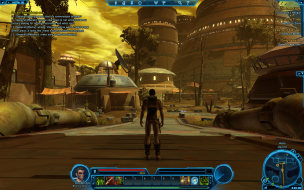
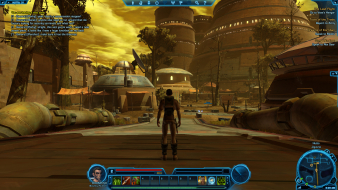
Just to tease some of you!
Almost there!!! Everything is centered!!!! but have some minor annoyances... like all the nameplates being shifted to the right for example.
Don't believe me? Here are some teasers;))
Enjoy!!! The preview:)
Best Regards,
Helifax Jedi Sage!;))
WideScreen Fixer... Fixes your Surround problems to give a gorgeous 3D Surround Experience! WideScreen Fixer
Only website to show TRUE 3D Vision Surround Gaming Videos(viewable by anyone) only at 3D Vision Surround Gallery