Widescreen Gaming Forum

[-noun] Web community dedicated to ensuring PC games run properly on your tablet, netbook, personal computer, HDTV and multi-monitor gaming rig.
It is currently 11 Jun 2026, 08:05

All times are UTC [ DST ]


Post new topic Reply to topic  [ 43 posts ]  Go to page 1, 2, 3, 4, 5  Next
Author Message
PostPosted: 24 Dec 2006, 15:01 
Offline

Joined: 24 Dec 2006, 14:58
Posts: 1
hey i´ve been trying to do what is posted for MU online, i got the IDA, but im not being able to find the lines they say that need to be changed, could anyone help a bit with this.


Top
 Profile  
Reply with quote  
PostPosted: 11 Nov 2008, 02:40 
Offline
Founder
Founder
User avatar

Joined: 13 Oct 2003, 05:00
Posts: 7358
Mmmm that is interesting. I tried manually adding with the 178 drivers but (After that didn't work) I don't think I tried with the 180 series. I'll give it a go when I get home I suppose.


Top
 Profile  
Reply with quote  
PostPosted: 12 Nov 2008, 18:52 
Offline
Founder
Founder
User avatar

Joined: 13 Oct 2003, 05:00
Posts: 7358
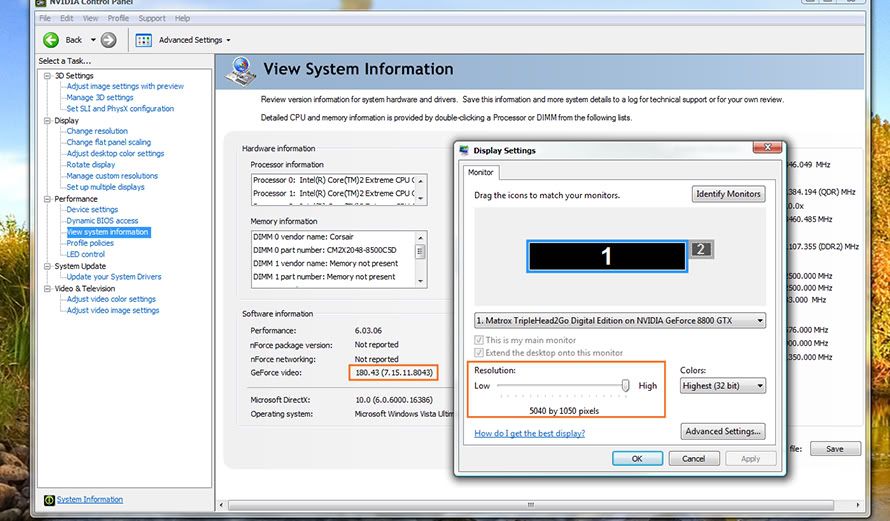
Ok, just tried a straight update from 178.08 to 180.43, it actually kept the custom res and its working (desktop and games) at 5040x1050:


Am I missing something or is this what people were saying doesnt work?!


Top
 Profile  
Reply with quote  
PostPosted: 12 Nov 2008, 19:20 
Offline
Founder
Founder
User avatar

Joined: 13 Oct 2003, 05:00
Posts: 7358
Ive just tried it on a 2nd Triplehead system, Vista X64, 2x 260GTXs, upgraded from 177.41, custom res was not carried over (as it was inputed by Matrox, not me). I input my own custom 5040x1050 res settings as above (which are just copied from Matrox anyway) and it also works fine, 180.43 - Vista - 5040x1050, desktop and games.


Top
 Profile  
Reply with quote  
PostPosted: 12 Nov 2008, 20:22 
Offline
Founder
Founder
User avatar

Joined: 13 Oct 2003, 05:00
Posts: 7358
I'll give this a go tonight and report back.


Top
 Profile  
Reply with quote  
PostPosted: 13 Nov 2008, 00:32 
Offline
Founder
Founder
User avatar

Joined: 13 Oct 2003, 05:00
Posts: 7358
No go for me, couldn't set the custom resolution...it sends all of my screens out of range. Could be ultramon or my 4th screen, but I don't have time to mess around right now.

I'm staying on 180.43 for the moment, 3x1280x800 is an annoyance, but frankly having working bezel management back makes it worthwhile.


Top
 Profile  
Reply with quote  
PostPosted: 14 Nov 2008, 01:33 
Offline
Founder
Founder
User avatar

Joined: 13 Oct 2003, 05:00
Posts: 7358
No go for me, couldn't set the custom resolution...it sends all of my screens out of range. Could be ultramon or my 4th screen, but I don't have time to mess around right now.

I'm staying on 180.43 for the moment, 3x1280x800 is an annoyance, but frankly having working bezel management back makes it worthwhile.


Whenever you get the chance and have the older drivers with 5040x1050 res working (Custom input by GXM in the NV control panel), edit (goto Advanced) the setting and confirm its the same as above. Its possible the setting is automatically tweaked per system (specific monitor settings) and my exact settings may not work on all screens (though it should). This is unlikely IMO.

Afaik, the Matrox Custom res is just what you see there however, so if it works in driver version x, it should work in driver y as long as the settings are an exact match.


Top
 Profile  
Reply with quote  
PostPosted: 14 Nov 2008, 02:55 
Offline
Founder
Founder
User avatar

Joined: 13 Oct 2003, 05:00
Posts: 7358
Didn't work for me either. I put in the exact settings as in the screenshot above.

Interestingly, the "Horizontal scan rate" and "pixel clock" values (which are apparently calculated based on the input values) were different than what was in the example screenshot.

Anyway - not working for me under 180.43.

Shit. :(


Top
 Profile  
Reply with quote  
PostPosted: 14 Nov 2008, 13:20 
Offline
Founder
Founder
User avatar

Joined: 13 Oct 2003, 05:00
Posts: 7358
I dont get it! I did it on 2 different systems with totally different graphics cards and different size and brand monitors, so it wasnt a once off fluke!?

Can you post up a screen shot of your custom res settings for comparison? Also what I was suggesting above was that you go and check your 177.41 custom res and copy that (if different to mine).

EDIT:

The monitors I have this working on are:
Zalman Trimon (22")
2x Dell 2208WFP (22")
2x Dell E248 (24")
1x Dell 2407WFP (24")


Graphics Cards:
2x GTX260
2x 8800GTX

OS:
Both Vista X64, which should be the most difficult to get to work, not the easiest. UAC was disabled on one and severely crippled on the other, since it affects driving signing maybe try that too.


Top
 Profile  
Reply with quote  
PostPosted: 14 Nov 2008, 15:07 
Offline
Founder
Founder
User avatar

Joined: 13 Oct 2003, 05:00
Posts: 7358
Here's the screenshot I took under the CUDA drivers:


I keep UAC 100% off.


Top
 Profile  
Reply with quote  
Display posts from previous:  Sort by  
Post new topic Reply to topic  [ 43 posts ]  Go to page 1, 2, 3, 4, 5  Next

All times are UTC [ DST ]


Who is online

Users browsing this forum: No registered users and 12 guests


You cannot post new topics in this forum
You cannot reply to topics in this forum
You cannot edit your posts in this forum
You cannot delete your posts in this forum
You cannot post attachments in this forum

Search for:
Jump to:  
cron


Powered by phpBB® Forum Software © phpBB Group