
Hi forum
I'm new to this board and want to say hello to you.
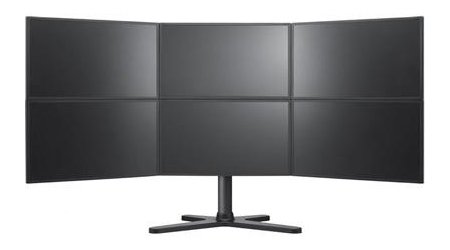
Since yesterday I have my Samsung MD230x6 ready (Pic)
I loaded noe the widescreen fixer and the cod4 plugin, but for me it doesn't works.
I pressed the multiply (*) but no reaction. Then if I left the game sometimes the widescreenfixer is not
responding, sometimes it's closed with no error.
I have a 64bit Windows 7 Ultimate.
Can someone help me to find the problem?
Very best regards from switzerland
Nullpunkt
2 x 3 screens and COD4
-
BHawthorne

- Insiders

- Posts: 1640
- Joined: 06 May 2006, 12:46
It's called Eyefinity 3x2
It's called Eyefinity 3x2 actually. ;)
Could you elaborate a little more on how it's not working right?
Could you elaborate a little more on how it's not working right?
Brad Hawthorne
Product Manager
Nthusim Pty. Ltd. | www.nthusim.com
Product Manager
Nthusim Pty. Ltd. | www.nthusim.com
Hi BHawthorneIt does not
Hi BHawthorne
It does not change the size of the game, thats my problem : )
I can enable the fix, but theres no change.. The game still is shown on a single screen.
Please see attached Image. I tried different Ratios, but it never brings me another size.
Best regards
Nullpunk
It does not change the size of the game, thats my problem : )
I can enable the fix, but theres no change.. The game still is shown on a single screen.
Please see attached Image. I tried different Ratios, but it never brings me another size.
Best regards
Nullpunk
" The game still is shown on
" The game still is shown on a single screen."
well there is your problem.
Did you select your desired Resolution ?
Btw Widescreenfixer works much better if you enable it while in-game not in the game-menues
well there is your problem.
Did you select your desired Resolution ?
Btw Widescreenfixer works much better if you enable it while in-game not in the game-menues
HiMy monitors have a total
Hi
My monitors have a total size of 5760 x 2160.
I tried this dimension and I also tried 5760 x 1080 (for 3 screens)
If I turn on the wide screen fixer while in the game, the game itself crashs with message: call of duty works no more (translated from german meesage)
Is there a log I can find more details or does someone knows where the problem could be?
Best regards
Nullpunkt
My monitors have a total size of 5760 x 2160.
I tried this dimension and I also tried 5760 x 1080 (for 3 screens)
If I turn on the wide screen fixer while in the game, the game itself crashs with message: call of duty works no more (translated from german meesage)
Is there a log I can find more details or does someone knows where the problem could be?
Best regards
Nullpunkt
HiI buyed now COD: Black
Hi
I buyed now COD: Black Ops from Steam with same result.
Settings attached in picture...
If I start the fix within the game I can see that it distorts the picture, but do not increase the window.
I tried it in full screen and normal mode.
Do I have to change something else?
Best regards
Nullpunkt
I buyed now COD: Black Ops from Steam with same result.
Settings attached in picture...
If I start the fix within the game I can see that it distorts the picture, but do not increase the window.
I tried it in full screen and normal mode.
Do I have to change something else?
Best regards
Nullpunkt
-
suiken_2mieu

- Insiders
- Posts: 2351
- Joined: 20 Aug 2009, 04:20
- Location: Virginia
- Contact:
nullpunkt wrote:HiI buyed
Hi
I buyed now COD: Black Ops from Steam with same result.
Settings attached in picture...
If I start the fix within the game I can see that it distorts the picture, but do not increase the window.
I tried it in full screen and normal mode.
Do I have to change something else?
Best regards
Nullpunkt
dude, you have to go ingame in the options menu and change your resolution to 5760x2160.
Widescreenfixer just changes the game FOV to match your aspect ratio, not actually changing the resolution (size) of the game.
I imagine it goes like this:
Options, Video Settings, Resolution: 640x480.
Change that last part to 5760x2160.
System Core: | Intel Core i5-2500K + ASUS P8Z68-V + 16GB Corsair XMS3 DDR3 1333 MHz | Win7 x64 | MSI R7970 Lightning 3GB [1105/1400] |
Display: | 3 x Dell Ultrasharp 3007WFP-HC @ 7680x1600 | Dell u3011 |
Display: | 3 x Dell Ultrasharp 3007WFP-HC @ 7680x1600 | Dell u3011 |
Who is online
Users browsing this forum: Bing [Bot] and 10 guests