Using FOV to turn Games into Simulators

User created game mods, skins, texture packs and camera tools
ZeosPantera
Posts: 18
Joined: 23 Apr 2011, 19:00

Using FOV to turn Games into Simulators

Post by ZeosPantera »

Tripling the amount of screen real estate you have shouldn't simply add on to the "normal" distorted single monitor view you are use to. It should completely change and your gaming experience along with it.

I developed this theory with race simulators constantly trying to find not a competitive edge, but a way to push further toward realism. Owning pedals and an expensive wheel helps toward that end. Building an elaborate cockpit with gauges and a leather dashboard can improve the sense of being in a real car. I have even seen people dress in full fire-suits and crash gear to try and achieve a more realistic experience. After spending all that time and money building what they felt could help produce realism, realism in a race sim really only comes down to what is displayed on your screen and how your brain plans to interpret it.

Essentially This
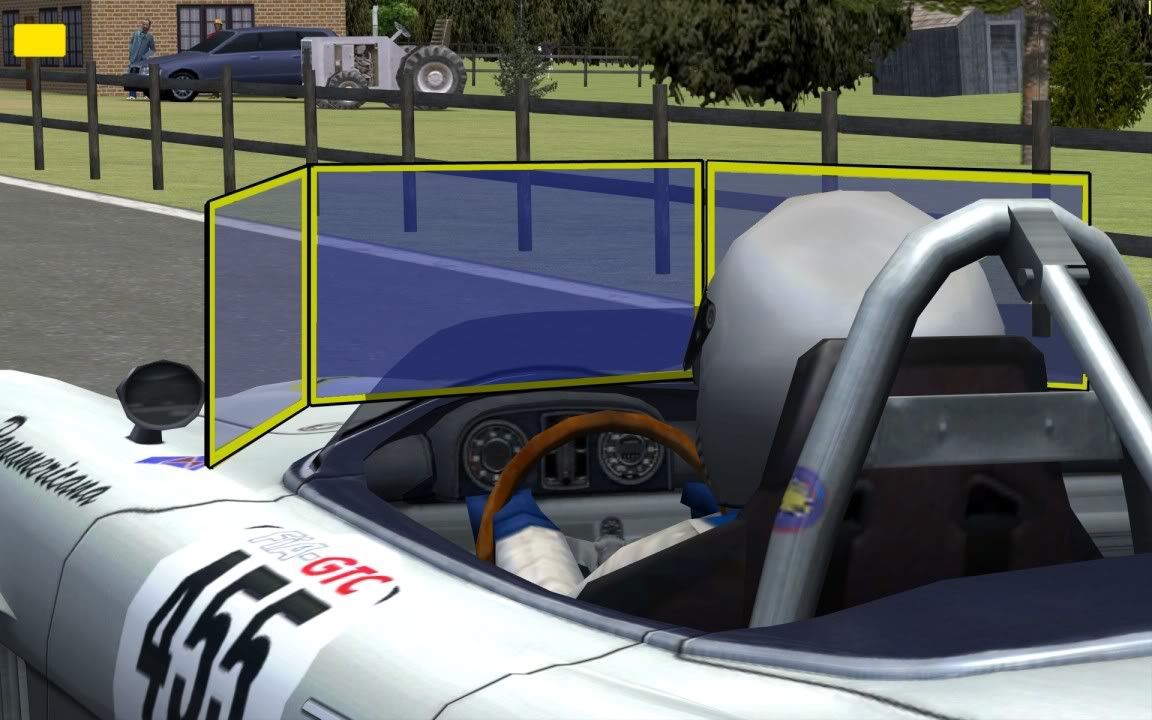


I plan to show how some simple measurements and adjustments to most games can change the experience from just a game into essentially Virtual Reality.

Firstly, all of your FOV calculations are wrong, and don't take that the wrong way. They have to be, they were designed and engineered to be wrong, in every game ever made. Since the original DOOM and Castle Wolfenstein, game developers simply picked a number they liked for FOV and ran with it. The developers of those original "3D" games had nothing but single 15" CRT's to play on and so did the customers. The designers squeezed as much of the game world onto the screen as they felt they needed and moved on.

SEVERAL years have now passed since the birth of 3d gaming and I now post on a forums created to help people running 6 Mega Pixel displays totaling fifty or sixty inches wide. Yet that same frame of mind to arbitrarily squeeze as much of the world onto a screen using a randomly chosen fov still lingers. Every video I have found of triple-head seems to leave the standard 90° view on the center monitor and then just adds 25-30 degree's of skewed garbage on the sides.

Even an official WSGF video shows off this issue. http://www.youtube.com/watch?v=KhiqxayUhbw

I believe our display area's are large enough now that we can stop using the established, old and fundamentally flawed systems of guessing what a good FOV is and TRY to put ourselves where we have always wanted to go. Inside the games we play instead of just looking at them in a disconnected way through a fish eye lens.

Not all of you will agree with me, my previous attempts to explain what I am suggesting to gamers was met with name-calling and blatant mis-understanding on both sides. I hope for less of that here, on the mecha of gaming lunacy I will preach "less is more". If nothing else I hope to pass on some understanding and breed a bit of experimentation into you all, but first.


A quick Pro's and Con's list.

Pro's
- 1:1 scale of objects compared to real life
- 1:1 scale of distance compared to real life (no need for Iron-sight's that zoom)
- 100% accurate feel of an environment (judging size of a room, courtyard, Height of a building, etc)
- Immersion in a way not previously possible (VR Goggles in the movies maybe)
- Pace of game slowed (you have to look around and be cautious of your surroundings)
- Greatly enhanced details (small items are no longer lost)
- Improved framerates (less to see)


Con's
- Claustrophobia (dependent on screen size/#)
- Restricted ability to see enemies or points of interest above or below without actually looking for them.(dependent on screen size/#)
- Having to look down to see the floor for jump's/traps.(dependent on screen size/#/orrientation)
- Difficulty navigating when close to objects/obstructions
- Feeling of panic due to lack of vision (Makes games spooky again)(dependent on screen size/#/balls)
- Losing some of the competitive edge you hoped to gain (getting pwnt never felt so real!)
- Missing special effects and events in scripted scenarios if not looking in the right direction.


But even if you try it as just an experiment, adjusting the FOV in-game to identically match the real FOV to your monitors will turn your setup essentially into a training simulator.

The results can be easily seen with this example put together by Tet5uo for another thread.
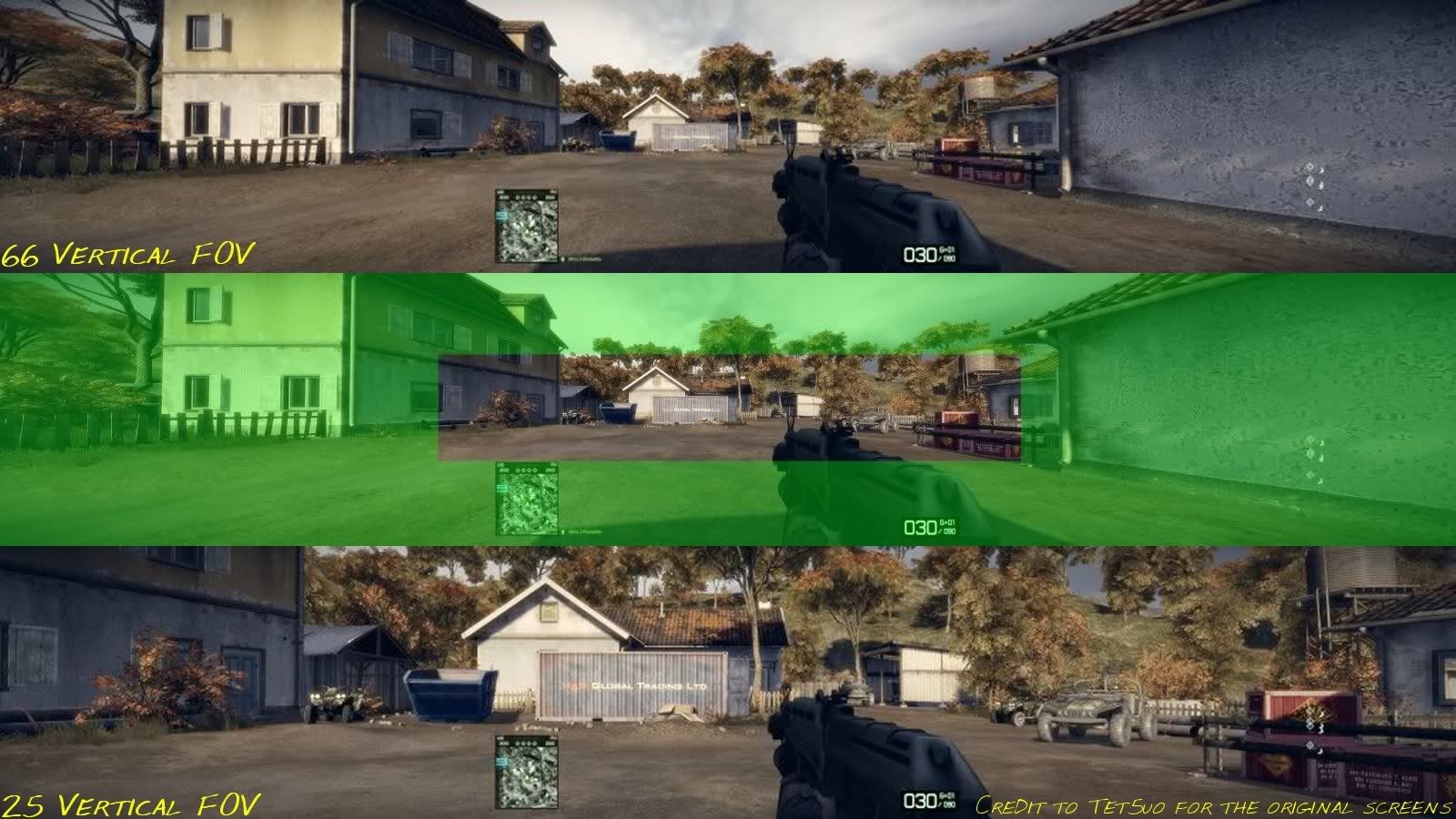


A V-FOV of 25° is a likely calculation with modern displays with the average size and distance users sit from their screens. An enemy far to the left of you would be seen in the 66° but having an enemy next to or behind that quad cycle (the one quad bike that is practically invisible at 66°) would be much easier to pick up, aim and fire. I believe there is no argument that the 25° view presents a much clearer sense of what you are looking at. Gaining clarification of what is in-front of you Vs what you were missing on the sides in the first place.

It can also be seen between these two videos Concerning F1 racing simulators.

Improper FOV - http://www.youtube.com/watch?v=sr3M7enTESs#at=12

Proper FOV - http://www.youtube.com/watch?v=MO1gVZyvVbw


The screen-placement was also a prohibitive factor on the Improper setup, but the location of the front wheels is a clear indicator of why proper FOV is important when attempting realism.


If your an inquisitive soul we can start with the math. Please, Get a tape measure...

This is very simple. (inches or CM makes no difference)

-Measure the height of your screen's viewable area.

-Measure the distance from your eyes to the center of your center screen while in a comfortable gaming position.

These two measurements can be used to determine our real life Vertical FOV. How much of our vision, in degrees, our screens take up vertically. Since we want accurate measurements and I cannot find an online calculator that easily gives them we may have to divide and then multiply... ooooh.


**I have added this spreadsheet with various popular screen sizes/ aspect ratios and some distance's to choose from. See if you match up! https://spreadsheets.google.com/spreadsheet/ccc?hl=en&hl=en&key=tv24g9vaum_X_BjHDLQNlNA&authkey=CPzqkIAJ

This is the triangle calculator I currently use. http://www.pagetutor.com/trigcalc/trig.html

Value A is half your screens Height (my height is 12" so I enter 6)

Value B is the distance to your eye (my dist is 34")


Press Calculate and DOUBLE the Value of X. That value is half of your calculated V-FOV (Mine is 10.01 x2 = 20°Fov)

Vertical FOV is a superior measurement to base off of because no matter the aspect of your screen or how many screens you have on the horizontal that number will only vary slightly. A single 16:9 23" and three 16:9 23" retain the same V-FOV. Also the fact that humans have two eyes makes measurements that much more difficult on the horizontal. To calculate the horizontal (with& bezel mngmt) all you need to do is some additional maths.

(example- no bezel, single screen), I calculate to 20°V so my 16:10 screen is 32°H keeping a 1:1 pixel ratio. 20/10=2 ... 2x16=32.. done

Adding two additional screens on the horizontal pointing directly at me would add 64°+32°= 96°total Horizontal without bezel management. Taking the management into account means figuring the exact aspect of your screens and the calculator here on the site works perfectly for that http://www.widescreengamingforum.com/fovcalc.php

Input your resolution with comp and take that ratio number (ex. Surround aspect ratio = 205 : 36) and divide your known V-FOV with the height (mine 20/36=0.5555) then multiply the result with the horizontal ratio (mine 0.5555x205=113.87,just round to 114)

So my setup calculates to 114°H x 20°V in relation to my eyes in the real world. If I match that in-game it should be like looking through a window into the game world. The problem with many games is FOV adjustments are flawed or inadequate to adjust to these levels. So check the Confirmed Game Solutions forums to see if you can even try on a game of your choice.

You will note the horizontal of my setup calculates to 114° so even with "proper" Simulator View I still gain a decent advantage over a single screen setup of 90°.

You will want to lower your mouse sensitivity once you are using the low FOV. I suggest testing on a relatively easy single player game that you know well enough to test with, such as HL2 or Bioshock or Amnesia (as my friend tested). If you find it difficult try moving yourself or your monitors closer and recalculating. The FOV #'s will increase. Never move so close that it is uncomfortable.

It is in all likelihood possible to keep your current, high FOV and use a simulator view by just moving MUCH closer to your monitor(s). I recently did the calculations for someone on a youtube comment who claimed to sit twelve inches from their 23" 16:9 monitor. Using the above method it calculated to a horizontal of 90° which means he is using a sim view in most games and will probably need thick thick glasses in a few years.

*TracK-IR - Quick opinion, it is a great tool for single monitor or small triple arrangements but one of the points of surround gaming is so you can use your own head to turn and look at things. If you want to look behind you, put monitors behind you. If the forward and back motion could be translated into FOV adjustment you could lean back and see less and lean in and see more. Just like a real window.

In conclusion, when thinking about going triple-head for gaming the reason someone should want to is to make the experience more realistic and immersive. Real life obviously shows us more than a single monitor can provide so we go triplehead, but in general real life shows us 180°x 150° and trying to mimic that is something none of us can hope for until a more cranially intrusive solution is found.

Thanks for reading.

User avatar
suiken_2mieu
Insiders
Insiders
Posts: 2351
Joined: 20 Aug 2009, 04:20
Location: Virginia
Contact:

Re: Using FOV to turn Games into Simulators

Post by suiken_2mieu »

Eh, This is bad, FOV would be based on Screen Size (with Apsect Ratio) rather than just aspect ratio.
System Core: | Intel Core i5-2500K + ASUS P8Z68-V + 16GB Corsair XMS3 DDR3 1333 MHz | Win7 x64 | MSI R7970 Lightning 3GB [1105/1400] |
Display: | 3 x Dell Ultrasharp 3007WFP-HC @ 7680x1600 | Dell u3011 |
ZeosPantera
Posts: 18
Joined: 23 Apr 2011, 19:00

Re: Using FOV to turn Games into Simulators

Post by ZeosPantera »

It is based on screen size and the distance to screen. Aspect ratio only needs to be used to convert from vertical to horizontal.

I am currently working on an excel spreadsheet with all the common sized screens, aspect ratio's and distances for a single screens. I can't accommodate the bezel sizes so that you will still need to calculate manually.
User avatar
suiken_2mieu
Insiders
Insiders
Posts: 2351
Joined: 20 Aug 2009, 04:20
Location: Virginia
Contact:

Re: Using FOV to turn Games into Simulators

Post by suiken_2mieu »

It is based on screen size and the distance to screen. Aspect ratio only needs to be used to convert from vertical to horizontal.

I am currently working on an excel spreadsheet with all the common sized screens, aspect ratio's and distances for a single screens. I can't accommodate the bezel sizes so that you will still need to calculate manually.

Well the thing is, that if you want to avoid getting sick from motion sickness (or lack of motion), you would need a big screen. Also you're going to need to account for the position of the viewers head as well. You cant assume they are smack dab right in the middle of the screen.
System Core: | Intel Core i5-2500K + ASUS P8Z68-V + 16GB Corsair XMS3 DDR3 1333 MHz | Win7 x64 | MSI R7970 Lightning 3GB [1105/1400] |
Display: | 3 x Dell Ultrasharp 3007WFP-HC @ 7680x1600 | Dell u3011 |
zild1221
Posts: 3
Joined: 23 Apr 2011, 18:53

Re: Using FOV to turn Games into Simulators

Post by zild1221 »

First off, just wanted to say hello. First post. I have lurked here in the past to set games up properly and so forth. Now, regarding this statement...

Well the thing is, that if you want to avoid getting sick from motion sickness (or lack of motion), you would need a big screen.


Stop being a [censored]. After using it for a few days, it becomes second nature.

As for this statement...

Also you're going to need to account for the position of the viewers head as well. You cant assume they are smack dab right in the middle of the screen.


If your head is not center to your monitor horizontally, you are a complete [censored]. As for the height of your head in relation to the monitor, you fix that by adjusting the horizon line in the game.

Everyone stop arguing against proper FOV and just try it for at least a week. I guarantee everyone who argues against it has not used it for more than 20 minutes.

Moderator Edit: for your first post, you're awfully rude. If you can't be polite, don't bother posting at all.
ZeosPantera
Posts: 18
Joined: 23 Apr 2011, 19:00

Re: Using FOV to turn Games into Simulators

Post by ZeosPantera »

Not quite sure what you mean by "lack of motion". The type of game will determine the severity of the motion required. A heavy movement FPS such as TF2 or CSS with the necessity to perform full 180° bunny hopping moves every two seconds for three hours at a time would, in my opinion, not be a pleasant experience. But certainly a more strategic shooter like Arma or Ghost Recon would benefit from this reality treatment. As would most vehicle based games where the path is usually linear.

As far as accounting for the head position I have to assume most players would be centered and relatively still 90% of the time. Something like Track IR would come in handy to adjust the view per monitor if it could be set to accurately change the FOV based on distance from the screen surface. However, I don't think TrackIR or most games currently have that ability.

Here are the Preliminary FOV calculations, I haven't done the Horizontals yet as they will take the longest to figure out. Just pick your monitor size on the bottom and then you should see all/most of the aspect ratio's available for that size monitor. I sort of assumed the distance range from twenty inches to three feet would cover a pretty large percentage of users. If you work out to something in-between the chart (ie you run 34") then just take the average between the FOV values for 32" and 36". These measurements can't be 100% accurate due to head movement and slight variations in screen size and how it is measured.

https://spreadsheets.google.com/ccc?key=0Ah63E8wuWhrgdHYyNGc5dmF1bV9YX0JqSERMUU5sTkE&hl=en&authkey=CPzqkIAJ
User avatar
suiken_2mieu
Insiders
Insiders
Posts: 2351
Joined: 20 Aug 2009, 04:20
Location: Virginia
Contact:

Re: Using FOV to turn Games into Simulators

Post by suiken_2mieu »

What I mean by lack of motion, is the user NOT moving, but the camera in-game is moving constantly.
System Core: | Intel Core i5-2500K + ASUS P8Z68-V + 16GB Corsair XMS3 DDR3 1333 MHz | Win7 x64 | MSI R7970 Lightning 3GB [1105/1400] |
Display: | 3 x Dell Ultrasharp 3007WFP-HC @ 7680x1600 | Dell u3011 |
User avatar
Paradigm Shifter
Editors
Editors
Posts: 5706
Joined: 14 Oct 2003, 13:52

Re: Using FOV to turn Games into Simulators

Post by Paradigm Shifter »

zild, you don't "get used" to motionsickness. If extemely limited FOVs make you feel sick, there is no "acclimatisation period" after which you don't notice it any more.

By example; Borderlands, by default, gives me serious migraines at the default FOV. Expand that out, and it doesn't.

You have been given a formal warning.
ZeosPantera
Posts: 18
Joined: 23 Apr 2011, 19:00

Re: Using FOV to turn Games into Simulators

Post by ZeosPantera »

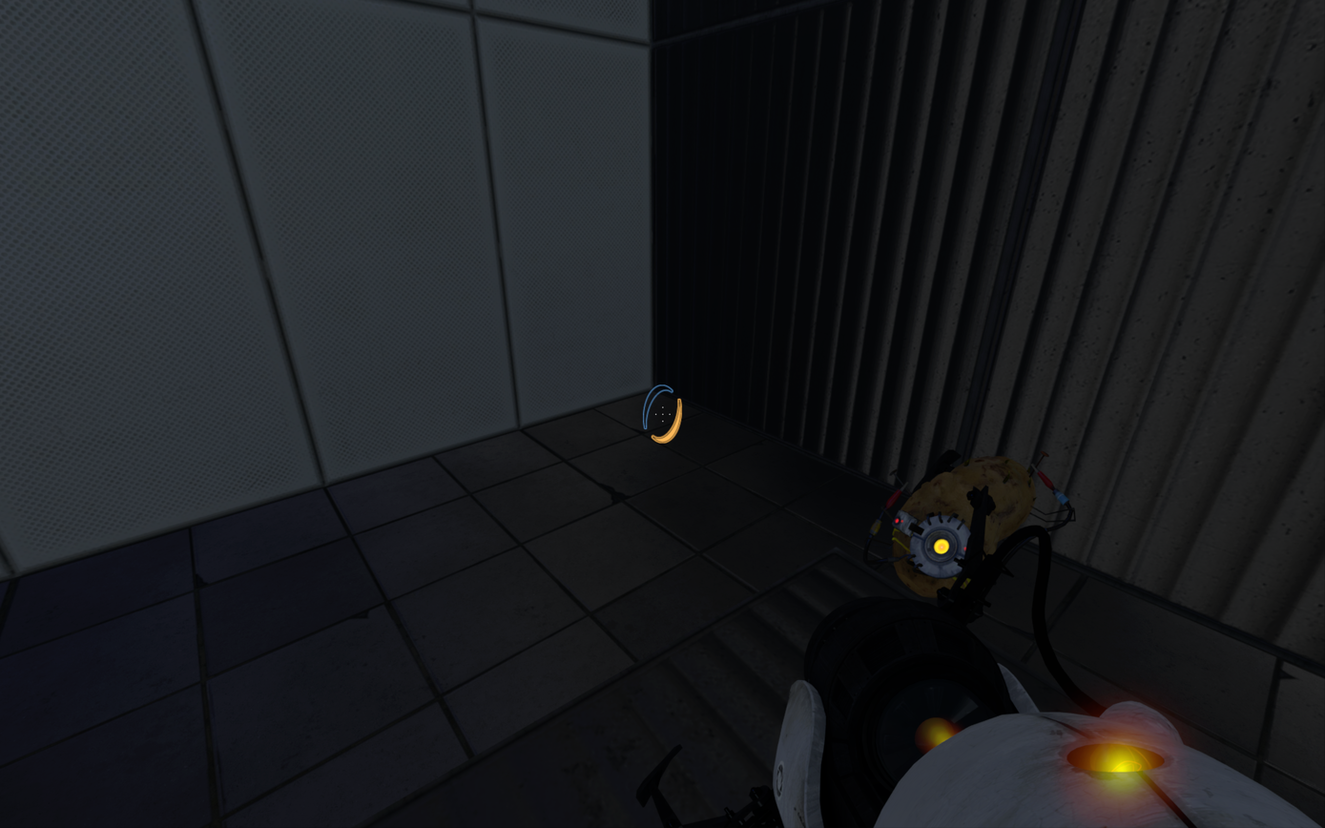
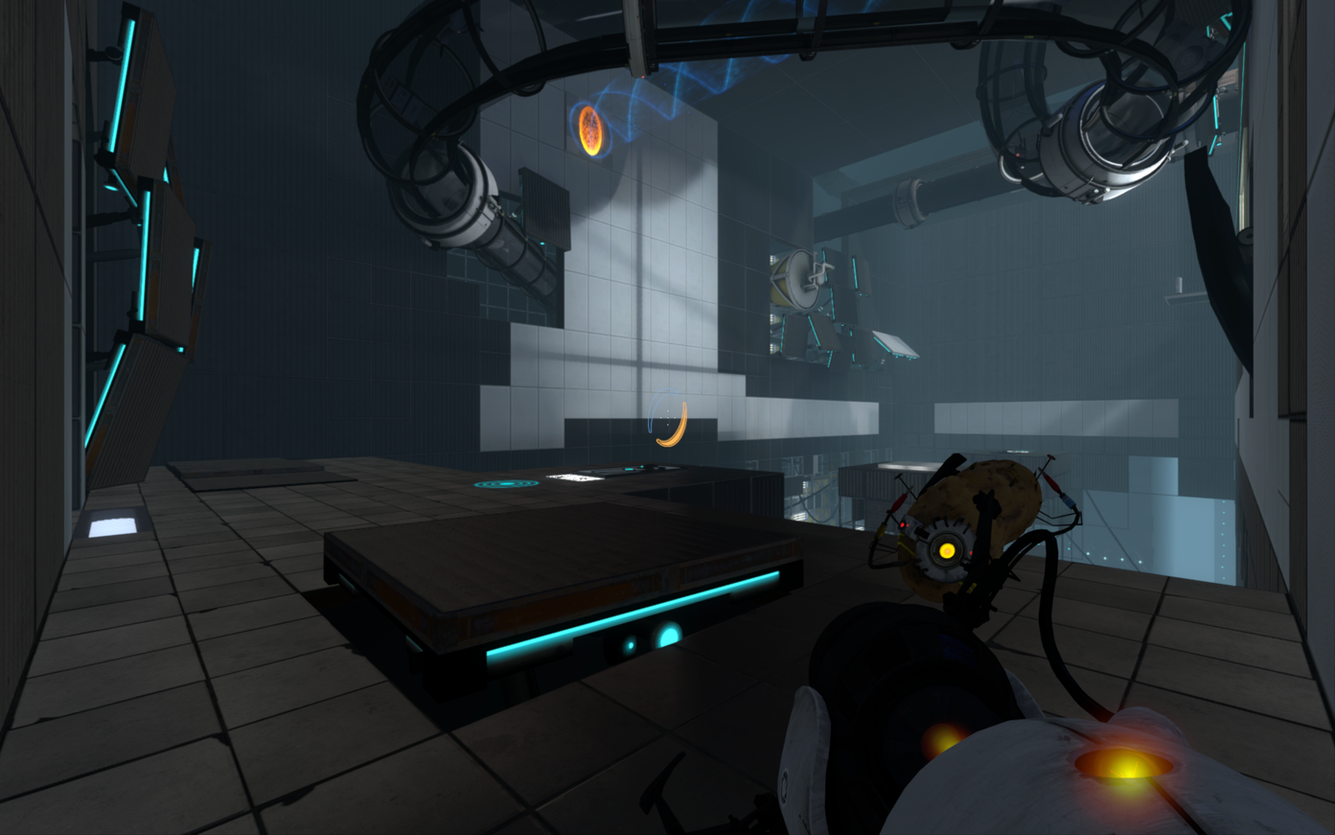
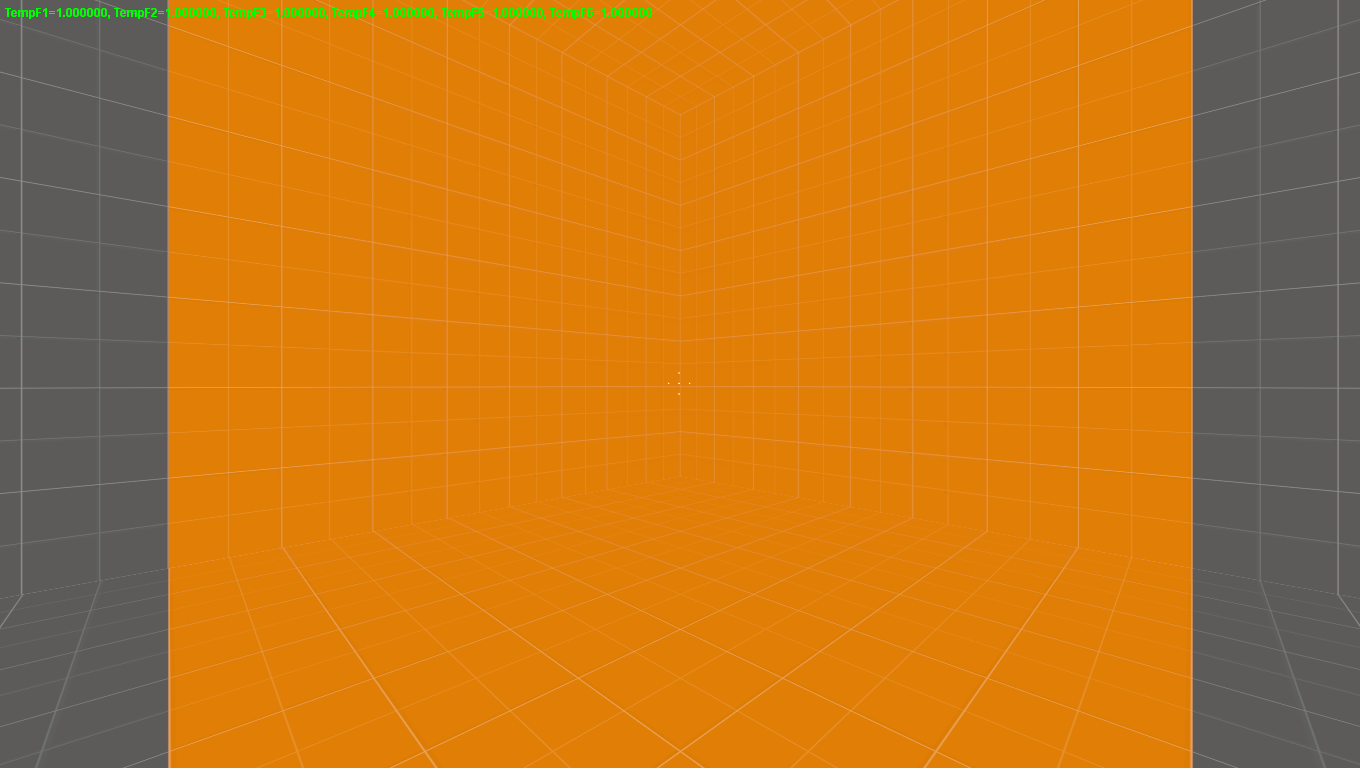
An interesting discovery. It appears that Portal 2 uses a default Horizontal FOV of greater than 90°.

Stood in a perfectly square corner.


Looking out if it were 90° the edges of the screen would have JUST had some of the left and right wall showing. BUT, with this much wall showing on either side.


I believe we are looking at 100+ degrees. Which is why people are complaining the FOV making them ill. Most are taking it as too low and believe it's default to 75 degrees. This shows much different scenario.
User avatar
Paradigm Shifter
Editors
Editors
Posts: 5706
Joined: 14 Oct 2003, 13:52

Re: Using FOV to turn Games into Simulators

Post by Paradigm Shifter »

Um... it's not rocket science that any incorrect FOV will make people feel queasy. You have a fixed FOV naturally (both horizontally and vertically) from the positioning of your eyes, and focusing on a screen which alters that FOV perception to either a decreased or increased amount will potentially cause problems as your brain suddenly has to cope with a different field of view than the one it has been used to since you opened your eyes on the day you were born.

Having said that, have you tried standing in the corner of a room and seeing how much wall you can see? Without moving your eyes from a 45* angle from each perpendicular wall... lots of wall.

More so than that screenshot, actually, which makes me think that it's not greater than 90* - it is in fact less as people have apparently been surmising - or the 'camera' effect is at play again and the camera is actually not in the Player Characters 'head' but a few inches in front of it, which would have a similar effect.
ZeosPantera
Posts: 18
Joined: 23 Apr 2011, 19:00

Re: Using FOV to turn Games into Simulators

Post by ZeosPantera »

Well, the average human can see nearly 180° horizontal. Just stretch your arms strait out and wiggle your fingers. Looking strait ahead you should be able to detect their movement at around 170-180°.

I have discovered the root problem. I am not sure if it is inherent in only the source engine but setting your FOV to 90 with a NON 4:3 monitor gives an improper result.

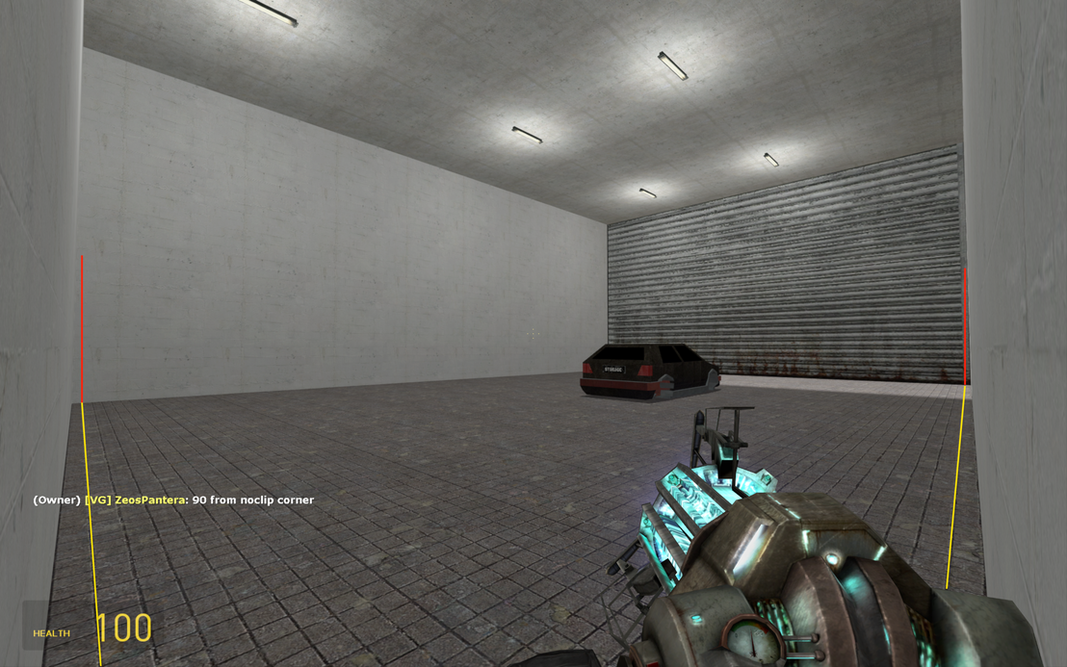
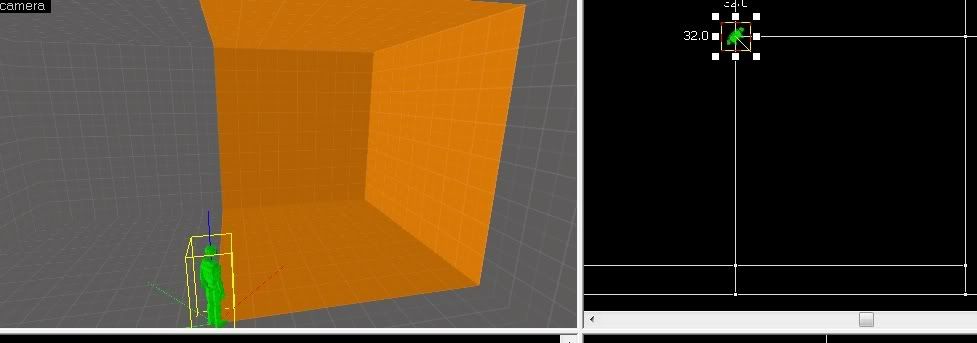
Testing with garrys mod. No-clipped into the corner. Square room with tiled floor.


Even went so far as to have a friend make a custom map in source to check.


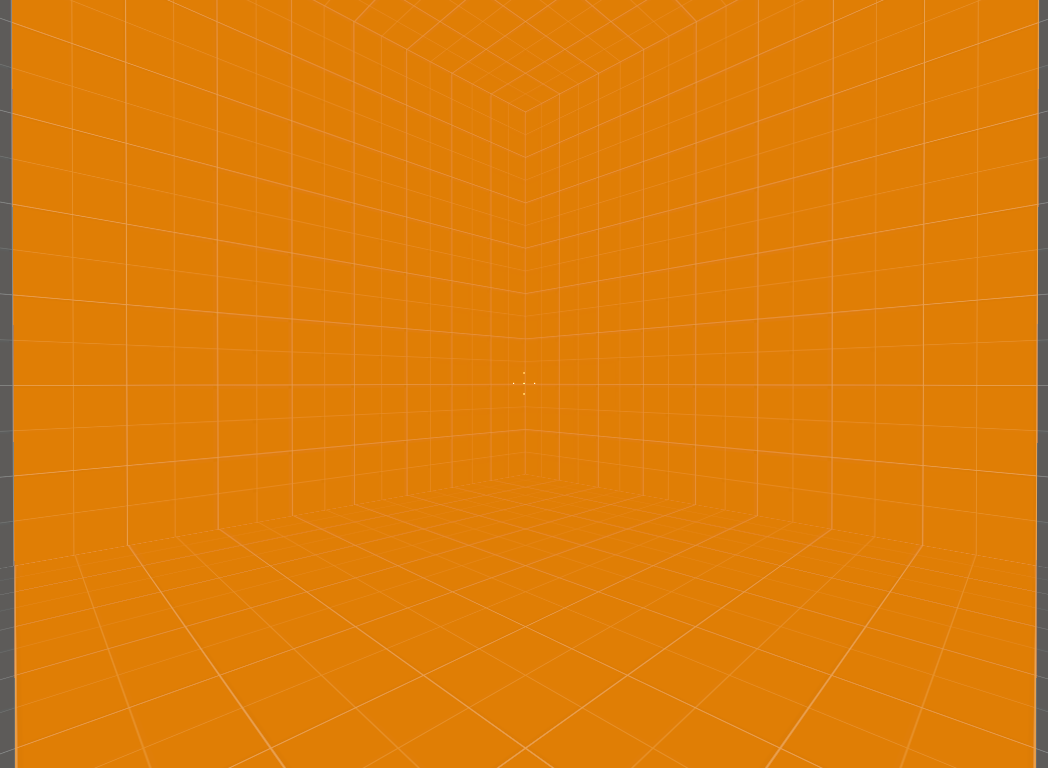
Here is the view on his widescreen monitor with a setting of 90°


Then he changed it to nearly 4:3 as to show the gray parts. (4.1:3 or similar)


Now I can't believe source is using vertical as the modifier as setting 90° vertical renders 144° horizontal and I don't think it is that bad. But still this is a hell of a shock for me.

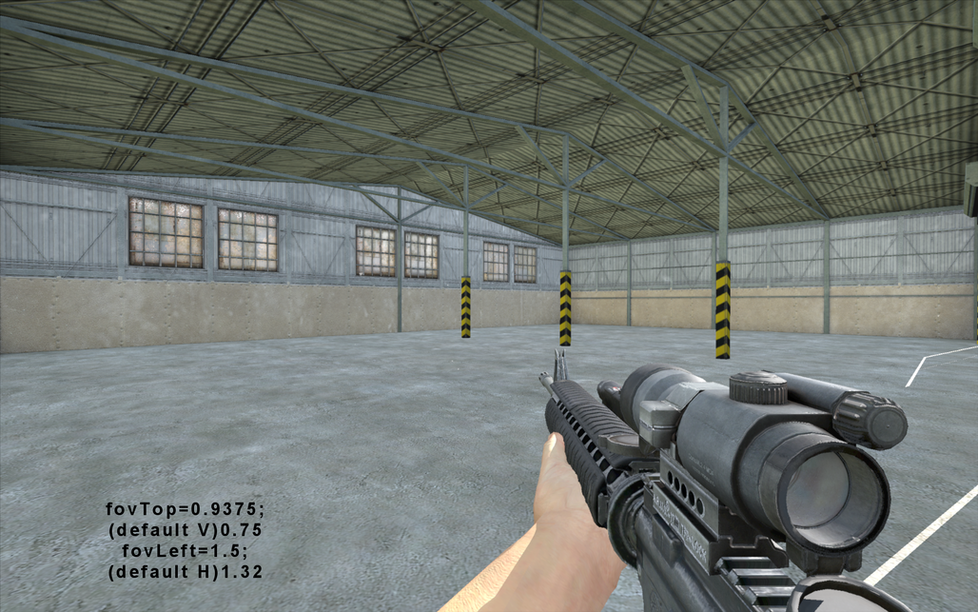
I tried in arma2 but had to use radians. To achieve perfect 90° I had to set the fovleft setting (horizontal) to 1.57 then calculate the fovtop(vertical) to match my 16:10 monitor. When doing so it was in-game perfectly 90° as the screenshot shows.

Omnimus
Posts: 22
Joined: 24 Apr 2010, 23:07

Re: Using FOV to turn Games into Simulators

Post by Omnimus »

Tripling the amount of screen real estate you have shouldn't simply add on to the "normal" distorted single monitor view you are use to. It should completely change and your gaming experience along with it.


//Lots of text.

Thanks for reading.


Hello.
First, nice post. I enjoyed reading it.

Second.
I agree with you, to some extent. The part whole idea about Fov-to-area and position, is true.
When i play my triple screen setup, i actually enjoy *lowering* the fov, and moving back from the table abit.
It makes stuff seem more realistic and closer to 1:1 size. (without actually loosing out on view field vs the single screen setup.)

What i dont agree with is using fov that produces true 1:1 size.

This would require a grand surround setup in both height and width, and probably also account for turning your head to the side to look (almost calling for a complete sphere of monitor space.)
Without it, it will be painfully frustrating and cause nausea.


But as i said, Fov-to-area is a good thing. I for one will probably go in that direction.
User avatar
Abram
Insiders
Insiders
Posts: 1993
Joined: 21 Mar 2006, 05:01

Re: Using FOV to turn Games into Simulators

Post by Abram »

Full fire-suits and crash gear? Seriously?
ZeosPantera
Posts: 18
Joined: 23 Apr 2011, 19:00

Re: Using FOV to turn Games into Simulators

Post by ZeosPantera »

Full fire-suits and crash gear? Seriously?


These people are in the vast minority, but if you are a legitimate actual racer there is a point to "practicing". Gym shorts and a t-shirt can't be worn on race day.
User avatar
suiken_2mieu
Insiders
Insiders
Posts: 2351
Joined: 20 Aug 2009, 04:20
Location: Virginia
Contact:

Re: Using FOV to turn Games into Simulators

Post by suiken_2mieu »

[quote]Full fire-suits and crash gear? Seriously?


These people are in the vast minority, but if you are a legitimate actual racer there is a point to "practicing". Gym shorts and a t-shirt can't be worn on race day.
Um, do you see what wheel they are using? It's not very good on anything but a 360 and there are better options. These guys don't know realism.
System Core: | Intel Core i5-2500K + ASUS P8Z68-V + 16GB Corsair XMS3 DDR3 1333 MHz | Win7 x64 | MSI R7970 Lightning 3GB [1105/1400] |
Display: | 3 x Dell Ultrasharp 3007WFP-HC @ 7680x1600 | Dell u3011 |
ZeosPantera
Posts: 18
Joined: 23 Apr 2011, 19:00

Re: Using FOV to turn Games into Simulators

Post by ZeosPantera »

[quote][quote]Full fire-suits and crash gear? Seriously?


These people are in the vast minority, but if you are a legitimate actual racer there is a point to "practicing". Gym shorts and a t-shirt can't be worn on race day.
Um, do you see what wheel they are using? It's not very good on anything but a 360 and there are better options. These guys don't know realism.

Normally I would agree with you.. But that viper R in the background says otherwise..
User avatar
Abram
Insiders
Insiders
Posts: 1993
Joined: 21 Mar 2006, 05:01

Re: Using FOV to turn Games into Simulators

Post by Abram »

I guess his Viper payments are too much to afford a better wheel. But is the ptehr guy also wearing a helmet?

Still, i don't get it.
User avatar
suiken_2mieu
Insiders
Insiders
Posts: 2351
Joined: 20 Aug 2009, 04:20
Location: Virginia
Contact:

Re: Using FOV to turn Games into Simulators

Post by suiken_2mieu »

I think we're getting a little off topic. If you can get the calculations down on some games we can configure easily, Ill try it out and tell you want I think.

I have 3 x 30" monitors in landscape. Here are the Specs. I have them angled in about 45 Degrees. I sit roughly 2.5' away from the center monitor and I sit smack dab in the middle of it.
System Core: | Intel Core i5-2500K + ASUS P8Z68-V + 16GB Corsair XMS3 DDR3 1333 MHz | Win7 x64 | MSI R7970 Lightning 3GB [1105/1400] |
Display: | 3 x Dell Ultrasharp 3007WFP-HC @ 7680x1600 | Dell u3011 |
ZeosPantera
Posts: 18
Joined: 23 Apr 2011, 19:00

Re: Using FOV to turn Games into Simulators

Post by ZeosPantera »

I think we're getting a little off topic. If you can get the calculations down on some games we can configure easily, Ill try it out and tell you want I think.


Great to hear someone willing to try it. Just make sure to lower your mouse sensitivity. I find that is the first thing using a low FOV requires.

Your vertical = 29.68 (30 will do)
Your single screen horizontal = 47.488

I can calculate the horizontal for a single but only guess your horizontal without your resolution with bezel correction across all 3 screens. Plus depending on the game you choose the horizontal may only need to be set for the center.
User avatar
suiken_2mieu
Insiders
Insiders
Posts: 2351
Joined: 20 Aug 2009, 04:20
Location: Virginia
Contact:

Re: Using FOV to turn Games into Simulators

Post by suiken_2mieu »

[quote]I think we're getting a little off topic. If you can get the calculations down on some games we can configure easily, Ill try it out and tell you want I think.


Great to hear someone willing to try it. Just make sure to lower your mouse sensitivity. I find that is the first thing using a low FOV requires.

Your vertical = 29.68 (30 will do)
Your single screen horizontal = 47.488

I can calculate the horizontal for a single but only guess your horizontal without your resolution with bezel correction across all 3 screens. Plus depending on the game you choose the horizontal may only need to be set for the center.
well the FOV will be different per game, imho. Try using this to do it. FOV Calc
Also I don't use Bezel Comp.
System Core: | Intel Core i5-2500K + ASUS P8Z68-V + 16GB Corsair XMS3 DDR3 1333 MHz | Win7 x64 | MSI R7970 Lightning 3GB [1105/1400] |
Display: | 3 x Dell Ultrasharp 3007WFP-HC @ 7680x1600 | Dell u3011 |
Post Reply

Who is online

Users browsing this forum: No registered users and 16 guests