
No more AMD for me, I'm jumping off this boat to Nvidia surround, i'm fed up with CF + Eyefinity stutter, even 6XXX series has this god damned problem, I'm pretty sure 6990 will have stutter on Eyefinity too as 5XXX CF / 5970 . Also notice the tearing problem cuz of DP-DVI/VGA and consider that Nvidia SLI with 3 native DVI connections doesn't have tearing at all.
So, what we have in total
Bezel management support for the monitors with the same size but different manufacturers
Nvidia - yes
AMD- no
Stuttering in 3 monitors mode
Nvidia SLI - no
AMD CF - yes
Tearing problem because of DP/VGA/DVI adapter on AMD cards
Nvidia SLI - no (because it's using 3 DVI ports)
AMD CF - yes
3:0, Nvidia wins competition
Good Bye AMD
Enough ATI for me


Re: Enough ATI for me
No more AMD for me, I'm jumping off this boat to Nvidia surround, i'm fed up with CF + Eyefinity stutter, even 6XXX series has this god damned problem, I'm pretty sure 6990 will have stutter on Eyefinity too as 5XXX CF / 5970 . Also notice the tearing problem cuz of DP-DVI/VGA and consider that Nvidia SLI with 3 native DVI connections doesn't have tearing at all.
So, what we have in total
Bezel management support for the monitors with the same size but different manufacturers
Nvidia - yes
AMD- no - Yes, never had an issue when I mixed mine and my parters together.
Stuttering in 3 monitors mode
Nvidia SLI - no - With SLI the game either works great or not at all, some games simply dont work with SLI, others stutter a lot and have less performance in SLI compared to a single card.
AMD CF - yes
Tearing problem because of DP/VGA/DVI adapter on AMD cards
Nvidia SLI - no (because it's using 3 DVI ports)
AMD CF - yes - Sadly this is pritty much down to the adaptor you use not the ati cards, I have active adaptors and never suffer from teraing or flickering for about a year now.
3:0, Nvidia wins competition - Looks like a draw on the aspects rasied.
Good Bye AMD
There other things to look at also, heat, noise, power consumption, flexability etc which ati tends to win on, with nvidia winning on performance... when SLI is wokring.
| Gigabyte X79S-UP5-WiFi Skt2011 | i7 4820k @4.4GHz Watercooled (Ivy Bridge-E) | Corsair Vengence 32GB @2133MHz 11-11-11-27 2T Quad-Channel (8x4GB) | AMD R9-Fury-X 4GB @1140/505MHz + EKWB Watercooled | 256GB Crucial MX200 SSD | 8x 1TB Samsung F3 SATA-II | Corsair 850W TX PSU | 3x Dell S2209W 22"wide TFT's (5760x1080res) | Logitech Z-5400 5.1ch speakers | Win7 Ultimate x64 |
Re: Enough ATI for me
Look at this topic, bezel management doesn't work at all , only EDID update can help but not for everyone http://www.widescreengamingforum.com/forum/viewtopic.php?f=64&t=18597
With SLI at least Bad Company 2, NFS Shift and few other major games working fine, and with CF - not.
Tearing problems - http://hardforum.com/showthread.php?t=1576329
With SLI at least Bad Company 2, NFS Shift and few other major games working fine, and with CF - not.
Tearing problems - http://hardforum.com/showthread.php?t=1576329
-
BHawthorne

- Insiders

- Posts: 1640
- Joined: 06 May 2006, 12:46
Re: Enough ATI for me
Bezel management support for the monitors with the same size but different manufacturers
Nvidia - yes
AMD- no
Stuttering in 3 monitors mode
Nvidia SLI - no
AMD CF - yes
Tearing problem because of DP/VGA/DVI adapter on AMD cards
Nvidia SLI - no (because it's using 3 DVI ports)
AMD CF - yes
I got a small chuckle out of this actually. Neither side is ideal.
Mixing displays with NIVIDIA Surround is also a train wreck. Donno where you thought it was something NVIDIA does better. Neither side likes mixed set displays.
NVIDIA has a bunch of micro-stutter issues depending upon multi-GPU configuration. Again, you are assuming the grass is greener on the other side of the fence.
NVIDIA also has vsync tearing issues of it's own...
You seem to think NVIDIA has all the answers when neither side have it right yet.
I use both a Tri-SLI GTX470 NVIDIA Surround setup and a Crossfire 5870 Eyefinity 6 setup, so I'm in a position to make an informed statement about what you're assuming. :wink:
Brad Hawthorne
Product Manager
Nthusim Pty. Ltd. | www.nthusim.com
Product Manager
Nthusim Pty. Ltd. | www.nthusim.com
-
stangflyer
- Posts: 280
- Joined: 10 May 2009, 19:46
Re: Enough ATI for me
I have had both setups and have knowledge on using both. I had a 5970 and a 250gts for a year with 3x1680x1050 monitors.
3 months ago I sold the 5970 when I first thought the 6990 was going to come out. The guy I sold my 5970 to said I could use his 260(216)x2 nvidia cards until I got the 6990. So I used the nvidia solution for 2 months.
Here is what I saw.
When I was using the ati setup I was using 3 diff monitors. The first month I did have issues using a minidp to vga adapter but I then just got a dell native dp monitor for $140 inc shipping. BUT I could still use the 5040x1050 res. No bezel mgt of course.
With the nvidia solution I could only get 3840x800 to work at all but bezel mgt DID work. They had a big sale at dell on the same dp monitors I had and I got 2 more for $120 each shipped. Then the nvidia solution worked like it should.
My friend that bought my 5970 ran into financial difficulty about a month ago and I bought my 5970 back from him for 100 less than he bought it from me. (I came out good on this)
Now that I have matching monitors I have bm on the ati also.
I can tell you this! I like the eyefinity solution better than the nvida one. Ati seems to keep working on eyefinity with 5x1P etc. Nvidia seems to be sitting in the same boat as when they started. As far as stuttering I am lucky as I do not notice it. Or at least the 2 setups ran the same for me. You do not have to have matching monitors for eyefinity to work although having one with native dp does help or it did a few months ago. I would rather have the native res work than bm. Without matching monitors alot of people cannot get the native res to work on nvidia.
Went a little longer than I wanted here but what the heck!
3 months ago I sold the 5970 when I first thought the 6990 was going to come out. The guy I sold my 5970 to said I could use his 260(216)x2 nvidia cards until I got the 6990. So I used the nvidia solution for 2 months.
Here is what I saw.
When I was using the ati setup I was using 3 diff monitors. The first month I did have issues using a minidp to vga adapter but I then just got a dell native dp monitor for $140 inc shipping. BUT I could still use the 5040x1050 res. No bezel mgt of course.
With the nvidia solution I could only get 3840x800 to work at all but bezel mgt DID work. They had a big sale at dell on the same dp monitors I had and I got 2 more for $120 each shipped. Then the nvidia solution worked like it should.
My friend that bought my 5970 ran into financial difficulty about a month ago and I bought my 5970 back from him for 100 less than he bought it from me. (I came out good on this)
Now that I have matching monitors I have bm on the ati also.
I can tell you this! I like the eyefinity solution better than the nvida one. Ati seems to keep working on eyefinity with 5x1P etc. Nvidia seems to be sitting in the same boat as when they started. As far as stuttering I am lucky as I do not notice it. Or at least the 2 setups ran the same for me. You do not have to have matching monitors for eyefinity to work although having one with native dp does help or it did a few months ago. I would rather have the native res work than bm. Without matching monitors alot of people cannot get the native res to work on nvidia.
Went a little longer than I wanted here but what the heck!
Re: Enough ATI for me
Okay, have you tried BF: Bad Company 2 , NFS Shift on 5970 or 5XXX CF? It has enormous stutter and according to youtube videos with GTX570 SLI I don't see any stutter with Nvidia surround solution. BFBC2 one of my favorite games, I spend thousand of dollars to have it playing on max settings to enjoy this game for 100% and with 5850 CF it's failed, I have about 80-100 fps with CF but it's stutters as hell, so I sold my 5850, now I have 40-80 fps and even with low fps it's playing better than on CF. Same for the NFS Shift. Mirror's Edge crashes instantly on CF and many more games. And ofcourse, stupid bezel management, I sent dozen of emails to AMD support survey form with the questions to enable it since CCC 10.3 ! so almost 1 year passed and no any changes and replies from the support. I still can't understand why I Nvidia solution supports bezel management for all kinds of monitors and AMD not. Only with EDID hack you can do it on AMD so that means it's software lock
-
BHawthorne
- Insiders
- Posts: 1640
- Joined: 06 May 2006, 12:46
Re: Enough ATI for me
Okay, have you tried BF: Bad Company 2 , NFS Shift on 5970 or 5XXX CF? It has enormous stutter and according to youtube videos with GTX570 SLI I don't see any stutter with Nvidia surround solution. BFBC2 one of my favorite games, I spend thousand of dollars to have it playing on max settings to enjoy this game for 100% and with 5850 CF it's failed, I have about 80-100 fps with CF but it's stutters as hell, so I sold my 5850, now I have 40-80 fps and even with low fps it's playing better than on CF. Same for the NFS Shift. Mirror's Edge crashes instantly on CF and many more games. And ofcourse, stupid bezel management, I sent dozen of emails to AMD support survey form with the questions to enable it since CCC 10.3 ! so almost 1 year passed and no any changes and replies from the support. I still can't understand why I Nvidia solution supports bezel management for all kinds of monitors and AMD not. Only with EDID hack you can do it on AMD so that means it's software lock
Thing is you seem to have no personal experience on the NVIDIA side. You keep on referring to YouTube videos. Go burn $1000 on NVIDIA cards and get back with us in a month or so after you've had seat time with it.
Mirror's Edge? That title is horrid in triple-screen. I think it's -vert. No idea about BFBC2 as I'm no fan of FPS. NFS Shift? I'd get lag spikes all the time with my Tri-SLI GTX470 setup in triple screen. NFS Shift is a fun game but it's 3d engine is not efficient at all.
Brad Hawthorne
Product Manager
Nthusim Pty. Ltd. | www.nthusim.com
Product Manager
Nthusim Pty. Ltd. | www.nthusim.com
-
tepescovir
- Posts: 293
- Joined: 14 Apr 2006, 19:06
Re: Enough ATI for me
i have had both ati and nvidia. i had a number of ati pc's setup. one with dual 5970's one with single 5970, one with dual 5870 and again with every possible combination of the above running with both amd and intel up to a 980x cpu.
All the ati's had the same issues when running eyefinity, stuttering gameplay with crossfire enabled, worse framerates with crossfire enabled with bc2.
Vsync not working properly, allways trys to run at 120 instead of 60 with eyefinity. and visual tearing even with vsync.
i gave up and got dual 480's and have never looked back.
Vsync, sli and beautifully smooth gameplay since
All the ati's had the same issues when running eyefinity, stuttering gameplay with crossfire enabled, worse framerates with crossfire enabled with bc2.
Vsync not working properly, allways trys to run at 120 instead of 60 with eyefinity. and visual tearing even with vsync.
i gave up and got dual 480's and have never looked back.
Vsync, sli and beautifully smooth gameplay since
intel x79
2 way 780ti's under water
Intel 4760 extreme @ 4GHz
3 x 42 inch screens @5860x1080
16 gigs xmp ram @2200
2 way 780ti's under water
Intel 4760 extreme @ 4GHz
3 x 42 inch screens @5860x1080
16 gigs xmp ram @2200
Re: Enough ATI for me
[quote]Bezel management support for the monitors with the same size but different manufacturers
Nvidia - yes
AMD- no
Stuttering in 3 monitors mode
Nvidia SLI - no
AMD CF - yes
Tearing problem because of DP/VGA/DVI adapter on AMD cards
Nvidia SLI - no (because it's using 3 DVI ports)
AMD CF - yes
I got a small chuckle out of this actually. Neither side is ideal.
Mixing displays with NIVIDIA Surround is also a train wreck. Donno where you thought it was something NVIDIA does better. Neither side likes mixed set displays.
NVIDIA has a bunch of micro-stutter issues depending upon multi-GPU configuration. Again, you are assuming the grass is greener on the other side of the fence.
NVIDIA also has vsync tearing issues of it's own...
You seem to think NVIDIA has all the answers when neither side have it right yet.
I use both a Tri-SLI GTX470 NVIDIA Surround setup and a Crossfire 5870 Eyefinity 6 setup, so I'm in a position to make an informed statement about what you're assuming. :wink:
wow 2 seperate PC? i was tempted to use the new MSI MB with 8PCIE to try the hydra feature
Re: Enough ATI for me
You may want to check your mainboard if it's running @ 16 lanes crossfire before you say AMD cards micro stutter.
I've had 2 5870s (2x16lanes crossfire M4A79 Deluxe), no stuttering
Now I've got 2 6970s, had the ASUS P8P67 which was horrible (2x4lanes crossfire) - bought the P8P67 WS Revolution with 2x16...AMAZING performance. The mainboard killed it all.

(FRAPS)
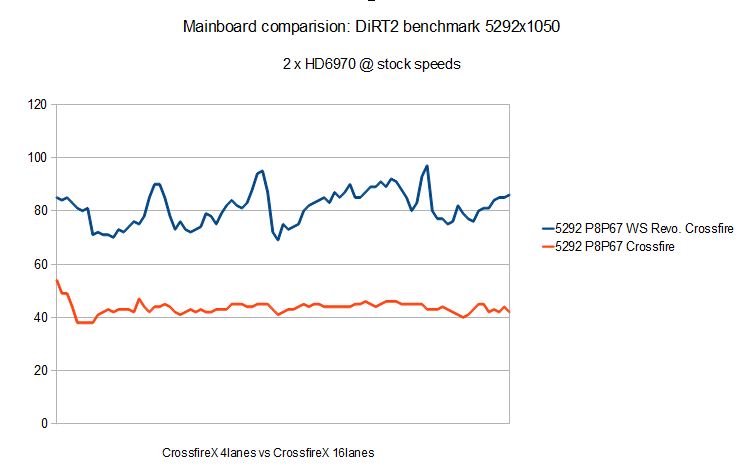
(FRAPS)
I wonder if nvidia cards have the same scaling? Post if you can prove it.
Different monitors by diff manufacturers? You have the money for crossfire and all but not for 3 monitors of the same brand.. come on, seriously STOP trolling Rebelstar.
I've had 2 5870s (2x16lanes crossfire M4A79 Deluxe), no stuttering
Now I've got 2 6970s, had the ASUS P8P67 which was horrible (2x4lanes crossfire) - bought the P8P67 WS Revolution with 2x16...AMAZING performance. The mainboard killed it all.
(FRAPS)
(FRAPS)
I wonder if nvidia cards have the same scaling? Post if you can prove it.
Different monitors by diff manufacturers? You have the money for crossfire and all but not for 3 monitors of the same brand.. come on, seriously STOP trolling Rebelstar.
Re: Enough ATI for me
I'm not trolling.
2 x 16 lanes? What about 5970 in the single PCIe slot? I had no stutter at all in Unigine Heaven 2.0 with almost 100% CF scaling and "incredible" stutter almost in every game I have tried. Just put in the search word "stutter" within this forum and you'll see - all this related to the AMD.
"In Fullscreen mode on a single monitor Crossfire works (I've monitored the GPUs so I'm sure it's working). It handles pretty well but still stutters here and there."
"The ATI driver issues and stutter/flickering is keeping me away from ATI"
and some links http://www.widescreengamingforum.com/forum/viewtopic.php?f=64&t=19629&hilit=stutter
3 monitors of the same brand? What If I had 1 monitor before, 1 got as gift and 1 bought myself. Or like this - I have expensive HP 24' IPS monitor and bought 2 extra cheap TN screens. There is a lot such examples and my question - why Nvidia software allows me to use bezel compensation for any kind of screen and AMD software not? Is there any 1 good reason to do this for AMD? See this topic how users hack EDID of their monitors to make bezel management working http://www.widescreengamingforum.com/forum/viewtopic.php?f=64&t=18597&start=0
And I'm 100% sure any AMD programmer in next CCC config can enable this like
bezelmanagementforall = 1
This is so pissing me off :evil:
I really want to buy 6990 and I like AMD but I'm jumping off this board cuz of: bezel management and microstutter because I can avoid all that bad stuff with Nvidia at least in BFBC2
2 x 16 lanes? What about 5970 in the single PCIe slot? I had no stutter at all in Unigine Heaven 2.0 with almost 100% CF scaling and "incredible" stutter almost in every game I have tried. Just put in the search word "stutter" within this forum and you'll see - all this related to the AMD.
"In Fullscreen mode on a single monitor Crossfire works (I've monitored the GPUs so I'm sure it's working). It handles pretty well but still stutters here and there."
"The ATI driver issues and stutter/flickering is keeping me away from ATI"
and some links http://www.widescreengamingforum.com/forum/viewtopic.php?f=64&t=19629&hilit=stutter
3 monitors of the same brand? What If I had 1 monitor before, 1 got as gift and 1 bought myself. Or like this - I have expensive HP 24' IPS monitor and bought 2 extra cheap TN screens. There is a lot such examples and my question - why Nvidia software allows me to use bezel compensation for any kind of screen and AMD software not? Is there any 1 good reason to do this for AMD? See this topic how users hack EDID of their monitors to make bezel management working http://www.widescreengamingforum.com/forum/viewtopic.php?f=64&t=18597&start=0
And I'm 100% sure any AMD programmer in next CCC config can enable this like
bezelmanagementforall = 1
This is so pissing me off :evil:
I really want to buy 6990 and I like AMD but I'm jumping off this board cuz of: bezel management and microstutter because I can avoid all that bad stuff with Nvidia at least in BFBC2
Re: Enough ATI for me
Well, I see your point then.
It looks like in your case you really HAVE to move onto Nvidia if you want to upgrade. No sarcasm intended.
I have no idea what's up with AMD and the lack of support for all these things. It feels like there are only a hand full of programmers for the drivers, if at all. I mean, in the CCC and for the Crossfire profiles...barely anything happens. (for example the new Crysis2 profile is useless in crossfire)
But it's not like I couldn't live with it. I'm in a different situation...without all the problems that you seem to have. :/
I know it sucks to have all these little problems that could be fixed so easily - little problems with huge effect.
"2 x 16 lanes? What about 5970 in the single PCIe slot?"
well I don't really know how good or bad the controller works on this card. I think I've seen videos on youtube 5970@BC2. It was horrible. However I haven't had SUCH problems using two 5870.
I think the 5970 in general isn't as flexible and good as two interdependent cards. That's why I would never buy a dual gpu card..ever.
A few weeks ago I had the choice to either wait a few days for the 6990, or get another 6970. I've chosen the 6970, and actually performance wise it's not worse and I can always disable/unplug one card.
 shameless show off :oops:
I think that way was much more fun doing that just getting a dual gpu card. ^^
It looks like in your case you really HAVE to move onto Nvidia if you want to upgrade. No sarcasm intended.
I have no idea what's up with AMD and the lack of support for all these things. It feels like there are only a hand full of programmers for the drivers, if at all. I mean, in the CCC and for the Crossfire profiles...barely anything happens. (for example the new Crysis2 profile is useless in crossfire)
But it's not like I couldn't live with it. I'm in a different situation...without all the problems that you seem to have. :/
I know it sucks to have all these little problems that could be fixed so easily - little problems with huge effect.
"2 x 16 lanes? What about 5970 in the single PCIe slot?"
well I don't really know how good or bad the controller works on this card. I think I've seen videos on youtube 5970@BC2. It was horrible. However I haven't had SUCH problems using two 5870.
I think the 5970 in general isn't as flexible and good as two interdependent cards. That's why I would never buy a dual gpu card..ever.
A few weeks ago I had the choice to either wait a few days for the 6990, or get another 6970. I've chosen the 6970, and actually performance wise it's not worse and I can always disable/unplug one card.
 shameless show off :oops:
I think that way was much more fun doing that just getting a dual gpu card. ^^

Re: Enough ATI for me
I have none of those problems. CrossFire + Eyefinity runs fine here. Using 3 identical Monitors, which all have DisplayPort.
Re: Enough ATI for me
Run a BFBC2 for example and take a video record.
Re: Enough ATI for me
I also get micro stutter on two 6950 with 16x2 lanes lanes
So ati does suck with crossfire was wondering if Nvidia 560 gtx sli 2gb would be better?
So ati does suck with crossfire was wondering if Nvidia 560 gtx sli 2gb would be better?
Re: Enough ATI for me
What should I record? I run BFBC2 daily and everything is fine...?
Re: Enough ATI for me
I also get micro stutter on two 6950 with 16x2 lanes lanes
if Nvidia 560 gtx sli 2gb would be better?
I still can't get exact answer if there any stutter with GTX560 SLI on 3 monitors.
-
Paradigm Shifter

- Editors

- Posts: 5706
- Joined: 14 Oct 2003, 13:52
Re: Enough ATI for me
[quote]I also get micro stutter on two 6950 with 16x2 lanes lanes
if Nvidia 560 gtx sli 2gb would be better?
I still can't get exact answer if there any stutter with GTX560 SLI on 3 monitors.
Well, I can't see micro-stutter on twin GTX460s, for what it's worth. :) Whether I just don't notice it or whatever, I dunno.
Re: Enough ATI for me
i feel that its a driver issue. so far i know that the new cards or even old 1s ... always missing some parts in drivers.
just recently i try to use a 32" LG LD450 ... the DVI to HDMI cable is buggy ... i just had a hunch its the drivers n yes it worked after an update ...
im nt surprised if its an issue of something not fixed in driver OR an overwritten driver problem. i had an issue with overwritten drivers before, i think AMD/ATI shud say with a warning that "catalyst ver xxx, 99% hardware ready, just install this. we will fix it again later" lol
i used Nvidia before too, but not the lastest ones, i have nightmares dealing with their overheating GPUs and failing fans. the older GPU do not tell you it is happily sterilizing your stuffs with a good fever. lol
in fact, just to share, i had a USB problem some time ago, and it fried my 5750 lol. how is that a connection huh? never fails to puzzle me.
just recently i try to use a 32" LG LD450 ... the DVI to HDMI cable is buggy ... i just had a hunch its the drivers n yes it worked after an update ...
im nt surprised if its an issue of something not fixed in driver OR an overwritten driver problem. i had an issue with overwritten drivers before, i think AMD/ATI shud say with a warning that "catalyst ver xxx, 99% hardware ready, just install this. we will fix it again later" lol
i used Nvidia before too, but not the lastest ones, i have nightmares dealing with their overheating GPUs and failing fans. the older GPU do not tell you it is happily sterilizing your stuffs with a good fever. lol
in fact, just to share, i had a USB problem some time ago, and it fried my 5750 lol. how is that a connection huh? never fails to puzzle me.
Re: Enough ATI for me
No stutter here. Bad Company 2, Dead Space 2, Half Life 2, no problems.
Tearing is a non-issue unless you're forcing V-Sync.
For me stutter is only noticeable when you already running at borderline unplayable res like 30 FPS.
Aside from ATI 5 series cards, which have known incurable problems with CF+EF, you cannot make dumb generalizations about any recent cards.
Tearing is a non-issue unless you're forcing V-Sync.
For me stutter is only noticeable when you already running at borderline unplayable res like 30 FPS.
Aside from ATI 5 series cards, which have known incurable problems with CF+EF, you cannot make dumb generalizations about any recent cards.
Who is online
Users browsing this forum: No registered users and 3 guests