
Eyefinity resolution not working on 5760x1200 but only 1920x1200 as highest setting (a wtf solution but fixed :-)

Hardware discussions about AMD Eyefinity
Post Reply
player-x
Posts: 5
Joined: 13 Sep 2011, 07:33

Eyefinity resolution not working on 5760x1200 but only 1920x1200 as highest setting (a wtf solution but fixed :-)

Post by player-x »

I reinstalled windows after my upgrade to a new SSD, but I cant set a Eyefinity resolution anymore, but only the standard native res of the monitor.

Have A i7 950, 6GB ram, 5870, tested all the hardware wits OCCT, Sandra, MemTest86+ and Furmark, and all looks ok.

As you can see I made a Eyefinity set.
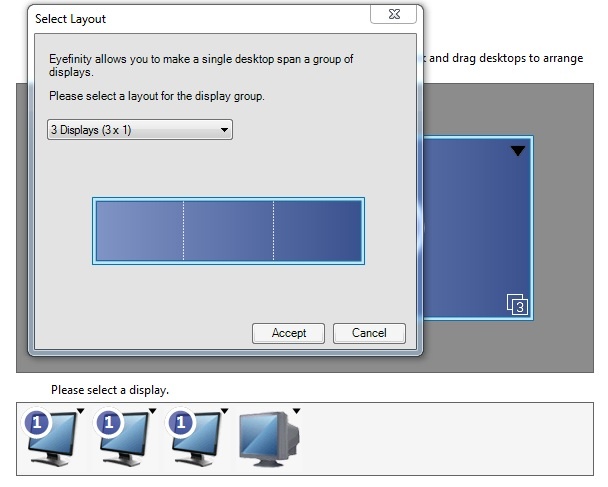


But if i go in to the Catalist or the Windows settings to set 5760x1200 resolution, the setting is not there.

As you can see only the standaard setings are there and no Eyefinity resolutions :'(

This worked perfectly before, but cant set it anaymore after the reinstall.
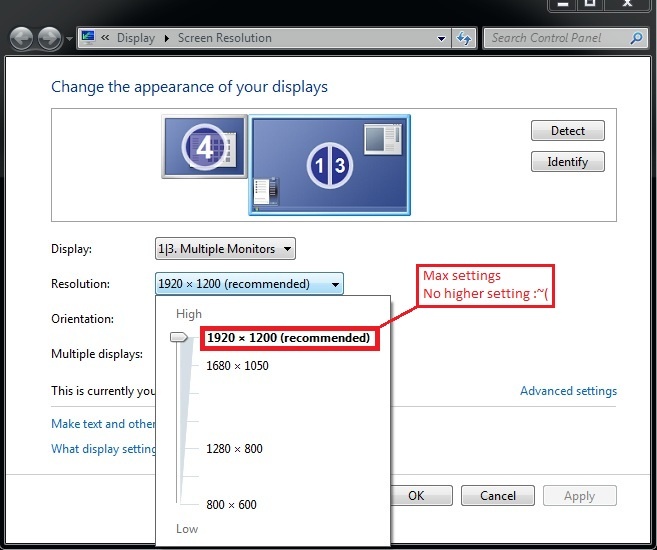


Tried everything from going back to Catalyst 10.3 (firs working driver I used) and 11.3 from six months a go till latest11.9.

Also used driver cleaner between installs to clean out all old settings from old driver installs

Pleas dose anyone seen this problem before, because its driving me nuts, and have done everything the way I use to use it. >_<
Dyre Straits
Posts: 210
Joined: 06 May 2010, 05:52

Completely disconnect your TV

Post by Dyre Straits »

Completely disconnect your TV [the 4th display] and see if you can get it to work.
~Windows 7 x64 Professional~MSI X58A-GD45~Intel I7-950~6x2 GB DDR3 1600 RAM (Triple Channel)~RealTek Onboard~XFX HD 6950 2 GB GDDR5~3 ViewSonic 24 inch LCDs in Eyefinity~SATA Dual Layer DVD RW~1000 W PSU~And a Whole Lot More!~Done with Vista~XP Pro on the way out, too!~AND....250 GB XBOX 360~
player-x
Posts: 5
Joined: 13 Sep 2011, 07:33

Cheers, this fixed it. was

Post by player-x »

Cheers, this fixed it. was looking AND not finding any solution. :rockout
Added the 4th monitor later to the system, for all my gadgets and icons, and to keep track of Vent, MSN and facebook shit, during gaming, as a extra screen is real handy for that!

This is defiantly one of those solution.

Kudos for the help :twothumb, I would have never found that one on my own, other then maybe by accident.
Dyre Straits
Posts: 210
Joined: 06 May 2010, 05:52

I had a very good hunch that

Post by Dyre Straits »

I had a very good hunch that that would do the trick. Enjoy!
~Windows 7 x64 Professional~MSI X58A-GD45~Intel I7-950~6x2 GB DDR3 1600 RAM (Triple Channel)~RealTek Onboard~XFX HD 6950 2 GB GDDR5~3 ViewSonic 24 inch LCDs in Eyefinity~SATA Dual Layer DVD RW~1000 W PSU~And a Whole Lot More!~Done with Vista~XP Pro on the way out, too!~AND....250 GB XBOX 360~
Post Reply

Who is online

Users browsing this forum: Bing [Bot] and 3 guests