
http://support.amd.com/us/gpudownload/Pages/index.aspx
Just pick your flavor. These are official now.
ATI 10.5 Drivers Up for Download
-
Dyre Straits
- Posts: 210
- Joined: 06 May 2010, 05:52
ATI 10.5 Drivers Up for Download
~Windows 7 x64 Professional~MSI X58A-GD45~Intel I7-950~6x2 GB DDR3 1600 RAM (Triple Channel)~RealTek Onboard~XFX HD 6950 2 GB GDDR5~3 ViewSonic 24 inch LCDs in Eyefinity~SATA Dual Layer DVD RW~1000 W PSU~And a Whole Lot More!~Done with Vista~XP Pro on the way out, too!~AND....250 GB XBOX 360~
Re: ATI 10.5 Drivers Up for Download
Well I just tried it.
Did not fix my Eyefinity issue with my dell/bizlink adapter. I'm going to return my bizlink adapter.
Did not fix my Eyefinity issue with my dell/bizlink adapter. I'm going to return my bizlink adapter.
-
spammeister
- Posts: 84
- Joined: 14 Nov 2009, 01:12
Re: ATI 10.5 Drivers Up for Download
I do not know how this compares to the 10.5beta from a while ago though.
-
Dyre Straits
- Posts: 210
- Joined: 06 May 2010, 05:52
Re: ATI 10.5 Drivers Up for Download
I do not know how this compares to the 10.5beta from a while ago though.
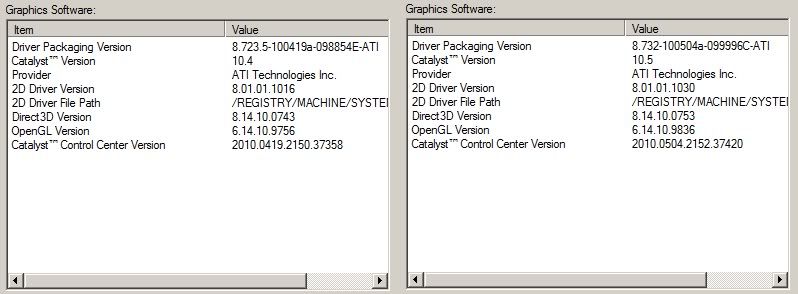
In your screenshots, look at the numbers:
In the 10.5beta drivers, begin at 100419 in the first line. Compare that with 100504 in the 10.5s. Those are the dates of the driver packaging and can be read as thus: 2010/04/19 vs. 2010/05/04, or April 19, 2010 vs. May 4, 2010.
Keep in mind that it takes ATI a few weeks to get the Microsoft certification for WHQL drivers. So, the driver dates will always precede the official release by at least a couple weeks or more.
~Windows 7 x64 Professional~MSI X58A-GD45~Intel I7-950~6x2 GB DDR3 1600 RAM (Triple Channel)~RealTek Onboard~XFX HD 6950 2 GB GDDR5~3 ViewSonic 24 inch LCDs in Eyefinity~SATA Dual Layer DVD RW~1000 W PSU~And a Whole Lot More!~Done with Vista~XP Pro on the way out, too!~AND....250 GB XBOX 360~
-
spammeister
- Posts: 84
- Joined: 14 Nov 2009, 01:12
Re: ATI 10.5 Drivers Up for Download
In your screenshots, look at the numbers:
In the 10.5beta drivers, begin at 100419 in the first line. Compare that with 100504 in the 10.5s. Those are the dates of the driver packaging and can be read as thus: 2010/04/19 vs. 2010/05/04, or April 19, 2010 vs. May 4, 2010.
Keep in mind that it takes ATI a few weeks to get the Microsoft certification for WHQL drivers. So, the driver dates will always precede the official release by at least a couple weeks or more.
OK, well I went from 10.4b's to 10.5WHQL, so neither of those screenies are the 10.5betas. I wouldn't ask a question to which the answer I already knew.
10.5's fixed:
Re-logging into a system after a Remote Desktop connection no longer results in "Catalyst Control Center is not supported..." warning message or the Graphics menu for Catalyst Control Center Advanced view to go missing.
Update - It doesn't fix the remote desktop problem! LIES DAMN LIES!
Re: ATI 10.5 Drivers Up for Download
Well, 10.5 is a no go for me. back to the same issue i had sense i got these cards back in the 9.10 drivers.
Was running the 10.3 drivers and the only problem I seemed to have was the issue with the cursor would turn into a line of dots. I had taken the advice of Dave and enabled pointer trails then set them to be short. That fixed that problem. or at least was a good work around. I never downloaded the 10.4 drivers. because I heard a lot of people were getting the flickering issue again . everything was fine. so i didn't download them .
Then I upgraded to some dell IPS panels with native DP. after doing so. I started getting to where my windows would flicker when I moved them around or would re size or scroll. the exsact same issue i had when I was running in extended mode in the 9.10- 9.11 drivers. So I figured it would be a good time to give the 10.4 drivers a try. Maybe that would get rid of the problem . Guess what........... it did.
but today. I thought I would try the 10.5 drivers. they should be getting better right.......... wrong! the same issue is back. windows flickering when resizing. scrolling or moving around. so i remove the 10.5 drivers clean out with driver sweep. and try again. same thing.
remove drivers and reinstall the 10.4 drivers. all better now.
This has got to be the worst experience I've ever had with GPU drivers. It just seems that for every one step forward its two steps back.
Come on ATI these cards have been out for a little while now. Ive had some minor game bugs. most of which I could live with. but these drivers are affecting my windows environment and others are having the same issues. can we get some of these other issues worked out now. Please
Was running the 10.3 drivers and the only problem I seemed to have was the issue with the cursor would turn into a line of dots. I had taken the advice of Dave and enabled pointer trails then set them to be short. That fixed that problem. or at least was a good work around. I never downloaded the 10.4 drivers. because I heard a lot of people were getting the flickering issue again . everything was fine. so i didn't download them .
Then I upgraded to some dell IPS panels with native DP. after doing so. I started getting to where my windows would flicker when I moved them around or would re size or scroll. the exsact same issue i had when I was running in extended mode in the 9.10- 9.11 drivers. So I figured it would be a good time to give the 10.4 drivers a try. Maybe that would get rid of the problem . Guess what........... it did.
but today. I thought I would try the 10.5 drivers. they should be getting better right.......... wrong! the same issue is back. windows flickering when resizing. scrolling or moving around. so i remove the 10.5 drivers clean out with driver sweep. and try again. same thing.
remove drivers and reinstall the 10.4 drivers. all better now.
This has got to be the worst experience I've ever had with GPU drivers. It just seems that for every one step forward its two steps back.
Come on ATI these cards have been out for a little while now. Ive had some minor game bugs. most of which I could live with. but these drivers are affecting my windows environment and others are having the same issues. can we get some of these other issues worked out now. Please

Re: ATI 10.5 Drivers Up for Download
Well my newly created, new profiles are seeming to load and arrange the screens properly in the first attempt. Yay. Switchign profiles also seems a bit faster, except when laoding my EF profiles - those still take about 20 seconds.
Other than that, I see no changes or differnce, but that;s been the case since 10.1.
A little off-topic, and i was hoping this would change with new drivers:
I use three 1920x120 screen, and I am able to force aspect scaling through CCC to get each one to proeprly display at 1920x1080. But whatever i do, i cannot get a 1080-high EF setup, even if i start with all displays at 1920x1080. Does anyone know how i can do this? I assume that since the call all, independently get to 1080,that it's possible, but i ]'m just missing something. I don;t NEED it, but it'd be nice for those graphics-heavy games to grab me a few extra frames per second.
Other than that, I see no changes or differnce, but that;s been the case since 10.1.
A little off-topic, and i was hoping this would change with new drivers:
I use three 1920x120 screen, and I am able to force aspect scaling through CCC to get each one to proeprly display at 1920x1080. But whatever i do, i cannot get a 1080-high EF setup, even if i start with all displays at 1920x1080. Does anyone know how i can do this? I assume that since the call all, independently get to 1080,that it's possible, but i ]'m just missing something. I don;t NEED it, but it'd be nice for those graphics-heavy games to grab me a few extra frames per second.
-
suiken_2mieu

- Insiders

- Posts: 2351
- Joined: 20 Aug 2009, 04:20
- Location: Virginia
- Contact:
Re: ATI 10.5 Drivers Up for Download
Well my newly created, new profiles are seeming to load and arrange the screens properly in the first attempt. Yay. Switchign profiles also seems a bit faster, except when laoding my EF profiles - those still take about 20 seconds.
Other than that, I see no changes or differnce, but that;s been the case since 10.1.
A little off-topic, and i was hoping this would change with new drivers:
I use three 1920x120 screen, and I am able to force aspect scaling through CCC to get each one to proeprly display at 1920x1080. But whatever i do, i cannot get a 1080-high EF setup, even if i start with all displays at 1920x1080. Does anyone know how i can do this? I assume that since the call all, independently get to 1080,that it's possible, but i ]'m just missing something. I don;t NEED it, but it'd be nice for those graphics-heavy games to grab me a few extra frames per second.
This happends because of how eyefinity works out the resolution solution. The only real way to get it, is to put in a 1080p panel. Or we could send ATI a bunch of nasty emails saying we want real custom resolution solutions with eyefinity or not.
System Core: | Intel Core i5-2500K + ASUS P8Z68-V + 16GB Corsair XMS3 DDR3 1333 MHz | Win7 x64 | MSI R7970 Lightning 3GB [1105/1400] |
Display: | 3 x Dell Ultrasharp 3007WFP-HC @ 7680x1600 | Dell u3011 |
Display: | 3 x Dell Ultrasharp 3007WFP-HC @ 7680x1600 | Dell u3011 |
-
spammeister
- Posts: 84
- Joined: 14 Nov 2009, 01:12
Re: ATI 10.5 Drivers Up for Download
10.5's fixed:
Re-logging into a system after a Remote Desktop connection no longer results in "Catalyst Control Center is not supported..." warning message or the Graphics menu for Catalyst Control Center Advanced view to go missing.
Update - It doesn't fix the remote desktop problem! LIES DAMN LIES!
OK, so it seems to have only done it the first time I logged in after installing the 10.5's, subsequent logins have not had that message pop up.
And that "video converter" program doesn't actually seem to want to convert any video I throw at it (not that I actually ever expected it to do anything at all, really).
-
Dyre Straits
- Posts: 210
- Joined: 06 May 2010, 05:52
Re: ATI 10.5 Drivers Up for Download
[quote]
10.5's fixed:
Re-logging into a system after a Remote Desktop connection no longer results in "Catalyst Control Center is not supported..." warning message or the Graphics menu for Catalyst Control Center Advanced view to go missing.
Update - It doesn't fix the remote desktop problem! LIES DAMN LIES!
OK, so it seems to have only done it the first time I logged in after installing the 10.5's, subsequent logins have not had that message pop up.
And that "video converter" program doesn't actually seem to want to convert any video I throw at it (not that I actually ever expected it to do anything at all, really).
The video converter has worked very well for me. In fact, even the latest FRAPS AVI files are able to be converted to whatever option I select.
~Windows 7 x64 Professional~MSI X58A-GD45~Intel I7-950~6x2 GB DDR3 1600 RAM (Triple Channel)~RealTek Onboard~XFX HD 6950 2 GB GDDR5~3 ViewSonic 24 inch LCDs in Eyefinity~SATA Dual Layer DVD RW~1000 W PSU~And a Whole Lot More!~Done with Vista~XP Pro on the way out, too!~AND....250 GB XBOX 360~
-
ViciousXUSMC

- Editors

- Posts: 1497
- Joined: 31 Jul 2006, 14:58
Re: ATI 10.5 Drivers Up for Download
I still have the two main issues i have with eyefinity. I get a corrupted cursor often. (have it right now) and I still have "the line" issue on one or two monitors and it prevents me from overclocking as overclocking makes it a lot worse.
I have not been gaming much of the late, but doing a ton of encoding and photoshop work and this corrupted cursor is the pits! my arrow looks like a giant black box right now. And it only happens on certain monitors, currently only center monitor has an issue, soon as I move the cursor to the other 2 monitors its perfect again.
Sadly I have gotten so used it I can use the bad cursors like normal almost because I dont like to restart my computer every time the issue comes up.
I have not been gaming much of the late, but doing a ton of encoding and photoshop work and this corrupted cursor is the pits! my arrow looks like a giant black box right now. And it only happens on certain monitors, currently only center monitor has an issue, soon as I move the cursor to the other 2 monitors its perfect again.
Sadly I have gotten so used it I can use the bad cursors like normal almost because I dont like to restart my computer every time the issue comes up.
Re: ATI 10.5 Drivers Up for Download
Have you enabled pointer trails in windows
-
tepescovir
- Posts: 293
- Joined: 14 Apr 2006, 19:06
Re: ATI 10.5 Drivers Up for Download
the 10.5 drivers broke vsync again for most games, so back to 10.4. i really cant understand how ati still has problems getting vsync to work after all these years
intel x79
2 way 780ti's under water
Intel 4760 extreme @ 4GHz
3 x 42 inch screens @5860x1080
16 gigs xmp ram @2200
2 way 780ti's under water
Intel 4760 extreme @ 4GHz
3 x 42 inch screens @5860x1080
16 gigs xmp ram @2200
-
ViciousXUSMC
- Editors
- Posts: 1497
- Joined: 31 Jul 2006, 14:58
Re: ATI 10.5 Drivers Up for Download
Have you enabled pointer trails in windows
Nope, I discovered that having it on is a temporary work around for the bug, however some games make the cursor invisible if they are on.
Re: ATI 10.5 Drivers Up for Download
I had that problem, too. That, and mousetrails bug the hell out of me.. I'd rather have the wonky cursors. Now that I've been using 10.5 for a bit, I can say that those wonky cursors come up much less than other versions.
Funny, I've seen improvements like that, and saved profile tweaks that are great, but I don't think I've had any drivers with performance improvements since the second post-5870 release.
Funny, I've seen improvements like that, and saved profile tweaks that are great, but I don't think I've had any drivers with performance improvements since the second post-5870 release.
-
Unknownsock
- Posts: 110
- Joined: 01 Jun 2009, 23:36
Re: ATI 10.5 Drivers Up for Download
the 10.5 drivers broke vsync again for most games, so back to 10.4. i really cant understand how ati still has problems getting vsync to work after all these years
Just use D3Doverrider that comes with Rivatuner, never had any triple buffering and V-sync problems since.
The only way i was able to get 10.5 drivers to install was by using Driver sweeper. Even rolling back didnt work. All my FPS was capped at 20-30 in almost every game..
That corrupt cursor is annoying too, I've seen it pop up alot since i installed these, only happened several times with 10.4. I used to be able to just switch my monitors on and off and it would fix it.

Re: ATI 10.5 Drivers Up for Download
I get a corrupted cursor often.
I get this, too. After playing games, sometimes my cursor on one of the monitors is corrupted. Mostly when playing BFBC2. I had less problems with this bug with Cat 10.4. The cursor used to repair itself after some time.
Re: ATI 10.5 Drivers Up for Download
I am not able to make a monitor group using miniDP->DP-VGA adapter->VGA which was correct in 10.5 beta, eventhough 1600x900x3 an not fullHD because of this adapter I suppose.
Waitting for Accell to arrive
Waitting for Accell to arrive
Re: ATI 10.5 Drivers Up for Download
[quote] I get a corrupted cursor often.
I get this, too. After playing games, sometimes my cursor on one of the monitors is corrupted. Mostly when playing BFBC2. I had less problems with this bug with Cat 10.4. The cursor used to repair itself after some time.
I get that as well. Sometimes I am playing Aion, sometimes I am just on desktop. The cursor will restore iteself within short order without me doing anything that I can tell. Wierd stuff.
Who is online
Users browsing this forum: No registered users and 1 guest