Diablo II

Detailed breakdowns of how games react to widescreen, ultra-wide, 4k and multi-mon
mfuhreck
Posts: 5
Joined: 28 May 2009, 23:09

Diablo II

Post by mfuhreck »


Widescreen Grade: C
Multi-monitor Grade: C

Read Full Detailed Report - Diablo II

Diablo II is an RPG from Blizzard, sequel to classic smash hit Diablo. You play as one of seven classes, and must complete a series of quests, culminating in the destruction of Diablo, the lord of terror, his brothers, and a couple thousand demonic minions along the way.


Last edited by mfuhreck on 27 Mar 2013, 13:12, edited 1 time in total.
Reason: Edit
User avatar
skipclarke
Founder
Founder
Posts: 7358
Joined: 13 Oct 2003, 05:00

Diablo II: Detailed report

Post by skipclarke »

Thanks for the help on this one. Will need to get a DR from someone (hint, hint). And note, while this is great for solo play. It will probably get you booted form Battle.Net.
User avatar
skipclarke
Founder
Founder
Posts: 7358
Joined: 13 Oct 2003, 05:00

Diablo II: Detailed report

Post by skipclarke »

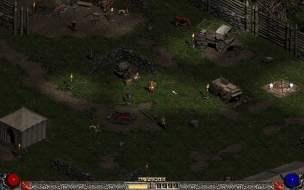
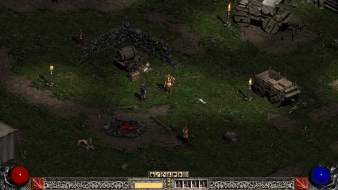
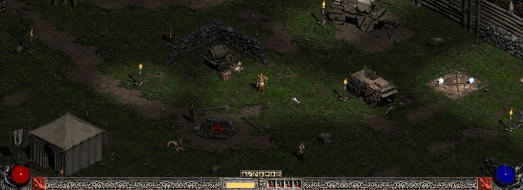
mfuhreck sent me some pics.

800x600


1280x1024


1280x720


The game appears pixel based to me. Would love to see this in Wide Surround. May have to pick this up from Amazon. Never did finish it.
User avatar
skipclarke
Founder
Founder
Posts: 7358
Joined: 13 Oct 2003, 05:00

Diablo II: Detailed report

Post by skipclarke »

The FileFront link died. I found it on another site, and hosted it here:

http://www.widescreengamingforum.com/downloads/D2MultiRes-v102.zip
User avatar
Paradigm Shifter
Editors
Editors
Posts: 5706
Joined: 14 Oct 2003, 13:52

Diablo II: Detailed report

Post by Paradigm Shifter »

I had some fairly serious texture corruption issues when trying this using DirectX support rather than software. Haven't tried it with the latest Catalyst drivers yet, though.

Still, it was fun to play Diablo 2 again in a res other than 800x600 or 640x480.

edit:

Got a PM that might have a solution for that texture corruption I mentioned...

Did you have catalyst AI on? It screws up textures in many older games.

Ah, yes, I did. I need Cat AI on otherwise Crossfire doesn't work.

Interesting. I'll give it a shot with it off and see what happens.

Thanks to Stormwatcher for the possible fix there! :D
stubbie
Posts: 4
Joined: 26 Mar 2008, 09:30

Diablo II: Detailed report

Post by stubbie »

This is the link I found the mod at before I even tried coming to WSGF: http://hellforge.gameriot.com/blogs/Hellforge/Play-Diablo-II-In-High-Resolution

I just wanted to say that the mod works fine for me.
I have a ATI HD4870 and my monitor is 22" 1680x1050.
I am using XP SP2.

I have to run it in DirectDraw because I get terrible artifacts in DirextX. I tried disabling Catalyst AI as you suggested but that didn't fix it.

But it works great in DirectDraw anyway.
The fps get locked at 25 but that is due to the way the game is coded. But at that fps it is very playable and I have had no slowdowns at all. And that was all through act 1.
The_cranky_hermit
Insiders
Insiders
Posts: 3010
Joined: 07 Nov 2005, 04:16

Diablo II: Detailed report

Post by The_cranky_hermit »

==Game Information==

Diablo II is an RPG from Blizzard, sequel to classic smash hit Diablo. You play as one of seven classes, and must complete a series of quests, culminating in the destruction of Diablo, the lord of terror, his brothers, and a couple thousand demonic minions along the way.


==Version==

Based on version 1.12, with Lord of Destruction.


==Method==

Do NOT attempt to play Battle.Net this way. You risk a ban!

Download a mod, D2MultiRes. Extract it to your game directory, and launch using D2MultiResGame.exe. Once you start a game, there will be a new "resolution" option in the video options menu. Select it, and resolutions above 800x600 will be available.

The readme warns that you may get bad graphics glitches in Direct3D mode. I did, myself.


But when I switched to DirectDraw 2D mode, it worked just fine. You can set this by running D2VidTst.exe. Sadly, DirectDraw 2D disables parallax scrolling and other visual effects.


==Screen change==

Pixel based.

800x600


1280x720


1680x1050


1920x1200


==Supported resolutions==

Every resolution I tested worked.
Confirmed: 1280x720, 1280x768, 1280x800, 1440x900, 1680x1050, 1920x1080, and 1920x1200

I wouldn't recommend playing above 1680x1050, as it makes everything very small.


==Singleplayer anomalies==

Lacking Direct3D mode is a pretty big one. But everything else seems fine.

Side-screens like inventory retain their original size, but take up half the screen with a tiled background (they originally took up half a 640x480 screen without needing any tiled background).


==Multiplayer support==

Considered unsupported, due to the risk of banning.


==Aspect ratio support==

Screen change is pixel based, and does not regard aspect ratio.


==HUD stretch==

The HUD keeps its original size, with the life/mana spheres anchored to the corners, and the stamina and potions anchored to the bottom-center. And the map is pixel based.


==Cut-scenes==

FMVs run at 640x480, but are hard-letterboxed to a theatrical 2.20:1. This means windowboxing on wide monitors.


==Surround==

Supported natively, pixel-based.

1680x1050


1920x698:


==Grading==

Calculated grade: D

Hack solution is a damaging flaw.

CCE: 100%

taniniver
Posts: 6
Joined: 30 Nov 2007, 21:48

Re: Diablo II: Detailed report

Post by taniniver »

This patch doesn't work for me. I extracted it into the Diablo 2 folder (all 4 files in the archive) but when trying to load I get an error window -

ERROR: Unable to load D2MultiRes.dll. Exiting Diablo II...

The log file generated contains the following text:

Loading D2MultiRes v1.02
Enumerating Display Modes...
Added Display Mode: 10: 640 x 480
Added Display Mode: 11: 720 x 480
Added Display Mode: 12: 720 x 576
Added Display Mode: 13: 800 x 600
Added Display Mode: 14: 1024 x 768
Added Display Mode: 15: 1152 x 864
Added Display Mode: 16: 1280 x 720
Added Display Mode: 17: 1280 x 768
Added Display Mode: 18: 1280 x 800
Added Display Mode: 19: 1280 x 960
Added Display Mode: 20: 1280 x 1024
Added Display Mode: 21: 1360 x 768
Added Display Mode: 22: 1600 x 900
Added Display Mode: 23: 1600 x 1024
Added Display Mode: 24: 1600 x 1200
Added Display Mode: 25: 1680 x 1050
Added Display Mode: 26: 1920 x 1080
Added Display Mode: 27: 1920 x 1200
Added Display Mode: 28: 1920 x 1440
Added Display Mode: 29: 2048 x 1536
Added Display Mode: 30: 2560 x 1600
Enumeration Complete: 21 Display Mode(s) Found...
Loading DLL File: D2Client.dll
Loading DLL File: D2GFX.dll
Loading DLL File: D2GDI.dll
Loading DLL File: D2Common.dll
Loading DLL File: D2CMP.dll
Loading DLL File: Fog.dll
Loading DLL File: D2Win.dll
Loading DLL File: Storm.dll
Loading DLL File: D2DDraw.dll
Loading DLL File: D2Direct3D.dll

I'm playing on Windows 7 x64, in case that makes any difference.
The_cranky_hermit
Insiders
Insiders
Posts: 3010
Joined: 07 Nov 2005, 04:16

Re: Diablo II: Detailed report

Post by The_cranky_hermit »

Do you have LoD installed?
taniniver
Posts: 6
Joined: 30 Nov 2007, 21:48

Re: Diablo II: Detailed report

Post by taniniver »

Yes, though I just noticed the initial post mentions version 1.12, and I'm on 1.13. Perhaps it doesn't work with the latest version.

I was trying it in single player.
austenwink
Posts: 3
Joined: 05 May 2010, 08:47

Re: Diablo II: Detailed report

Post by austenwink »

I have this exact same problem. Please help. Version 1.13 LOD expansion installed.
The_cranky_hermit
Insiders
Insiders
Posts: 3010
Joined: 07 Nov 2005, 04:16

Re: Diablo II: Detailed report

Post by The_cranky_hermit »

I haven't downloaded 1.13 yet, though I don't see why it wouldn't work with it.
User avatar
DaFox
Posts: 2356
Joined: 14 Nov 2006, 15:48

Re: Diablo II: Detailed report

Post by DaFox »

I haven't downloaded 1.13 yet, though I don't see why it wouldn't work with it.


It's a hack, it has a bunch of memory offsets etc that have changed with the new patch. I'm pretty sure that it does not work with it.

That being said they did add more resolution support with 1.13 which is absolutely horrible. It just scales it up, Pixels and all. And widescreen is just stretch.
anamaniac
Posts: 3
Joined: 07 Mar 2010, 02:48

Eyefinity time!

Post by anamaniac »

I think I'm about to load up D2 again and test 6144x1152. :)
mfuhreck
Posts: 5
Joined: 28 May 2009, 23:09

Re: Diablo II: Detailed report

Post by mfuhreck »

Try running Direct3d again, this time turn off persepective in the options. It fixes pretty much all the glitches, and direct3d look far superior.
anamaniac
Posts: 3
Joined: 07 Mar 2010, 02:48

Re: Diablo II: Detailed report

Post by anamaniac »

I can only get full screen working if I stick to a single monitor resolution (2048x1152). Once I go for anything wider, it crashes.
I can run any resolution in windowed mode though. However I can't run any decent resolution because windows forces half of the belt under my screen, to fix it it'd have to know how to get rid of the top window bar.

I wish Blizzard would make this official. :(
I get it's for competitive reasons they decided to cap the resolution, but common, its been 10 years.
lobski
Posts: 93
Joined: 17 Apr 2008, 09:36

Re: Diablo II: Detailed report

Post by lobski »

Perhaps somebody can help me, has anyone found a way to get rid of the 25FPS cap? This make the mouse laggy and simulations input lag. I've written on this on many forums, with no workaround.
User avatar
suiken_2mieu
Insiders
Insiders
Posts: 2351
Joined: 20 Aug 2009, 04:20
Location: Virginia
Contact:

Re: Diablo II: Detailed report

Post by suiken_2mieu »

I can only get full screen working if I stick to a single monitor resolution (2048x1152). Once I go for anything wider, it crashes.
I can run any resolution in windowed mode though. However I can't run any decent resolution because windows forces half of the belt under my screen, to fix it it'd have to know how to get rid of the top window bar.

I wish Blizzard would make this official. :(
I get it's for competitive reasons they decided to cap the resolution, but common, its been 10 years.

Have you tried making a special shortcut in ultramon?
System Core: | Intel Core i5-2500K + ASUS P8Z68-V + 16GB Corsair XMS3 DDR3 1333 MHz | Win7 x64 | MSI R7970 Lightning 3GB [1105/1400] |
Display: | 3 x Dell Ultrasharp 3007WFP-HC @ 7680x1600 | Dell u3011 |
austenwink
Posts: 3
Joined: 05 May 2010, 08:47

Re: Diablo II: Detailed report

Post by austenwink »

I know this is old hat. But has anyone been able to make the Multires hack to work with version 1.13.
theGlasswalker
Posts: 1
Joined: 12 Mar 2012, 01:29

I know it has been a while

Post by theGlasswalker »

I know it has been a while since this thread has been active, but I was wondering if anyone knew why I can't get the resolution up to 1920x1080. The max I have the option of going is 1680x1050.
Post Reply

Who is online

Users browsing this forum: No registered users and 8 guests