Widescreen Gaming Forum

[-noun] Web community dedicated to ensuring PC games run properly on your tablet, netbook, personal computer, HDTV and multi-monitor gaming rig.
It is currently 12 Jul 2026, 09:43

All times are UTC [ DST ]


Post new topic Reply to topic  [ 22 posts ]  Go to page Previous  1, 2, 3, 4, 5, 6 ... 22  Next
Author Message
PostPosted: 04 Aug 2015, 00:41 
Offline

Joined: 03 Aug 2015, 22:44
Posts: 15
Thank you my friend for your answer, but I can ashore you that this is a 1.2 cable here's the link of it http://www.chiptec.net/acessorios-diver ... l?___SID=U


Top
 Profile  
Reply with quote  
PostPosted: 04 Aug 2015, 10:38 
Offline

Joined: 03 Aug 2015, 22:44
Posts: 15
You can see all the specs here

https://www.asus.com/ROG-Republic-Of-Ga ... OG_G750JX/

they say 1 mini-displayport and 1 Thunderbolt, but has you can see in the screenshot, they are in the same place


Attachments:
Asus G750JX thunderbolt.jpg
Asus G750JX thunderbolt.jpg [ 131.24 KiB | Viewed 10084 times ]
Top
 Profile  
Reply with quote  
PostPosted: 04 Aug 2015, 12:48 
Offline
Insiders
Insiders
User avatar

Joined: 31 Mar 2011, 02:10
Posts: 244
From the testing you've described it doesn't sound like an issue with the cable or the monitor, it's an issue with the laptop, as skipclarke suggested. Perhaps the GPU or motherboard only uses a 1.1 Displayport, which wouldn't be able to drive a 2560x1440 display at 144 Hz.

One thing that you could try to test further is lowering the resolution and seeing if higher refresh rates become available. If so, that would confirm that the laptop's displayport simply can't drive the full resolution and full refresh rate of your monitor.

If that's the case, you'd be better off returning the monitor and getting one with a lower resolution if you still want to hit 144 Hz.


Top
 Profile  
Reply with quote  
PostPosted: 04 Aug 2015, 12:50 
Offline

Joined: 03 Aug 2015, 22:44
Posts: 15
i have tried that my friend, in all resolutions 85Hz is the Max.

Thanks for your answer my frend


Top
 Profile  
Reply with quote  
PostPosted: 04 Aug 2015, 14:27 
Offline
Administrators
Administrators
User avatar

Joined: 27 Dec 2009, 14:27
Posts: 1789
:welcome
I see you have also posted here about your issue:-
http://www.monitortests.com/forum/Threa ... e?pid=4287
https://forums.geforce.com/default/topi ... /?offset=2
https://rog.asus.com/forum/showthread.p ... Hz-Problem

The monitor does confirm that it is DisplayPort 1.2 compatible.

Looking into the laptop in more detail I read that it sports a Nvidia GTX-770M GPU, a chipset which is compatible and has been issued with the Displayport 1.2 connectivity.
According the the Nvidia site the GT-770M GPU chipset is able to drive 3840x2160 resolution, although it does not state at what refresh rate, according to my bandwidth calculator tool 3840x2160@85hz would be possible over Displayport 1.2.


The cable you purchased does not specify if it is DP 1.2 compatible, however it does state that it is a plain DisplayPort cable type.

Quote:
There are a few Reduced Bit Rate (RBR) cables on the market that will support only up to 1080p, but these are generally restricted to projector installation applications. Unless the cable is identified as RBR, it is a standard DisplayPort cable and will support all DisplayPort configurations.

Despite what you may read, there is no such thing as a DisplayPort 1.1 cable and DisplayPort 1.2 cable. A standard DisplayPort cable, including the so-call DisplayPort 1.1 cables, will work for any DisplayPort configuration including the new capabilities enabled by DisplayPort 1.2, including 4K and multi-stream capabilities. All standard DisplayPort cables support RBR, HBR (High Bit Rate), and HBR2 (High Bit Rate 2), which can support 4K at 60Hz, or up to four 1080p displays using multi-stream.

~snip

An important criterion for selecting a DisplayPort cable is to know which type of DisplayPort connector you need at each end. The other obvious criterion is cable length; they are generally available in lengths of 1 to 3 meters (up to about 10 feet).

As mentioned previously, it is important to avoid low quality DisplayPort cables to prevent unexpected video or audio problems, and sometimes even system power-up problems. Always buy cables from a reputable computer system or accessory brand. Or safer yet, buy a cable that is DisplayPort certified. DisplayPort certified cables are listed here.

Recently VESA has experienced quite a few complaints regarding troublesome DisplayPort operation that ended up being caused by improperly made DisplayPort cables. These “bad” DisplayPort cables are generally limited to non-DisplayPort certified cables, or off-brand cables. To further investigate this trend in the DisplayPort cable market, VESA purchased a number of non-certified, off-brand cables and found that an alarmingly high number of these were configured improperly and would likely not support all system configurations.
-Source

DisplayPort 1.2 transmits data using the HBR2 mode.

To be able to drive 2560x1440@144hz you require 12.74Gbit/s of bandwidth, something of which only displayport 1.2 will handle.

Displayport 1.2 has a recommended maximum cable length of 3 meters, which your 2 meter cable is of cause inside of this maximum.


Given the feedback you have provided over your various posts I would conclude that the issue could be with an Nvidia driver or the unbranded cable you have purchased.

Please ensure you have installed the latest nvidia drivers provided by Asus for your laptop - http://dlcdnet.asus.com/pub/ASUS/nb/Dri ... 133788.zip

If this continues to be an issue then please try with an alternative brand displayport cable.

Good luck!

_________________
| Gigabyte X79S-UP5-WiFi Skt2011 | i7 4820k @4.4GHz Watercooled (Ivy Bridge-E) | Corsair Vengence 32GB @2133MHz 11-11-11-27 2T Quad-Channel (8x4GB) | AMD R9-Fury-X 4GB @1140/505MHz + EKWB Watercooled | 256GB Crucial MX200 SSD | 8x 1TB Samsung F3 SATA-II | Corsair 850W TX PSU | 3x Dell S2209W 22"wide TFT's (5760x1080res) | Logitech Z-5400 5.1ch speakers | Win7 Ultimate x64 |


Top
 Profile  
Reply with quote  
PostPosted: 04 Aug 2015, 14:35 
Offline

Joined: 03 Aug 2015, 22:44
Posts: 15
Thank you very much my friend for your kind answer

has you might understand, i think that in different forums are different people with other knowledges, but i had no luck in 2 weeks, from talking to Nvidia, Asus, and some forums, but i really really thank you for your attention.

I´m going for the new cable, http://www.amazon.co.uk/dp/B00A7R9I22/r ... 71_TE_item , i talked do accell, and from the displayport.org, they say it´s certified displayport cable.

So when it get´s here, i will feedback my friend.

Thank you very very much for your analysis and your kind answer.


Top
 Profile  
Reply with quote  
PostPosted: 04 Aug 2015, 15:04 
Offline
Founder
Founder
User avatar

Joined: 13 Oct 2003, 05:00
Posts: 7358
Al_Jourgensen wrote:
You can see all the specs here

https://www.asus.com/ROG-Republic-Of-Ga ... OG_G750JX/

they say 1 mini-displayport and 1 Thunderbolt, but has you can see in the screenshot, they are in the same place


Personally, I think it is the output on the laptop. The specs page you link to (same one I found), only describes it as "mini DisplayPort" and "Thunderbolt". Based on this, I would assume it is the original "Thunderbolt (1)" and not the newer Thunderbolt 2.

According to the Wikipedia page, Thunderbolt 2 added support for 20Gbit/s and DP 1.2.

https://en.wikipedia.org/wiki/Thunderbolt_(interface)#Controllers


Top
 Profile  
Reply with quote  
PostPosted: 04 Aug 2015, 18:56 
Offline

Joined: 03 Aug 2015, 22:44
Posts: 15
But it can't be the output or else I couldn't reach the 144Hz on the VG248QE, and play in 3D, don't you think this is strange? I get the 60, 120, and 144Hz, in the VG, in this one I only get 85Hz top, and the 100Hz appears after I try to create it,without success, because I get a black screen, and then when the image comes, the 100Hz option appears, also 120hz I get a black screen, but in this case I have to force the restart, or I don't see nothing, the 144Hz also works, but doesn't stay costumized in the NVCP. The PG278Q it's not thunderbolt 2, it's like the VG , only with more better quality and higher resolutions.


Top
 Profile  
Reply with quote  
PostPosted: 04 Aug 2015, 19:29 
Offline
Founder
Founder
User avatar

Joined: 13 Oct 2003, 05:00
Posts: 7358
It is strange. But the VG248QE was only 1920x1080, where as the PG278Q is 2560x1440. 1080p is 2,073,600 pixels, while 1440p is 3,686,400. That is 1.78x more pixels. You need 78% more bandwidth to hit 144Hz on the PG278Q.

Do you know someone with a desktop card with DP 1.2 that you could use to test the monitor and cable?


Top
 Profile  
Reply with quote  
PostPosted: 04 Aug 2015, 20:07 
Offline

Joined: 03 Aug 2015, 22:44
Posts: 15
I already test it in a store, i took my notebook there and the result was the same, in PG278Q, that was connected with the cable that he broughts, to a ROG tower, with a GTX980, they only said that they hooked it up, and didn't even install nothing, not even a driver, i plug mine in with my cable and same result, i couldn´t test with other cable, because here (Portugal) the DP tech it´s unnoticed, nobody knows what a DP is, i always have to buy them out of the country, or in some Portuguese stores, but they don´t know anything about this tech.

unfortunately i´m on my own....so i´m going to try a new cable (Lenovo...) tomorrow, and see what is going to happen

I think that if my card GTX 770M, was not suitable, Nvidia already would told me that, and don´t even bother to find a solution, in Nvidia web the card is compatible, and Asus as well would warn me about the compatibility, i read in some forums, users that are satisfied with it, and have it hooked up to a tower, but in that case the DP cable is different.


EDIT:-
and really, this is a real frustrating situation, i have my mind melted because of this, and because being all day, since the last 2 weeks, reading constantly forums, or possible solutions, and none of them says that could be the Nvidia Card, or the DP input being incompatible, even if not having the G-Sync tech in the card, the display should work has the other normal 3D displays.


EDIT:-
see this specs http://www.geforce.com/hardware/noteboo ... ifications its suitable


Top
 Profile  
Reply with quote  
PostPosted: 05 Aug 2015, 11:18 
Offline
User avatar

Joined: 11 Jun 2014, 02:54
Posts: 76
Al_Jourgensen wrote:
But it can't be the output or else I couldn't reach the 144Hz on the VG248QE, and play in 3D, don't you think this is strange? I get the 60, 120, and 144Hz, in the VG, in this one I only get 85Hz top, and the 100Hz appears after I try to create it,without success, because I get a black screen, and then when the image comes, the 100Hz option appears, also 120hz I get a black screen, but in this case I have to force the restart, or I don't see nothing, the 144Hz also works, but doesn't stay costumized in the NVCP. The PG278Q it's not thunderbolt 2, it's like the VG , only with more better quality and higher resolutions.


It is almost assuredly an issue with the monitors scaler unit and/or driver level support. If you have used the same output, and the same cable on a different monitor and had it running at 1440p @144Hz that is the only thing left in the line it can be. Reading this you have obviously spent a great deal of time and tried a great many things. The only thing I would offer is going into the monitors settings and turning GSYNC off. That ought to let it be a little more liberal when setting a resolution and refresh rate. You might also need to go into NVCP and disable GSYNC altogether in the Manage 3D settings tab. The specs for GSYNC are so very specific and have little to no play, also the mobile chips use a totally different type of GSYNC that is entirely driver based. Which is why laptops with GSYNC aren't required to have dedicated hardware, while the displays that are made with a desktop graphics SKU in mind must have that custom Nvidia scaler unit. It might just flat out be an incompatible configuration. Nvidia is so damn finicky with the type of things they implement. Even if the hardware is more than capable of handling it they often still won't let it slide. They have some serious control freaks in R&D and the higher levels of management. All that said as far as I'm concerned they are still the better of the two evils, but that is mostly bias coming from the configurations I tend to typically use, mixed with a moderate amount of years worth of vitriol and disappointment from they who shall not be named. I am sorry if this has already been stated by someone but I am exhausted and started skimming halfway down the thread. Anyways good luck.


Top
 Profile  
Reply with quote  
PostPosted: 05 Aug 2015, 11:43 
Offline

Joined: 03 Aug 2015, 22:44
Posts: 15
Thank you my friend for your kind answer, shore is exhausting....you can imagine....the thing is, that in my NVCP, i don´t have the G-Sync option, only the V-Sync, so i can´t change that unfortunately......regarding the disable of G-Sync in the display, it´s a no can do, it doesn't have that option on the control panel of the display......but i really appreciate your concern, and really really thank you for you reply.


Top
 Profile  
Reply with quote  
PostPosted: 05 Aug 2015, 14:31 
Offline
Administrators
Administrators
User avatar

Joined: 27 Dec 2009, 14:27
Posts: 1789
So I looked more into the chipsets used.
Although as previously posted the GPU chipset supports DP1.2, however it would seem that the thunderbolt chipset is that of thunderbolt v1 (10Gbit/s max throughput).

Thunderbolt is essentially Displayport but with additional PCI-E lanes mapped.

This means the PCI-E lanes and the DP video signal are routed into the thunderbolt chipset and this is likely where the bottleneck is happening as Thunderbolt v2 runs at a 20Gbit/s throughput which is suffcient for DP1.2 which can use up to 17.28Gbit/s.

As such I am with Skipclarke on this one, that it certainly does appear to be the thunderbolt port that is running at a slower revision and is therefore unable to support the 2560x1440@144 resolution/refresh.

The VG248QE running at 1920x1080@144 = 7.17Gbit/s
The PG278Q running at 2560x1440@144 = 12.74Gbit/s

It is entirely possible to run the VG248QE at 144hz via VGA/DVI-D Dual Link/HDMI1.3+/DisplayPort1.1+ - all within the bandwidth limitations of the thunderbolt port on your laptop.
The PG278Q will only run at the native resolution and refresh rate when used with DisplayPort1.2

Using DP1.1, running the PG278Q at a native resolution of 2560x1440, the maximum refresh rate bandwidth would allow you is 97hz, which is of cause a non standard rate so it jumps to 85hz.
Using DP1.1 running the PG278Q at the maximum refresh rate of 144hz, the maximum 16:9 aspect ratio resolution would be approximately 2107x1185 which is a non standard resolution and is not devisable by 8, thus scaling this up to 2560x1440 would not look great, as it is a non standard resolution the next offcial 16:9 standard is 1920x1080.

So you may run the display at:-
2560x1440@60hz
OR
1920x1080@144hz

If you see below, the following signal types support the following bandwidths...

VGA or DVI-A = 6.4 Gbit/s (400 MHz)
DVI-D = 3.96 Gbit/s (165 MHz)
DVI-D Dual Link = 7.92 Gbit/s (330 MHz)
HDMI v1.0/1.1/1.2 = 3.96 Gbit/s (165 MHz)
HDMI v1.3/1.4 = 8.16 Gbit/s (340 MHz)
DisplayPort v1.0/1.1 = 8.64 Gbit/s (360 MHz)
DisplayPort v1.2 = 17.28 Gbit/s (720 MHz)

_________________
| Gigabyte X79S-UP5-WiFi Skt2011 | i7 4820k @4.4GHz Watercooled (Ivy Bridge-E) | Corsair Vengence 32GB @2133MHz 11-11-11-27 2T Quad-Channel (8x4GB) | AMD R9-Fury-X 4GB @1140/505MHz + EKWB Watercooled | 256GB Crucial MX200 SSD | 8x 1TB Samsung F3 SATA-II | Corsair 850W TX PSU | 3x Dell S2209W 22"wide TFT's (5760x1080res) | Logitech Z-5400 5.1ch speakers | Win7 Ultimate x64 |


Top
 Profile  
Reply with quote  
PostPosted: 05 Aug 2015, 15:21 
Offline

Joined: 03 Aug 2015, 22:44
Posts: 15
Thank you my friend for your kind answer, i appreciated the effort, and seems reasonable, but i have the mini Displayport 1.2, beside this, he shares it with the thunderbolt that delivers data and graphics via one connection and cable at up to 10Gbit/s, so i guess you are right regarding the thunderbolt, but the mini displayport 1.2, he is in the same port, there i have my doubts, because if it is 1.2, it should get there.

but your are totally right, i don´t know why Nvidia or Asus don´t mention this, and still are looking for solutions...


EDIT:-
I only have one doubt, why can I create the 144Hz refresh rate at 2560 with the NVCP, saying yes, and then the thing is that everything I create doesn't appear on NVCP. Could it be because of that? And when i lower the resolution to 1980, why he makes the same thing?


EDIT:-
Can someone tell me if there is any software to test the port?


Top
 Profile  
Reply with quote  
PostPosted: 05 Aug 2015, 19:15 
Offline
Administrators
Administrators
User avatar

Joined: 27 Dec 2009, 14:27
Posts: 1789
Sadly I am not familiar with any software that can display the displayport version, however it should be possible to trace down the model number of the chipset that is used, using this one can then look at the spec sheet of the chipset and see what it is capable of.


You can find a list of the various ThunderBolt chipsets here.. http://ark.intel.com/compare/65995,6600 ... 1880,78941
These are all the intel thunderbolt v1 chipsets, which you will notice that those that support DP, support DP1.1

I am unable to find any information to which exact chipset is used in your laptop other than a few statements about it supporting 10Gb/s transfer.

I suspect you may have the Intel DSL3210 Eagle Ridge chipset, which can be picked up cheap ~$10 and was a very common chipset used.

Here you can see how the DisplayPort signal is routed through the Thunderbolt chipset.
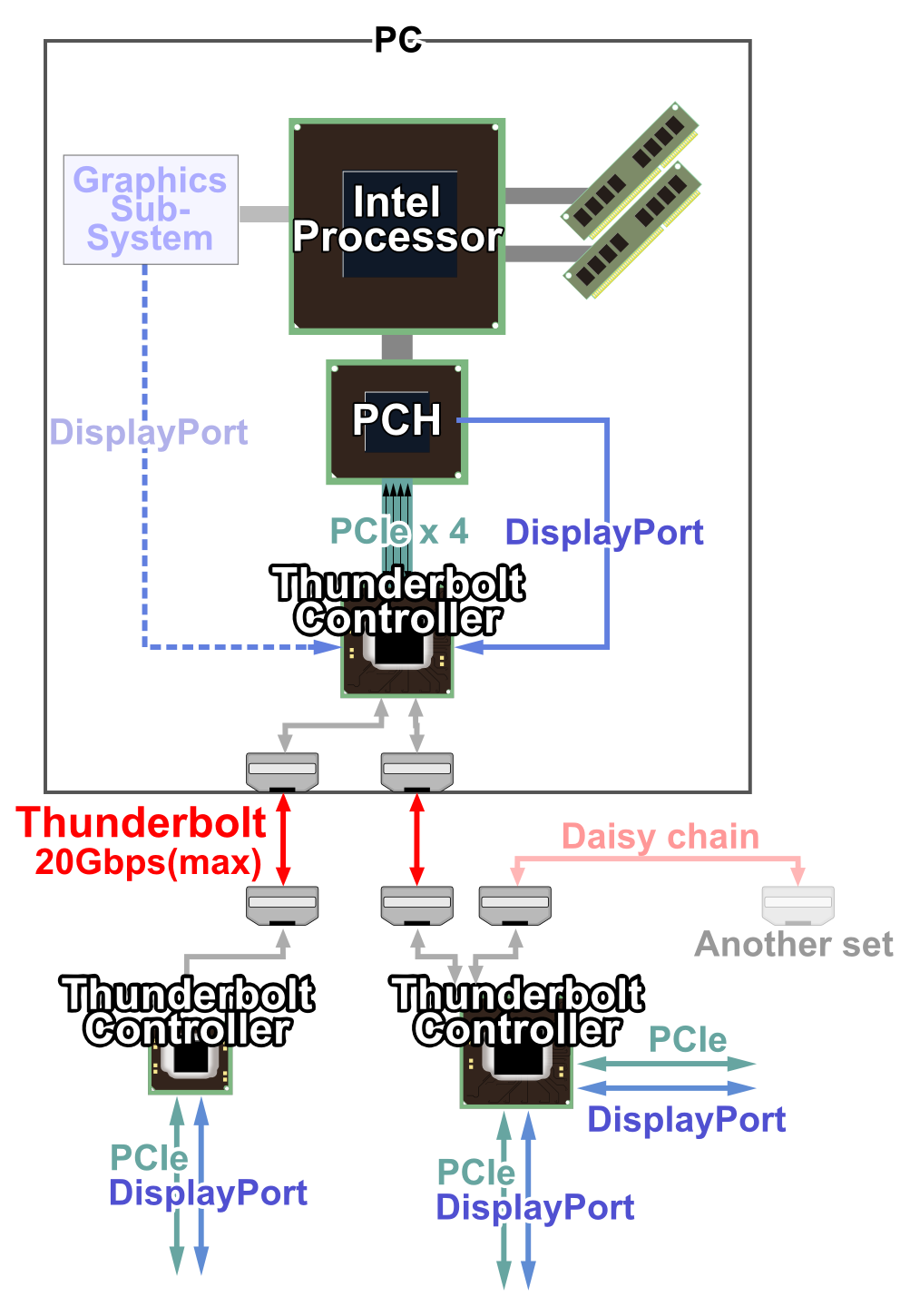
Image
Note this shows a 2 port / 20Gbit version.

EDIT:-
Also please use the 'edit' post feature when making consecutive posts, thank you. :)

_________________
| Gigabyte X79S-UP5-WiFi Skt2011 | i7 4820k @4.4GHz Watercooled (Ivy Bridge-E) | Corsair Vengence 32GB @2133MHz 11-11-11-27 2T Quad-Channel (8x4GB) | AMD R9-Fury-X 4GB @1140/505MHz + EKWB Watercooled | 256GB Crucial MX200 SSD | 8x 1TB Samsung F3 SATA-II | Corsair 850W TX PSU | 3x Dell S2209W 22"wide TFT's (5760x1080res) | Logitech Z-5400 5.1ch speakers | Win7 Ultimate x64 |


Top
 Profile  
Reply with quote  
PostPosted: 05 Aug 2015, 22:35 
Offline

Joined: 03 Aug 2015, 22:44
Posts: 15
Delphium wrote:
Sadly I am not familiar with any software that can display the displayport version, however it should be possible to trace down the model number of the chipset that is used, using this one can then look at the spec sheet of the chipset and see what it is capable of.


You can find a list of the various ThunderBolt chipsets here.. http://ark.intel.com/compare/65995,6600 ... 1880,78941
These are all the intel thunderbolt v1 chipsets, which you will notice that those that support DP, support DP1.1

I am unable to find any information to which exact chipset is used in your laptop other than a few statements about it supporting 10Gb/s transfer.

I suspect you may have the Intel DSL3210 Eagle Ridge chipset, which can be picked up cheap ~$10 and was a very common chipset used.

Here you can see how the DisplayPort signal is routed through the Thunderbolt chipset.
Image
Note this shows a 2 port / 20Gbit version.

EDIT:-
Also please use the 'edit' post feature when making consecutive posts, thank you. :)


Hello again, sorry about the posts....

My friend, i really appreciate your help, seriously

The thing is that i can´t understand some tech language, and i don´t know how to identify my Chipset model, but i let you a PNG file, with the specs from CPU Z, sorry, it´s the only way that i know.
i don´t know also if you have read my other attachments a .rar file, have some screenshots, and Nvidia reports, and all my specs, in a TXT file, it´s in the first post.

i finnaly got an awser from Nvidia, as follow, but nothing that could help me regarding the fact of getting this cable that they advise me http://www.amazon.com/s/ref=nb_sb_ss_c_ ... nics%2C207 :

"Subject
Unable to set refresh rate to 144Hz

Discussion Thread
Response Via Email (David) 08/05/2015 11:50 AM
Hi Jose,
Thanks for waiting. The thundebolt mini DP may be the problem. Have you check with Asus and see what kind of cable/adapter may be be compatible with your setup?
They may have recommendation. In addition, since this both laptops and VG248 monitor is from Asus, you may check with them and see if there is any special you have to do to get them both to work correctly.
For thunderbolt to DP cable, you can find them on Amazon."

really my friend i thank you very very much for your kind help, and i see that you understand plenty of this, so i´m going to go with your advises.

But don´t you find odd, that i can put the customized resolution, with 144Hz, and the NVCP saying that is supported, but then doesn't save it, so i can choose it? on the other side, are the 120 Hz black screen, that left me thinking about the compatibility, and then the 100HZ "No Range" message, and when it disappears, the 100Hz option appears on NVCP..., before this i only got 85Hz as max.

I don´t know, but i´m going to order the cable, i only lose 20 bucks, and stop melting my mind on this matter...and buy a new laptop.........

Another odd thing that i can tell you is this, when i had the VG248QE, i plug in this cable, and get 85Hz Max as well, but then i go to a store, and test the notebook with a thunderbolt port to HDMI, just to test the port. When i got home and hook up the cable again, all Hz option where shown, like the 120 and 144Hz, and i really don´t know, if it is that thunderbolt cable the solution for this, since no one (Nvidia for example) questions about port compatibility.

Thanks my friend for your kind attention, hope it helps

Why did i change displays from the VG to this,....why!!........


Attachments:
converted.png
converted.png [ 3.7 MiB | Viewed 5392 times ]
Top
 Profile  
Reply with quote  
PostPosted: 10 Aug 2015, 14:31 
Offline

Joined: 03 Aug 2015, 22:44
Posts: 15
Hello again my friends

Ok so i tried a new cable today, a "lenovo"....same result....but i didn´t unistall and reeinstall my drivers yet, i´m going to do that later, with no expectations......so acording to the Nvidia guy, i´m going to wait for this cable http://www.amazon.com/gp/product/B00C7R ... ailpages00 arrives 19th......the headache continues.....But i´m going to feedback allways, when i have something new, so this post could help others.

Thank you for your patience, kindness, and attention to my case my friends


Top
 Profile  
Reply with quote  
PostPosted: 23 Aug 2015, 23:03 
Offline

Joined: 03 Aug 2015, 22:44
Posts: 15
Hello my friends

thank you for your patience, but i don´t like threads that i have open, unanswer.

So the cable has arrived, i try it, same thing... i guess that my friend Delphium has a point, beside this i´m arguing with Asus about this, with that marvelous support, and they said they escalated my problem, so i can get a definitive answer, but none refer what you are mentioning, but i´m probably going to use your info, so i can help them see what the really answer is, and try to open there eyes to it....

My friend Delphium, you also told me this, that should could run the thing like this:

"So you may run the display at:-
2560x1440@60hz
OR
1920x1080@144hz"

but i don´t have the 144Hz option at 1920x1080, only the 100Hz one......

i guess i have to buy a new laptop, but not from Asus anymore, i´m tired of them after 20 years using it, so now the doubt is where to go.....Alienware, Gigabyte, Code, Msi....i don´t know any more brands that can specifically have of course G-Sync, Intel 5th Gen., and a GTX980....i think that with this i can manage....Alienware i already know that don´t have G-Sync models, don´t know why....and in raking of support, is in seconde next to apple, then the rest is all under, almost at the level of Asus, but Asus is the last one.

But to enter this new world, i need some advise in this.

Thank you very much for your kind attention my friends


Top
 Profile  
Reply with quote  
PostPosted: 30 Aug 2015, 23:15 
Offline

Joined: 30 Aug 2015, 23:08
Posts: 1
I ran into some similar issues. My GTX 770 will not support 2560 x 1440 at 144 hz. The best I can get is 120 hz. However, when I swapped in a 7970, it ran the monitor at 144 hz just fine. I think your issue is with the hardware itself. The 9xx series (like the one you tested at the store) works fine. It's the older nvidia cards that won't support the high hertz.


Top
 Profile  
Reply with quote  
PostPosted: 30 Aug 2015, 23:23 
Offline

Joined: 03 Aug 2015, 22:44
Posts: 15
nhguapo wrote:
I ran into some similar issues. My GTX 770 will not support 2560 x 1440 at 144 hz. The best I can get is 120 hz. However, when I swapped in a 7970, it ran the monitor at 144 hz just fine. I think your issue is with the hardware itself. The 9xx series (like the one you tested at the store) works fine. It's the older nvidia cards that won't support the high hertz.


Thank you my friend for your kind answer, but can you explain me what is the 7970?

so only 9 series are the only one that can handle this kind of display?

how did you solve it?

thank you my friend


Top
 Profile  
Reply with quote  
Display posts from previous:  Sort by  
Post new topic Reply to topic  [ 22 posts ]  Go to page Previous  1, 2, 3, 4, 5, 6 ... 22  Next

All times are UTC [ DST ]


Who is online

Users browsing this forum: No registered users and 9 guests


You cannot post new topics in this forum
You cannot reply to topics in this forum
You cannot edit your posts in this forum
You cannot delete your posts in this forum
You cannot post attachments in this forum

Search for:
Jump to:  
cron


Powered by phpBB® Forum Software © phpBB Group





