Widescreen Gaming Forum

[-noun] Web community dedicated to ensuring PC games run properly on your tablet, netbook, personal computer, HDTV and multi-monitor gaming rig.
It is currently 12 Jul 2026, 19:11

All times are UTC [ DST ]


Post new topic Reply to topic  [ 97 posts ]  Go to page Previous  1 ... 30, 31, 32, 33, 34, 35, 36 ... 97  Next
Author Message
 Post subject: Re: The Evil Within
PostPosted: 20 Oct 2014, 08:14 
Offline
I Donated
I Donated

Joined: 18 Jul 2007, 04:19
Posts: 513
Anyone else getting really awful framerate on Surround? I used the console to unlock the FPS, but I'm getting about 12-26 FPS! Seems strange, does anyone have an SLi profile or some FPS fix for the game? This is down right unplayable.


Top
 Profile  
Reply with quote  
 Post subject: Re: The Evil Within
PostPosted: 20 Oct 2014, 09:55 
Offline
Insiders
Insiders

Joined: 01 Sep 2010, 11:38
Posts: 516
Amon Amarth wrote:
Anyone else getting really awful framerate on Surround? I used the console to unlock the FPS, but I'm getting about 12-26 FPS! Seems strange, does anyone have an SLi profile or some FPS fix for the game? This is down right unplayable.


That's the game unfortunately mate, and without SLi to help out as well it's not going to get any better. The game @ 1920x1080 isnt that great either, but obviously better than surround. Looking at the forums, you can see a lot of people complaining about the framerates, and massive dips - even on the PS4 the game dips below 30, so it's the game.

_________________
起死回生 (kishi kaisei) Wake from death and return to life..


Top
 Profile  
Reply with quote  
 Post subject: Re: The Evil Within
PostPosted: 20 Oct 2014, 17:35 
Offline

Joined: 20 Oct 2014, 17:33
Posts: 1
hey guys
please help as soon as I run the game I just hear the first second of some intro sound and then windows says my graphics stopped working but has recoved ..and cannot get the game to run :(

check the screen thanks my graphics card is ATI mobility Radeon HD 4670
Image


Top
 Profile  
Reply with quote  
 Post subject: Re: The Evil Within
PostPosted: 23 Oct 2014, 14:59 
Offline
Editors
Editors
User avatar

Joined: 06 Mar 2008, 17:20
Posts: 3424
Hey wist :welcome
This is not exactly a widescreen issue, so you'd better ask on the game's official forums for tech help.

Back on topic: anybody up for a Detailed Report ? This bogus ultrawide default aspect ratio is... fascinating.


Top
 Profile  
Reply with quote  
 Post subject: Re: The Evil Within
PostPosted: 29 Oct 2014, 22:43 
Offline

Joined: 03 Mar 2014, 07:13
Posts: 5
Any fix for update on flawless? The new game update no longer works with it


Top
 Profile  
Reply with quote  
 Post subject: Re: The Evil Within
PostPosted: 30 Oct 2014, 03:04 
Offline

Joined: 21 May 2011, 01:58
Posts: 47
Looks like the developers released a new patch for the game and flawless isn't working anymore.

Hayden, any chance of an update?

see here:
http://steamcommunity.com/app/268050/discussions/0/620695877099729474/

Thanks,

kiax0001


Top
 Profile  
Reply with quote  
 Post subject: Re: The Evil Within
PostPosted: 30 Oct 2014, 18:11 
Offline
I Donated
I Donated
User avatar

Joined: 30 May 2012, 03:56
Posts: 92
kiax0001 wrote:
Looks like the developers released a new patch for the game and flawless isn't working anymore.

Hayden, any chance of an update?

see here:
http://steamcommunity.com/app/268050/discussions/0/620695877099729474/

Thanks,

kiax0001

Second that... Just when you have it working perfect they go and screw it up. I know they're trying to make the game better for others, but it totally hosed up the fix and it doesn't recognize the game has launched. Hope this is an easy update...

_________________
| i7 3930K | 16GB Mushkin Redline 2133MHz | ASUS Rampage IV Formula | EVGA 2080ti SC ULTRA | EVGA Supernova 1200W PS | 2x Samsung EVO 500GB SSD RAID 0 | 2x IBM 520 SSD 240GB | Rosewill Blackhawk | 3x Acer Predator G-Sync 144MHz @ 7680x1440 |


Top
 Profile  
Reply with quote  
 Post subject: Re: The Evil Within
PostPosted: 03 Nov 2014, 23:01 
Offline
User avatar

Joined: 24 Jun 2013, 01:54
Posts: 34
Played a bit of the demo and was ready to pull the trigger. Glad I didn't. Hopefully this can be rectified.


Top
 Profile  
Reply with quote  
 Post subject: Re: The Evil Within
PostPosted: 04 Nov 2014, 01:01 
Offline
I Donated
I Donated
User avatar

Joined: 30 May 2012, 03:56
Posts: 92
If you can find a copy of the old .exe before the update (Ver 1.0) and copy it back into the Evil Within folder the fix will still work. Make a backup of the new one JIC. I found a copy by clicking the exe and going to properties/ previous versions and restoring a copy to the desktop. I replace the NEW .exe with the OLD version before the Steam update and the fix in FW still works and the game plays fine. This wasn't my idea; someone on the FW website suggested it and I just copied their idea...works though.

_________________
| i7 3930K | 16GB Mushkin Redline 2133MHz | ASUS Rampage IV Formula | EVGA 2080ti SC ULTRA | EVGA Supernova 1200W PS | 2x Samsung EVO 500GB SSD RAID 0 | 2x IBM 520 SSD 240GB | Rosewill Blackhawk | 3x Acer Predator G-Sync 144MHz @ 7680x1440 |


Top
 Profile  
Reply with quote  
 Post subject: Re: The Evil Within
PostPosted: 08 Nov 2014, 07:30 
Offline

Joined: 03 Mar 2014, 07:13
Posts: 5
No fix yet and no one asking. Is this game dead already?


Top
 Profile  
Reply with quote  
 Post subject: Re: The Evil Within
PostPosted: 08 Nov 2014, 12:23 
Offline

Joined: 12 Oct 2014, 19:39
Posts: 4
Same problem here :( I wanted to finish LOTR before I started playing this, sat down last night to start it and WTF!

Guess that's the trouble of devs not supporting surround natively. The Flawless site being down isn't helping although I doubt there is an update for this yet anyway.


Top
 Profile  
Reply with quote  
 Post subject: Re: The Evil Within
PostPosted: 08 Nov 2014, 22:42 
Offline

Joined: 03 Mar 2014, 07:13
Posts: 5
Yeah we are lucky to have a flawless to fix these problems and no pressure on Hayden it just sucks when the patch kills the fix


Top
 Profile  
Reply with quote  
 Post subject: Re: The Evil Within
PostPosted: 13 Nov 2014, 06:09 
Offline
User avatar

Joined: 12 Nov 2014, 20:30
Posts: 45
any fixes? :cheers:


Top
 Profile  
Reply with quote  
 Post subject: Re: The Evil Within
PostPosted: 13 Nov 2014, 17:38 
Offline
User avatar

Joined: 25 Feb 2012, 21:54
Posts: 5
HaYDeN wrote:
cloud226 wrote:
same here, the fix removes the letterbox, but only displays in the center screen.

in Flawless Status Window, it shows "Resolution=2016x1080, Aspect=1.867, Monitors=1x1, Bezel Comp=True", while my actual resolution is 6048x1080, could this be the reason?

thanks


Do you have AMD hardware? cause I'm really sick and tired of repeating how shit AMD API's (for display detection) are, eg. they don't work properly (especially for Crossfire), nor are they programmer friendly.

I'll likely never own AMD gear again, so it's not something on my list to investigate... the only way forward would be someone providing teamviewer or something for a reasonable period of time to troubleshoot the problem or something.

But yes, what you've pointed out will be exactly the issue - your displays are being detected incorrectly... for whatever reason, as a temporary work around you can hardcode your display configuration by going to settings -> display detection -> enable display detection override.

Where do you enable display detection override at? I dont see it in my CC


Top
 Profile  
Reply with quote  
 Post subject: Re: The Evil Within
PostPosted: 15 Nov 2014, 23:06 
Offline
User avatar

Joined: 12 Nov 2014, 20:30
Posts: 45
Funkengreuven wrote:
If you can find a copy of the old .exe before the update (Ver 1.0)...


If you have, can you pls upload it for us?

:cry:


Top
 Profile  
Reply with quote  
 Post subject: Re: The Evil Within
PostPosted: 18 Nov 2014, 23:25 
Offline

Joined: 19 May 2011, 20:51
Posts: 31
Blood101 wrote:
Funkengreuven wrote:
If you can find a copy of the old .exe before the update (Ver 1.0)...


If you have, can you pls upload it for us?

:cry:


+1


Top
 Profile  
Reply with quote  
 Post subject: Re: The Evil Within
PostPosted: 19 Nov 2014, 23:15 
Offline
Insiders
Insiders
User avatar

Joined: 12 Dec 2006, 20:37
Posts: 170
Quote:
Hayden http://www.wsgf.org/forums/viewtopic.php?f=63&t=24098&start=940 -- "Website is back up.

The Evil Within has been updated but not the repository just at the moment [still some more environment stuff to configure], as a temporary solution, right click it and click Re-Install."


Works great!

_________________
i7 sandy 4.4ghz with a snorkel
1080gtx
8gb RAM
Gigabyte P67-UD7 rev. B3
OS -Samsung 840pro 256GB ssd
Games -Samsung 840pro 500GB ssd
Pagefile -crucial 60GB ssd
Storage -2x 4TB WD
PWS -Seasonic Prime 1k Titanium


Top
 Profile  
Reply with quote  
 Post subject: Re: The Evil Within
PostPosted: 27 Nov 2014, 22:21 
Offline

Joined: 23 Dec 2009, 18:58
Posts: 31
Saw this is on sale on Steam and decided to download the demo first. Eyefinity doesn't seem to work at all. I set for 5760x1080 and only the middle monitor is used, the 2 side ones are blank. When I set it to windowed, it shows that it's 5760 across, but only rendering the middle display.

Did I miss a setting to get it to work?


Top
 Profile  
Reply with quote  
 Post subject: Re: The Evil Within
PostPosted: 28 Dec 2014, 03:59 
Offline

Joined: 21 Jan 2014, 21:50
Posts: 112
Just wanted to mention to any folks who might be on the fence about this one.

I bought the game shortly after release. Hayden's fix worked perfectly. But game performance was so bad, I didn't play it.

There was a performance patch in December. I can attest, that on my system, in areas where I was getting 30 fps, I'm getting 60. I haven't dipped below 57 anywhere so far, several hours in. The opening scene with the rain is a good test. I used to get mid 30s here, now 60 (I force a cap with afterburner). Microstuttering is still an issue however, but overall performance is waaaay better than the release build, and I'm enjoying it now

Despite the patch, Hayden's fix still works perfectly, except I have to choose "windowed" in game, and use game companion to force borderless windows. Don't know why that's required, but it works.

I'm also using nvidia inspector with the settings listed on PCgamingwiki. Don't know if it's making a big difference, but it seems better (placebo?)

Surround 5888x1080, GTX 980sc SLI, i7 3770k @4.4


Top
 Profile  
Reply with quote  
 Post subject: Re: The Evil Within
PostPosted: 03 Mar 2015, 18:50 
Offline
User avatar

Joined: 24 Jun 2013, 01:54
Posts: 34
Just a heads up guys. The latest update that released today has broken the Flawless Widescreen plugin for The Evil Within. It is now outputting the following error code:

Configure function call for the attached process failed, retrying in 26 seconds...

Last Error:
Could not find LetterBoxFix2 injection point, The Evil Within may have updated to a version that is no longer supported.

Try restarting The Evil Within or selecting a different version and re-enable the fix.


Top
 Profile  
Reply with quote  
 Post subject: Re: The Evil Within
PostPosted: 03 Mar 2015, 23:28 
Offline
User avatar

Joined: 04 Oct 2014, 15:31
Posts: 25
:( /sigh

Another game that I will have to wait on now. Frustrating that the developers don't support this resolution as native and we have to fly on updates with FW to fix the issues.


Top
 Profile  
Reply with quote  
 Post subject: Re: The Evil Within
PostPosted: 04 Mar 2015, 00:03 
Offline

Joined: 15 Feb 2015, 23:11
Posts: 30
Look forward to getting the updated fix as I really love this game especially in 21:9.


Top
 Profile  
Reply with quote  
 Post subject: Re: The Evil Within
PostPosted: 04 Mar 2015, 16:45 
Offline

Joined: 19 Aug 2010, 23:05
Posts: 145
This game has been released quite a long time ago.
Not sure Hayden will want or have enough time to fix that.
He said he's already spent a lot on it.
Instead, could it be possible to downgrade the .exe of the game to a prior version and have it working this way?


Top
 Profile  
Reply with quote  
 Post subject: Re: The Evil Within
PostPosted: 04 Mar 2015, 20:24 
Offline

Joined: 19 Aug 2010, 23:05
Posts: 145
So i managed to roll back to the previous update by replacing these two files.
evilwithin.exe (31648 kb)
and base\common.tangoresource file (42661 kb)

As any other files could have been updated i don't know if any flaw could happen but at least the game is starting wide screen.


Top
 Profile  
Reply with quote  
 Post subject: Re: The Evil Within
PostPosted: 04 Mar 2015, 21:30 
Offline
User avatar

Joined: 04 Oct 2014, 15:31
Posts: 25
Good find, where did you manage to source these previous files from?

Cheers


Top
 Profile  
Reply with quote  
 Post subject: Re: The Evil Within
PostPosted: 04 Mar 2015, 23:00 
Offline

Joined: 15 Feb 2015, 23:11
Posts: 30
Hope this gets updated as the DLC is massive amount of content & coming in a few days now on 10th March.


Top
 Profile  
Reply with quote  
 Post subject: Re: The Evil Within
PostPosted: 05 Mar 2015, 07:45 
Offline
User avatar

Joined: 24 Jun 2013, 01:54
Posts: 34
K4sh wrote:
So i managed to roll back to the previous update by replacing these two files.
evilwithin.exe (31648 kb)
and base\common.tangoresource file (42661 kb)

As any other files could have been updated i don't know if any flaw could happen but at least the game is starting wide screen.


How did you roll back these two files?


Top
 Profile  
Reply with quote  
 Post subject: Re: The Evil Within
PostPosted: 08 Mar 2015, 12:42 
Offline

Joined: 15 Feb 2015, 23:11
Posts: 30
Massive thanks to HaYDen he has now fixed the plugin so its working again!


Top
 Profile  
Reply with quote  
 Post subject: Re: The Evil Within
PostPosted: 08 Mar 2015, 13:21 
Offline
User avatar

Joined: 04 Oct 2014, 15:31
Posts: 25
21_9 PC Gamer wrote:
Massive thanks to HaYDen he has now fixed the plugin so its working again!


HaYDeN.....legends.....good work buddy and thankyou


Top
 Profile  
Reply with quote  
 Post subject: Re: The Evil Within
PostPosted: 10 Mar 2015, 16:24 
Offline

Joined: 10 Mar 2015, 16:10
Posts: 7
i meant to come here sooner and say thanks but i am here now to report a trouble.

was working fine prior 2 days ago, then i updated the plugin stupidly with out first backing up my files or updating my archive of flawlesswidescreen with the plugin i had working included and now i have an error
Quote:
Configure function call for the attached process failed, retrying in 33 seconds...

Last Error:
Could not find LetterBoxFix2 injection point, The Evil Within may have updated to a version that is no longer supported.

Try restarting The Evil Within or selecting a different version and re-enable the fix.


i tried doing an extensive google search for an older plugin and i get similar errors with an older one
Quote:
Could not find BloomFix injection point, The Evil Within may have updated to a version that is no longer supported.

Try restarting The Evil Within or selecting a different version and re-enable the fix.


if some kind person that was wise enough to avoid the very latest plugin update the one prior to FWS_plugin.fws version 2.1.85 rev 4 going live and can post a link so i can download what i need to run the older plugin, would be much appreciated.

i cannot play this with any other version out there on the web that are floating around because they all crash otherwise i would have the option of switching out and using a different version of evilwithin.exe but i cannot. i crash with every one i tried except the one i am using now which is the ALi213 files. dont hate i did not steal this game i am simply using the exe as a workaround for the crashing.

-PS to the maker of flawlesswidescreen, would be great if there was a rollback option for when updated plugins get pushed live and break something, that those users can rollback to the version they had when everything was working. thanks


Top
 Profile  
Reply with quote  
 Post subject: Re: The Evil Within
PostPosted: 10 Mar 2015, 17:41 
Offline

Joined: 15 Feb 2015, 23:11
Posts: 30
bloodgual wrote:
i meant to come here sooner and say thanks but i am here now to report a trouble.

was working fine prior 2 days ago, then i updated the plugin stupidly with out first backing up my files or updating my archive of flawlesswidescreen with the plugin i had working included and now i have an error
Quote:
Configure function call for the attached process failed, retrying in 33 seconds...

Last Error:
Could not find LetterBoxFix2 injection point, The Evil Within may have updated to a version that is no longer supported.

Try restarting The Evil Within or selecting a different version and re-enable the fix.


i tried doing an extensive google search for an older plugin and i get similar errors with an older one
Quote:
Could not find BloomFix injection point, The Evil Within may have updated to a version that is no longer supported.

Try restarting The Evil Within or selecting a different version and re-enable the fix.


if some kind person that was wise enough to avoid the very latest plugin update the one prior to FWS_plugin.fws version 2.1.85 rev 4 going live and can post a link so i can download what i need to run the older plugin, would be much appreciated.

i cannot play this with any other version out there on the web that are floating around because they all crash otherwise i would have the option of switching out and using a different version of evilwithin.exe but i cannot. i crash with every one i tried except the one i am using now which is the ALi213 files. dont hate i did not steal this game i am simply using the exe as a workaround for the crashing.

-PS to the maker of flawlesswidescreen, would be great if there was a rollback option for when updated plugins get pushed live and break something, that those users can rollback to the version they had when everything was working. thanks
Latest plugin works fine with the new patch you need to go to Steam & update the game its 2 patches totalling 10.1Gb as the DLC # 1 came out today.


Top
 Profile  
Reply with quote  
 Post subject: Re: The Evil Within
PostPosted: 10 Mar 2015, 22:20 
Offline

Joined: 10 Mar 2015, 16:10
Posts: 7
so, it works for you therfore theres no problem and i am just dreaming or no on the plugin before last update?

i am not about to download any DLC or update, i am lucky it plays without crashing as is, im just asking for the plugin before this last update, which i know worked. if that is not something that can be provided then just say so.


Top
 Profile  
Reply with quote  
 Post subject: Re: The Evil Within
PostPosted: 14 Mar 2015, 16:30 
Offline

Joined: 09 Mar 2015, 17:11
Posts: 4
Doesn't work for me, I just get this error message over and over

c_HackTool - Failed to open process, error code = 5.

I only just got the game, so I don't know if it is an update that broke it or what.


Top
 Profile  
Reply with quote  
 Post subject: Re: The Evil Within
PostPosted: 14 Mar 2015, 22:36 
Offline

Joined: 15 Feb 2015, 23:11
Posts: 30
As I said before if you legit own the game Steam will patch it twice then the latest FWS works just fine as it should! Steam auto patches nowadays there is no way to disable that anymore so I can only assume if it does not patch you either:

1: Do not own the game legit.
2: You cannot connect to Steam online to get the patch(s).


Top
 Profile  
Reply with quote  
 Post subject: Re: The Evil Within
PostPosted: 15 Mar 2015, 00:45 
Offline
I Donated
I Donated
User avatar

Joined: 30 May 2012, 03:56
Posts: 92
Does the DLC break the current fix if you install it? I can't figure out reading the posts if it does or not. I am able to play it fine in 21:9 now with latest Steam patch and FWS. I want to get the DLC, but not if its going to break the fix. Anyone know for sure?

_________________
| i7 3930K | 16GB Mushkin Redline 2133MHz | ASUS Rampage IV Formula | EVGA 2080ti SC ULTRA | EVGA Supernova 1200W PS | 2x Samsung EVO 500GB SSD RAID 0 | 2x IBM 520 SSD 240GB | Rosewill Blackhawk | 3x Acer Predator G-Sync 144MHz @ 7680x1440 |


Top
 Profile  
Reply with quote  
 Post subject: Re: The Evil Within
PostPosted: 15 Mar 2015, 10:40 
Offline

Joined: 15 Feb 2015, 23:11
Posts: 30
Funkengreuven wrote:
Does the DLC break the current fix if you install it? I can't figure out reading the posts if it does or not. I am able to play it fine in 21:9 now with latest Steam patch and FWS. I want to get the DLC, but not if its going to break the fix. Anyone know for sure?
DLC works 100% with latest fix I own the season pass it all looks good to me in 21:9. Here are some screenshots I took of it in 21:9 a few days ago:
Spoiler:
Image

Spoiler:
Image

Spoiler:
Image

Spoiler:
Image

Spoiler:
Image

Spoiler:
Image

Spoiler:
Image


Top
 Profile  
Reply with quote  
 Post subject: Re: The Evil Within
PostPosted: 23 Mar 2015, 13:53 
Offline

Joined: 23 Mar 2015, 13:44
Posts: 1
Hi Guys,

I believe I can clear up the confusion here. The current plugin for The Evil Within doesn't work if you are running the original unpatched version of the game (cracked or retail, DLC or no). You will get an error regarding the LetterBox2 injection point or similar. If you have the steam version of the game, you are likely not having the issue as the game is being kept up to date, DLC or no.

If you are running the game by installing from an ISO image or BluRay disc, you will need to obtain the latest patch by going to the Bethesda website and downloading it there. If you are running a cracked version, you will need to apply the update, then obtain a crack for the current version of the game. You do not need to have the DLC to update to the latest version. There are update files for both the DLC and the base game.


Top
 Profile  
Reply with quote  
 Post subject: Re: The Evil Within
PostPosted: 15 May 2015, 02:24 
Offline

Joined: 15 May 2015, 02:18
Posts: 1
I too am having a problem. I'm trying to run 5760x1080 res. The game is fully updated, Flawless Widescreen is fully updated. When the game starts I get sounds but no display until it has you press any key to proceed. Then I only get a picture on the main center screen. I can arrow through options but cannot see them. The mouse is constrained to the center screen. Any thoughts?


Top
 Profile  
Reply with quote  
 Post subject: Re: The Evil Within
PostPosted: 16 May 2015, 04:35 
Offline
User avatar

Joined: 15 May 2015, 19:54
Posts: 3
Location: Gibraltar
I played this some time ago and i can tell you it isn't that good even story wise it gets boring pretty fast -_- or maybe it was just me.


Top
 Profile  
Reply with quote  
 Post subject: Re: The Evil Within
PostPosted: 23 Dec 2015, 17:02 
Offline

Joined: 20 Oct 2015, 15:09
Posts: 10
too bad. the game is on sale. but i am sick of that fov....

widescreenfixer wont work anymore with The Evil Within. If i hit Escape, it works, but ingame, the camera moves and its unplayable......


any ideas how to fix the FOV ?


flawless widescreen:


working when i hit escape
Image


ingame - horrible
Image


Top
 Profile  
Reply with quote  
 Post subject: Re: The Evil Within
PostPosted: 23 Dec 2015, 22:01 
Offline
Insiders
Insiders

Joined: 21 Oct 2014, 23:33
Posts: 291
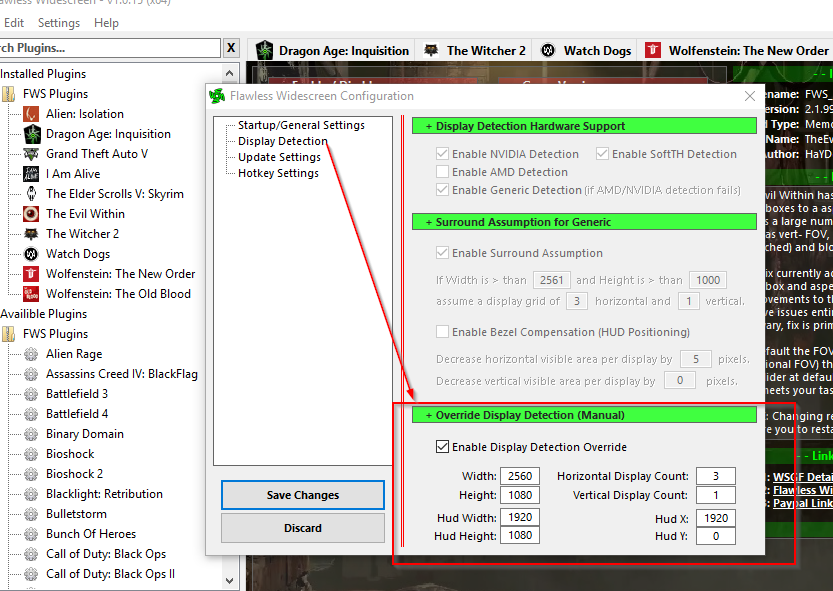
dark3zz, you can fix it. The problem is you are 21:9, you need to enforce your resolution on FWS (same as Manual PLP).

In FWS, go to menu Settings, Configuration, Display Detection. Checkmark Enable Detection Override; enter Width & Height (fullscreen), HUD W&H (fake center's size* ), HUDX (fake side width *), HUDY zero. And you have 3 monitors, not one. Save Changes.

* Note that to get this working you need to pretend you have PLP:
- Your fake center: 1920x1080
- Your fake sides width: 320 (which is 2560 minus 1920, divided by 2)
- You have 3 fake montors (not 1).
(fake values will make good HUD & spread game properly)
(all this assuming your normal resolution is 2560x1080)

Image
Details: http://www.wsgf.org/blog/imusrt/2015/09/18/evil-within-dlc-manual-plp-instructions-2014

If you like the game, recommend DLC: The Executioner. Great fun, OP 1st person melee slaughter & minimal sneaking.


Top
 Profile  
Reply with quote  
 Post subject: Re: The Evil Within
PostPosted: 24 Dec 2015, 14:19 
Offline

Joined: 20 Oct 2015, 15:09
Posts: 10
hei imusrt, that helped alot, thank you so much !

i didnt recognized that i can force my resolution with the tool :)

i hope it is right this way ? looks much better ingame now


Image

and i deactivated the Letterbox Fix in the Plugin


Top
 Profile  
Reply with quote  
 Post subject: Re: The Evil Within
PostPosted: 25 Dec 2015, 05:27 
Offline
Insiders
Insiders

Joined: 21 Oct 2014, 23:33
Posts: 291
dark3zz, that looks right. Glad it worked. DLC will work same, & many other games. So worth attempting when a problem. But won't work for all games. Depends on what FWS is actively doing in its fix, which varies by game.


Top
 Profile  
Reply with quote  
 Post subject: Re: The Evil Within
PostPosted: 25 Dec 2015, 06:05 
Offline
Insiders
Insiders
User avatar

Joined: 14 Feb 2010, 13:39
Posts: 761
imusrt wrote:
dark3zz, that looks right. Glad it worked. DLC will work same, & many other games. So worth attempting when a problem. But won't work for all games. Depends on what FWS is actively doing in its fix, which varies by game.


Thanks for propagating the knowledge imusrt, I'm not sure why more people don't realize this is possible, I have tried to point it out a few times previously.

Support for PLP and constraining automatically to 16:9 is behavior that probably needs to be present by default, that is the chief problem with the majority of games in that they are designed only for 16:9.

_________________
Resident Jester - Flawless Widescreen - Widescreen gaming the way it should be.
[Steam Profile]

Want to keep Flawless Widescreen alive? Donate Here


Top
 Profile  
Reply with quote  
 Post subject: Re: The Evil Within
PostPosted: 25 Dec 2015, 06:56 
Offline
Insiders
Insiders
User avatar

Joined: 14 Feb 2010, 13:39
Posts: 761
Perhaps this is helpful:

Image

Altho I've never tested 3:2 display stack, although I've tried to support it from the beginning :P

_________________
Resident Jester - Flawless Widescreen - Widescreen gaming the way it should be.
[Steam Profile]

Want to keep Flawless Widescreen alive? Donate Here


Last edited by HaYDeN on 25 Dec 2015, 07:15, edited 1 time in total.

Top
 Profile  
Reply with quote  
 Post subject: Re: The Evil Within
PostPosted: 25 Dec 2015, 07:11 
Offline
Insiders
Insiders
User avatar

Joined: 14 Feb 2010, 13:39
Posts: 761
And for 21:9 (2560x1080) when a 16:9 HUD is desired (1920x1080):

Image

However - it's correct to note that sometimes the implementation doesn't always lend itself well to this specific solution.

_________________
Resident Jester - Flawless Widescreen - Widescreen gaming the way it should be.
[Steam Profile]

Want to keep Flawless Widescreen alive? Donate Here


Top
 Profile  
Reply with quote  
 Post subject: Re: The Evil Within
PostPosted: 25 Dec 2015, 22:36 
Offline
Insiders
Insiders

Joined: 21 Oct 2014, 23:33
Posts: 291
Wouldn't 21:9 also need "Horizontal Display Count: 3" ? (for fake PLP)
Also your idea for FWS improvement sounds great. Current fake-PLP workaround is not obvious, for those with 21:9. And over time we will see people using more varied resolutions.

Related FWS improvement (which is likely too low priority & annoying dev):
for manual (non-Eyefinity) MM spread, FWS could work better if it had an option to "always enforce resolution" (default or override), on every game it supports.


Last edited by imusrt on 26 Dec 2015, 00:18, edited 1 time in total.

Top
 Profile  
Reply with quote  
 Post subject: Re: The Evil Within
PostPosted: 25 Dec 2015, 22:47 
Offline

Joined: 20 Oct 2015, 15:09
Posts: 10
hei, Hayden and imusret, you are two great guys, thanks for helping here...

- does this fix work also for every game like Blacklist ? that game is the only one which i dont have a solution yet.......


Top
 Profile  
Reply with quote  
 Post subject: Re: The Evil Within
PostPosted: 26 Dec 2015, 00:31 
Offline
Insiders
Insiders

Joined: 21 Oct 2014, 23:33
Posts: 291
dark3zz, Tom Clancy's Splinter Cell series is not supported by FWS.
Also from a MM manual-spreading perspective, a number from that game-series is problematic (including Blacklist itself).
Strong chance you won't get Blacklist to work 21:9 without a FWS plugin (which doesn't exist). But I could be wrong, I have not tested series on 21:9.

Your best chance is likely In-game windowed, quit. Resolution-file-edit (these *) & read-only. In-game ShiftWindow (+ border = borderless). Try this in both DX11 & DX9 (In-game Advanced Settings DirectX DX9 & DX11).
%USERPROFILE%\Documents\Ubisoft\Blacklist\videoSettings.ini
* WindowedViewportX=####
* WindowedViewportY=1080

- - -
other interesting values:
- IsLetterBoxUsageEnabled=1
- EyefinityMode=2
- IsMultiMonitorEmulationEnabled=0
- MinTripleDisplayAspectRatio=3.7000
- AdapterIndex=-1
- MonitorAspect=-1.0000
- validationRequired=0

No Hope Here:
registry (no hope here, skip it)
other files (no hope here, skip it)
SoftTH, made no diff (& In-game fullscreen, DX9, file edit)

FYI. Small chance this type of thing would work. An Aspect entry would be ideal, but hard to find:
FOV: Edit exe with hex editor
- Open Blacklist_game.exe with a hex editor like HxD.
- Search for DesiredFOV=75 and change its value to whatever you choose, then save your changes.


Top
 Profile  
Reply with quote  
 Post subject: Re: The Evil Within
PostPosted: 28 Dec 2015, 15:46 
Offline

Joined: 23 Feb 2012, 18:14
Posts: 11
Greetings, i 'll try to describe my issue, with my poor english: i'm playing the game , weel trying to play it in my native resolution, 1680 x 1050, using Flawless for FOV fix..all is working except meny, diary and all non ingame text (in game inventory too) is totally unreadable..it's off set to the right..i can only see the first 4 digit of menu command..same for diary,etc..can someone pls help me to get rid of this issue? if i set windowed mode, menu become normal..but i dont likme playing windowed mode. Thansk for the help and sry my bad eng.

p.s. i'm playing on a AMD HD 7950 3 Gb with latest dirvers installed


Top
 Profile  
Reply with quote  
 Post subject: Re: The Evil Within
PostPosted: 28 Dec 2015, 22:20 
Offline
Insiders
Insiders

Joined: 21 Oct 2014, 23:33
Posts: 291
indio68,
1. If windowed works right, easiest to just make the window borderless. This looks as good as fullscreen.
You do this by forcing the game's borders to the outside of your screen. Use ShiftWindow for this (+ border = borderless, & to position).
Are you using Windows 10? If so, there may be a complication.

2. But if you want fullscreen to work, it is likely you need to adjust FWS (in FWS menu Settings, Configuration, Display Detection. Use the Detection Override).
Have you tried this? I don't know what override values you should try (use trial & error).

Recommend also in-game Letterbox Disabled. And in FWS plugin, checkmark all except Letterbox Fix & leave FOV sliders zero (because FWS fixes the FOV to proper, no extra FOV is needed).

It should be noted that The Evil Within's FWS plugin has a disclaimer about 16:10:
"...unknown if this will resolve issues entirely for 21:9 and 16:10 - milage may vary"
But I know 21:9 will work fine with FWS's detection override (using "fake PLP" values). So 16:10 single-screen has hope, using same or similar method. Although 16:10 aspect is obviously completely different than 21:9. 16:10 is much taller so may not work out. No idea, but worth attempting.


Top
 Profile  
Reply with quote  
 Post subject: Re: The Evil Within
PostPosted: 28 Dec 2015, 23:37 
Offline

Joined: 23 Feb 2012, 18:14
Posts: 11
thanks for replay me...yes i tried detection override but putting my res 1680 x 1050 for with\height, hud and hud x hud y..does'nt worked..and yes i'm using win10...what is this PlP fakes?? no idea on what value i must put inthere..any tips? thanks again.


Top
 Profile  
Reply with quote  
 Post subject: Re: The Evil Within
PostPosted: 29 Dec 2015, 04:35 
Offline
Insiders
Insiders

Joined: 21 Oct 2014, 23:33
Posts: 291
indio68,
It may be that you are using incorrect FWS override settings. Did you enter this? If not, adjust & try it.
Width: 1680
Height: 1050
Hud Width: 1680
Hud Height: 1050
Horizontal Display Count: 1
Vertical Display Count: 1
Hud X: 0 (you use zero? if not fix it)
Hud Y: 0 (you use zero? if not fix it)

As for borderless game (suggestion #1), it would work great in previous operating system. But in Windows 10 a slight window-border may still be present (not sure, have not tested game on Windows 10). There is potential workarounds for this too (e.g. WinShift). So if FWS override-numbers don't work for you, the borderless suggestion is your likeliest & best fix.

Failing all above, try this:
"Fake PLP" is a way to make 21:9 work, by altering FWS override-numbers.
It is telling FWS you have multiple fake monitors of small size, so your HUD lines up right, & elsewhere fills proper with game-world.
But I am very uncertain this type of fudging will help in 16:10 case. You would have to test out some values. Something like this (adding fake screens on top & bottom in 16:10's case):
Width: 1680
Height: 1050
Hud Width: 1680
Hud Height: 945 (which is 1680 / 16 x 9)
Horizontal Display Count: 1
Vertical Display Count: 3 (impersonating very slim fake screens on top & bottom of your main game area.)
Hud X: 0
Hud Y: 52 (which is 1050 - 945, / 2)

These fake numbers will not produce the "proper 16:10 game view" but may well improve your text problem etc.


Top
 Profile  
Reply with quote  
 Post subject: Re: The Evil Within
PostPosted: 29 Dec 2015, 17:38 
Offline

Joined: 23 Feb 2012, 18:14
Posts: 11
many many thanksimusrt...i'll give it a try...i want use my 1680 x 1050 to have best graphic..in my native resolution..i'll let you know if your values 'r working. thanks again.


Top
 Profile  
Reply with quote  
 Post subject: Re: The Evil Within
PostPosted: 29 Dec 2015, 18:19 
Offline

Joined: 23 Feb 2012, 18:14
Posts: 11
damn!! no way..even with the value u write above, nothing worked..menu text is offset to the right and a little cut in the lover (and i think )and upper ..i can see only half of the word Downloadable content and cant see the description of the menu command in the bottom of the screen when u hoover mouse on the voice of menu..uff this thing made me mad! i cant belive i can't see proper menu.what value make text going to left and up?thanks


Top
 Profile  
Reply with quote  
 Post subject: Re: The Evil Within
PostPosted: 29 Dec 2015, 22:19 
Offline
Insiders
Insiders

Joined: 21 Oct 2014, 23:33
Posts: 291
Your game is screaming for a 16:9 monitor.
HUD X is the left-edge of "text layer etc" (zero being your bezel).
HUD Y is the top-edge.

Other than you testing other fudged FWS override numbers, I am out of ideas.


Top
 Profile  
Reply with quote  
 Post subject: Re: The Evil Within
PostPosted: 29 Dec 2015, 22:41 
Offline

Joined: 23 Feb 2012, 18:14
Posts: 11
so i need to play with those 2 v alue only, for trying fixing this damn HUD?? playing a BIT IN WINDOWED..AND ..OH MAN..I THINK I LOST AT LEAST 40% OF THE hud till now.-..seems like FOV fix zoom in my hud too..in windowed letters are smaller and all centered..i didnt seee so many options and tipsin full screen
..but having the border so big is not thaT GOOD IN WINDOWED..i'll try to play with those value than..thanks for your effort!


Top
 Profile  
Reply with quote  
 Post subject: Re: The Evil Within
PostPosted: 30 Dec 2015, 19:25 
Offline
Insiders
Insiders

Joined: 21 Oct 2014, 23:33
Posts: 291
Remember, you can force windowed into borderless. Just add your border thickness to ShiftWindow's values. This will push your window's borders beyond your viewable screen, so you do not see them.
(assuming you are not using Windows 10. If you are, full borderless may not work out. Not yet tested).


Top
 Profile  
Reply with quote  
 Post subject: Re: The Evil Within
PostPosted: 31 Dec 2015, 15:52 
Offline

Joined: 23 Feb 2012, 18:14
Posts: 11
yea windows 10 here...well i think i will end the game with border in windowed mode..happy new year anyway!! and thanks


Top
 Profile  
Reply with quote  
 Post subject: Re: The Evil Within
PostPosted: 07 Sep 2016, 22:41 
Offline

Joined: 07 Sep 2016, 22:33
Posts: 2
Hello, I am having trouble to use Flawless Widescreen with this game. Could somebody help me? I am having this error (in the Status Windows) after I open the game "Could not find LetterBoxFix2 injection point, The Evil Within may have updated to a version that is no longer supported. Try restarting The Evil Within or selecting a different version and re-enable the fix."
How can I make it work? I am playing on a 21:9 monitor (2560x1080) and is really annoying to play with the black bars on all sides.


Top
 Profile  
Reply with quote  
 Post subject: Re: The Evil Within
PostPosted: 08 Sep 2016, 18:29 
Offline
Insiders
Insiders

Joined: 21 Oct 2014, 23:33
Posts: 291
netowww,

Fairly strong chance of fix:
1. Open in Wordpad: (path-to-FWS)\PluginCache\FWS_Plugins\Modules\TheEvilWithin\Dependencies\Scripts\TheEvilWithin.lua.
2. Find first occurrence of "LetterBoxFix2" (it's the one with quotes).
3. Notice SignatureScan directly beneath above line. The hex in this line should be changed to match your game's exe.
4. So open your game's exe in hex editor & find the closest match to that SignatureScan's hex string.
5. Once found, jot down the hex-difference & edit your lua entry to match your game exe's difference.
6. Failing that, try editing lua based on the remaining very-close-matches, one at a time until FWS hooks.

You can use HxD hex editor.
(There is no hex wildcard support in HxD. Wildcard support can be found in e.g. Hex Editor xvi32 & would work great, but learning curve)


Top
 Profile  
Reply with quote  
 Post subject: Re: The Evil Within
PostPosted: 23 Sep 2016, 20:04 
Offline

Joined: 07 Sep 2016, 22:33
Posts: 2
imusrt wrote:
netowww,

Fairly strong chance of fix:
1. Open in Wordpad: (path-to-FWS)\PluginCache\FWS_Plugins\Modules\TheEvilWithin\Dependencies\Scripts\TheEvilWithin.lua.
2. Find first occurrence of "LetterBoxFix2" (it's the one with quotes).
3. Notice SignatureScan directly beneath above line. The hex in this line should be changed to match your game's exe.
4. So open your game's exe in hex editor & find the closest match to that SignatureScan's hex string.
5. Once found, jot down the hex-difference & edit your lua entry to match your game exe's difference.
6. Failing that, try editing lua based on the remaining very-close-matches, one at a time until FWS hooks.

You can use HxD hex editor.
(There is no hex wildcard support in HxD. Wildcard support can be found in e.g. Hex Editor xvi32 & would work great, but learning curve)

Thank you for all the help and info that you gave me. I did what you said and it worked!
Thank you very much for the support. You were very helpful. :)


Top
 Profile  
Reply with quote  
 Post subject: Re: The Evil Within
PostPosted: 05 Oct 2016, 04:05 
Offline

Joined: 01 Oct 2016, 03:45
Posts: 2
Many thanks HaYDeN and imusrt for the info on this thread. I'm able to get the game to run correctly on 3440x1440 with the following setting,

Game Option:
Fullscreen: ON
Letterbox: OFF

Flawless Widescreen
Settings/Configuration/Display Detection
Enable Display Detection Override
W: 3440
H: 1440
Hud W: 3440
Hud H: 1440
Hor Disp Count: 3
Ver Disp Count: 1
Hud X: 3440
Hud Y: 0

Flawless Widescreen The Evil Within Setting
Everything default with only "LetterBox Fix" unchecked.

Would you guys suggest any other change? Currently, the game look great. Again, thank you for all the wonderful explanation. I'm completely new to 21:9. I'm totally in love! :D


Top
 Profile  
Reply with quote  
 Post subject: Re: The Evil Within
PostPosted: 03 Nov 2016, 02:17 
Offline

Joined: 03 Nov 2016, 02:07
Posts: 2
Hello, I have a setup of 3 very different displays:
Left: 1680x1050 (16:10) + Center: 3440x1440 (21:9) + Right: 1920x1080 (16:9)

I gruop them with AMD eyefinity, to get a desktop 7040x1440 (both side displays are v-centered and I miss image in corners because my displays do not cover all 7040x1440 rectangle)

I have filled these settings:
W: 7040 H: 1440
Hud W: 3440 Hud H: 1440
Hor Disp Count: 3 Ver Disp Count: 1
Hud X: 1680 Hud Y: 0

BUT my HUD, I mean, what I should see in the center display, is not centered. The central 3440 area is shifted to the right, like if this setup would have set 1800 pixels to each side of my central hud, but I should have 1680 to the left and 1920 to the right instead 1800 to both sides.

By the way, I have tried different values for the HUD X setting, but it ignores me, does not matter what value I set in HUD x, the result is always the same, 1800 pixels each side.

Is this a limitation of WSGF ? this always assume symmetrical setups ? Or there is any way to get it to work properly 1680+3440+1920?

Please help! Thank you


Top
 Profile  
Reply with quote  
 Post subject: Re: The Evil Within
PostPosted: 06 Feb 2017, 14:19 
Offline

Joined: 06 Feb 2017, 14:06
Posts: 14
Hi guys,

I really need your help with this game. It seems that FWS doesnt work to me, even if i managed the correct hex string for "LetterBoxFix2" as described from imusrt just few post above.
Now I'm finally able to run FWS without errors at startup but nothing seems to happen ingame when i change the settings like fov or aspect ratio. I've tried everything but sadly with no results. Whats wrong?


Top
 Profile  
Reply with quote  
Display posts from previous:  Sort by  
Post new topic Reply to topic  [ 97 posts ]  Go to page Previous  1 ... 30, 31, 32, 33, 34, 35, 36 ... 97  Next

All times are UTC [ DST ]


Who is online

Users browsing this forum: No registered users and 19 guests


You cannot post new topics in this forum
You cannot reply to topics in this forum
You cannot edit your posts in this forum
You cannot delete your posts in this forum
You cannot post attachments in this forum

Search for:
Jump to:  
cron


Powered by phpBB® Forum Software © phpBB Group