Widescreen Gaming Forum
https://www.wsgf.org/phpBB3/

Splinter Cell: Conviction
https://www.wsgf.org/phpBB3/viewtopic.php?f=61&t=20296
Page 1 of 2

Author:  scavvenjahh [ 06 Aug 2010, 18:58 ]
Post subject:  Splinter Cell: Conviction


Widescreen Grade: A
Ultra-Widescreen Grade: B
Multi-monitor Grade: A
4k Grade: Incomplete

Read Full Detailed Report - Splinter Cell: Conviction

Tom Clancy's Splinter Cell: Conviction is the fifth installment (released in April 2010) in the Splinter Cell series of video games. The game was developed by Ubisoft Montreal, developers of Tom Clancy's Splinter Cell, Splinter Cell: Chaos Theory and the sixth generation versions of Splinter Cell: Double Agent. The game introduces a number of new gameplay features to the series, one of which is the "Mark & Execute" feature, which allows the player to mark specific targets, such as enemies or objects, and shoot them when they burst through a door or window.

The player can choose to prioritize these targets, so that, for example, he could distract one guard by shooting out a light in his vicinity and then take out another guard. Another new feature is the "Last Known Position", which occurs when the player breaks the line of sight of an alerted guard. This creates a visual silhouette of where the guard thinks Sam is, allowing the player to flank his enemies. Main target subjects can use the player's abilities against them. The player can be taken hostage by the subject in co-op mode; the hostage's partner can neutralize the subject by shooting them or pulling them off his teammate.
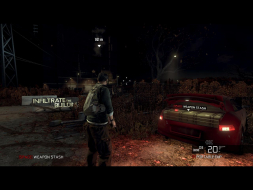


4:3
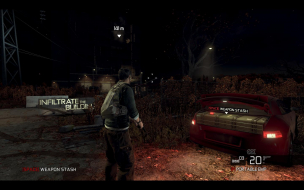

16:10
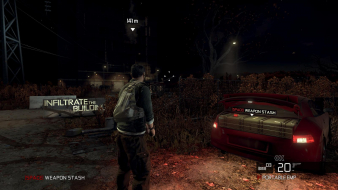

16:9
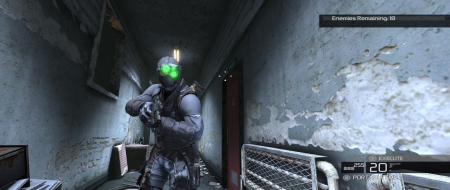

21:9


3x1


Author:  scavvenjahh [ 06 Aug 2010, 19:09 ]
Post subject:  Re: Splinter Cell: Conviction

An extra note on MinTripleDispRatio.
It can also be used in non-16:9 widescreen ARs, if you really can't stand the black bars. What you'll get is a full-height picture with no distortion, a Vert+ FOV and massively squeezed HUD/crosshair/mouse cursor/FMVs. Not exactly a better solution than the default anamorphism, so I don't think we'll endorse it, but here goes.

C:ProgramDataUbisoftConvictionConvictionUserPC.ini

[Engine.Display]
MinTripleDispRatio=3.9

Edit the value so that it is not higher than your AR.

16:10, MinTripleDispRatio=1.6

Author:  Tanuki [ 06 Aug 2010, 23:35 ]
Post subject:  Re: Splinter Cell: Conviction

Sam is starting to resemble that old guy in the club.

Author:  MobsterOO7 [ 07 Aug 2010, 03:13 ]
Post subject:  Re: Splinter Cell: Conviction

Actually I thought that Sam was looking a little younger in this new game.

Author:  The_cranky_hermit [ 19 Aug 2010, 15:01 ]
Post subject:  Re: Splinter Cell: Conviction

Certified.

Author:  Crollo [ 17 Jun 2011, 22:30 ]
Post subject:  Re: Splinter Cell: Conviction

An extra note on MinTripleDispRatio.
It can also be used in non-16:9 widescreen ARs, if you really can't stand the black bars.


If people don't like the black bars, they can go play halo and shut up. First they continually complain the playing field is stupid because 4:3 users are put at a disadvantage against 16:9 players, so even the playing field with a system that easily gives them access to the exact same wide angle aspect ratio regardless of the users screen, so that nobody has an advantage by having a better monitor. Oh no, we can't stand the black bars! This is a bad thing!

Really, sorry to be an ass, but if there's actually people out there who can't stand the black bars and would rather put themselves at an advantage against 16:9 players by opening the mattes so they can see more then they should, then they can just shut up and play something else that does allow them to be put at a disadvantage, then bitch at that instead.

Author:  thomasvdalen [ 25 Jun 2013, 20:34 ]
Post subject:  Re: Splinter Cell: Conviction

got bad settings or something but this is what i have till now.

Can someone please check it out?

http://imageshack.us/photo/my-images/845/2yxs.jpg
http://imageshack.us/photo/my-images/22/k3sa.jpg
http://imageshack.us/photo/my-images/542/9ns.jpg

and config file is here:
https://docs.google.com/file/d/0B5rPjOY ... sp=sharing

Thanks

Author:  scavvenjahh [ 26 Jun 2013, 08:59 ]
Post subject:  Re: Splinter Cell: Conviction

EyefinityMode=0 seems strange... Change it to EyefinityMode=2 in ConvictionUserPC.ini
Btw since you're using triple-widescreen you didn't have to edit the MinTripleDispRatio value. Just sayin'.

Author:  thomasvdalen [ 02 Jul 2013, 22:10 ]
Post subject:  Re: Splinter Cell: Conviction

still fish eye effect...


Code:
[Engine.Display]
AdapterNumber=0
DisableShaderOptims=False
UseTripleBuffering=False
ForceGpuCount=0
MaxFPS=120
EyefinityMode=2
ForceMultiMon=False
MinTripleDispRatio=3.9

[Inputs]
ControllerType=KT_X360
KeyboardLayout=KT_DEFAULT
UseXInputByDefault=True

Author:  thomasvdalen [ 03 Jul 2013, 12:47 ]
Post subject:  Re: Splinter Cell: Conviction

Here is a sample video on how things works now..


Needti to edit the url (scavv says: post approved, url fixed for ya)

Page 1 of 2 All times are UTC [ DST ]
Powered by phpBB® Forum Software © phpBB Group
https://www.phpbb.com/