Widescreen Gaming Forum
https://www.wsgf.org/phpBB3/

The Elder Scrolls III: Morrowind
https://www.wsgf.org/phpBB3/viewtopic.php?f=61&t=15192
Page 1 of 2

Author:  Tanuki [ 22 Oct 2007, 01:14 ]
Post subject:  The Elder Scrolls III: Morrowind


Widescreen Grade: C
Ultra-Widescreen Grade: C
Multi-monitor Grade: C
4k Grade: Incomplete

Read Full Detailed Report - The Elder Scrolls III: Morrowind

Morrowind is the third installment of the Elder Scrolls series by Bethesda. Players select a character from an array of races and seek their destiny on the harsh landscape of the island Morrowind. This is an expansive RPG with a large world for characters to explore at their whim. Character development is based on developing skills and their corresponding attributes. This is the first Elder Scrolls game to utilize the plugin system which allows community created content to be added to the game.
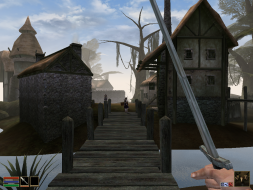

4:3
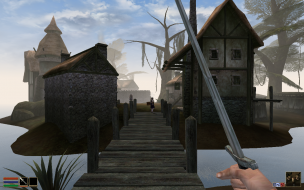

16:10


16:9


21:9


3x1


Author:  Tanuki [ 22 Oct 2007, 01:22 ]
Post subject:  The Elder Scrolls Morrowind: Detailed Report

Please note that I am using plugins and texture replacers which account for the different look from vanilla Morrowind. The widescreen behavior is the same.

I am also using a higher resolution font for better reading.

If you want to try this open "Morrowind.ini" and look for "Font 0=*********"

Try replacing the listed font with "century_gothic_font_regular" or "century_gothic_big". The first change is smaller and does not have any clipping problems. The second font can have an occasional clipping problem but it should rarely impact your game if at all.

The font changes were found at PJF's Pages. Big thanks.

Author:  The_cranky_hermit [ 22 Oct 2007, 01:38 ]
Post subject:  The Elder Scrolls Morrowind: Detailed Report

==Method==

Two things. Can you provide a link to the Morrowind FPS Optimizer? Also, could you include instructions on how to do this manually via regedit? I'm sure there are people who would rather edit registry keys manually than trust it to a third party program.

==Grading==


Calculated grade: C+

Major unresolved issues: None
Minor unresolved issues: None

Summary of widescreen-related flaws:
Registry solution
Stretched FMVs

Cranky's coverage estimate: 100%

Author:  Tanuki [ 22 Oct 2007, 01:48 ]
Post subject:  The Elder Scrolls Morrowind: Detailed Report

I will put in the link.

You can do it manually but you do not get the correct FOV. What is your call?


EDIT - Werewolf FOV section added.

Author:  Tanuki [ 22 Oct 2007, 02:11 ]
Post subject:  The Elder Scrolls Morrowind: Detailed Report

I will try and find a savegame online to show the werewolf FOV view. I am nowhere close at this point and do not feel like making a special mod.

But maybe a console command?

Author:  Tanuki [ 22 Oct 2007, 02:24 ]
Post subject:  The Elder Scrolls Morrowind: Detailed Report

Updated werewolf FOVs to avoid crashing. 8)

Author:  The_cranky_hermit [ 22 Oct 2007, 02:31 ]
Post subject:  The Elder Scrolls Morrowind: Detailed Report

You can do it manually but you do not get the correct FOV. What is your call?

There should be a way to manually increase the FOV too. I'm pretty sure that all the tool does is edit the registry settings and/or the .ini file. Can you try to figure out how to get both the resolution and FOV set manually?

Author:  Tanuki [ 22 Oct 2007, 03:43 ]
Post subject:  The Elder Scrolls Morrowind: Detailed Report

Reworked the DR with the werewolf FOV problem explained.


There should be a way to manually increase the FOV too. I'm pretty sure that all the tool does is edit the registry settings and/or the .ini file. Can you try to figure out how to get both the resolution and FOV set manually?


Negative. It is not in the registry or any ini files. The only place I found it was in a created ini used by the FPS Optimizer. Perhaps it is buried in the code?

I was unable to find any console commands.

Author:  Tanuki [ 22 Oct 2007, 03:57 ]
Post subject:  The Elder Scrolls Morrowind: Detailed Report

It's not like a fanmade tool can just invoke console commands when the game isn't even running.


Perhaps a different approach will help this situation.


On startup.


Right after launch before Morrowind goes fullscreen. Disregard what you see on the right window.

Author:  The_cranky_hermit [ 22 Oct 2007, 04:10 ]
Post subject:  The Elder Scrolls Morrowind: Detailed Report

Ok, I think I understand what's going on. I graded this on the misconception that the FPS optimizer only modifies .ini files and changes registry settings. Since it appears that it needs to actually hack the game's memory footprint in order to change the FOV, the game gets a new (worse) grade.

==Grading==


Calculated grade: D+

Major unresolved issues: None
Minor unresolved issues: None

Summary of widescreen-related flaws:
Hack solution
Hack disables werewolf FOV
Stretched FMVs

Cranky's coverage estimate: 100%

Page 1 of 2 All times are UTC [ DST ]
Powered by phpBB® Forum Software © phpBB Group
https://www.phpbb.com/