Widescreen Gaming Forum
https://www.wsgf.org/phpBB3/

Silent Hill 3
https://www.wsgf.org/phpBB3/viewtopic.php?f=61&t=12897
Page 1 of 1

Author:  Paddy the Wak [ 10 Jan 2006, 20:35 ]
Post subject:  Silent Hill 3


Widescreen Grade: C
Ultra-Widescreen Grade: Incomplete
Multi-monitor Grade: Unsupported
4k Grade: Incomplete

Read Full Detailed Report - Silent Hill 3

Silent Hill 3 is a survival horror game published by Konami and developed by Team Silent, a production group within Konami Computer Entertainment Tokyo. It is the third installment in the Silent Hill survival horror series and is a direct sequel to the first Silent Hill game.

Set seventeen years after the events of Silent Hill in which Harry Mason defeats the god of the town cult and is given a baby girl to care for, Silent Hill 3 focuses on Heather, a teenage girl who finds herself being drawn into Silent Hill's alternate reality. She discovers that the cult plans to use her to birth their god, and becomes caught in a conflict within the cult.

Heather in an "otherworld" amusement park. Gameplay in Silent Hill 3 resembles closely that of its two predecessors, the three main gameplay elements being combat, exploration, and puzzle solving.
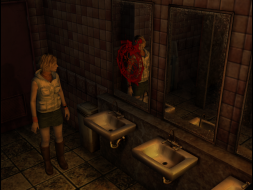


4:3


16:10
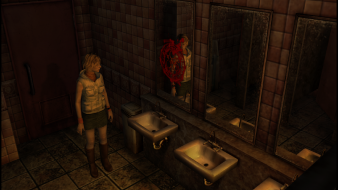

16:9


3x1


Author:  tsotelo [ 09 Apr 2012, 18:32 ]
Post subject:  Silent Hill 3 Eyefinity.

Attached screenshots of the game working ok with Eyefinity. Resolution 4320x900. All this using the FOV hack Racer_S. Instructions here.

Hardware:
2x Radeon HD 6850 in CrossfireX
Intel Core i7 930
6 GB Ram

Software:
Microsoft Windows 7 64 Bit
AMD Catalyst 12.3 Driver

Uploaded with ImageShack.us

Uploaded with ImageShack.us

Uploaded with ImageShack.us

The menus look bad, but the gameplay is almost perfect.

Author:  DSpider [ 26 May 2012, 12:49 ]
Post subject:  For a more convenient way to

For a more convenient way to start it up, create a batch file in the install directory (I named mine "SH3.bat" but you can name it anything you want, like "Start Game.bat", etc) and add this:

Code:
@echo off
   
   title "Hide Stupid-Ass CMD Window"
   for /f %%a in ('CMDOW ^| find "Hide Stupid-Ass CMD Window"') do CMDOW %%a /hid
   
   start /min sh3FOV.exe
   sh3.exe
   
   taskkill /im sh3FOV.exe


Next, create a shortcut to the desktop (right click - Send To - Desktop). Right click it, choose Properties and set the proper game icon from the sh3.exe file. While you're in the Properties window, set it so that it starts minimized (so that the black command prompt screen doesn't pop up briefly) from "Run - Normal window" to "Minimized".
 
 
Note: What this does is basically hides the black command line screen, starts the FOV trainer minimized and then runs sh3.exe (no start in front of it so that the next command, taskkill, waits for sh3.exe to finish). Then after you exit the game the trainer also closes, since you don't need it anymore.

Hope it helps! If you want, you may include it in the Silent Hill 3 main page and possibly in other games that use FOV trainers as well. You have my blessing. I spent about 4 hours trying to figure this out. Tested on Windows XP Pro SP3.

Cheers.

Author:  DSpider [ 26 May 2012, 12:51 ]
Post subject:  Revised version. This one

Revised version. This one also hides the FOV changing tool. Much cleaner this way.
Sorry for the double post.

Code:
@echo off
   
   title "Hide Stupid-Ass CMD Window"
   for /f %%a in ('CMDOW ^| find "Hide Stupid-Ass CMD Window"') do CMDOW %%a /hid
   
   start /min sh3FOV.exe
   for /f %%a in ('CMDOW ^| find "FOV Hack - Silent Hill 3"') do CMDOW %%a /hid
   sh3.exe
   
   taskkill /im sh3FOV.exe

Author:  joeboo [ 09 Oct 2012, 04:14 ]
Post subject:  I have uploaded pics of what

I run my games in 5760x1080 (5880x1080 with bezel management) as one continuous game screen across all three monitors. My video card is one single NVIDIA GTX 670 than connects and runs all three monitors as well as my 61" TV at the same time.

I have uploaded pics of what Silent Hill 3 looks like, but it looks much better on 3 screens. As you can see you get a much wider FOV! Click on the link below each picture to see a higher-resolution picture:


http://imageshack.us/a/img811/596/sh3triscreen1.jpg


http://imageshack.us/a/img228/4070/sh3triscreen2.jpg


http://imageshack.us/a/img405/2908/sh3triscreen3.jpg


http://imageshack.us/a/img825/1482/sh3triscreen4.jpg


Anything that is 2D (pre-rendered movies,menus,hud,etc) is stretched REALLY wide. The cut-scenes that use focus or depth of field effects also look a little wierd. SH3's real-time shadows will also look a little wierd. Other than that it runs really well.

You do see some wierd things like Douglas hiding to the side (in a non-rendered area) when Heather walks by Happy Burger, and other things the game developers never intended for us to see.

To get this to work is the same process as running it in 1920x1080,etc..

Just set your resolution to 5760x1080, and your FOV as 0.57 (Width) and 2.0 (Height)

Author:  Ashir [ 23 Sep 2013, 23:33 ]
Post subject:  Re: Silent Hill 3

Image

In case someone is interested, this is the same image but in 16:10

Author:  DaemonXHUN [ 25 Feb 2018, 04:50 ]
Post subject:  Re: Silent Hill 3

For those who want to play this game in 21:9, here's some help:

1. First download the Silent Hill 3 FOV Tool |Link: http://www.moddb.com/games/silent-hill- ... s/fov-tool
2. Unpack the downloaded rar file and copy it's contents to Silent Hill 3 main folder.
3. Start the game once in order for the game to create the disp.ini file (and while you are here you can also change your graphics quality settings).
4. Open the disp.ini file (it's in the savedata folder) and change "size" to your desired resolution (for example: size=2560x1080), then save the file.
5. Open up sh3FOV.exe, then set Height FOV to 1,2 and Width FOV to 0.64 (the FOV settings work weird here, the lower you go, the more FOV you got, but this is the most correct, most "strechless" setting).
6. Start the game and when you are in-game, hit * to activate the FOV tool.

You can also change FOV settings without having to quit from the game, just make sure to hit * again after you adjusted the slider.

Page 1 of 1 All times are UTC [ DST ]
Powered by phpBB® Forum Software © phpBB Group
https://www.phpbb.com/