Widescreen Gaming Forum

[-noun] Web community dedicated to ensuring PC games run properly on your tablet, netbook, personal computer, HDTV and multi-monitor gaming rig.
It is currently 12 Jul 2026, 08:49

All times are UTC [ DST ]


Post new topic Reply to topic  [ 16 posts ]  Go to page 1, 2, 3, 4, 5 ... 16  Next
Author Message
 Post subject: Rise of Nations
PostPosted: 26 Jan 2004, 21:05 
Offline

Joined: 25 Jan 2004, 19:57
Posts: 1


Widescreen Grade: C
Ultra-Widescreen Grade: Incomplete
Multi-monitor Grade: C
4k Grade: Incomplete

Read Full Detailed Report - Rise of Nations

Rise of Nations is a real-time strategy computer game, developed by Big Huge Games and published by Microsoft on May 20, 2003. The development of the game was led by veteran Brian Reynolds, of Civilization II and Sid Meier's Alpha Centauri. Concepts taken from turn-based strategy games have been added into the game—including territories and attrition warfare. Rise of Nations features 18 civilizations, playable through 8 ages of world history.

The game employs the concept of "territory," as employed in the Civilization long series of games; the area near the player's settlements is considered their territory, and players may only construct buildings within their territory or that of an ally. A nation's borders can be expanded by the creation and expansion of cities and forts, a technology tree, and obtaining access to certain rare resources. Other technologies and resources cause enemy units to suffer attrition over time, which can eventually destroy an unsupported invasion force.

Cities are centrally important to gameplay; most buildings can only be built within a certain distance of a city, borders are most easily expanded by building and expanding cities, and cities are the only source of the resource-collecting Citizen unit. Only a limited amount of cities can be built and cities can only be destroyed by its owner. Conquered cities join the conqueror's faction.


4:3


16:10


16:9


3x1


Last edited by wtrex5 on 03 Nov 2014, 05:51, edited 10 times in total.
Edit


Top
 Profile  
Reply with quote  
PostPosted: 01 Feb 2004, 06:36 
Offline

Joined: 24 Jan 2004, 18:48
Posts: 1
Awesome!

Thanks.


Top
 Profile  
Reply with quote  
PostPosted: 29 Jul 2004, 17:35 
Offline

Joined: 22 Jul 2004, 16:02
Posts: 4
i have 1.3 patch , an no where I can find the rise.ini or rise2.ini...i even did the entire search of C drive ..and still not found..

what I do now?


Top
 Profile  
Reply with quote  
PostPosted: 07 Nov 2004, 22:54 
Offline

Joined: 07 Nov 2004, 22:47
Posts: 1
I don't have a widescreen but I play RON. The original game places *.ini files in the game folder. So if you haven't patched it yet, look for rise2.ini in the C:Program FilesMicrosoft GamesRise of Nations folder. After the patch they moved the relevant *.ini to your C:Documents and Settings%Your Username%Local SettingsApplication DataMicrosoft GamesRise of Nationsrise2.ini. Either way, the first line should be ShowAllResolutions. Set it to 1. It may or may not work depending on your video card.

I did this trick to allow me to play the game at 1400*1050 rather than 1280*1024. Enjoy.


Top
 Profile  
Reply with quote  
PostPosted: 25 Mar 2005, 18:55 
Offline
Editors
Editors
User avatar

Joined: 14 Oct 2003, 13:52
Posts: 5706
If it's not there, you have to run the game first, before it will generate the .ini file. Exit the game, then you can edit it.


Top
 Profile  
Reply with quote  
PostPosted: 26 Mar 2005, 23:35 
Offline

Joined: 26 Mar 2005, 23:33
Posts: 1
Lol, i tried changing the .ini but it was already modified by patch or, most likely, by the exp.pack.


Top
 Profile  
Reply with quote  
PostPosted: 16 Jun 2006, 01:38 
Offline

Joined: 20 May 2006, 23:05
Posts: 3
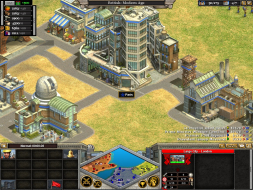
I recently installed this game on my laptop and saw that the site needed screenshots, so here you go. :)


The main display isn't stretched at all and the GUI is 'embiggoned' by expanding the panel on the far right-hand side.

I believe this game is Hor +


Top
 Profile  
Reply with quote  
PostPosted: 16 Jun 2006, 02:25 
Offline
Insiders
Insiders

Joined: 07 Nov 2005, 04:16
Posts: 3010
I took some screenshots of this demo the other day, but I hadn't posted them yet. But I found the game to be vert -, while you find it to be hor +. But I used resolutions of 1024x768 and 1280x800. Another difference is that I played the demo.

What is the largest non-widescreen resolution available to you? I'm guessing that it's either 1280x1024 or 1280x960. If it's bigger than 1024x768, can you take a comparison shot of that as well as 1440x900?

If not, are any smaller widescreen resolutions available to you?


Top
 Profile  
Reply with quote  
PostPosted: 18 Jun 2006, 21:53 
Offline

Joined: 20 May 2006, 23:05
Posts: 3
Hi cranky hermit,

I have following resolutions available:

1024x768 (default)
1152x864
1280x768
1280x800
1280x854
1360x768
1365x768
1366x768
1440x900

It seems that the largest non-widescreen resolution available is 1152x864. I suspect this is because my display is natively 1440x900, which wouldn't accommodate either 1280x960 or 1280x1024.

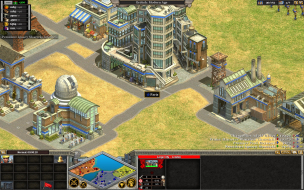
I've taken two more screenshots, one at 1152x864 and one at 1280x800:


You also appear to be correct about the game being Vert - rather than Hor +.

If you need any more screenshots, just let me know. :)


Top
 Profile  
Reply with quote  
PostPosted: 18 Jun 2006, 22:04 
Offline
Editors
Editors
User avatar

Joined: 03 Jan 2006, 20:58
Posts: 125
It seems to me that it's hor+ and ver-, as you can see in the screenshots a part of the top and bottom has been cut off, but you do see more on the sides :?

You sure you havent zoomed in or something?


Top
 Profile  
Reply with quote  
PostPosted: 18 Jun 2006, 22:09 
Offline

Joined: 20 May 2006, 23:05
Posts: 3
Positive. The screenshots are taken just at the beginning of the last tutorial mission (Battle of Britain). I only wait a few seconds for the food amount to read 2163 (so that the screens are more or less the same); otherwise I don't touch anything.


Top
 Profile  
Reply with quote  
PostPosted: 07 May 2012, 20:06 
Offline

Joined: 07 May 2012, 16:15
Posts: 1
This method does not work for me, what could be wrong ? Tried russian/english versions. I deleted registry entries/profile/saves before installing another version.

I have only:

1024x768x16
1024x768x32
1280x1024x16
1280x1024x32

.. before tweaking .ini and after.

Win 7 64 SP1
AMD PII X955
4Gb RAM
ATI 5850
Monitor: BenQ G2420HDBL

All is up to date and virus free.. I hope free.


Top
 Profile  
Reply with quote  
 Post subject: Re: Rise of Nations
PostPosted: 11 Nov 2013, 20:09 
Offline

Joined: 23 Nov 2011, 00:52
Posts: 60
I got to 2560 x 1600 it wont play in surround at 7680 x 1600 I have disable surround


Top
 Profile  
Reply with quote  
 Post subject: Re: Rise of Nations
PostPosted: 28 Apr 2014, 00:00 
Offline

Joined: 23 Nov 2011, 00:52
Posts: 60
I got this working at 4800 x 2560 anyone ever have luck moving the hud?


Top
 Profile  
Reply with quote  
 Post subject: Re: Rise of Nations
PostPosted: 06 Aug 2014, 19:59 
Offline

Joined: 23 Nov 2011, 00:52
Posts: 60
http://steamcommunity.com/app/287450/di ... 593282563/

Rise of Nations Extended came out here are my fixes for Borderless Windowed mode
http://steamcommunity.com/groups/Window ... 619417537/
Went to this thread and used Windowless border mode.

1. Install and run Borderless Windowed Mode
2. Run Rise of Nations in Windowed mode
3. Set to resolution
4. Click Tray of borderless window and click F3 (add window)
5. Click Game / Window of game and push F3
6. Add Game
7. Now the game will run in borderless window mode.
8. If the offset of buttons is wrong set to your desired resolution again
9. Exit Game
10. Restart game
11. Open Borderless window and click open game settings. Click Apply and will reset it.

Fixes:
If your game is offset on the bottom (meaning bottom row of icons)
1. go to PosY: enter -2 or 0 click apply and fixed

Things RISE OF NATIONS: Extended needs to do:
1. Mod for the ability to change where the UI sits. There is no reason for it to be on the bottom left / right allow it to be centerized at these High resolutions.
This should be EASY to fix


Top
 Profile  
Reply with quote  
 Post subject: Re: Rise of Nations
PostPosted: 24 Feb 2015, 00:51 
Offline

Joined: 02 Feb 2010, 23:51
Posts: 63
I tried out the latest version at 21:9, and it's appears to be hor+. I think it's resolution-dependent so the more pixels you throw at it, the more you can see. I was running 2560x1440 before, now I'm at 3440x1440 so it's only hor+ because of that.

http://www.wsgf.org/forums/viewtopic.php?f=95&t=27979


Top
 Profile  
Reply with quote  
Display posts from previous:  Sort by  
Post new topic Reply to topic  [ 16 posts ]  Go to page 1, 2, 3, 4, 5 ... 16  Next

All times are UTC [ DST ]


Who is online

Users browsing this forum: No registered users and 25 guests


You cannot post new topics in this forum
You cannot reply to topics in this forum
You cannot edit your posts in this forum
You cannot delete your posts in this forum
You cannot post attachments in this forum

Search for:
Jump to:  
cron


Powered by phpBB® Forum Software © phpBB Group