
Thought I'd post this here too, enjoy!
http://www.youtube.com/watch?v=KT3GSSyaMuo
Search found 9 matches
- 17 Feb 2011, 05:34
- Forum: YouTube Links
- Topic: Crysis 2 (Beta) Gameplay On Nvidia Surround
- Replies: 1
- Views: 1820
- 05 Feb 2011, 06:36
- Forum: Multi-Monitor Gaming
- Topic: Nvidia surround not working at 5040x1050
- Replies: 13
- Views: 7618
Re: Nvidia surround not working at 5040x1050
Hoo-ray! After 2 months of dilligent and hard work, I got my setup working! I bought a 4th Samsung 226bw monitor, and tested it by replacing each one of my previous monitors one by one. Now, I found a "faulty" monitor amongst the three identical monitors I had, replaced it. And got the 5040x1050 ...
- 28 Jan 2011, 21:00
- Forum: Multi-Monitor Gaming
- Topic: Nvidia surround not working at 5040x1050
- Replies: 13
- Views: 7618
Re: Nvidia surround not working at 5040x1050
I have gathered new information, if it is of any help:
I upgraded to a EVGA 780i SLI "FTW" motherboard (which by irony is not winning me anything).
There has been no change to my issue, I'm still experiencing the problem stated in the first post and can only achieve a resolution of 3840x1024 ...
I upgraded to a EVGA 780i SLI "FTW" motherboard (which by irony is not winning me anything).
There has been no change to my issue, I'm still experiencing the problem stated in the first post and can only achieve a resolution of 3840x1024 ...
- 26 Jan 2011, 11:52
- Forum: Multi-Monitor Gaming
- Topic: Nvidia surround not working at 5040x1050
- Replies: 13
- Views: 7618
Re: Nvidia surround not working at 5040x1050
Go get the 266.58 WHQL HERE: http://www.nvidia.com/Download/index.aspx?lang=en-us
Then report back.
The latest driver update did not solve my problem :(
Nice to see an update from Nvidia though.
I noticed one new thing about my monitors, in the "information" tab on my monitors setup ...
Then report back.
The latest driver update did not solve my problem :(
Nice to see an update from Nvidia though.
I noticed one new thing about my monitors, in the "information" tab on my monitors setup ...
- 25 Jan 2011, 15:00
- Forum: Multi-Monitor Gaming
- Topic: Nvidia surround not working at 5040x1050
- Replies: 13
- Views: 7618
Re: Nvidia surround not working at 5040x1050
Not sure if this will help with your particular situation but have you tried disabling bezel compensation? I've seen that work in multi monitor gaming.
Yeah, tried that. Not that much of a fan with Bezel so I had it off the first time I ran surround.
This problem still persists, so far no ...
Yeah, tried that. Not that much of a fan with Bezel so I had it off the first time I ran surround.
This problem still persists, so far no ...
- 25 Dec 2010, 06:26
- Forum: Multi-Monitor Gaming
- Topic: Nvidia surround not working at 5040x1050
- Replies: 13
- Views: 7618
Re: Nvidia surround not working at 5040x1050
680i chipset and GF10x cards !? That means a state-of-the-art SLI system on PCI-E 1.0 ports :?
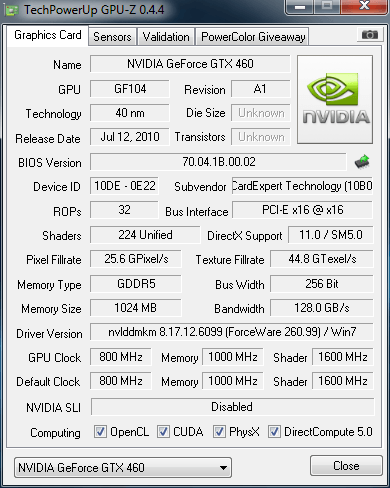
Can you post a GPU-Z screenshot of one of the cards ?
Here is an image of the GPU-z setup:
- 17 Dec 2010, 11:51
- Forum: Multi-Monitor Gaming
- Topic: Hi I have a question about triple monitor set up!
- Replies: 4
- Views: 2658
Re: Hi I have a question about triple monitor set up!
This has something to do with the field of view and the fact that games are really not designed for surround gaming.
It's normal though, yeah. I have played around 12 games in surround using SoftTH and pretty much every game has the same 'issue' even when using a FOV fixer.
It's normal though, yeah. I have played around 12 games in surround using SoftTH and pretty much every game has the same 'issue' even when using a FOV fixer.
- 17 Dec 2010, 11:48
- Forum: Multi-Monitor Gaming
- Topic: Nvidia surround not working at 5040x1050
- Replies: 13
- Views: 7618
Re: Nvidia surround not working at 5040x1050
I got the scaling to work correctly earlier, but I'm still restricted to 3840x1024.
I contacted Nvidia support but appearantly they are out for the holidays and I would most likely get a reply in the new years.
So if anyone has any ideas on how to possible fix this, please post by.
I will ...
I contacted Nvidia support but appearantly they are out for the holidays and I would most likely get a reply in the new years.
So if anyone has any ideas on how to possible fix this, please post by.
I will ...
- 16 Dec 2010, 08:01
- Forum: Multi-Monitor Gaming
- Topic: Nvidia surround not working at 5040x1050
- Replies: 13
- Views: 7618
Nvidia surround not working at 5040x1050
Hello this is my first post on the forums so bear with me and thank you for any help.
Please read my post thoroughly, this is not a common issue as all my monitors are IDENTICAL.
I recently bought two Gainward GTX-460 GS-GLH graphics cards to run in SLI on my setup with 3 matching PC monitors ...
Please read my post thoroughly, this is not a common issue as all my monitors are IDENTICAL.
I recently bought two Gainward GTX-460 GS-GLH graphics cards to run in SLI on my setup with 3 matching PC monitors ...