Page 1 of 3
A Plague Tale: Innocence Ultrawide Fix
Posted: 13 May 2019, 23:18
by OnkelJupp
A Plague Tale: Innocence is an amazing game which sadly doesn't support Ultrawide (neither Gameplay nor Cutscenes).
You can easily fix this by Hex Editing the Game and changing all 39 8E E3 3F Hex Values with 8E E3 18 40 Hex Values (for 3440x1440; 26 B4 17 40 [instead of 8E E3 18 40] for 2560x1080; 9A 99 19 40 [instead of 8E E3 18 40] for 3840x1600).
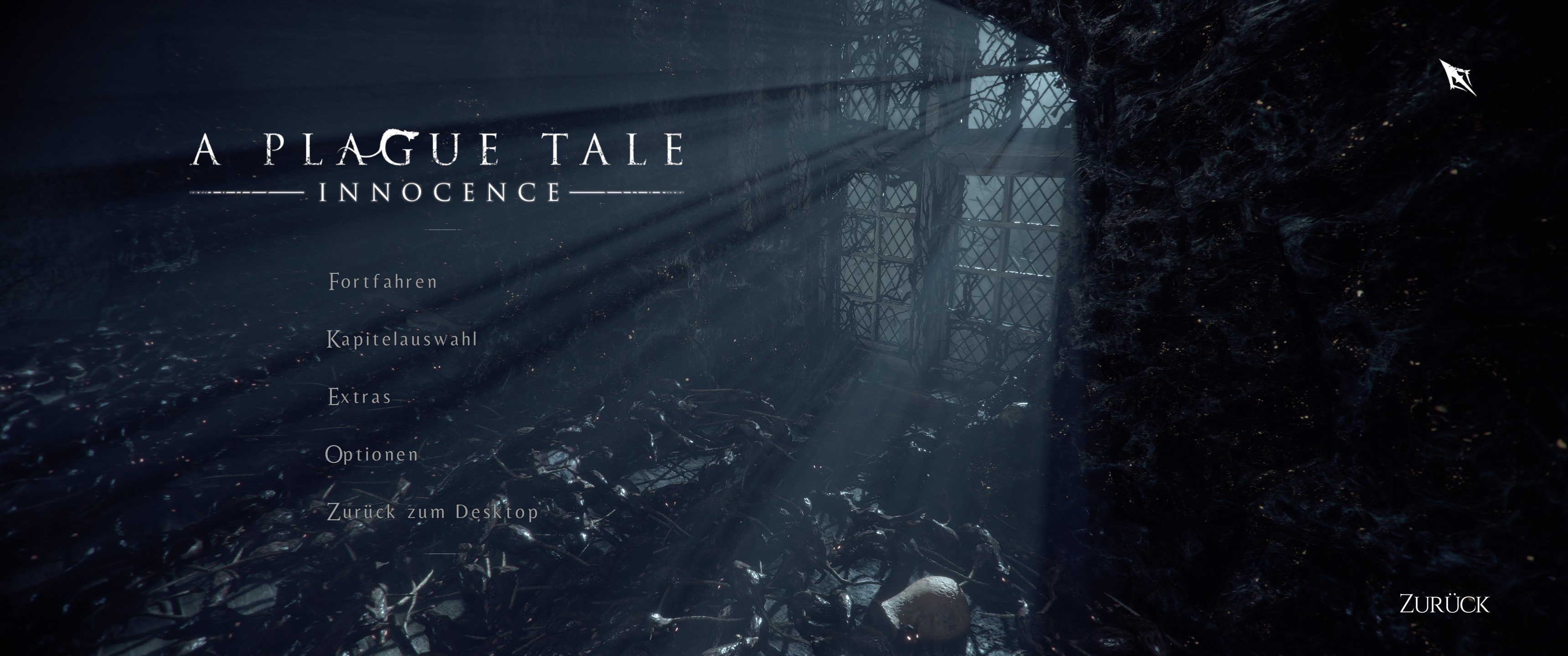
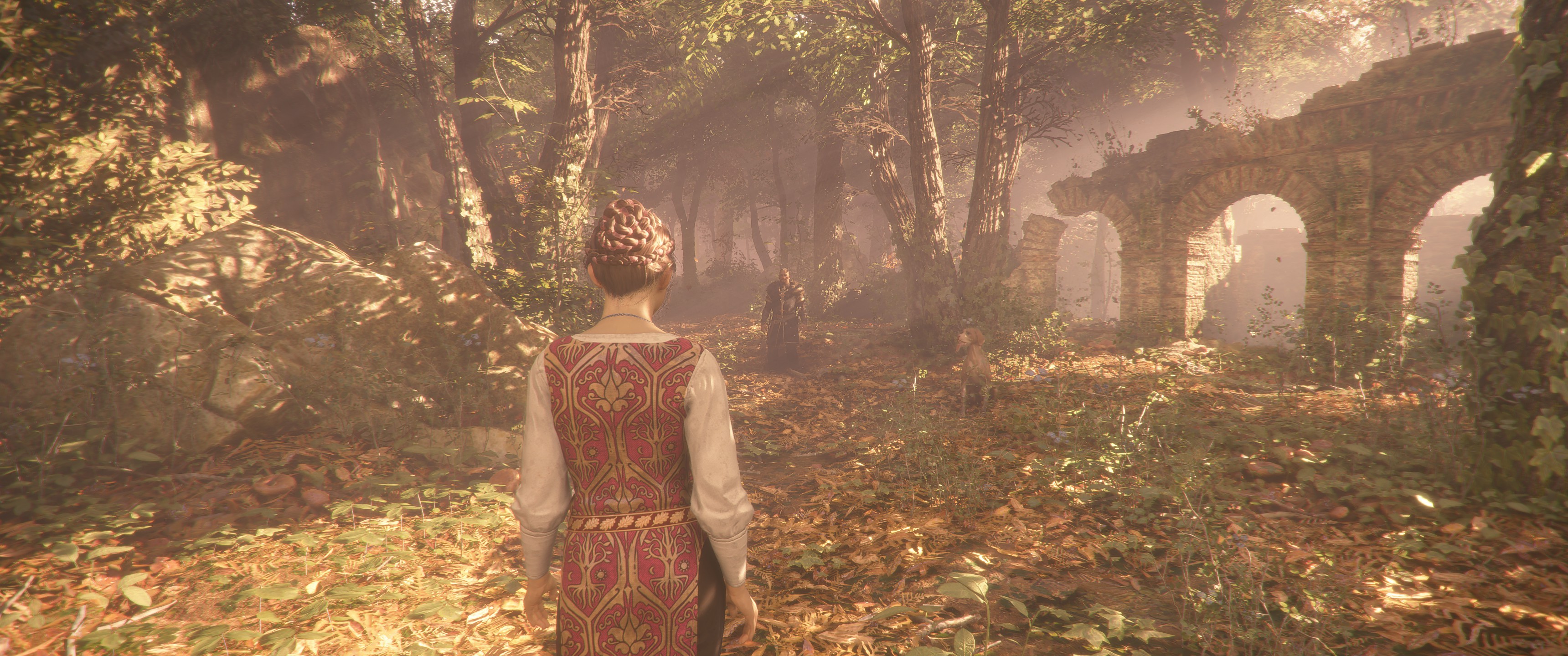
Now you can enjoy both Gameplay and Cutscenes (aswell as the HUD) in 21:9 (even the Main Menu works).
Sometimes the transition between Loading Screen and Cutscene glitches out with red bars on the side but it shouldn't be too worrying (since it lasts only for the duration of the Loading Screen).
Keep in mind that this Fix only works for Steam and needs to be redone after every Update (also keep in mind to read the short Hex Edit Info down below if you don't know how to Hex Edit).
If the Fix strangely doesn't work try to set the inGame resolution to 16:9 (1920x1080) since the 39 8E E3 3F Hex Values are for 16:9.
Main Menu:
Cutscene:
Gameplay:
If you don't know how to Hex Edit:
Just download HxD --> Open HxD --> Press Control O --> Choose the Game's Exe (''APlagueTaleInnocence_x64'' in steamapps/common/APlagueTaleInnocence) --> Press Control R --> Go to Hex Values (on top) --> Search for 39 8E E3 3F and change it with 8E E3 18 40 --> Activate Search direction all --> Press Change everything (bottom middle) --> (should change two values) Now go to the top left and save it where the normal exe is, changing it with the old one. If you have problems just repair the Game via Steam.
Re: A Plague Tale: Innocence Ultrawide Fix
Posted: 14 May 2019, 00:27
by Dzukacorama
Tnx !
Re: A Plague Tale: Innocence Ultrawide Fix
Posted: 14 May 2019, 00:35
by OnkelJupp
No problem!
Re: A Plague Tale: Innocence Ultrawide Fix
Posted: 14 May 2019, 05:30
by blaze1961
My display is 2560x1080 I did a search with 8E E3 18 40 but the hex key wasn't found. What am I doing wrong?
Re: A Plague Tale: Innocence Ultrawide Fix
Posted: 14 May 2019, 05:47
by Rose
blaze1961 wrote:My display is 2560x1080 I did a search with 8E E3 18 40 but the hex key wasn't found. What am I doing wrong?
The guide can be confusing. Replace every instance of 39 8E E3 3F with 26 B4 17 40.
8E E3 18 40 is 3440x1440 and isn't something to search for.
Re: A Plague Tale: Innocence Ultrawide Fix
Posted: 14 May 2019, 06:17
by blaze1961
Rose wrote:blaze1961 wrote:My display is 2560x1080 I did a search with 8E E3 18 40 but the hex key wasn't found. What am I doing wrong?
The guide can be confusing. Replace every instance of 39 8E E3 3F with 26 B4 17 40.
8E E3 18 40 is 3440x1440 and isn't something to search for.
Thank You!!! Works great
Re: A Plague Tale: Innocence Ultrawide Fix
Posted: 14 May 2019, 06:37
by BigBOSS
Rose wrote:blaze1961 wrote:My display is 2560x1080 I did a search with 8E E3 18 40 but the hex key wasn't found. What am I doing wrong?
The guide can be confusing. Replace every instance of 39 8E E3 3F with 26 B4 17 40.
8E E3 18 40 is 3440x1440 and isn't something to search for.
In the version from CODEX it does not work. Crash on launch
Re: A Plague Tale: Innocence Ultrawide Fix
Posted: 14 May 2019, 11:38
by OnkelJupp
Rose wrote:The guide can be confusing. Replace every instance of 39 8E E3 3F with 26 B4 17 40.
8E E3 18 40 is 3440x1440 and isn't something to search for.
Yeah, if you don't know how to Hex Edit and just read the top part it can be quite confusing. But that's why I explained it extra under the pictures.
I also edited my post.
BigBOSS wrote:In the version from CODEX it does not work. Crash on launch
This Fix is only for the Steam Version.
Re: A Plague Tale: Innocence Ultrawide Fix
Posted: 14 May 2019, 12:10
by Small tree
1280x1024?
Re: A Plague Tale: Innocence Ultrawide Fix
Posted: 14 May 2019, 13:26
by OnkelJupp
Small tree wrote:1280x1024?
00 00 A0 3F
Re: A Plague Tale: Innocence Ultrawide Fix
Posted: 14 May 2019, 13:53
by BigBOSS
OnkelJupp wrote:Rose wrote:This Fix is only for the Steam Version.
What will be ideas for start in Codex? Can you make a patcher?
Re: A Plague Tale: Innocence Ultrawide Fix
Posted: 14 May 2019, 14:25
by Sib3riX
Woking thank you!
Re: A Plague Tale: Innocence Ultrawide Fix
Posted: 14 May 2019, 14:37
by Small tree
OnkelJupp
thx. but, It does not work, I replaced it with an editor, it will work in a window without a frame, but not full screen, when you do full screen, the bands remain(((
Re: A Plague Tale: Innocence Ultrawide Fix
Posted: 14 May 2019, 15:29
by mjhieu
Pls give me Hex number for 3840:1080 32:9. I know how to replace it by using Hex. Thanks alot
Re: A Plague Tale: Innocence Ultrawide Fix
Posted: 14 May 2019, 15:44
by Li
mjhieu wrote:Pls give me Hex number for 3840:1080 32:9. I know how to replace it by using Hex. Thanks alot
Yes, need fix to 3840x1080 resolution. Maybe u can explain how calculate it?
Re: A Plague Tale: Innocence Ultrawide Fix
Posted: 14 May 2019, 17:45
by mjhieu
Li wrote:mjhieu wrote:Pls give me Hex number for 3840:1080 32:9. I know how to replace it by using Hex. Thanks alot
Yes, need fix to 3840x1080 resolution. Maybe u can explain how calculate it?
I found the Hex fix for 3840:1080, It isnt perfect but playable. Look for APlagueTaleInnocence_x64.exe in game folder and search 39 8E E3 3F Hex Values, then change all to 39 8E 63 40
Re: A Plague Tale: Innocence Ultrawide Fix
Posted: 14 May 2019, 19:12
by AgitossUa
BigBOSS wrote:OnkelJupp wrote:Rose wrote:This Fix is only for the Steam Version.
What will be ideas for start in Codex? Can you make a patcher?
You do something wrong.
39 8E E3 3F>26 B4 17 40 - works for me on codex version.
Re: A Plague Tale: Innocence Ultrawide Fix
Posted: 14 May 2019, 20:03
by OnkelJupp
You can find the most common ones here:
http://www.wsgf.org/article/common-hex-values !
Sorry, I only play in Borderless Window Mode; after some Steam Community Hub Feedback I thought it would work fine with Fullscreen.
Re: A Plague Tale: Innocence Ultrawide Fix
Posted: 14 May 2019, 21:41
by Li
mjhieu wrote:Li wrote:mjhieu wrote:Pls give me Hex number for 3840:1080 32:9. I know how to replace it by using Hex. Thanks alot
Yes, need fix to 3840x1080 resolution. Maybe u can explain how calculate it?
I found the Hex fix for 3840:1080, It isnt perfect but playable. Look for APlagueTaleInnocence_x64.exe in game folder and search 39 8E E3 3F Hex Values, then change all to 39 8E 63 40
Work's fine - thank you very match
Re: A Plague Tale: Innocence Ultrawide Fix
Posted: 14 May 2019, 22:18
by loki31
OnkelJupp wrote:A Plague Tale: Innocence is an amazing game which sadly doesn't support Ultrawide (neither Gameplay nor Cutscenes).
You can easily fix this by Hex Editing the Game and changing all 39 8E E3 3F Hex Values with 8E E3 18 40 Hex Values (for 3440x1440; 26 B4 17 40 [instead of 8E E3 18 40] for 2560x1080; 9A 99 19 40 [instead of 8E E3 18 40] for 3840x1600).
Now you can enjoy both Gameplay and Cutscenes (aswell as the HUD) in 21:9 (even the Main Menu works).
Sometimes the transition between Loading Screen and Cutscene glitches out with red bars on the side but it shouldn't be too worrying (since it lasts only for the duration of the Loading Screen).
Keep in mind that this Fix only works for Steam and needs to be redone after every Update (also keep in mind to read the short Hex Edit Info down below if you don't know how to Hex Edit).
If the Fix strangely doesn't work try to set the inGame resolution to 16:9 (1920x1080) since the 39 8E E3 3F Hex Values are for 16:9.
Main Menu:
Cutscene:
Gameplay:
If you don't know how to Hex Edit:
Just download HxD --> Open HxD --> Press Control O --> Choose the Game's Exe (''APlagueTaleInnocence_x64'' in steamapps/common/APlagueTaleInnocence) --> Press Control R --> Go to Hex Values (on top) --> Search for 39 8E E3 3F and change it with 8E E3 18 40 --> Activate Search direction all --> Press Change everything (bottom middle) --> (should change two values) Now go to the top left and save it where the normal exe is, changing it with the old one. If you have problems just repair the Game via Steam.
Onkeljupp!
thanks a lot!