Page 1 of 3
World War Z
Posted: 16 Apr 2019, 07:36
by Rose
I'm not sure if I'm getting the game but one of the devs said this on the game's ultrawide support:
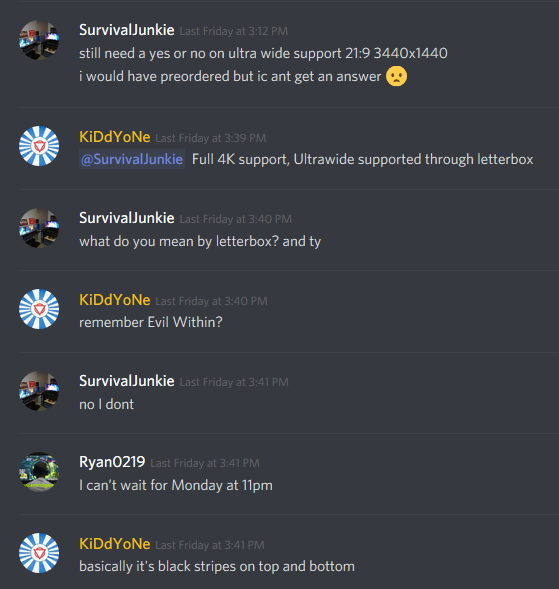
- uw wwz.png (70 KiB) Viewed 54868 times
I've also been told that the game uses an in-house engine, not Unity or Unreal Engine that we're familiar with. This would need to be confirmed though. I'll update the thread if I find out more.
EDIT: I modified the game .exe to remove the pillarboxing. See my post
right here.
Re: World War Z
Posted: 16 Apr 2019, 09:28
by Guest
Hello, I've just tested on PC, no ultrawide support (21/9 3440x1440), black bars on left and right (looks like regular 16/9, no bars on top or bottom).
So dev are liars

.
So hard to code Ultrawide ? -_- ....
Can we have a fix please guys ?
Re: World War Z
Posted: 16 Apr 2019, 09:51
by Zebus
+1 We need it please !
Re: World War Z
Posted: 16 Apr 2019, 18:21
by amigo091
No UWHD support
2560x1080 (21:9)Here is the in-game screenshots


Re: World War Z
Posted: 16 Apr 2019, 22:50
by Rose
I also summarized the situation and whether the game supports other hardware
here on PCGamingWiki. I did test for multimonitor support as well by changing to a custom resolution, and it was pillarboxed but seeing how the game allows you to select a screen, I wasn't sure, so it's still at "unknown" and needs proper testing by someone who actually has a triple monitor setup.
In other news, the same Saber Interactive dev said ultrawide support is planned. Let's hope it's not vert-

Re: World War Z
Posted: 17 Apr 2019, 03:35
by SurvivalJunkie
Rose wrote:I also summarized the situation and whether the game supports other hardware
here on PCGamingWiki. I did test for multimonitor support as well by changing to a custom resolution, and it was pillarboxed but seeing how the game allows you to select a screen, I wasn't sure, so it's still at "unknown" and needs proper testing by someone who actually has a triple monitor setup.
In other news, the same Saber Interactive dev said ultrawide support is planned. Let's hope it's not vert-
Hi I am Survival Junkie on the discord. I have both an Ulta Wide(Z35P) and also 3 Hp 23es monitors. What do you need tested with a triple monitor config? I might be able to try it for you.
Re: World War Z
Posted: 17 Apr 2019, 06:08
by Rose
For the wiki and general awareness, we need to know whether the game is pillarboxed for multimonitor users. You can also check whether the cutscenes are windowboxed by starting any campaign. You can take a screenshot / photo of the outcome too but that's not necessary.
Re: World War Z
Posted: 17 Apr 2019, 09:04
by Zebus
Yes! So we can expect this functionality in the next patch ?
I hope for this...
Re: World War Z
Posted: 17 Apr 2019, 09:11
by valcan_s
Rose wrote:For the wiki and general awareness, we need to know whether the game is pillarboxed for multimonitor users. You can also check whether the cutscenes are windowboxed by starting any campaign. You can take a screenshot / photo of the outcome too but that's not necessary.
I can 100% verify that on Nvidia Surround @ 5760x1080 : 3x 1080p the game is pill boxed and the Left and Right screen have black overlays. Also I can verify that the FOV is low but not as an error it is the same as 1080p and just needs a slider so it is better aka 100 - 120ish. The game owns I really love it if they can add Ultra Wide and multi screen that be insane as well a FOV slider.
Here are some screens:
Also the game supports DX11 and Vulkan API, both work great and run super fast as well as the game looks real nice.
Here is the EXE I renamed them to wwzRetailEgs.zip_004.zip the original name is wwzRetailEgs.zip.004 so the file extension is .001 - .004 they are just a group of zip files. To get them to work just rename them back.
Re: World War Z
Posted: 17 Apr 2019, 20:07
by cabante
Ok, so I have figured out a way to get stretched image until we get patch from devs.
Im running a 3440x1440 monitor, and here is what I did:
1. go to C:\Users\(((your user name)))\AppData\Local\Saber\WWZ\client\storage
2. open video.dat with notepad.
3. Change to "WindowSizeX": 2560 and "OutputSizeX": 2560 instead of 3440 , and save.
4. In nvidia panel I go to desktop size and position (mine is in Swedish so I translated)
5. Scaling: Fullscreen , save.
6. Run game, should be in 2560x1440 , stretched.
Lets hope we get patch sooner than later from devs. They have it on the "to-do-list" apperantly.
Re: World War Z
Posted: 17 Apr 2019, 21:46
by acecel
cabante wrote:Ok, so I have figured out a way to get stretched image until we get patch from devs.
Im running a 3440x1440 monitor, and here is what I did:
1. go to C:\Users\(((your user name)))\AppData\Local\Saber\WWZ\client\storage
2. open video.dat with notepad.
3. Change to "WindowSizeX": 2560 and "OutputSizeX": 2560 instead of 3440 , and save.
4. In nvidia panel I go to desktop size and position (mine is in Swedish so I translated)
5. Scaling: Fullscreen , save.
6. Run game, should be in 2560x1440 , stretched.
Lets hope we get patch sooner than later from devs. They have it on the "to-do-list" apperantly.
Could you post a few screenshots for us to see how bad/ok it looks please ?
Re: World War Z
Posted: 18 Apr 2019, 14:09
by Zebus
Thanx Cabante i try this tonight!
You rock!
Re: World War Z
Posted: 18 Apr 2019, 19:32
by Evil_Raven
Re: World War Z
Posted: 18 Apr 2019, 23:31
by Liberator
Tried acecel method
No success, Same Old Black Bars On the Side Of Screen
Re: World War Z
Posted: 19 Apr 2019, 12:28
by Rose
I've had the game since its release but I avoided playing it or trying anything, hoping for the devs to release an update. It's only today that I decided to disassemble the exe and look into it. Took me about 5 to 10 minutes to remove the pillarboxing.
Download the modified exe
here, put it in WorldWarZ\en_us\client\bin\pc\ and overwrite.
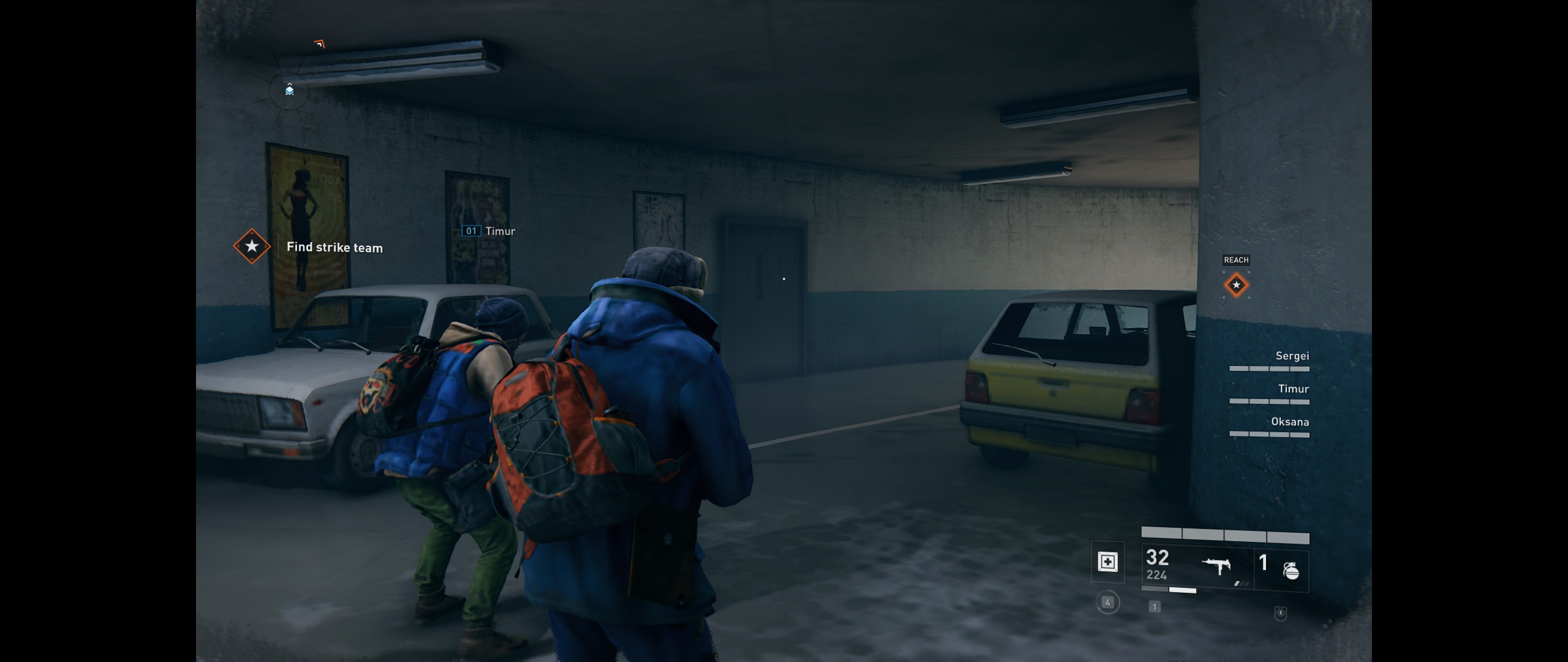
- Pillarboxed
- Pc Screenshot 2019.04.19 - 16.54.49.48.jpg (294.76 KiB) Viewed 24724 times
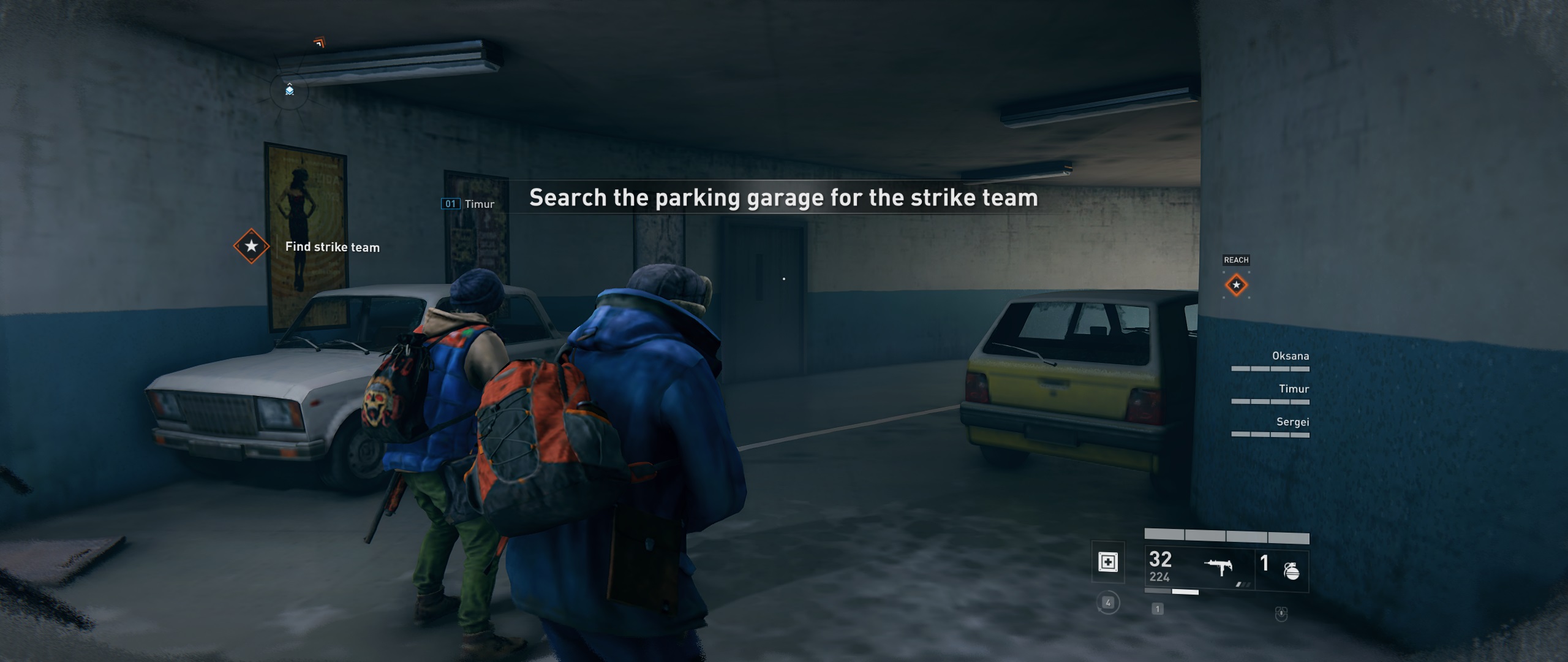
- Modded
- Pc Screenshot 2019.04.19 - 16.52.11.49.jpg (335.09 KiB) Viewed 24788 times
Alternatively, try out this patcher that should work with every version:
Edit: Updated the patcher to be permanent.
Re: World War Z
Posted: 19 Apr 2019, 17:32
by Garwinski
Rose wrote:I've had the game since its release but I avoided playing it or trying anything, hoping for the devs to release an update. It's only today that I decided to disassemble the exe and look into it. Took me about 5 to 10 minutes to remove the pillarboxing.
Download the modified exe
here, put it in WorldWarZ\en_us\client\bin\pc\ and overwrite.
Pc Screenshot 2019.04.19 - 16.54.49.48.jpg
Pc Screenshot 2019.04.19 - 16.52.11.49.jpg
Temped to try it though, but I am a little worried that this might get you banned or something, even though I have no idea what kind of anti cheat WWZ has (if any).
Re: World War Z
Posted: 19 Apr 2019, 18:33
by Evil_Raven
Garwinski wrote:Rose wrote:I've had the game since its release but I avoided playing it or trying anything, hoping for the devs to release an update. It's only today that I decided to disassemble the exe and look into it. Took me about 5 to 10 minutes to remove the pillarboxing.
Download the modified exe
here, put it in WorldWarZ\en_us\client\bin\pc\ and overwrite.
Pc Screenshot 2019.04.19 - 16.54.49.48.jpg
Pc Screenshot 2019.04.19 - 16.52.11.49.jpg
Temped to try it though, but I am a little worried that this might get you banned or something, even though I have no idea what kind of anti cheat WWZ has (if any).
no anti-cheat
Re: World War Z
Posted: 19 Apr 2019, 21:57
by acecel
Rose wrote:I've had the game since its release but I avoided playing it or trying anything, hoping for the devs to release an update. It's only today that I decided to disassemble the exe and look into it. Took me about 5 to 10 minutes to remove the pillarboxing.
Download the modified exe
here, put it in WorldWarZ\en_us\client\bin\pc\ and overwrite.
Pc Screenshot 2019.04.19 - 16.54.49.48.jpg
Pc Screenshot 2019.04.19 - 16.52.11.49.jpg
Thanks for this, but could you explain the method you used to do it ?
As there is already a new version 1.01 with some fixes, and it won't be the last patch

Re: World War Z
Posted: 20 Apr 2019, 14:57
by Evil_Raven
Re: World War Z
Posted: 21 Apr 2019, 02:18
by Rose
acecel, as far as I know, version 1.01 was the launch version. There's no universal way of achieving ultrawide support across different engines.
Evil_Raven, you don't need to upload the .exe anymore. I have had the game since its release. I also updated the comment shortly after the "1.02" hotfix came out. Thank you for the gorgeous screenshots though!
I have some news from Discord as well, now that I'm finally able to post here without getting timed out:
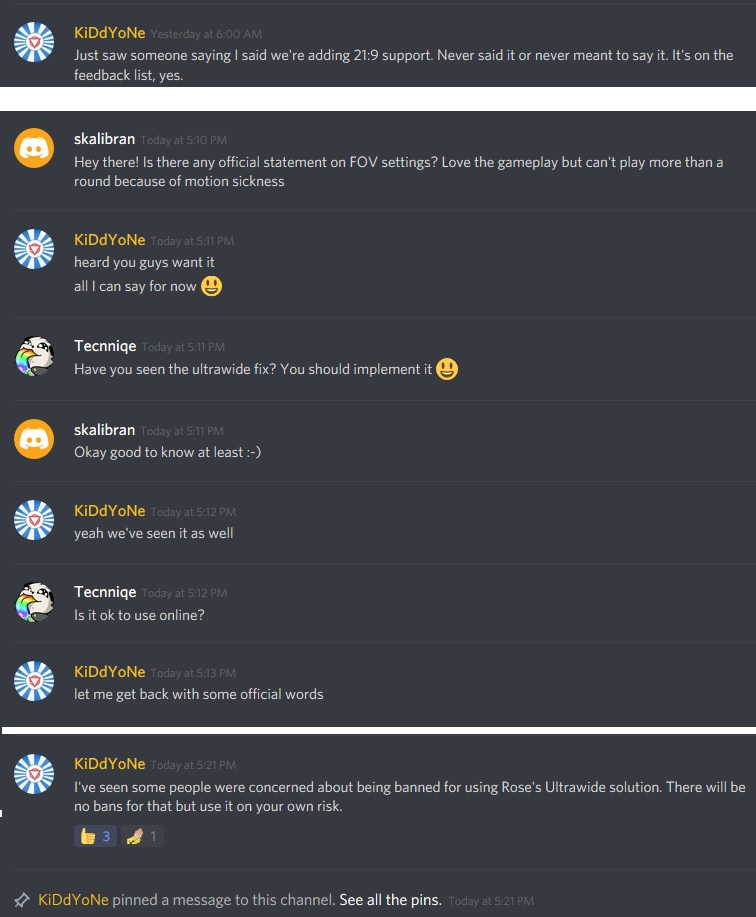
- uw news.jpg (116.6 KiB) Viewed 21493 times