Page 1 of 1
James Cameron's Avatar: The Game Change of FOV?
Posted: 23 Sep 2018, 19:06
by vekio
The game support widescreen but I think FOV has been designed for 4:3 resolution. At 16:9 the character is too close on the screen and it is a bit annoying.
Re: James Cameron's Avatar: The Game Change of FOV?
Posted: 23 Sep 2018, 20:07
by susahamat
idk about the game , but i've searched infomation about this game in patch 1 has been included FOV
https://worthplaying.com/article/2010/1/24/patch/71784/
Re: James Cameron's Avatar: The Game Change of FOV?
Posted: 24 Sep 2018, 15:15
by vekio
I have versions v1.02 but it does not help. I think that the wrong FOV in widescreen is in most games from the previous generation of consoles.
Developers of many games have adapted their games to widescreen, but the FOV has been such as in 4:3 games.
A similar situation is in Gears of War but in this case you can correct the FOV by entering the appropriate command in the console. Here, unfortunately, you can not do this..
Maybe after many years from the released of this game we will be able to repair FOV by hack.
Re: James Cameron's Avatar: The Game Change of FOV?
Posted: 24 Sep 2018, 19:38
by susahamat
try this open cheat engine search hex 428c0000 then you will get a lot of addresses in the left area, search choose address 3xxxxx - 4xxxxx then change all to 42f00000
Fov calculator
70 = 428c0000
80 = 42a00000
90 = 42b40000
For more here
https://www.h-schmidt.net/FloatConverter/IEEE754.html
Re: James Cameron's Avatar: The Game Change of FOV?
Posted: 28 Sep 2018, 19:38
by vekio
If I understood correctly, I should open Avatar.exe file in cheat engine and change addresses that were given by you?
Can I do this using only a hex editor like XVI32?
Re: James Cameron's Avatar: The Game Change of FOV?
Posted: 29 Sep 2018, 10:28
by susahamat
yup, you should do it with cheat engine only because it has different address when re-lauching the game
Re: James Cameron's Avatar: The Game Change of FOV?
Posted: 06 Oct 2018, 22:05
by vekio
Ok thanks. Maybe this advice will be useful for someone else but I decided to gave up. I have absolutely no idea how this program works. I'm not a programmer or IT specialist, just only a gamer so I'm not able to change anything in the game files.
I'm only able to change the game parameters if there is some ini file in the folder but it looks like this game does not have an ini file. Alternatively, I'm able to change eg game resolution if it can be done in the registry but that's all.
Re: James Cameron's Avatar: The Game Change of FOV?
Posted: 07 Oct 2018, 01:40
by czarman
I was able to find the FOV via CheatEngine but my Knowledge about this Tool is very limited.
Here is so far what i achieved, maybe someone can make a Trainer or a fixed Point out of it.
The FOV address is AA 61 9C 3F
1.Start the Game make it windowed (Alt+Tab) Start Cheatengine and look for
6C 4C 01 11 AA 61 9C 3F (
writable + Array of byte). There will be only one.
2.Add this Address and Create a Hotkey for example Numpad + -->
6C 4C 01 11 AA 61 FC 3F3.Now right Mouse click on the Address and select
Find out what writes to the address --> press once your Hotkey Numpad + and then the Stop Button to end the Debugger.
4.Select the second new code -> add to the code list
5.Select the new code -> right mouse click -> replace this code that does nothing
6.Press Numpad + again for stable FOV.
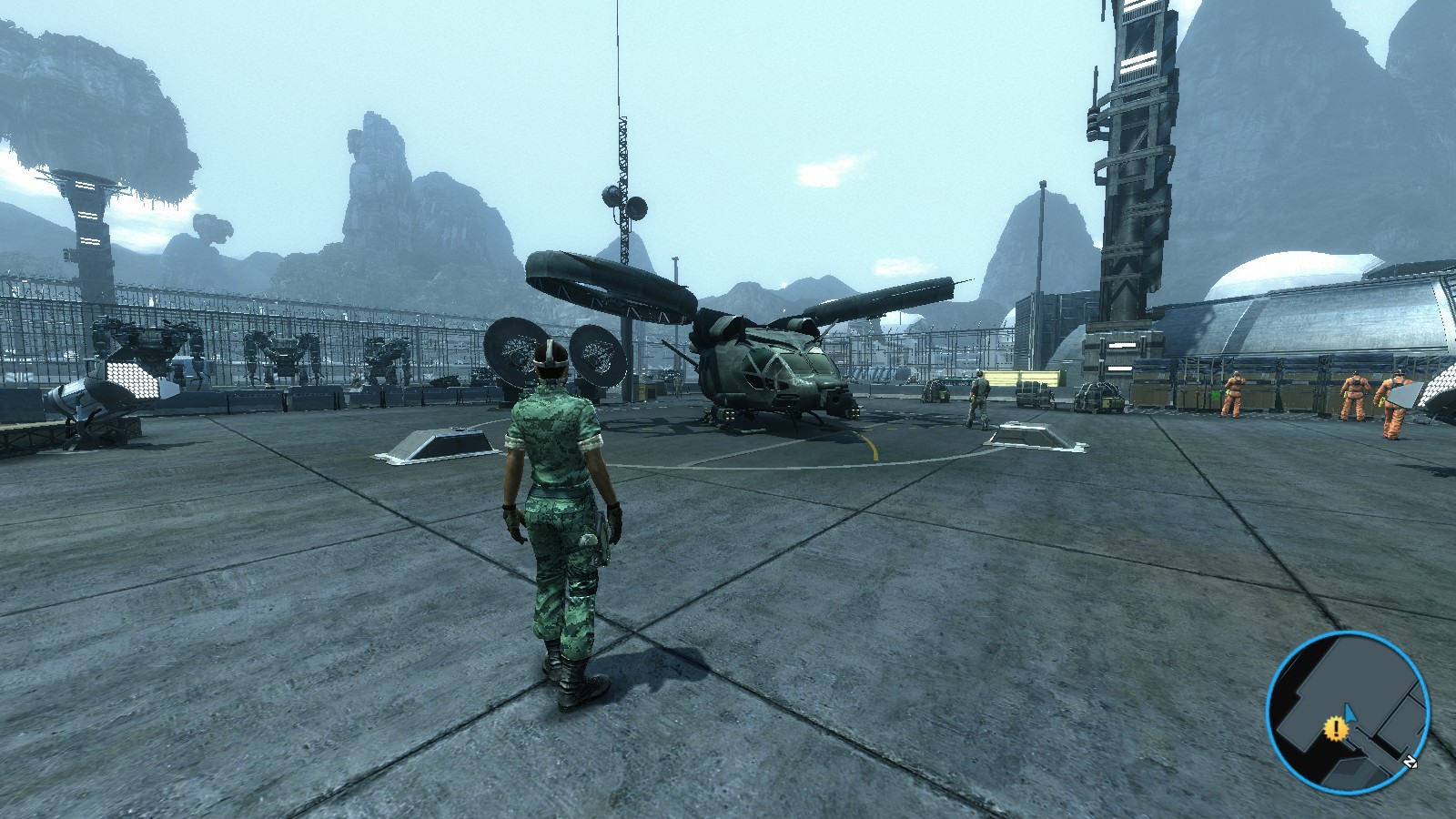
- Avatar 2018-10-07 08-25-54-27.jpg (369.57 KiB) Viewed 9969 times
Re: James Cameron's Avatar: The Game Change of FOV?
Posted: 14 Oct 2018, 19:33
by vekio
This is looks good. Better than a normal FOV in the game. I hope that someone will be able to do FOV hack without using Cheat Engine.
I still don't understand how to get this FOV as pictured above in this program.