Page 1 of 1
Shenmue I & II
Posted: 22 Aug 2018, 07:46
by Amon Amarth
I'm a fairly large fan of the series, and picking this up today, I feel like it should be setup to work in Surround/21:9.
Any chance we can get someone to look at a multi-monitor solution for it? Thanks in advance.

Re: Shenmue I & II
Posted: 22 Aug 2018, 18:18
by Mesenzio
I second this request. It is possible with the Dreamcast emulator, I know it's a different thing, but still.
Re: Shenmue I & II
Posted: 23 Aug 2018, 00:23
by Supahgl00
I can confirm the game is a mess in 21:9.
Re: Shenmue I & II
Posted: 23 Aug 2018, 06:37
by Amon Amarth
Yeah, the game's got a weird implementation for aspect ratio's outside of 16:9. It's even worse in multi-monitor, where the main menu is completely cut off, and you can't even make out the logo.
Hoping for a fix for one of my childhood favorites.
Thanks.
Re: Shenmue I & II
Posted: 23 Aug 2018, 15:35
by Botan
These's this HEX edit guide. It's not perfect but from the looks of the screenshots, it's actually playable in 21:9
https://steamcommunity.com/sharedfiles/ ... 1489284806
Re: Shenmue I & II
Posted: 23 Aug 2018, 19:30
by Supahgl00
To be honest I never expected it to work well if at all in 21:9 to begin with. I was just going to play it 16:9 with black bars, but I can't even do that unless I run the game stretched or windowed.
Anyway, Thanks for the fix man. I'll go try it out now.

Edit: The fix works on Shenmue 1, HUD is stretched but I can live with that. Shenmue 2 however, the fix makes it worse lol.
Just have to wait for that one

Re: Shenmue I & II
Posted: 23 Aug 2018, 22:19
by CousinH
Some screens in 5760/1080 (triple screen nvidia surround) :

- 20180823223323_1.jpg (984.68 KiB) Viewed 20348 times
The HUD is well proportioned but it will have to move a little (the action keys are between 2 screens).

- 20180823223441_1.jpg (517.65 KiB) Viewed 20358 times

- 20180823223642_1.jpg (704.61 KiB) Viewed 20360 times

- 20180823223744_1.jpg (477.89 KiB) Viewed 20338 times
We can see the black bands during the cutscenes, I did not test the HEX edit

- 20180823224041_1.jpg (495.85 KiB) Viewed 20341 times

- 20180823224055_1.jpg (559.5 KiB) Viewed 20359 times
Be careful, this causes a lot of graphic bugs on the sides and the sky moves too fast.
Re: Shenmue I & II
Posted: 24 Aug 2018, 04:41
by Amon Amarth
Well, that certainly doesn't looked stretched, the HUD looks pretty well centered in those screens. I'll have to give it a try and see how it works out.
CousinH wrote:Some screens in 5760/1080 (triple screen nvidia surround) :
The HUD is well proportioned but it will have to move a little (the action keys are between 2 screens).
We can see the black bands during the cutscenes, I did not test the HEX edit
Be careful, this causes a lot of graphic bugs on the sides and the sky moves too fast.
Could you post what hex values you used to edit? The guide posted above is for 21:9 and not surround.
UPDATE: I was able to hex edit the aspect ratio. bit the HUD/UI doesn't look anything like the screens that CousinH posted. How did you get the HUD centered like that?
This is how mine turned out after hex editing:
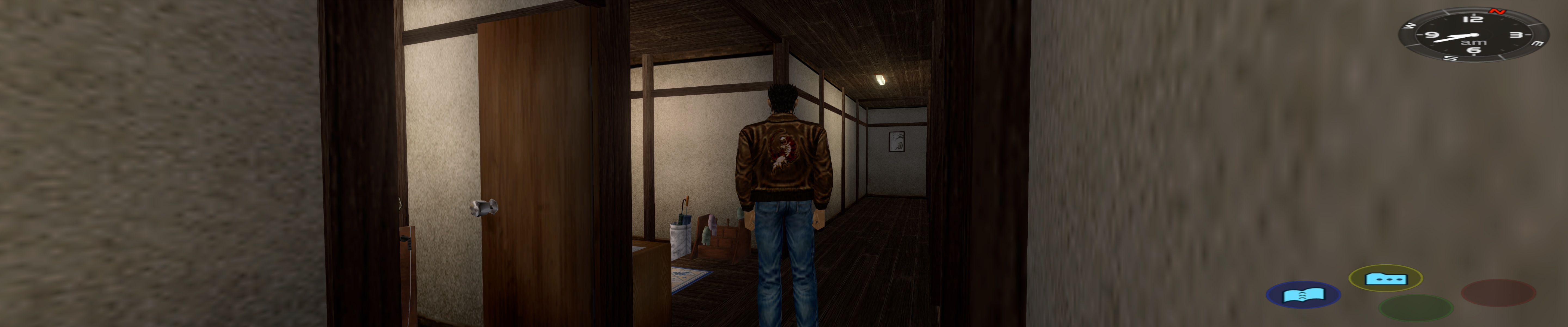
- sh1.jpg (665.3 KiB) Viewed 20221 times
Re: Shenmue I & II
Posted: 24 Aug 2018, 10:37
by CousinH
I forgot to specify, I'm on the beta of the game (HUD fix).
https://steamcommunity.com/app/758330/d ... 488015583/You can test the beta, or wait for the next update.
Re: Shenmue I & II
Posted: 02 Sep 2018, 16:28
by Hazuki
The new beta patch v2 fixes pretty all the 21:9 issues from what i can tell. Only annoying thing left is the mouse cursor appearing on screen at all times. Especially during QTE's and fights.
https://youtu.be/tYBlUi6TFjw