Page 1 of 3
Yakuza 0. Requesting FOV help
Posted: 01 Aug 2018, 19:06
by MezzuP
Hi there
Even though Sega announced proper UW support for the game, it turned out to be Vert-, a very typical problem
An FOV fix would be greatly appreciated

Re: Yakuza 0. Requesting FOV help
Posted: 02 Aug 2018, 19:48
by Prizorgi
Here is what I've found so far but I'm not an expert...
1a. Use Cheatengine :
- Replace 1.777777791 (float/Address 140F482A0) by 2.333333254 to change aspect ratio.
- Replace 41800000 (hex, 4 Bytes/Address 140F48320) by 41A8000 to fix a problem with ghost shadows.
Or 1b. Hexedit the .exe directly :
- Search and replace the second (I insist) 39 8E E3 3F by 55 55 15 40
- Search 00 00 80 41 (It's the one just after 39 8E E3 3F ) and replace it by 00 00 A8 41
2. Open graphics.ini in LOCAL DISK:\Users\YOUR NAME\AppData\Roaming\Sega\Yakuza0 and replace numbers by the following :
Letterbox=0
UIOffsetX="0.000"
UIOffsetY="0.000"
UIScaleX="0.800"
UIScaleY="1.000"
TargetAspectX=21
TargetAspectY=9
And that's all !
There is one problem with this method : All USM files (Pre-rendered movies) located in Program Files (x86)\Steam\steamapps\common\Yakuza 0\media\data\movie_w64 are STRETCHED.
I tried to correct the ratio by re-encoding them with Vidsquish
https://steamcommunity.com/groups/vidsquish/ by changing a profile and it worked (letterboxed or cropped) but I can't figure out a way to add audio...
Re: Yakuza 0. Requesting FOV help
Posted: 02 Aug 2018, 20:37
by susahamat
nice thanks !!!
Re: Yakuza 0. Requesting FOV help
Posted: 02 Aug 2018, 20:51
by LainP7
Prizorgi wrote:Here is what I've found so far but I'm not an expert...
1a. Use Cheatengine :
- Replace 1.777777791 (float/Address 140F482A0) by 2.333333254 to change aspect ratio.
- Replace 41800000 (hex, 4 Bytes/Address 140F48320) by 41A8000 to fix a problem with ghost shadows.
Or 1b. Hexedit the .exe directly :
- Search and replace the second (I insist) 39 8E E3 3F by 55 55 15 40
- Search 00 00 80 41 (It's the one just after 39 8E E3 3F ) and replace it by 00 00 8A41
2. Open graphics.ini in LOCAL DISK:\Users\YOUR NAME\AppData\Roaming\Sega\Yakuza0 and replace numbers by the following :
Letterbox=0
UIOffsetX="0.000"
UIOffsetY="0.000"
UIScaleX="0.800"
UIScaleY="1.000"
TargetAspectX=21
TargetAspectY=9
And that's all !
There is one problem with this method : All USM files (Pre-rendered movies) located in Program Files (x86)\Steam\steamapps\common\Yakuza 0\media\data\movie_w64 are STRETCHED.
I tried to correct the ratio by re-encoding them with Vidsquish
https://steamcommunity.com/groups/vidsquish/ by changing a profile and it worked (letterboxed or cropped) but I can't figure out a way to add audio...
Do you by chance know the hex values for 32:9?
Re: Yakuza 0. Requesting FOV help
Posted: 02 Aug 2018, 20:53
by Goldfinger150
Thanks for all the work! I would also love to get the hex values for 32:9.
Re: Yakuza 0. Requesting FOV help
Posted: 02 Aug 2018, 21:23
by susahamat
thanks for formula
Prizorgi .
here's fix for ultrawide just copy and replace in your installation folder, make sure in graphic.ini
Letterbox=0
TargetAspectX=21
TargetAspectY=9
Download (zippyshare) :
Day One Version
Yakuza0 Ultrawide FixPatch 1 :
Yakuza0 Ultrawide Fix Patch 1 Re-LaunchedPatch 2 :
Yakuza0 Ultrawide Fix Patch 2All Credits to
Prizorgi
Re: Yakuza 0. Requesting FOV help
Posted: 02 Aug 2018, 22:20
by Spacerik
Prizorgi wrote:Here is what I've found so far but I'm not an expert...
1a. Use Cheatengine :
- Replace 1.777777791 (float/Address 140F482A0) by 2.333333254 to change aspect ratio.
- Replace 41800000 (hex, 4 Bytes/Address 140F48320) by 41A8000 to fix a problem with ghost shadows.
Or 1b. Hexedit the .exe directly :
- Search and replace the second (I insist) 39 8E E3 3F by 55 55 15 40
- Search 00 00 80 41 (It's the one just after 39 8E E3 3F ) and replace it by 00 00 8A41
2. Open graphics.ini in LOCAL DISK:\Users\YOUR NAME\AppData\Roaming\Sega\Yakuza0 and replace numbers by the following :
Letterbox=0
UIOffsetX="0.000"
UIOffsetY="0.000"
UIScaleX="0.800"
UIScaleY="1.000"
TargetAspectX=21
TargetAspectY=9
And that's all !
There is one problem with this method : All USM files (Pre-rendered movies) located in Program Files (x86)\Steam\steamapps\common\Yakuza 0\media\data\movie_w64 are STRETCHED.
I tried to correct the ratio by re-encoding them with Vidsquish
https://steamcommunity.com/groups/vidsquish/ by changing a profile and it worked (letterboxed or cropped) but I can't figure out a way to add audio...
there was a mod for restoring the original music into the game.
have you tried copying and pasting that mod with your new videos to see if it works?
Re: Yakuza 0. Requesting FOV help
Posted: 02 Aug 2018, 23:16
by Prizorgi
Goldfinger150 wrote:Thanks for all the work! I would also love to get the hex values for 32:9.
You could try to replace 39 8E E3 3F by 39 8E 63 40 (Hexedit) or 1.777777791 by 3.555555582 (cheatengine).
Letterbox=0
TargetAspectX=32
TargetAspectY=9
Spacerik wrote:there was a mod for restoring the original music into the game.
have you tried copying and pasting that mod with your new videos to see if it works?
It changes nothing.
Re: Yakuza 0. Requesting FOV help
Posted: 02 Aug 2018, 23:31
by SergeantQQ
Long time lurker here for fixes for 21:9 displays. I feel like such a mooch. How do you guys learn to make these fixes? I'd really like to contribute, but Idk where to start.
edit: I'd like to recommend using 43:18 aspect ratio in the ini file if you're at 3440x1440, since it's not technically 21:9. Then there's no difference in letterboxed vs. non letterboxed. Using the 21:9 aspect ratio at this resolution still has a zoom in affect, albeit much less intense than it would be using the 16:9.
Re: Yakuza 0. Requesting FOV help
Posted: 03 Aug 2018, 00:29
by susahamat
Prizorgi wrote:Goldfinger150 wrote:Thanks for all the work! I would also love to get the hex values for 32:9.
You could try to replace 39 8E E3 3F by 39 8E 63 40 (Hexedit) or 1.777777791 by 3.555555582 (cheatengine).
Letterbox=0
TargetAspectX=32
TargetAspectY=9
Spacerik wrote:there was a mod for restoring the original music into the game.
have you tried copying and pasting that mod with your new videos to see if it works?
It changes nothing.
confirmed it worked for 32:9 , and dont forget fix shadow on 32:9 coz its different hex . replace 00 00 80 41 by 00 00 00 42 then manual Customize your HUD in video settings until are fit
btw this's pics location of address
Aspect Ratio :
The attachment Aspect Ratio.jpg is no longer available
Shadow :
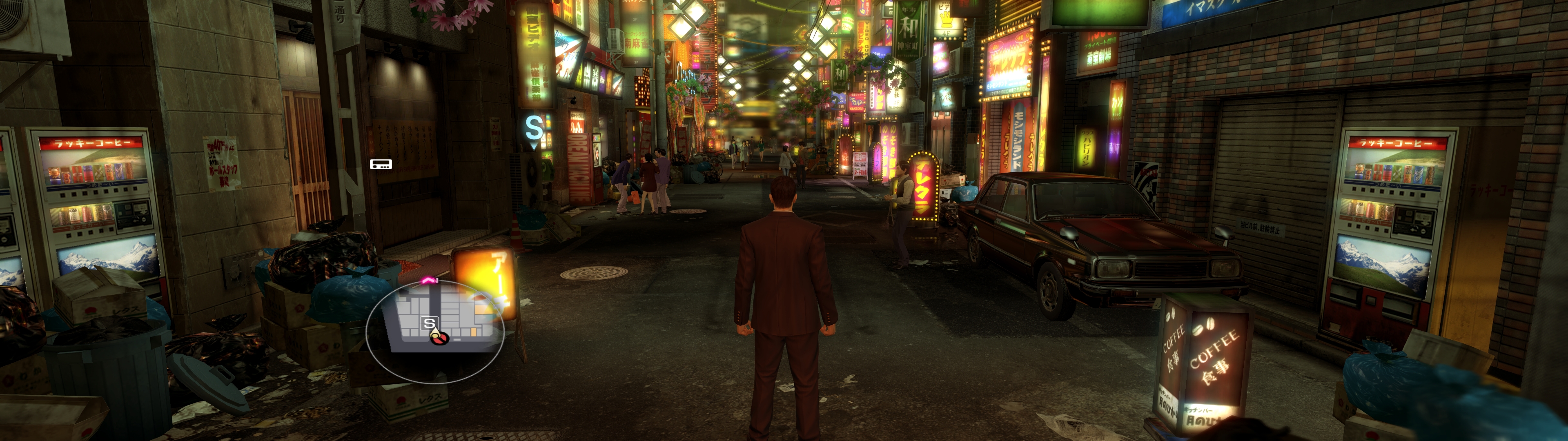
- Yakuza0_2018_08_03_06_21_49_897.jpg (2.62 MiB) Viewed 34050 times
Re: Yakuza 0. Requesting FOV help
Posted: 03 Aug 2018, 01:19
by Prizorgi
Nice ! If someone has an idea for USM vids, that could be perfect.
Re: Yakuza 0. Requesting FOV help
Posted: 03 Aug 2018, 01:31
by susahamat
maybe with this
https://sourceforge.net/projects/vgmtoo ... gmtoolbox/btw anybody know the default FOV value in this game ?
Re: Yakuza 0. Requesting FOV help
Posted: 03 Aug 2018, 01:45
by Prizorgi
Earlier, I said - Search 00 00 80 41 (It's the one just after 39 8E E3 3F ) and replace it by 00 00 8A 41 but it's A8.
VGM is great when I want to demux... But it's not possible to remux.
I've tried Scaleform to convert videos but it's not working for me.
So I've tried vidsquish that is really effective but I don't know how to modify a profile to add audio (for video, no problem).
Re: Yakuza 0. Requesting FOV help
Posted: 03 Aug 2018, 09:06
by nevil
I need 16:10 aspect ratio 1440x900, please!!Thanks a lot
Re: Yakuza 0. Requesting FOV help
Posted: 03 Aug 2018, 10:33
by Prizorgi
[16:10]
1a. Use Cheatengine :
- Replace 1.777777791 (float/Address 140F482A0) by 1.6 to change aspect ratio.
- Replace 41800000 (hex, 4 Bytes/Address 140F48320) by 41200000 to fix a problem with ghost shadows.
Or 1b. Hexedit the .exe directly :
- Search and replace the second (I insist) 39 8E E3 3F by CD CC CC 3F
- Search 00 00 80 41 (It's the one just after 39 8E E3 3F ) and replace it by 00 00 20 41
2. Open graphics.ini in LOCAL DISK:\Users\YOUR NAME\AppData\Roaming\Sega\Yakuza0 and replace numbers by the following :
Letterbox=0
TargetAspectX=16
TargetAspectY=10
Re: Yakuza 0. Requesting FOV help
Posted: 03 Aug 2018, 13:25
by nevil
Prizorgi wrote:[16:10]
1a. Use Cheatengine :
- Replace 1.777777791 (float/Address 140F482A0) by 1.6 to change aspect ratio.
- Replace 41800000 (hex, 4 Bytes/Address 140F48320) by 41200000 to fix a problem with ghost shadows.
Or 1b. Hexedit the .exe directly :
- Search and replace the second (I insist) 39 8E E3 3F by CD CC CC 3F
- Search 00 00 80 41 (It's the one just after 39 8E E3 3F ) and replace it by 00 00 20 41
2. Open graphics.ini in LOCAL DISK:\Users\YOUR NAME\AppData\Roaming\Sega\Yakuza0 and replace numbers by the following :
Letterbox=0
TargetAspectX=16
TargetAspectY=10
I did as you said but the game stretch too much, can you do this and give me link.Thank you so much
Re: Yakuza 0. Requesting FOV help
Posted: 03 Aug 2018, 15:04
by Goldfinger150
Awesome! Thanks for your work!
Re: Yakuza 0. Requesting FOV help
Posted: 03 Aug 2018, 16:01
by Prizorgi
nevil wrote:I did as you said but the game stretch too much, can you do this and give me link.Thank you so much
I tried and it worked... But I made a small change to fix shadows :[16:10]
1a. Use Cheatengine :
- Replace 1.777777791 (float/Address 140F482A0) by 1.6 to change aspect ratio.
- Replace 41100000 (hex, 4 Bytes/Address 140F48308) by 41200000 to fix a problem with ghost shadows.Or 1b. Hexedit the .exe directly :
- Search and replace the second (I insist) 39 8E E3 3F by CD CC CC 3F
- Search 00 00 10 41 (It's the one just after 39 8E E3 3F ) and replace it by 00 00 20 412. Open graphics.ini in LOCAL DISK:\Users\YOUR NAME\AppData\Roaming\Sega\Yakuza0 and replace numbers by the following :
Letterbox=0
TargetAspectX=16
TargetAspectY=10
Re: Yakuza 0. Requesting FOV help
Posted: 03 Aug 2018, 18:52
by hyp36rmax
This is awesome. Never used cheat engine before. Would love to see a fix for 7680x1440P for a triple monitor setup.
Re: Yakuza 0. Requesting FOV help
Posted: 03 Aug 2018, 20:56
by Prizorgi
hyp36rmax, could you try this fixed exe?
https://drive.google.com/open?id=1DBLMm-e1TUjVqUFEQEd6yNmiGMSFVR3o1. Replace your exe by this one (don't forget to backup the original)
2. Open graphics.ini in LOCAL DISK:\Users\YOUR NAME\AppData\Roaming\Sega\Yakuza0 and replace numbers by the following :
Letterbox=0
TargetAspectX=16
TargetAspectY=3