Page 1 of 3
State of Decay 2, requesting help with FoV please
Posted: 23 May 2018, 15:33
by CodenameJack447
Hello, i'm looking for help adjusting FoV in SoD2.
As an UE4 this game is, actually only known way to change FoV is trough engine.ini by setting this command:
[Engine.LocalPlayer]
AspectRatioAxisConstraint=AspectRatio_MaintainYFOV
The issue here is, FoV turns from Horizontal to Vertical, resulting as very high FoV (like 90+ degrees of vertical FoV), mostly with 21:9 resolutions. As you can imagine, everything looks too far away.
Also the game doesn't have a FoV slider in game options.
Could someone help with a custom FoV modifier?
Thanks in advance.
Re: State of Decay 2, requesting help with FoV please
Posted: 24 May 2018, 07:21
by czarman
Look via Cheatengine for these Adresses:
0.002777778
0.008726646192
Or via Hex edit for these Adresses:
61 0B 36 3B
35 FA 0E 3C
Re: State of Decay 2, requesting help with FoV please
Posted: 24 May 2018, 17:54
by CodenameJack447
Cannot use hex edit since is an UWP app.
I can use cheat engine:
- Looking 0.002777778 float , i've found 84 entries.
- Looking 0.008726646192, i've found 0 entries.
What should i do now?
Thanks.
Re: State of Decay 2, requesting help with FoV please
Posted: 26 May 2018, 00:20
by susahamat
try uncheck "Writable" and search again
Re: State of Decay 2, requesting help with FoV please
Posted: 26 May 2018, 22:02
by CodenameJack447
Doesn't work, unchecking "writable" is the same, 84 results show 0.002777777845 or 0.002777778544, if i try to modify all values to 0.00238 for example, the game closes. And going one by one doesn't have any effect in FoV.
Is fine guys, Thanks for your help. Much appreciated.
Re: State of Decay 2, requesting help with FoV please
Posted: 27 May 2018, 01:36
by susahamat
@codenamejack447 : try this trainer i made , let me know if works. make sure disable [/Script/Engine.LocalPlayer]
AspectRatioAxisConstraint=AspectRatio_MaintainYFOV in engine.ini
How To ?1.make sure game on latest update (patch5) > Extract .rar > Open SOD2_FOVChanger.exe > play a game
2.Press Hotkey :
] for increase FOV,
[ for decrease FOV
and backspace to default FOVtroubleshooting:
1.Doesnt worked when press hotkeys. (Workaround:close the trainer then re-open)
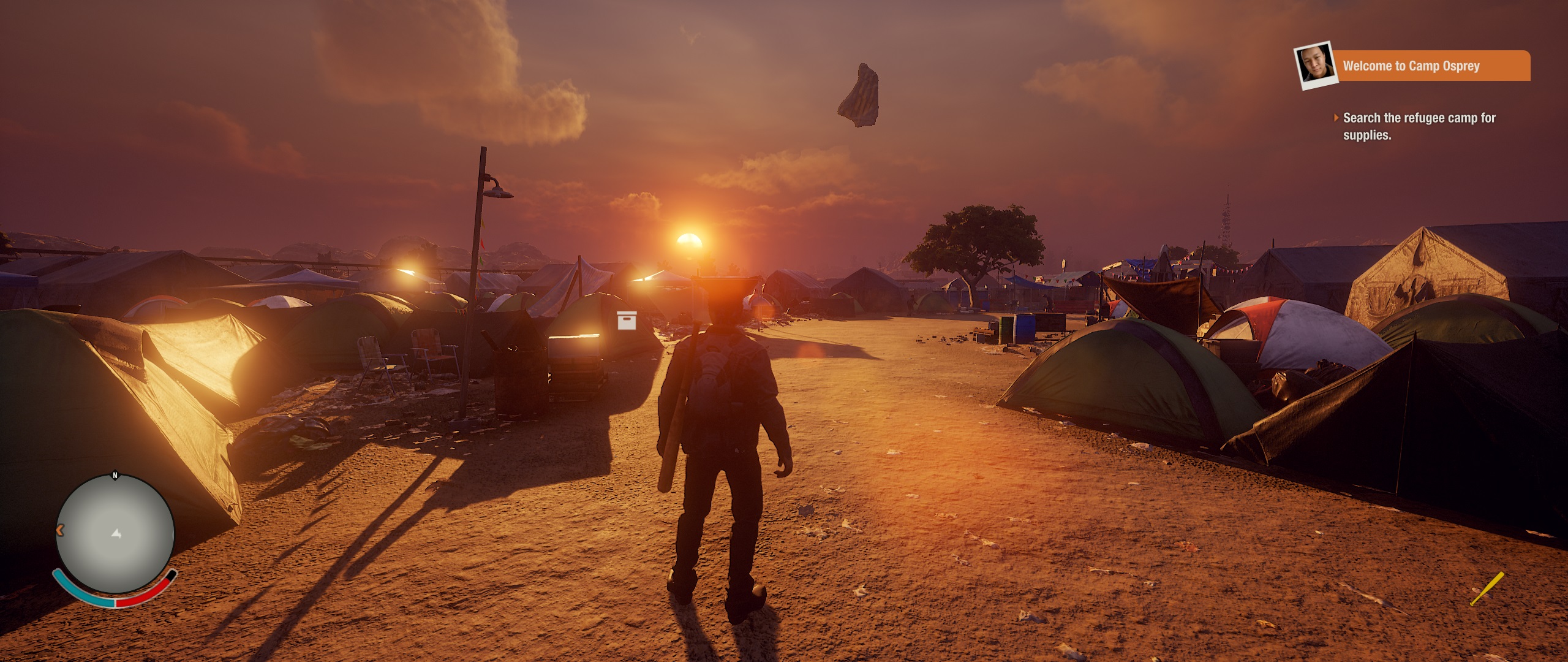
- Dayton (State of Decay 2) Screenshot 2018.05.27 - 07.30.36.92.jpg (772.96 KiB) Viewed 35498 times
Re: State of Decay 2, requesting help with FoV please
Posted: 27 May 2018, 03:59
by CodenameJack447
OMG! Awesome! It works better than expected.
Thanks a lot for this trainer!!!
P.S. I know this is off topic but. Would be possible a trainer like this in Forza Games for changing FoV too? Actually i use a steering wheel but cabin view has not a decent FOV. Tried cheat engine to find 0.00277777845 gives me entries too. If not possible it doesn't matter.
Re: State of Decay 2, requesting help with FoV please
Posted: 27 May 2018, 23:15
by susahamat
you're welcome
Re: State of Decay 2, requesting help with FoV please
Posted: 28 May 2018, 07:25
by CodenameJack447
Thank you very much, I will be aware of your news!
Re: State of Decay 2, requesting help with FoV please
Posted: 28 May 2018, 07:53
by Sabrewulf
Good sir, nice tool you have there... But might I ask you for one favor? Seeing as I have a Logitech G410 (10 keyless - No Numpad) Keyboard, I am unable to adjust the FOV. Can you please add other keybinds or allow them to be changed mayhaps? Would be very much appreciated.
Thank you sir
Mr. Sabrewulf
Re: State of Decay 2, requesting help with FoV please
Posted: 28 May 2018, 13:28
by susahamat
Re: State of Decay 2, requesting help with FoV please
Posted: 28 May 2018, 18:32
by Sabrewulf
Amazing job sir, works perfect! Very much appreciated indeed.
Re: State of Decay 2, requesting help with FoV please
Posted: 02 Jun 2018, 02:26
by LOLSaabaru
Hello, was using this tool but todays update appears to have broke it.

Re: State of Decay 2, requesting help with FoV please
Posted: 02 Jun 2018, 02:29
by Sabrewulf
Most kind sir, looks like there was a SOD2 update today and as expected, the FOV Changer no longer works. When you get some time, it would of course be greatly appreciated if you could please update it.
Thanks again!
Re: State of Decay 2, requesting help with FoV please
Posted: 03 Jun 2018, 16:54
by greatxerox
mmmmh , is this fix able to play on SOD2 using Tri-screen/Surround ? i just bought the game yesterday and it doesn't work
https://forums.geforce.com/default/topic/1057672/3d-vision/state-of-decay-2-surround-fix-/
Re: State of Decay 2, requesting help with FoV please
Posted: 03 Jun 2018, 18:04
by CodenameJack447
yes it does, i play it triple screen too, not at 7680x1440 but 4320x1920 is more inmersive IMHO.
Re: State of Decay 2, requesting help with FoV please
Posted: 03 Jun 2018, 18:12
by CodenameJack447
Re: State of Decay 2, requesting help with FoV please
Posted: 04 Jun 2018, 04:02
by LOLSaabaru
Hopefully the fixer gets updated soon, it worked perfectly, aside from the warp speed effect when driving too fast lol.
Re: State of Decay 2, requesting help with FoV please
Posted: 04 Jun 2018, 18:25
by greatxerox
please update the tool in order we can play Tri-screen with a good ratio
Re: State of Decay 2, requesting help with FoV please
Posted: 08 Jun 2018, 11:36
by debay
I also stopped playing after the sod2 update - without the fixer it is way less enjoyable!
@susahamat: It would be awesome and much appreciated if you could release an update!
