Page 1 of 8
Mass Effect: Andromeda
Posted: 23 Mar 2017, 14:14
by BX
 Widescreen Grade: AUltra-Widescreen Grade: BMulti-monitor Grade: B4k Grade: ARead Full Detailed Report - Mass Effect: AndromedaMass Effect: Andromeda is an action role-playing video game developed by BioWare and published by Electronic Arts for PlayStation 4, Xbox One and Microsoft Windows.
Re: Mass Effect: Andromeda
Posted: 24 Mar 2017, 09:55
by AeXiPHiXiON
I have no option to travel to another star system at 5960x1080, no left click... if i change my rez to 3840x2160 i get the option to travel..
Re: Mass Effect: Andromeda
Posted: 24 Mar 2017, 10:17
by butaszr
Has anyone started working on a fix to remove the pillarboxes on ingame cutscenes and dialogues? Believe me, I'd do it myself if I could but I really don't know how. I don't want to start the singleplayer campaign until this fix is applied.
Re: Mass Effect: Andromeda
Posted: 24 Mar 2017, 10:40
by Toothless Spoon
Whats the performance like on Multi-mon?
Re: Mass Effect: Andromeda
Posted: 24 Mar 2017, 12:10
by cluthz
Health bar and the targeting boxes around enemies seems to be misaligned for me:
Re: Mass Effect: Andromeda
Posted: 24 Mar 2017, 15:17
by SpikedSouls
something I found... which to me means that Bioware will not do anything at all about this:
https://twitter.com/GambleMike/status/8 ... 0829060096
Re: Mass Effect: Andromeda
Posted: 24 Mar 2017, 23:32
by JagdtMirage
AeXiPHiXiON,
A fix for 5760x1080, is to go into "Windowed Borderless" mode, I lost 4 hours of the trial mode hunting this information down.
Hat tip to @baconelk (Beth Gordon from Intel) for the information.
-Jagdt
Re: Mass Effect: Andromeda
Posted: 25 Mar 2017, 01:10
by msm903
Do you loose any performance using Windowed Borderless VS Fullscreen?
Re: Mass Effect: Andromeda
Posted: 25 Mar 2017, 01:11
by helifax
butaszr wrote:Has anyone started working on a fix to remove the pillarboxes on ingame cutscenes and dialogues? Believe me, I'd do it myself if I could but I really don't know how. I don't want to start the singleplayer campaign until this fix is applied.
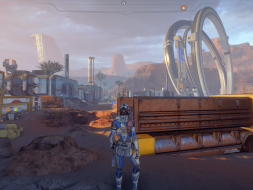
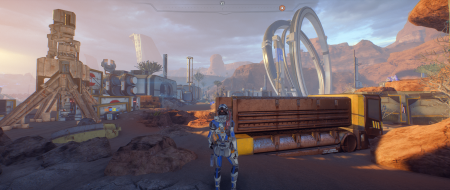
Are you talking about this: Instead of this:
Nope... No idea how to do that ^_^ (Also, this is in Exclusive Fullscreen - no Window Mode bollocks).
^_^
Yes, I have a fix, currently on my PC alone. I can share it though... Didn't think people were actually interested in it though;)
Re: Mass Effect: Andromeda
Posted: 25 Mar 2017, 01:13
by helifax
Toothless Spoon wrote:Whats the performance like on Multi-mon?
Performance wise in 5760x1080 on 2x980Ti is around 50-60 FPS on Ultra for me (Exclusive Fullscreen ofc, as SLI doesn't work in Window Mode - as anyone with a "tiny" knowledge on how SLI works can tell you).
Don't know on 3x1440 thou....

Re: Mass Effect: Andromeda
Posted: 25 Mar 2017, 01:23
by transam617
Helifax - I have a similar setup to yours but get constant VRAM crashes on Ultra at 5760x1080. Is this your experience too?
Re: Mass Effect: Andromeda
Posted: 25 Mar 2017, 01:31
by helifax
transam617 wrote:Helifax - I have a similar setup to yours but get constant VRAM crashes on Ultra at 5760x1080. Is this your experience too?
How do you know is a VRAM crash? What is the exact error you get when the game crashes?
I did get a few crashes on a DX11 function called "TryMap", but that was because I was running the game in 3D Surround (Surround and 3D Vision on 3 screens. You could say I was running the game on 6 screens as in 3D you need to render twice what is on you monitor). Lowering a few things from Ultra to High seems to "fix it". (I think I lowered, Lighting & Shadows). Worth to mention, I have POST-Process on LOW because I AM NOT A FAN on DOF... Really am not. Wish they added an OFF option as well;)) (But, I managed to remove it as well, by modifying a shader so no more DOF, yey! )
Re: Mass Effect: Andromeda
Posted: 25 Mar 2017, 01:34
by butaszr
helifax wrote:
Nope... No idea how to do that ^_^ (Also, this is in Exclusive Fullscreen - no Window Mode bollocks).
^_^
Yes, I have a fix, currently on my PC alone. I can share it though... Didn't think people were actually interested in it though;)
That. Looks. Magnificent. Please share it, oh my ultrawide saviour.
Re: Mass Effect: Andromeda
Posted: 25 Mar 2017, 01:44
by helifax
butaszr wrote:helifax wrote:
Nope... No idea how to do that ^_^ (Also, this is in Exclusive Fullscreen - no Window Mode bollocks).
^_^
Yes, I have a fix, currently on my PC alone. I can share it though... Didn't think people were actually interested in it though;)
That. Looks. Magnificent. Please share it, oh my ultrawide saviour.
Can definitely do!
I made the fix for FlawlessWidescreen:
https://www.flawlesswidescreen.org/I want to contact Hayden (the creator) and see if I can push the fix through the official channels;) If not I can give the "lose" files here, but I'd rather do it the proper way;)
So a bit of patience please!
Also, take note, that in this mode, you'll see some "weird" thing happening on the side screens. The game obviously wasn't designed to show this and the reason is pillarboxed (like NPC popping into existance and so on). This is not often, but is there! In any case, is better than BLACK bars;)
And before anyone asks, yes there is a problem with the galaxy map - not being able to travel between clusters - and no I didn't look into it. My "fix" is to ALT+ENTER, travel to new cluster, ALT+ENTER back again

Re: Mass Effect: Andromeda
Posted: 25 Mar 2017, 02:08
by AeXiPHiXiON
thanks helifax, alt-enter is a much better solution

dual 1080's,
[email protected], 5960x1080
These settings give me pretty solid 60fps with some drops into low 50's.. AO was the biggest drag on fps
Texture Quality: Ultra
Anti-Aliasing: Temporal AA
Ambient Occlusion: Off
Post-Process Quality: Low
Texture Filtering: High
Lighting Quality: Medium
Shadows Quality: High
Effects Quality: Medium
Mesh Quality: Ultra
Shader Quality: High
Terrain Quality: High
Vegetation Quality: Ultra
resolution scaling set to 1080p
vsync enabled
triple buffering enabled
http://www.pcgamer.com/mass-effect-andr ... -analysis/http://www.digitaltrends.com/computing/ ... nce-guide/http://segmentnext.com/2017/03/22/mass- ... aks-guide/
Re: Mass Effect: Andromeda
Posted: 25 Mar 2017, 02:10
by transam617
I get pop up window that says I ran out of vram, and I need a GPU with more than 512MB. The standard out of VRAM crash.
usually happens on the ship.
DirectX function "device->CreateTexture3D( &texDesc3d,desc.subResourceCount!=0? reinterpret_cast<constD3D11_SUBRESOURCE_DATA*>(desc.subResourceData):0,&texture->m_texture3d)" failed with E_OUTOFMEMORY ("Direct3D could not allocate sufficient memory to complete the call."). GPU: "NVIDIA GeForceGTX980 Ti", Driver: 37892, Free virtual memory: 4264183992kB / 4294967168kB. Make sure you have a supported graphics card with at least 512 MB.
Re: Mass Effect: Andromeda
Posted: 25 Mar 2017, 07:27
by kingdoggy
Share the love Helifax!

I think a shit ton of people are waiting for that fix. Would love the loose files until the official one makes it through
Re: Mass Effect: Andromeda
Posted: 25 Mar 2017, 07:31
by Xapuyc
If I set graphics to full maximum at 6020*1080, I get out of vram on GTX 1080 with 8GB vram. Is it normal for ME Andromeda?
Re: Mass Effect: Andromeda
Posted: 25 Mar 2017, 07:35
by Yorke
kingdoggy wrote:Share the love Helifax!
I think a shit ton of people are waiting for that fix. Would love the loose files until the official one makes it through
^
I mean, I don't wanna sound pushy or nothin, but I've finally got the time to tuck in to the game this weekend, and those black bars got me jonesing for a 21:9 fix
Re: Mass Effect: Andromeda
Posted: 25 Mar 2017, 13:14
by Lunanella
Helifax, you got me eagerly awaiting for your fix! The black bars heavily break the immersion - I can handle a few random, broken NPC appearances in the background if it means the whole screen will be used.
:3