Page 1 of 1
Ryse Son of Rome in Surround ?
Posted: 11 Oct 2014, 05:56
by t2n_maxpayne
Hi,
Ryse Son of Rome came out and I purchased it today.
It does not seem to support a proper in surround (5760x1080)? Was wondering if anyone has figured out how to fix it?
If someone can fix this please reply.
Thanks !!!
Re: Ryse Son of Rome in Surround ?
Posted: 11 Oct 2014, 14:57
by morback
Hi,
It seems to support Eyefinity. However the HUD is stretched.
Screenshots (In-game and menu) :


Resolution : 4480x1022 /// [1280x1024]x[ 1920 x 1080 ]x[1280x1024]
Crossfire is not supported since I play in this resolution (no SSAA, details low, temporal AA and motion blur enabled) with an average of 30fps with CFX activated and between 45 and 50fps with CFX disabled. Catalyst 14.7 since 14.9 freezes my pc with cfx.
Configuration : 7970GE/R9 280X crossfire, 3570k, 8GB RAM, 850psu.
Re: Ryse Son of Rome in Surround ?
Posted: 11 Oct 2014, 17:55
by Hank
was thinking about purchase it too, but without 3xscreen i won't make it
Re: Ryse Son of Rome in Surround ?
Posted: 12 Oct 2014, 00:05
by AndroidVageta
I know that it works OK in Eyefinity. The UI is stretched but the actual game (ya know, the 3D part) is fine. FOV and all that.
Does it not work at all for you or is it just the UI that's the problem?
Re: Ryse Son of Rome in Surround ?
Posted: 12 Oct 2014, 03:06
by Toothless Spoon
It's actually not too bad. The game scales Hor+ but initially the menus and HUD are Stretched and Spanned. There is a option in game that allows you to adjust the menus/HUD parameters, but it doesn't allow enough adjustment to centre the HUD. If that was fixed, and the constraints lifted even more, the game would work flawlessly - at least on Nvidia Surround.
I've started a thread on steam, head over there too to voice your concerns.
http://steamcommunity.com/app/302510/di ... 1413049407
Re: Ryse Son of Rome in Surround ?
Posted: 12 Oct 2014, 19:35
by helifax
Toothless Spoon wrote:It's actually not too bad. The game scales Hor+ but initially the menus and HUD are Stretched and Spanned. There is a option in game that allows you to adjust the menus/HUD parameters, but it doesn't allow enough adjustment to centre the HUD. If that was fixed, and the constraints lifted even more, the game would work flawlessly - at least on Nvidia Surround.
I've started a thread on steam, head over there too to voice your concerns.
http://steamcommunity.com/app/302510/di ... 1413049407
Hud fix:

FWS plugin:

Just need to send it to Hayden so he can push it live.
Re: Ryse Son of Rome in Surround ?
Posted: 13 Oct 2014, 01:17
by helifax
Fix is now part of Flawless WideScreen Fixer.
Re: Ryse Son of Rome in Surround ?
Posted: 13 Oct 2014, 04:50
by Toothless Spoon
helifax wrote:Fix is now part of Flawless WideScreen Fixer.
Nice work, cheers.

Re: Ryse Son of Rome in Surround ?
Posted: 13 Oct 2014, 06:50
by valcan_s
helifax wrote:Fix is now part of Flawless WideScreen Fixer.
Awesome Helifax works perfectly, thanks man
Re: Ryse Son of Rome in Surround ?
Posted: 14 Oct 2014, 05:11
by Funkengreuven
I've been trying to play this game a few times now in NVidia surround, but I keep getting low memory issues. Has anyone else seen this? I have PC visuals set to performance to free up as much vid memory as possible, and I'm playing it in all normal mode with no SSAO (or whatever its calling it on this game) and I still get low memory error a few seconds into game (bridge scene). Also, I can't seem to change the textures to anything lower than "very high", even though I have normal selected for everything else...it's greyed out. I have 3GB 780ti cards.
Re: Ryse Son of Rome in Surround ?
Posted: 20 Oct 2014, 19:05
by helifax
Funkengreuven wrote:I've been trying to play this game a few times now in NVidia surround, but I keep getting low memory issues. Has anyone else seen this? I have PC visuals set to performance to free up as much vid memory as possible, and I'm playing it in all normal mode with no SSAO (or whatever its calling it on this game) and I still get low memory error a few seconds into game (bridge scene). Also, I can't seem to change the textures to anything lower than "very high", even though I have normal selected for everything else...it's greyed out. I have 3GB 780ti cards.
Have the same cards. Played the whole game 4 times in 3D Surround (2D Vision + 3DVision). Didn't have any problems with the game, just the drivers sometimes freezing up. (Doing the same thing in other games as well.. If I am luck I get a nvidia driver kernel crash & recovery...If not ...well no recovery...) I expect the driver is playing some tricks on you...
Re: Ryse Son of Rome in Surround ?
Posted: 14 Feb 2015, 20:41
by Gungoose360
Hey bro!
Just wondering if this game can span across multiple monitors without using surround? I.E: windowed drag to fit?
I can't seem to figure out where to type in the custom resolution, maybe i have to play the game to a certain point for it to actually create an ini file?
Wish every game had the Bioware/EA stretch to fit display config...

Re: Ryse Son of Rome in Surround ?
Posted: 30 Dec 2015, 17:31
by Dante003
The Flawless Widescreen fix is not working here, it seems that the game received a patch, so it stopped working.
Re: Ryse Son of Rome in Surround ?
Posted: 30 Dec 2015, 18:54
by imusrt
Answers for blubberduck86 & Dante003.
1. Manual spread method (written for PLP, but usable for 21:9):
http://www.wsgf.org/blog/imusrt/2015/04/27/ryse-son-rome-2014-manual-plp-instructions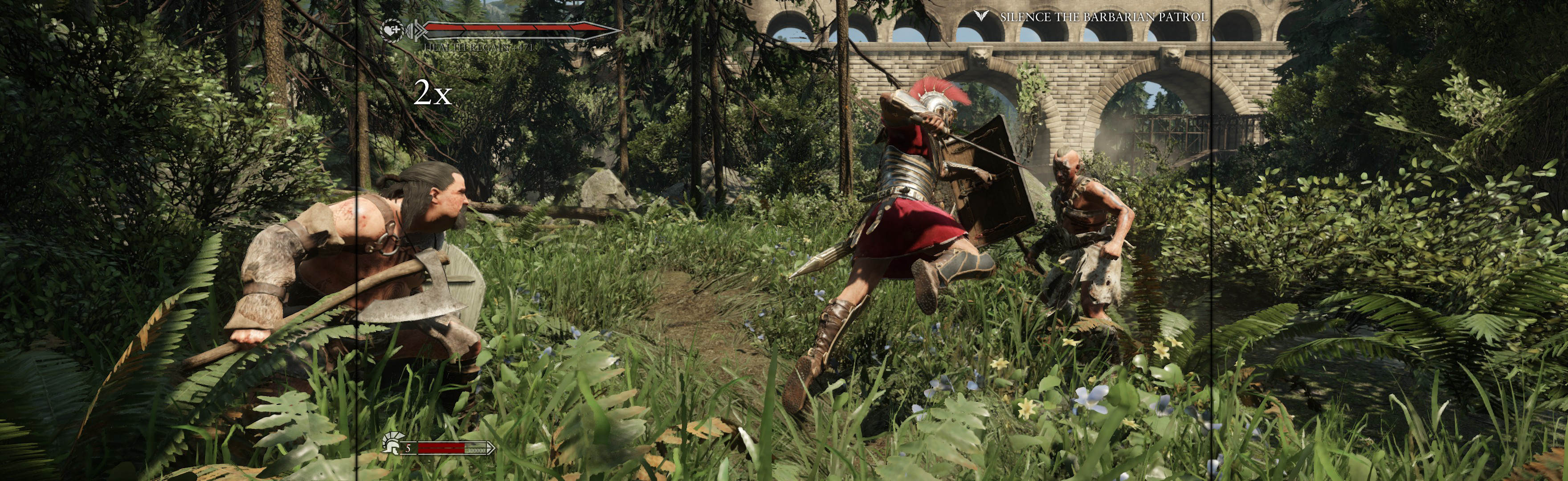
2. FWS notes:
A. FWS is optional. Was only used to fix game's stretched HUD, menu & text. Game still plays well without it.
B. If 21:9, be sure to alter FWS menu's Detection Override to use "fake PLP" (fake 16:9 center with fake slim sides).
21:9 e.g.:
Width: 2560
Height: 1080
Hud Width: 1920 (16:9 fake center)
Hud Height: 1080 (16:9 fake center)
Horizontal Display Count: 3 (with fake sides)
Vertical Display Count: 1
Hud X: 320 (which is 2560 minus 1920, divided by 2 = width of fake side)
Hud Y: 0
Dante003, could you confirm that FWS no longer works, even with these FWS detection override values?
Re: Ryse Son of Rome in Surround ?
Posted: 31 Dec 2015, 00:15
by Dante003
imusrt wrote:Answers for blubberduck86 & Dante003.
1. Manual spread method (written for PLP, but usable for 21:9):
http://www.wsgf.org/blog/imusrt/2015/04/27/ryse-son-rome-2014-manual-plp-instructions2. FWS notes:
A. FWS is optional. Was only used to fix game's stretched HUD, menu & text. Game still plays well without it.
B. If 21:9, be sure to alter FWS menu's Detection Override to use "fake PLP" (fake 16:9 center with fake slim sides).
21:9 e.g.:
Width: 2560
Height: 1080
Hud Width: 1920 (16:9 fake center)
Hud Height: 1080 (16:9 fake center)
Horizontal Display Count: 3 (with fake sides)
Vertical Display Count: 1
Hud X: 320 (which is 2560 minus 1920, divided by 2 = width of fake side)
Hud Y: 0
Dante003, could you confirm that FWS no longer works, even with these FWS detection override values?
With these configs it worked, without it, FWS closes, and if I open it again it says that cant enable the fix.
The main reason for me to try to fix is to see if the stretched cutscenes are fixed too.
Re: Ryse Son of Rome in Surround ?
Posted: 30 Mar 2016, 22:09
by NADRIGOL
Just bought this game from Steam. If I launch the game with the fix enabled, the menu is black. I can hear menu sound effects as I move the mouse around, but things don't seem to be in the correct positions, or at least I can't figure out how to start the game. If I launch the game and start the campaign with the stretched HUD, and then enable the fix, the HUD doesn't resolve to the patched values. It doesn't seem to have been patched since October 2015, so maybe I'm missing something someone else could point me in the direction of?
Re: Ryse Son of Rome in Surround ?
Posted: 30 Mar 2016, 22:15
by imusrt
What's your resolution? Did you try FWS resolution override (described above)?

