Page 1 of 1

'configure surround' missing from nvidia control panel

Posted: 17 Jul 2013, 23:47
by Mr Pibb
I just brought myself a new GTX760 4GB card for 2D surround use as my old TH2Go died. I have three identical 19" BenQ FP93GX gaming screens, purchased at the same time. All three have identical resolution and frequency (1280x1024@75Hz). They are all configured and running like this, 1 via DVI cable, one via HDMI - DVI cable, and one via DVI cable through a Display Port adapter. All three run just fine in windows Vista 32 bit.

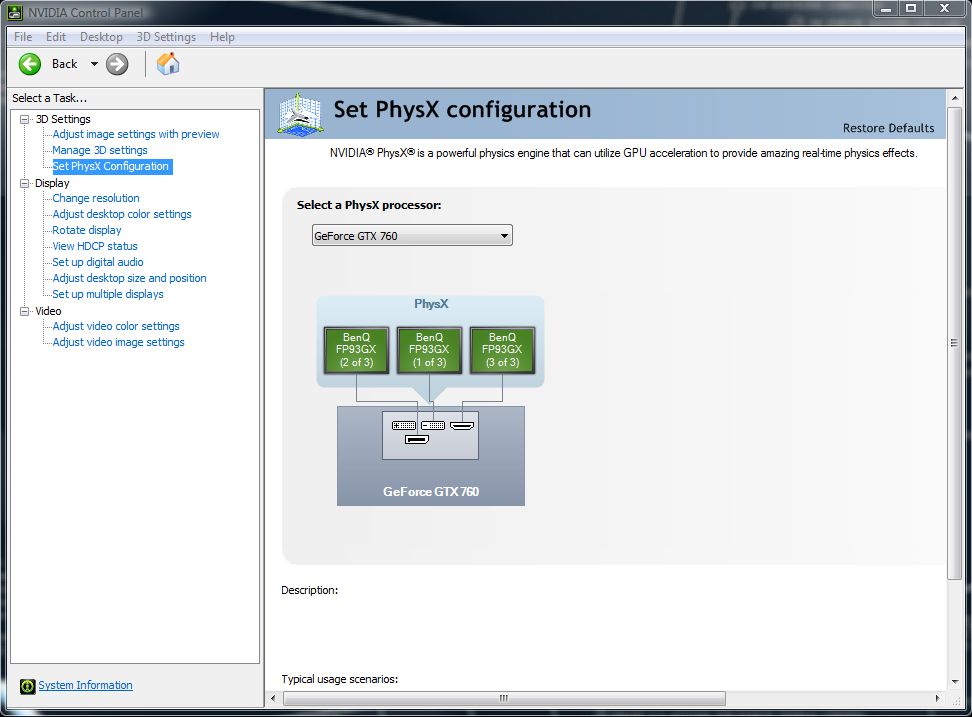
I am trying to enable 2D surround, but as you can see in this pic I have no option to configure surround in the Nvidia control panel:
Image

As you can see: I do have three screens running, I am not lying:

Image

Mobo is a Gigabyte GA-MA790XT-UD4P - which is a "crossfire" board, but I'm only using single GPU so that shouldn't matter.

I have done NUMEROUS 'Clean installs' of NVIDIA drivers 320.49. NO option to configure surround. Nothing shows up - nada, zip, zero.

I'm sick of banging my head against walls here. Far as I can tell everything's tip top. What have I done wrong?


Thanks. Dave.

Re: 'configure surround' missing from nvidia control panel

Posted: 18 Jul 2013, 17:19
by Delphium
Although according to http://www.geforce.com/hardware/technol ... quirements any 3 ports should work for surround with the spare for a 4th display.
Thus your setup should work just fine.

Could you try moving the monitor connected to the DisplayPort output onto the spare DVI connection and test again?

Re: 'configure surround' missing from nvidia control panel

Posted: 18 Jul 2013, 18:32
by Mr Pibb
Thanks Delphium, really appreciate the answer.

I've tried that, running both DVI ports and the other monitor on HDMI-DVI, but no result. I even tried running just two monitors via DVI only and still no go.

Talk about frustrating. I've got all the kit, it's all compliant (not to mention costing me a packet) and all I get is... zip.

Gutted.

Re: 'configure surround' missing from nvidia control panel

Posted: 19 Jul 2013, 10:45
by teardropmina
Mr Pibb wrote: All three run just fine in windows Vista 32 bit.


you're still using Vista?

afaik, surround only works on win 7 and 8 (currently)

http://nvidia.helpmax.net/en/3d-settings/nvidia-surround-configuration/

Re: 'configure surround' missing from nvidia control panel

Posted: 20 Jul 2013, 18:40
by Mr Pibb
teardropmina wrote:you're still using Vista?

afaik, surround only works on win 7 and 8 (currently)

http://nvidia.helpmax.net/en/3d-settings/nvidia-surround-configuration/


Teardropmina - I love you and want to have your babies! OK, Mrs Pibb might not like that and physically there'll be some issues, but the sentiment is there.

I can't believe I didn't read that - Win7/8 being required. That's so much cheaper to upgrade than 3 new monitors...

Wonderful, thanks. I'll be sure to post if indeed this solves the problem.

Dave.

Re: 'configure surround' missing from nvidia control panel

Posted: 04 Aug 2013, 09:16
by Mr Pibb
Well, I've installed win7 and "configure surround" now appears, and all is well. Thanks all for your help.

Hope this thread helps someone else too.

Re: 'configure surround' missing from nvidia control panel

Posted: 04 Aug 2013, 12:54
by Delphium
VERY well spotted there teardropmina, totaly slipped my mind, nice catch sir ;) :rockout:

Re: 'configure surround' missing from nvidia control panel

Posted: 04 Aug 2013, 22:38
by AussieTimmeh
Yeap, good catch there. Glad it's all working now and as a bonus, Windows 7!