
I’m relatively new to multiple monitors. My video card is a Nvidia GTX 670 2GB. Right now I have a 24 inch widescreen as my main monitor. I also have a dell 17 inch widescreen rotated in portrait. Ideally I want another 17 inch widescreen, and put it on the opposite side rotate portrait as well as I have access to them rather easily. Right now I have a different style 17 on the left of a 24.
In a perfect world, I would have 3 24 (or 27!) inch monitors all lined up together, but for now I am just playing around with the monitors I have easy access to.
My questions are, connecting them all, and how much more I can do with them. I know that in games like the DCS line of flight sims, there are lua files you can edit to put different gauges on different screens, etc.
As far as connections for these 3, the 24 has an HDMI connection, will I lose any quality if I use that HDMI connecting for my gaming monitor or should I stick with the DVI port? I only have 2 DVI ports. I’m sticking the other two monitors on the DVI (one is only VGA at the moment but I have a converter plug.
It works well for work related type tasks, I enjoy it when working at home and have several screens right in front of me.
But, can I game with all 3? Even if they are different sizes? Normally I’ll have one on with the game, and another with teamspeak, or some app.
Thanks for your suggestions in advance.
New Multi-Monitor Experience


Re: New Multi-Monitor Experience
What you are planning won't work. For surround you need three identical monitors running at the same resolution.
Philips BDM4065UC(3840x2160) Acer Z35(2560x1080@200hz); 980 Ti Hybrid @stock ; 6700K 4.6ghz (1.35v)/D15; 16GB 3200mhz; Asus Maximus Ranger VIII; AX860; 1TB 960 EVO; 750GB 840 EVO; Teufel Concept D 500; Sennheiser HD6XX; Windows 10 (latest build)


Re: New Multi-Monitor Experience
itgl72 wrote: will I lose any quality if I use that HDMI connecting for my gaming monitor or should I stick with the DVI port?
Hi, you will not loose any quality using HDMI over DVI, HDMI is essentially DVI but with addtional features such as audio.
Unfortunately Nvidia Surround requires identical resolutions, you could try out SoftTH which is a software solution that allows you to configure different display setups.
IMO you would be better off upgrading the monitors.
| Gigabyte X79S-UP5-WiFi Skt2011 | i7 4820k @4.4GHz Watercooled (Ivy Bridge-E) | Corsair Vengence 32GB @2133MHz 11-11-11-27 2T Quad-Channel (8x4GB) | AMD R9-Fury-X 4GB @1140/505MHz + EKWB Watercooled | 256GB Crucial MX200 SSD | 8x 1TB Samsung F3 SATA-II | Corsair 850W TX PSU | 3x Dell S2209W 22"wide TFT's (5760x1080res) | Logitech Z-5400 5.1ch speakers | Win7 Ultimate x64 |
Re: New Multi-Monitor Experience
I was looking around the net, and this is messier than I like, but, the two side monitors, those are the exact dell monitors, portrait setup, I have access to and was looking into doing that setup.
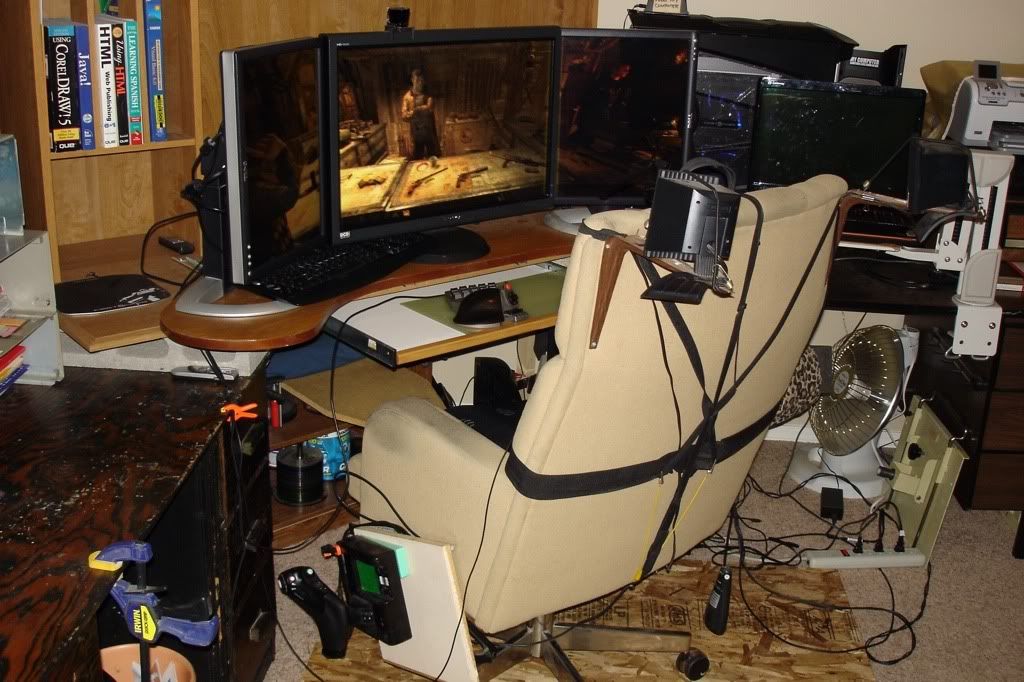
I know I am better with the same monitors, but for now thats down the line, kids, you know I have access to these and would like to tinker with something if possible. Maybe SoftTH is something I need to google.
I know I am better with the same monitors, but for now thats down the line, kids, you know
I have access to these and would like to tinker with something if possible. Maybe SoftTH is something I need to google.

Re: New Multi-Monitor Experience
Sure you can play games on a PLP setup.... but not all... and now how you want to.
Nvidia Surround doesn't work. So you have to use Extended mode.
SoftTH is a tool which alows you to create a Single Surface like Surround, but it only works for Dx9 ! Dx10 and 11 are not supported and don't work!
If you have Extended mode you can activate your games in Windowed mode. Then you lose some performance but you can drag and resize the window so it fits over 3 Screens in a PLP setup.
The problem is not all Games support that and even if they do you might get Problems with the HUD.
Nvidia Surround doesn't work. So you have to use Extended mode.
SoftTH is a tool which alows you to create a Single Surface like Surround, but it only works for Dx9 ! Dx10 and 11 are not supported and don't work!
If you have Extended mode you can activate your games in Windowed mode. Then you lose some performance but you can drag and resize the window so it fits over 3 Screens in a PLP setup.
The problem is not all Games support that and even if they do you might get Problems with the HUD.
We gonna send it to outa space!
Who is online
Users browsing this forum: No registered users and 41 guests